Installation
August 16, 2026 · View on GitHub
Install Crewplane to add the crewplane command to your shell.
After installation, open the project where Crewplane should create .crewplane/
and write local run records.
The first run does not need provider CLIs, API keys, provider accounts, or config edits. Those come later, after you have seen the mock workflow complete.
Watch the installation and first mock run walkthrough:
Before You Install
Choose the install method that matches your environment:
- Use Python 3.13 or newer for
uv,pipx, andpipinstalls. - Use Node.js 18 or newer for the npm wrapper.
- Use macOS or WSL/Ubuntu-style Linux for the install script.
- Install
tmuxto use Crewplane's compact live dashboard during runs. Crewplane can continue without it, buttmuxgives you the best first-run experience.
Provider CLIs are intentionally not part of installation. Install and authenticate Claude, Codex, Gemini, Copilot, or other provider tools later when you are ready for real provider runs.
Install With uv
For most users, uv tool install is the simplest way to install the command in
an isolated environment:
uv tool install crewplane
crewplane --help
The install succeeded when crewplane --help prints command help.
uv tool installplaces the executable in~/.local/bin. Ifcrewplane --helpprints "command not found" immediately after installing, either open a new shell session or add~/.local/binto yourPATH:export PATH="$HOME/.local/bin:$PATH"Adding the export line to your shell profile (
~/.bashrcor~/.zshrc) makes it permanent.
Install With pipx
Use pipx if you prefer Python CLI tools in isolated environments:
pipx install crewplane
crewplane --help
If pipx uses an older Python by default, pass Python 3.13 explicitly:
pipx install --python python3.13 crewplane
Install With The Script
On macOS and WSL/Ubuntu-style Linux, use the install script when you want one
command that can bootstrap uv and install Crewplane as a uv tool:
curl -fsSL https://raw.githubusercontent.com/crewplaneai/crewplane/master/install.sh | sh
crewplane --help
If uv is not already installed, the script downloads a version-pinned,
checksum-verified release. Automatic setup supports computers with 64-bit
Intel, AMD, or Arm processors. For other processor types, install uv first,
then rerun the script.
Install With Homebrew
On macOS, use the Crewplane Homebrew tap:
brew tap crewplaneai/crewplane
brew install crewplane
crewplane --help
Install With pip
If you prefer pip, use an activated virtual environment so the package and
command stay together:
python3.13 -m venv .venv
. .venv/bin/activate
python -m pip install crewplane
crewplane --help
Install With npm
The npm package provides a wrapper around the Crewplane command:
npm install -g crewplane
crewplane --help
Note: the npm wrapper does not support native Windows. Use WSL on Windows.
On computers with 64-bit Intel, AMD, or Arm processors, npm downloads and
verifies uv automatically when needed. For other processor types, install
uv before installing the npm package.
npm PATH troubleshooting
Global npm installs create shims under $(npm config get prefix)/bin. If npm
reports a successful install but your shell cannot find crewplane, add that
directory to PATH and confirm Node.js is still available:
npm_prefix="$(npm config get prefix)"
export PATH="$npm_prefix/bin:$PATH"
command -v node
command -v crewplane
crewplane --help
Contributors should use the development guide instead of the package install path.
Run The First Workflow
After installation, move into the project where Crewplane should create
.crewplane/ and run the mock quickstart:
crewplane init
crewplane validate
crewplane run
That path creates local Crewplane files, validates the generated workflow, and runs it with deterministic mock output. It does not require provider CLIs, API keys, provider accounts, token spend, or config edits.
Continue with the Quickstart for the full walkthrough of what those commands create and how to inspect the run record.
Recommended: Compact Dashboard
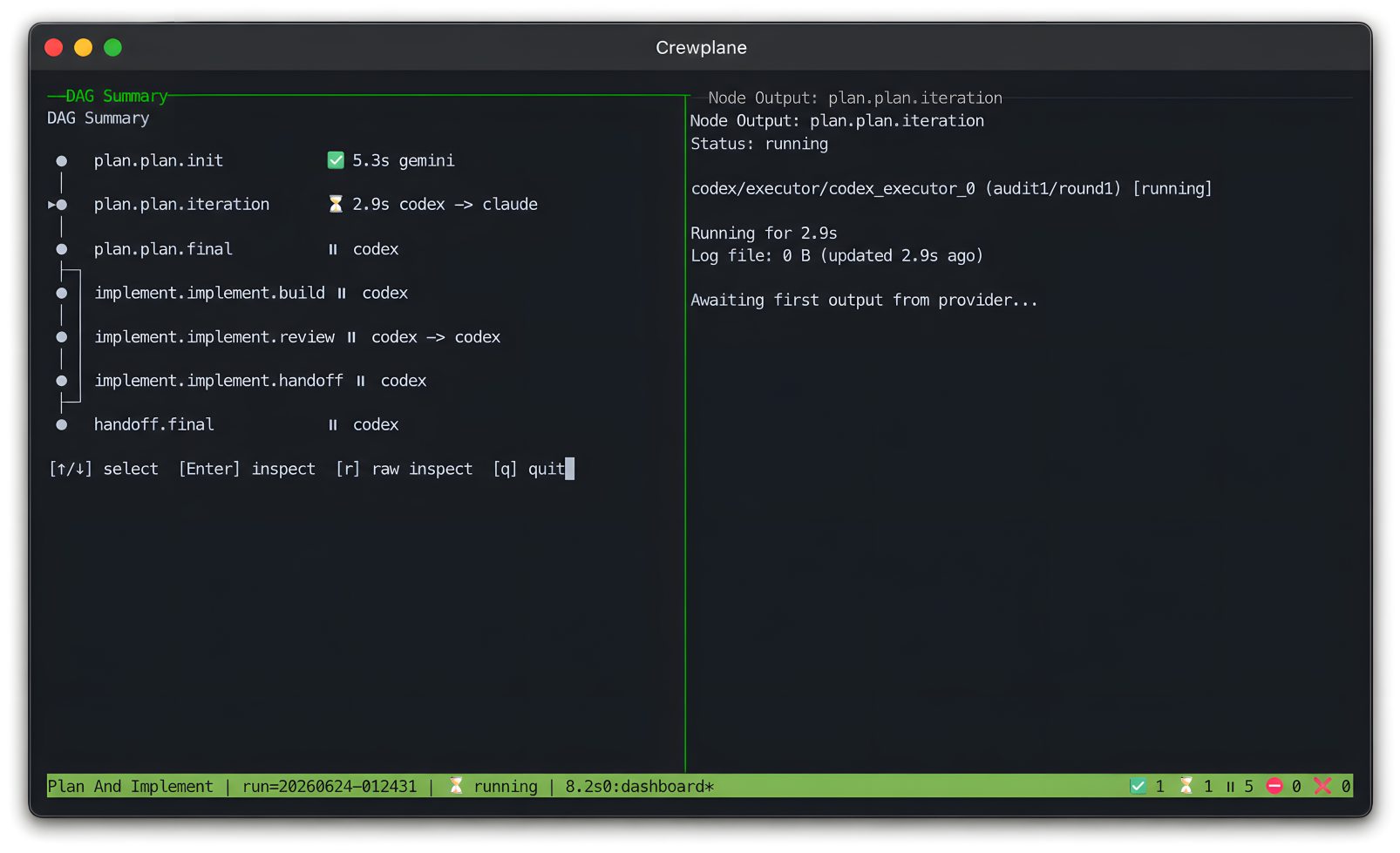
Install tmux before your first run so Crewplane can open the compact live
dashboard. It gives you a real-time view of the workflow, node status, and
provider output while crewplane run is active:
crewplane run
If tmux is missing, Crewplane warns and continues without the dashboard.
Provider CLIs Come Later
Crewplane does not install provider CLIs, manage provider credentials, or
sandbox provider CLI execution. Install each provider CLI outside Crewplane,
authenticate it directly, then confirm it works from your shell before adding
it to .crewplane/config.yml.
Common checks:
claude --version
codex --version
gemini --version
copilot version
Use Provider setup when you are ready to switch from the mock invoker to real provider commands.
Update
Update Crewplane from any directory, then print the installed version:
crewplane --update
crewplane --version
crewplane --update and crewplane -u run immediately and then exit. They do
not read .crewplane/, load project config, discover workflows, or write run
artifacts.
Crewplane only updates the copy that is currently running. Before running an upgrade command, it checks the installation path against the package manager's records. If it cannot verify which package manager installed that copy, it stops and prints manual update instructions.
Automatic updates support uv tool (including the install script), local or
global pipx, and Homebrew. Crewplane runs the package manager's standard
upgrade command without changing its configured package source, allowed
versions, installation settings, or security checks.
After the package manager reports success, Crewplane starts a fresh process to read the installed version. This avoids reusing version information loaded before the update:
- If the version changed, Crewplane prints the previous and new versions.
- If the version stayed the same, the package manager did not select a different version from its configured package source and version rules. A newer release may still exist elsewhere.
If the package manager command fails, Crewplane exits with the same status code
and prints the command you can retry. It does not retry automatically, run
sudo, or change the command. If a global pipx installation requires
administrator privileges, rerun the displayed command using the elevation
method approved for your system.
Manual update commands
If automatic updating is unavailable, use the command for the original installation method:
# uv tool or install script
uv tool upgrade crewplane

# Homebrew
brew upgrade crewplane

# pipx
pipx upgrade crewplane
pipx upgrade --global crewplane

# pip (run inside the environment where Crewplane is installed)
python -m pip install --upgrade crewplane

# global npm
npm update --global crewplane
Crewplane does not run npm update automatically because npm must recreate
Crewplane's private Python environment in a required postinstall script.
Review and approve that script through your normal npm policy before running
the command. If npm was updated while the script was blocked, approve the
script and recover with:
npm rebuild --global crewplane
Crewplane also refuses to update these installations automatically:
- a direct
piporuv pipinstallation - an editable checkout or an installation from a direct URL or local source
- a project-local
npmdependency - a temporary
uvxornpxenvironment
For a direct Python installation, use the environment-specific command printed
by crewplane --update. For an editable checkout, update the source and
reinstall Crewplane. For a direct URL or local source, repeat the original
install command so the source does not change. Update a project-local npm
dependency from its project, and rerun a one-off npx or uvx command instead
of modifying its temporary environment.
Older install-script versions
Older versions of the install script recorded a fixed Crewplane version in
uv's installation record. Because uv tool upgrade honors that version pin,
it cannot select a newer release. If you used the default install settings,
remove the pin by reinstalling Crewplane once:
uv tool install --force crewplane
If the original installation used a custom Python interpreter, package source,
or constraints, rerun the original install command. Replace the exact
requirement, such as crewplane==0.1.0, with crewplane and keep all other
options.
Uninstall
Use the uninstall command for the install method you chose:
# uv or install script
uv tool uninstall crewplane

# Homebrew
brew uninstall crewplane

# pipx
pipx uninstall crewplane

# pip
python -m pip uninstall crewplane

# npm
npm uninstall -g crewplane
Next
Continue to the provider-free Quickstart to initialize a project, validate the generated workflow, run it, and inspect the saved run record.
Or return to the documentation index.