DSH Plugin Hub plugin
September 3, 2026 · View on GitHub
English | 中文
Find plugins, explore rankings, and manage installations without leaving DeepSeek Harness. Settings → Plugin Hub has four tabs: Plugin marketplace, Installed, Rankings, and Tasks. Discover a plugin, review its installation plan, then follow the result. You can also ask your Agent to search the catalog or check local plugins and task status in a conversation.
The plugin connects to the public, read-only DSH Plugin Hub catalog API for published and verified community plugins, install commands, compatibility data, community metrics, and source links. The Settings page and conversation tools coexist; opening the marketplace website is not required to search. Installs, updates, and removals run locally after you review and confirm them.
Install · Browse in Settings · Search in a conversation · Tool inputs · Response fields · Configuration
Capabilities
| Entry point | How to use it | What you get |
|---|---|---|
| Settings · Plugin marketplace | Browse by keyword, category, and page | Cards with compatibility and local state; review a plan before installing or updating, with a warning when compatibility needs review. |
| Settings · Installed | Read the selected Harness profile | Local dependencies, versions, sources, bundle state, catalog versions, plus individual or batch updates and removal actions. |
| Settings · Rankings | Choose Daily growth, Top Stars, Newly listed, or Recently active | Ranked plugins with the selected metric and category filtering. |
| Settings · Tasks | Follow the selected profile's lifecycle queue | Queued, validation, execution, reconciliation, and final states with cancellation, retry, redacted logs, and restart notices. |
Conversation · dsh_plugin_search | Describe a feature or name a plugin, repository, or author | Search results, install commands, and source links. |
Conversation · dsh_plugin_rankings | Ask your Agent for a specific ranking | Ranked results, install commands, and source links. |
Conversation · dsh_plugin_installed | Inspect locally declared plugins | Package names, versions, sources, and activation states; never installs or changes anything. |
Conversation · dsh_plugin_task_status | Inspect local install, update, and removal tasks | Task states, failure summaries, and restart notices without raw logs or executable arguments. |
- Read Chinese or English descriptions; the conversation search tool also supports category, runtime type, installation source, ordering, and page filters.
- Return concise actionable text in Native mode and the complete structured result in PTC mode (called Code Mode in earlier releases).
- Validate every public API response field and expose pagination, data freshness, and anonymous quota metadata.
- Honor Harness cancellation, configurable timeouts, 429 retry information, and stable error categories.
Public catalog access only calls GET /api/v1/plugins/search and GET /api/v1/plugins/{owner}/{repo} and requires no API key. The Installed tab reads the configured profile locally. When a dependency exposes a public GitHub repository, only that owner/repo is sent to look up the catalog version; package specs, profile contents, and filesystem paths are not uploaded. The local task queue invokes the official dsh plugin --profile ... CLI only after the user reviews and confirms a structured plan in Settings.
Install and run
Requires an installed DeepSeek Harness and Node.js ^22.19.0 || >=24.0.0. The Settings page requires Web-profile client extension support; it does not appear in an environment without the Web client. Plugin searches need no additional API key; conversation use still requires a working model configured in Harness.
Install the npm package into the Web profile:
dsh plugin --profile web add @czj-git/dsh-plugin-hub
Inspect the composed configuration and start Harness:
dsh --profile web --dump-config
dsh --profile web
Open Settings → Plugin Hub, or try a conversation prompt below. If Harness is already running, restart it after installing or updating the plugin, then refresh the page.
Harness versions and authentication
Development dependencies target the 0.1.2-rc.1 SDK. The client uses Cordis Context and the independent UI renderer, not the removed dsh-client-runtime. Peer ranges explicitly include prereleases starting with 0.1.0-rc.7, 0.1.1-rc.2, and 0.1.2-alpha.5. npm test dispatches search and ranking calls through the actual Harness tool registry, covering safety metadata, compatibility ranges, nullable values, and absent fields from older API responses.
When the Web profile requires browser authentication, open the startup URL printed by dsh web. Never share its token with the website or another person. Opening a bare local URL may return 401. The website handoff flow is described below.
Plugin Hub in Settings
After the Web profile starts, open Harness Settings and select Plugin Hub in the left sidebar. The page uses the native Settings layout and Harness theme variables, follows the active Chinese or English locale, and never embeds an external page. Switching languages refetches the marketplace and rankings in the active locale and updates descriptions, detail links, and date formatting without a page reload; unfinished requests for the previous locale are cancelled.
Plugin marketplace · Installed · Rankings · Task center
Plugin marketplace
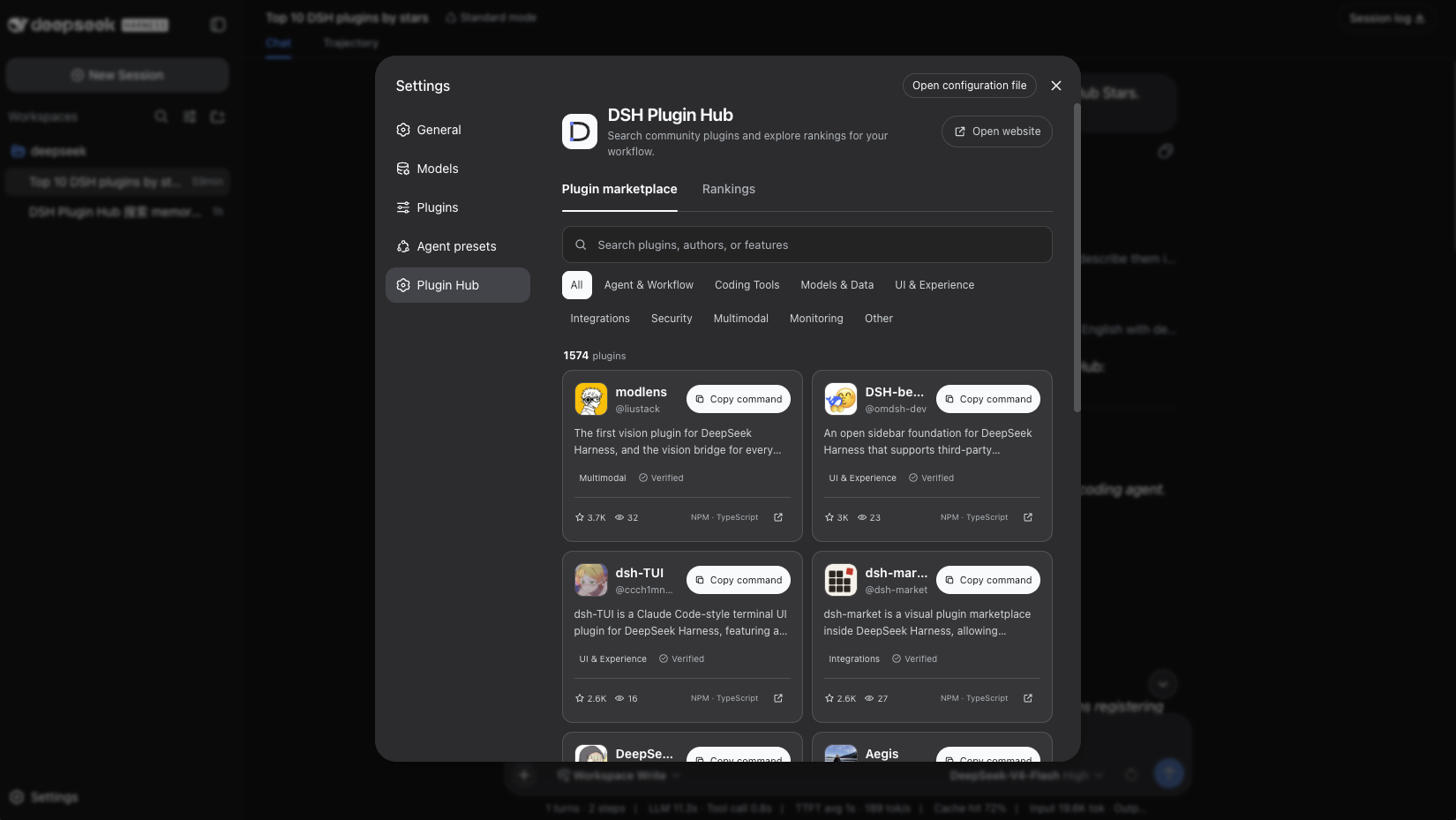
See what is already installed while browsing the catalog. The amber Review install action means compatibility needs review, not that an installation failed.
- Published and verified plugins default to GitHub Stars ordering; entering a keyword switches to relevance ordering.
- Nine marketplace categories and pagination are available. Category filters wrap so every option stays visible. The compact two-column desktop grid becomes one column in a narrow window.
- Each card shows the plugin name, owner, description, verification, category, Stars, views, package source, and primary language.
- The primary action reflects local state and compatibility: Install, Update, Installed, or Incompatible. Unknown compatibility shows an amber Review install or Review update action. A known-incompatible plugin cannot be installed from its card.
- Install and update actions open a plan with the source, version, compatibility, and risk notices. Only explicit confirmation creates a task; clicking a card does not immediately change the profile.
- The plugin name and detail arrow open its public DSH Plugin Hub detail page in the browser.
Installed
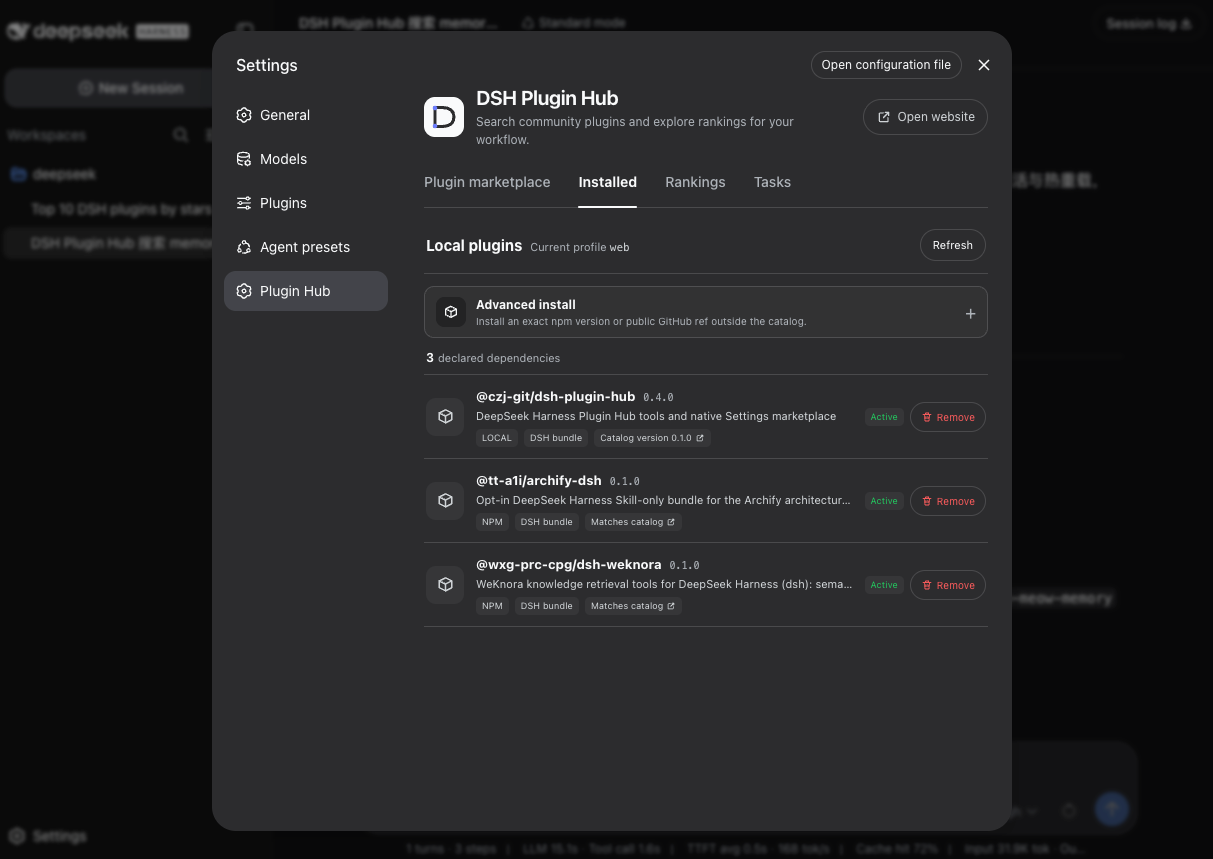
Check what is actually installed in the selected profile. Local and catalog versions are shown separately. The LOCAL badge here reflects a development installation; use the npm command above for a regular installation.
The Installed tab reads the current profile's package.json, resolved package versions, and dsh.profile.bundles instead of guessing local state from the website:
- It separates declared dependencies, actual installed versions, and activation in the profile bundle layer.
- It labels npm, GitHub, local, and unknown sources, plus missing and inactive packages.
- Catalog matches use semantic-version ordering for Matches catalog or an available update. Versions that cannot be compared safely are not mislabeled as upgrades.
- Only an explicit catalog 404 becomes Not listed. Network failures become Catalog unavailable without hiding local state.
- An uninitialized or empty profile gets an explicit empty state, and local inventory works offline.
- Local routes expose no CORS headers or filesystem paths. When newer versions exist, the Installed tab shows a count and can review one update or all available updates.
- Batch review refetches every catalog detail independently, then summarizes pinned source, target version, normalized operation, compatibility, and build-approval notices in one confirmation dialog. One confirmation queues the plans serially.
- Every declared dependency can enter removal confirmation. If batch queueing stops partway through, the UI reports how many tasks were already queued instead of encouraging a blind retry.
Rankings
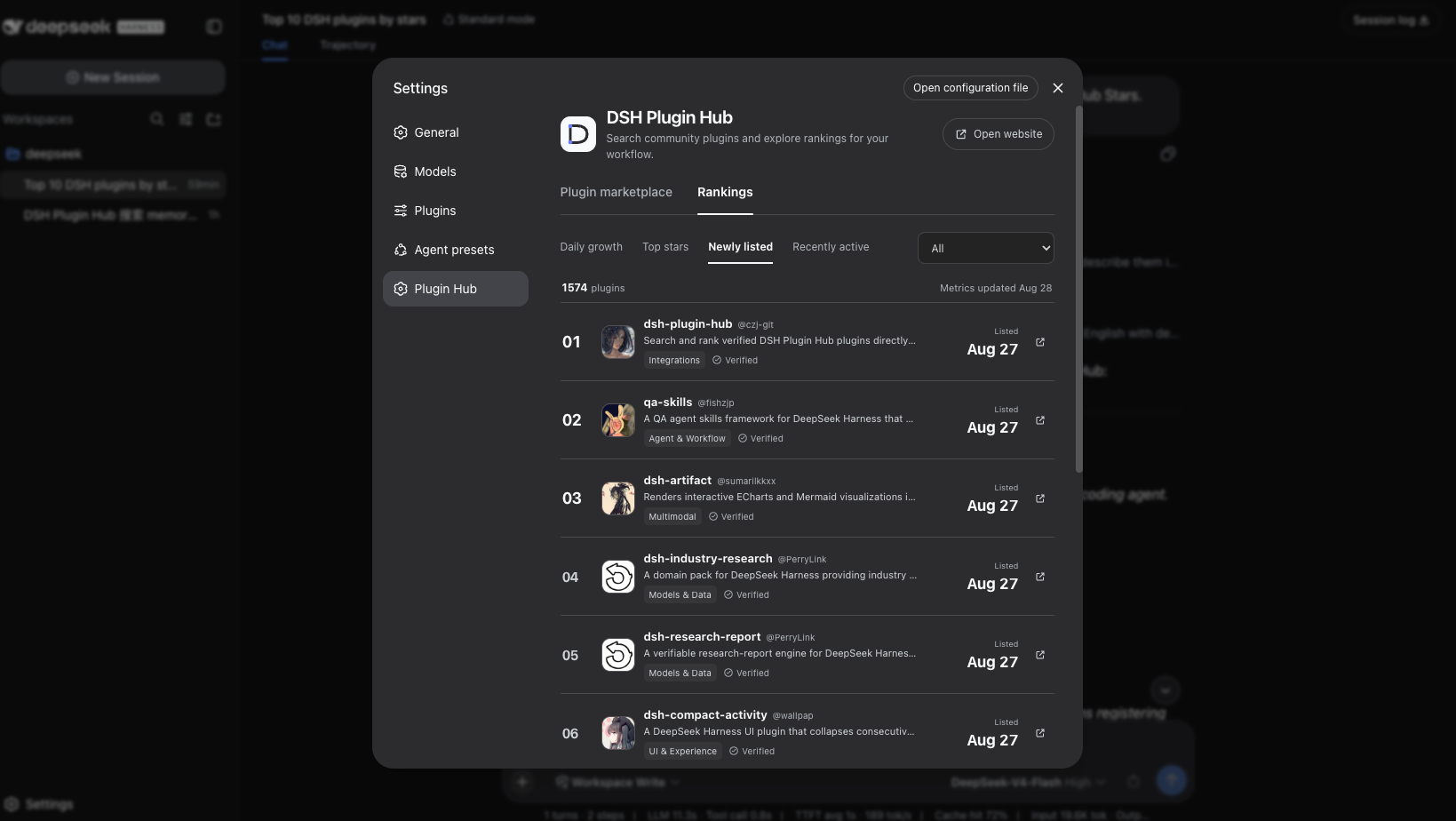
The Top stars view shows GitHub Star totals alongside each plugin. Switch ranking modes or filter by category to explore the catalog from another angle.
- Daily growth uses GitHub Star change between the latest two successful metric snapshots and shows “Pending” without a baseline.
- Top Stars orders by total GitHub Stars.
- Newly listed orders by first listing time in DSH Plugin Hub.
- Recently active orders by the latest GitHub push time.
- A compact single-column list retains rank, avatar, owner, description, category, verification, and the selected ranking metric, with category filtering and pagination.
Task center
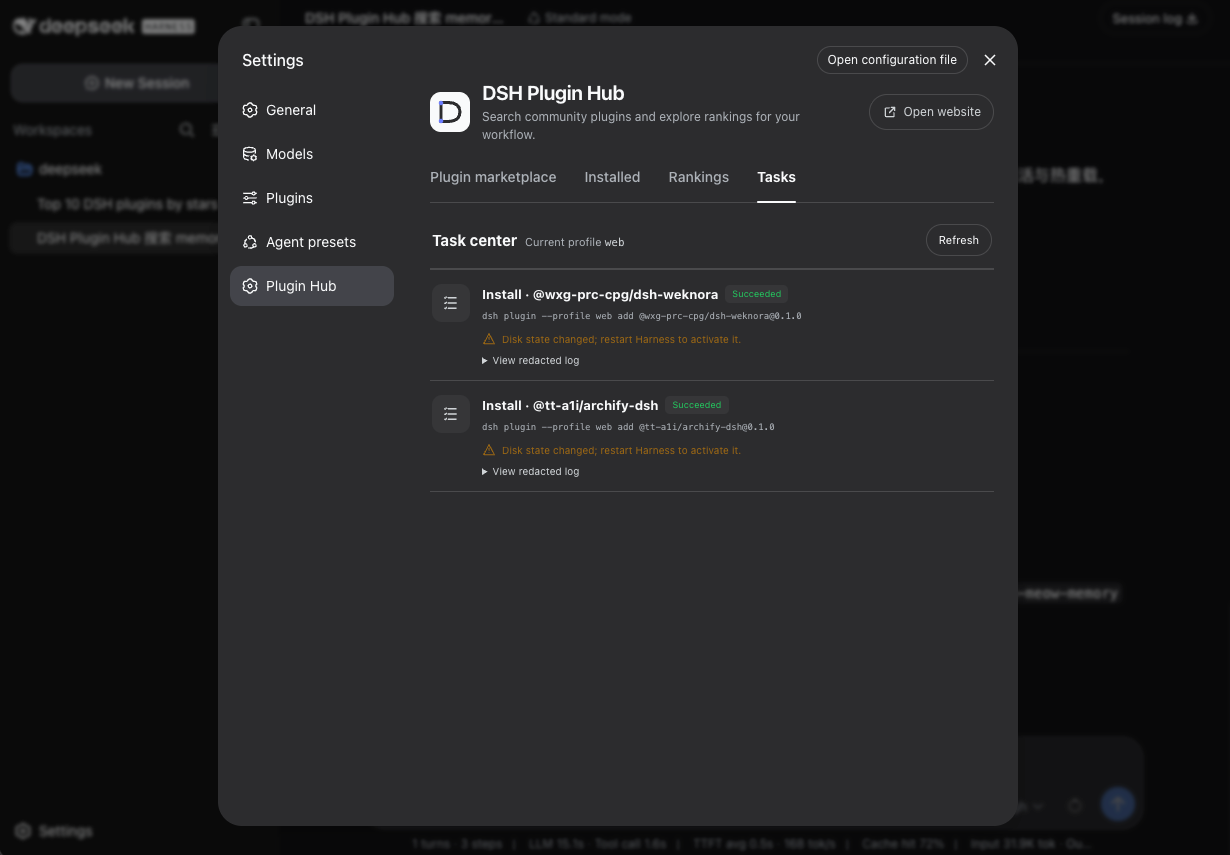
Succeeded means the CLI completed and the on-disk profile was reconciled, not that the running process has loaded the new plugin. The amber notice asks you to restart Harness to activate the change; it is not an installation error. Expand View redacted log to inspect the execution record.
Install, update, and removal are two-step operations: preview a plan, then confirm task creation. The confirmation panel shows the profile, package, pinned source and version, normalized CLI arguments, compatibility, build approval, permissions, external services, telemetry, risk flags, and restart behavior.
- The browser submits structured operation, profile, owner/repo, and packageName fields, plus an exact version or ref for advanced installation. It cannot submit shell text; the Host refetches catalog or source metadata and local state, then reconstructs fixed argv.
- Confirmation re-resolves catalog data and checks the fingerprint of the reviewed plan. If metadata changed, task creation is rejected until the new plan is reviewed.
- One profile executes tasks serially, and the same package cannot have duplicate active work. States are queued, validating, running, reconciling, succeeded, failed, cancelled, or interrupted.
- Safe POSIX process-group cancellation is available for running work. Failed and interrupted tasks can be retried. Logs redact ANSI controls, credentials, tokens, and private home paths.
- Success requires both a successful CLI result and a fresh local inventory reconciliation. Disk changes require a Harness restart before the new plugin instance is loaded.
- Failed tasks link to the matching Chinese or English build-approval or troubleshooting guide on DSH Plugin Hub.
Plugin counts, positions, versions, and task history in screenshots reflect capture time only. Chinese and English screenshots were taken separately, so local dependency counts may differ too.
Advanced installation
The Installed tab offers advanced installation from an exact npm package version or a public GitHub repository and branch, tag, or commit ref. The Host reads source metadata and resolves GitHub refs to immutable commit SHAs before showing a plan for confirmation. Sources outside the catalog are explicitly unverified; a package.json is not proof of compatibility. Private sources and arbitrary shell commands are not supported.
Continue from the website to Harness
Plugin detail pages and installation guides use Open in Harness to visit the local landing page at http://127.0.0.1:3080/api/dsh-plugin-hub/open. Click Continue in Harness there to enter Plugin Hub. A detail-page link carries only owner/repo and an optional display language; a general guide requests the Plugin Hub Settings page. Neither carries a command, version, package source, or login token. The landing route requires this plugin version 0.4.0 or later; update older installations and restart Harness first.
If the landing page requests sign-in, open the startup URL printed by dsh web in another tab in the same browser, then return to the landing page and continue. Do not append the startup token to a website link. The selection stays in the landing tab and survives authentication redirects that clear query parameters. The landing page never sets authentication cookies, reads credentials, or changes Harness authentication settings.
- The plugin accepts only a strict repository identity or the fixed Settings-page identifier. Duplicate parameters, extra path segments, whitespace, and command-like values are rejected before any preview request.
- A deep link is consumed once and removed from the address bar while unrelated query parameters and the URL fragment are preserved.
- For a valid repository, the local Host refetches catalog detail and verifies the exact package, source, target version, and Harness compatibility before showing the existing structured confirmation dialog.
- Opening a link never installs automatically and never bypasses build-script approval or lifecycle confirmation. Work enters the local queue only after explicit confirmation inside Harness.
Search in a conversation
The Settings page is not the only entry point. When the plugin is enabled, the Agent can still call dsh_plugin_search and dsh_plugin_rankings without opening Settings or asking you to write JSON. Send any one of these prompts in a Harness conversation:
Find a feature:
Use DSH Plugin Hub to search for memory plugins. Return up to 5 results, explain their purpose in English, and include install commands and detail links. Do not install anything.
Browse a ranking:
Use DSH Plugin Hub to show the top 10 plugins by GitHub Stars. Describe them in English and include detail links.
Discover new plugins:
Use DSH Plugin Hub to show the 5 most recently listed plugins. Explain their purpose and provide install commands.
Check local state:
Use DSH Plugin Hub to check installed plugins and recent tasks in the current profile. Tell me which plugins are active, which changes need a restart, and why any tasks failed. Do not change configuration or install anything.
Local queries use dsh_plugin_installed and dsh_plugin_task_status. Both read state without creating installation tasks.
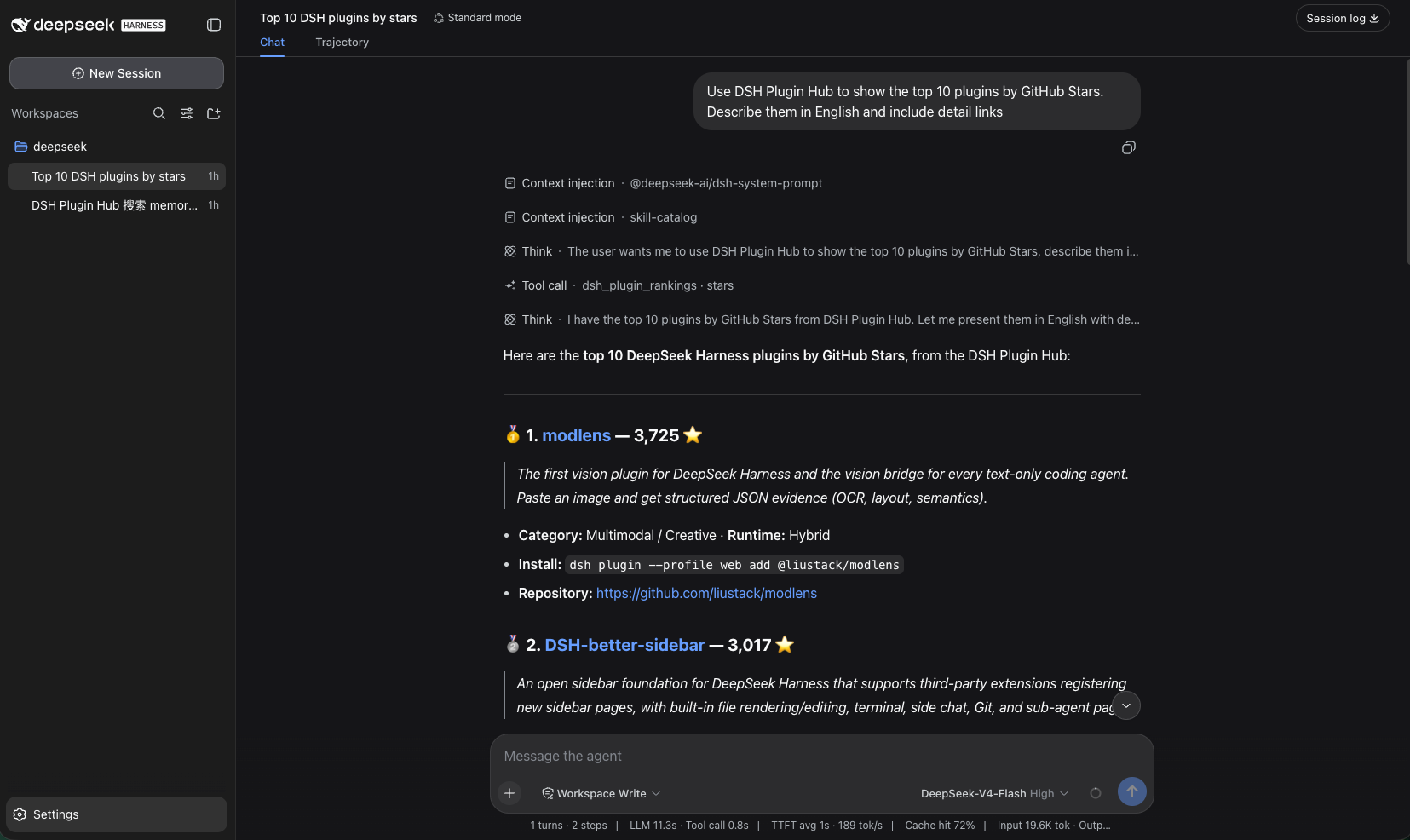
Conversation example: the Agent calls dsh_plugin_rankings and presents Top Stars with descriptions, install commands, and source links.
The model decides whether to call a tool and how to compose its answer. If it does not call one, explicitly ask: “Call dsh_plugin_search with memory as the query and en as the locale.” Search uses keyword matching; if no results appear, try a shorter Chinese or English keyword or remove a filter.
Returned install commands are text, not profile changes. Installing a plugin requires a separate request and remains subject to Harness permissions and approvals. Native mode's compact result omits some compatibility and timestamp fields; use PTC mode (called Code Mode in earlier releases) to read the complete structured result when you need those details.
How it works
flowchart TD
    website["Website: detail / install guide"] --> deeplink["Repository identity or Settings identifier only"]
    deeplink --> settings
    settings["Settings: marketplace / rankings"] --> proxy["Host same-origin search route"]
    installed["Settings: installed"] --> inventory["Host local inventory route"]
    inventory --> profile["Selected Harness profile"]
    installed --> batch["Individual / batch pinned update plans"]
    batch --> manage["Settings: confirmation / tasks"]
    manage --> tasks["Host serial lifecycle queue"]
    tasks --> catalog["Refetch and validate catalog detail"]
    tasks --> cli["Fixed argv to dsh plugin"]
    cli --> profile
    chat["Conversation: search / ranking tools"] --> client["Shared PluginHubClient"]
    proxy --> client
    client --> api["DSH Plugin Hub public read-only catalog API"]
    catalog --> api
The browser does not call the cross-origin public API directly. /api/dsh-plugin-hub/search proxies and validates searches, while /api/dsh-plugin-hub/installed only reads the configured local profile. /api/dsh-plugin-hub/tasks is a private same-origin API without CORS: every mutation must carry an Origin matching the current Host, inputs use strict schemas, and history is stored under Harness home in a 0700 directory and 0600 file.
Configuration
The bundle supplies these defaults:
- id: dsh-plugin-hub
  name: '@czj-git/dsh-plugin-hub'
  config:
    baseUrl: https://dshpluginhub.dev
    locale: en
    timeoutMs: 15000
    maxResults: 10
    profile: web
    taskTimeoutMs: 600000
    taskKillGraceMs: 5000
    taskHistoryLimit: 50
    taskLogBytes: 65536
    npmRegistryUrl: https://registry.npmjs.org
    githubApiUrl: https://api.github.com
| Field | Type | Default | Constraints and behavior |
|---|---|---|---|
baseUrl | string | https://dshpluginhub.dev | API origin. It must use HTTP(S), contain no credentials, query, or fragment, and is normalized without a trailing /. |
locale | zh | en | en | Description language when a tool call omits locale. |
timeoutMs | integer | 15000 | HTTP timeout per request, from 1 to 120000 milliseconds. |
maxResults | integer | 10 | Highest permitted limit, from 1 to 50, and the default limit for each call. |
profile | string | web | Harness profile read by the Installed tab; must be one safe path segment. |
taskTimeoutMs | integer | 600000 | Timeout for one lifecycle command, from 1000 to 3600000 milliseconds. |
taskKillGraceMs | integer | 5000 | Grace period before forced termination, from 100 to 30000 milliseconds. |
taskHistoryLimit | integer | 50 | Terminal tasks retained, from 1 to 200; active work is always retained. |
taskLogBytes | integer | 65536 | Retained redacted log bytes per task, from 1024 to 1048576. |
npmRegistryUrl | string | https://registry.npmjs.org | HTTP(S) registry used for advanced-install npm metadata. |
githubApiUrl | string | https://api.github.com | HTTP(S) API used to resolve public GitHub refs and manifests for advanced installation. |
Later profile patch layers must restate the complete config object because Cordis patching replaces the row value instead of deep-merging it.
Tool inputs
dsh_plugin_search
Searches published and verified plugins. The tool trims query and collapses consecutive whitespace to one space. An empty normalized query fails before any network request.
| Parameter | Required | Type/values | Default | Description |
|---|---|---|---|---|
query | Yes | string | — | A user need, feature, plugin, author, or repository. It must be non-empty after normalization and contain at most 100 characters. |
locale | No | zh, en | Configured locale | Selects localized descriptions. |
category | No | See “Enumerations” | All categories | Restricts the marketplace category. |
type | No | host, client, hybrid | All types | Restricts the plugin runtime type. |
source | No | npm, github | All sources | Restricts the installation source. |
sort | No | relevance, growth, stars, newest, active | relevance | Selects stable ordering. A non-empty query defaults to relevance. |
page | No | integer | 1 | Result page from 1 to 1000. |
limit | No | integer | Configured maxResults | Items on this page, from 1 to maxResults; the service limit is 50. |
Example input:
{
  "query": "vision",
  "locale": "en",
  "category": "multimodal-creative",
  "type": "hybrid",
  "source": "npm",
  "sort": "relevance",
  "page": 1,
  "limit": 5
}
Natural-language example:
Find a DeepSeek Harness plugin that lets a text-only agent analyze screenshots. Prefer npm packages and include the install command.
dsh_plugin_rankings
Lists rankings through the ordering modes of the same public search endpoint. This tool has no keyword, type, or source parameter.
| Parameter | Required | Type/values | Default | Description |
|---|---|---|---|---|
ranking | Yes | growth, stars, newest, active | — | Selects the ranking definition. |
locale | No | zh, en | Configured locale | Selects localized descriptions. |
category | No | See “Enumerations” | All categories | Ranks only one category. |
page | No | integer | 1 | Result page from 1 to 1000. |
limit | No | integer | Configured maxResults | Items on this page, from 1 to maxResults. |
Ranking definitions:
| Value | Ranking | Ordering signal |
|---|---|---|
growth | Daily growth | GitHub Star change between the two latest successful snapshots. starsDelta1d is null without a previous snapshot. |
stars | Top Stars | Total GitHub Stars. |
newest | Newly listed | First listing time in DSH Plugin Hub. |
active | Recently active | Latest GitHub push time. |
Example input:
{
  "ranking": "stars",
  "locale": "en",
  "category": "coding-tools",
  "page": 1,
  "limit": 10
}
Enumerations
category values:
| Value | Meaning |
|---|---|
agent-workflow | Agents and workflows |
coding-tools | Coding and developer tools |
models-data | Models and data |
ui-experience | UI and experience |
integrations | Connections and integrations |
security-governance | Security and governance |
multimodal-creative | Multimodal and creative tools |
observability-cost | Observability and usage |
other | Other |
sort values:
relevance: exact and prefix matches on names, repositories, and authors lead, followed by contains matches and descriptions; Stars and plugin ID keep ties stable.growth,stars,newest, andactive: use the same definitions as the ranking tool.
Tool output
The search and ranking tools return the same structured value. PTC mode can consume every field. Native mode uses the text projection below to avoid placing a large JSON object in the model context.
Complete field reference
| Path | Type | Description |
|---|---|---|
items | Plugin[] | Plugins on the current page. No matches produce [], not an error. |
items[].id | string | Stable public plugin ID. |
items[].slug | string | Public owner/repository identifier. |
items[].name | string | Display name. |
items[].owner | string | GitHub repository owner. |
items[].repo | string | GitHub repository name. |
items[].description | string | Description localized for the selected locale. |
items[].type | host | client | hybrid | Plugin runtime type. |
items[].category | string | Marketplace category enumeration. |
items[].topics | string[] | Repository topics. |
items[].language | string | Primary repository language. |
items[].license | string | License identifier. |
items[].package.name | string | Package or installation target. |
items[].package.version | string | Validated version. |
items[].package.source | npm | github | Installation source. |
items[].package.sourceSpec | string | Installation specifier pinned to the validated source/version. |
items[].package.installCommand | string | Copyable DSH command. Returning it does not execute it. |
items[].package.profile | string | Recommended Harness profile. |
items[].package.profiles | string[] | All profiles declared during validation; older servers may omit it. |
items[].compatibility.harnessVersion | string | Harness version used or required during validation. |
items[].compatibility.harnessRange | string | null | Declared compatible Harness range; null until cataloged. |
items[].compatibility.platforms | string[] | null | Declared platforms; null until cataloged. |
items[].compatibility.verificationLevel | static-checked | runtime-verified | Static or runtime verification level. |
items[].compatibility.smokeStatus | static-passed | passed | manual-step-required | failed | not-run | Smoke-check result. |
items[].compatibility.validatedAt | string | Compatibility validation time. |
items[].safety | object | Build approval, permissions, external services, telemetry, and risk flags. Unknown evidence uses unknown or null; older servers may omit it. |
items[].capabilities | string[] | null | Harness capability tags; null until cataloged. |
items[].metrics.stars | integer | GitHub Stars. |
items[].metrics.starsDelta1d | integer | null | Star change between the latest two successful snapshots; null without a baseline. |
items[].metrics.forks | integer | GitHub Forks. |
items[].metrics.openIssues | integer | GitHub open issues. |
items[].metrics.views | integer | Public DSH Plugin Hub view count. |
items[].timestamps.listedAt | string | First marketplace listing time. |
items[].timestamps.lastPushedAt | string | Latest GitHub push time. |
items[].timestamps.sourceUpdatedAt | string | Latest source-data update time. |
items[].links.detail | string | DSH Plugin Hub detail URL. |
items[].links.repository | string | GitHub repository URL. |
pagination.page | integer | Current page. |
pagination.perPage | integer | Page size returned by the service. |
pagination.total | integer | Total matching plugins. |
pagination.totalPages | integer | Total pages. |
meta.apiVersion | v1 | Public API version. |
meta.locale | zh | en | Effective description locale. |
meta.query | string | Normalized query accepted by the service; rankings normally return an empty string. |
meta.sort | string | Effective ordering. |
meta.dataUpdatedAt | string | Update time of the data used by this response. |
rateLimit.limit | integer | null | Anonymous limit from the response header; null when absent or invalid. |
rateLimit.remaining | integer | null | Remaining quota from the response header; null when absent or invalid. |
rateLimit.reset | string | null | Raw RateLimit-Reset response header. |
rateLimit.retryAfterSeconds | integer | null | Non-negative integer seconds from Retry-After, normally present on 429. |
Complete structured output example
This is a field-reference example. Plugin names, metrics, and dates are illustrative, not current catalog data; do not treat the example package name as a real installation target.
{
  "items": [
    {
      "id": "123",
      "slug": "owner/plugin",
      "name": "plugin",
      "owner": "owner",
      "repo": "plugin",
      "description": "A verified DeepSeek Harness plugin.",
      "type": "host",
      "category": "coding-tools",
      "topics": ["dsh-plugin", "developer-tools"],
      "language": "TypeScript",
      "license": "MIT",
      "package": {
        "name": "dsh-plugin-example",
        "version": "1.0.0",
        "source": "npm",
        "sourceSpec": "dsh-plugin-example@1.0.0",
        "installCommand": "dsh plugin --profile web add dsh-plugin-example",
        "profile": "web",
        "profiles": ["web"]
      },
      "compatibility": {
        "harnessVersion": "0.1.0-rc.7",
        "harnessRange": null,
        "platforms": null,
        "verificationLevel": "runtime-verified",
        "smokeStatus": "passed",
        "validatedAt": "2026-08-27T00:00:00.000Z"
      },
      "safety": {
        "buildApproval": "unknown",
        "permissions": null,
        "externalServices": null,
        "telemetry": "unknown",
        "riskFlags": []
      },
      "capabilities": null,
      "metrics": {
        "stars": 42,
        "starsDelta1d": 3,
        "forks": 4,
        "openIssues": 1,
        "views": 20
      },
      "timestamps": {
        "listedAt": "2026-08-20T00:00:00.000Z",
        "lastPushedAt": "2026-08-26T00:00:00.000Z",
        "sourceUpdatedAt": "2026-08-27T00:00:00.000Z"
      },
      "links": {
        "detail": "https://dshpluginhub.dev/en/plugins/owner/plugin",
        "repository": "https://github.com/owner/plugin"
      }
    }
  ],
  "pagination": {
    "page": 1,
    "perPage": 5,
    "total": 1,
    "totalPages": 1
  },
  "meta": {
    "apiVersion": "v1",
    "locale": "en",
    "query": "screenshot analysis",
    "sort": "relevance",
    "dataUpdatedAt": "2026-08-27T00:00:00.000Z"
  },
  "rateLimit": {
    "limit": 60,
    "remaining": 58,
    "reset": "42",
    "retryAfterSeconds": null
  }
}
Native mode text example
Plugin search: 1 matches; showing 1 on page 1.
1. plugin (owner/plugin)
   A verified DeepSeek Harness plugin.
   coding-tools · host · 42 stars · 1d growth +3
   Install: dsh plugin --profile web add dsh-plugin-example
   Details: https://dshpluginhub.dev/en/plugins/owner/plugin
   Repository: https://github.com/owner/plugin
Anonymous API quota remaining: 58/60.
No matches produce a successful items: []. Native mode renders:
Plugin search: no published, verified plugins matched. Try a broader query or remove a filter.
Errors and cancellation
Settings lifecycle tasks retain stable local failure codes and repair suggestions, including TASK_TIMEOUT, PNPM_NOT_FOUND, BUILD_APPROVAL_REQUIRED, NETWORK_FAILURE, COMMAND_FAILED, and RECONCILIATION_FAILED. Unfinished history becomes PROCESS_INTERRUPTED after a Harness restart and is never replayed automatically. The Tasks tab exposes redacted logs and retry for eligible terminal states.
Input validation, network failures, public API errors, and response-validation failures end the tool call instead of presenting partial data as success. The underlying client throws PluginHubApiError with these programmatic fields:
| Field | Type | Description |
|---|---|---|
message | string | Stable caller-facing explanation. |
code | string | Local error code or public service error code. |
status | integer | null | HTTP status, or null if no response was received. |
fields | Record<string, string> | Service field errors, or an empty object. |
retryAfterSeconds | integer | null | Retry delay accepted only from a valid non-negative integer header. |
Local error codes:
code | Condition |
|---|---|
CANCELLED | Harness cancelled the active tool call. |
TIMEOUT | The request exceeded configured timeoutMs. |
NETWORK_ERROR | DNS, TLS, connection, or another network operation failed. |
INVALID_RESPONSE | The service returned non-JSON data or a successful response missing required fields. |
HTTP_<status> | An unsuccessful response did not include a recognized public error object. |
Public service codes are preserved, including INVALID_QUERY for invalid parameters and RATE_LIMITED when anonymous quota is exhausted. A 429 response also reads Retry-After.
Programmatic handling example:
import { PluginHubApiError, PluginHubClient } from '@czj-git/dsh-plugin-hub/api'

const client = new PluginHubClient({
  baseUrl: 'https://dshpluginhub.dev',
  timeoutMs: 15_000,
})

try {
  const result = await client.search(
    { query: 'memory', locale: 'en', page: 1, perPage: 5 },
    new AbortController().signal,
  )
  console.log(result.items)
} catch (error) {
  if (error instanceof PluginHubApiError) {
    console.error(error.code, error.status, error.retryAfterSeconds)
  }
}
Development and verification
npm install
npm run check
npm run check runs strict type checking, keyless unit tests, and the production build. GitHub source installs run prepare to generate dist/; pnpm 10+ asks users to explicitly allow that build script. Publish an npm package or tarball containing prebuilt dist/ files to avoid install-time build permission.
Limitations
- Public catalog queries use search and detail endpoints; the ranking tool uses the search endpoint's stable sort modes.
- Plugin README bodies, comments, favorites, and user data are outside the public API.
- Conversation tools read the catalog, local inventory, and task status. They cannot create install, update, or removal tasks; lifecycle changes require explicit confirmation in Settings.
- Lifecycle tasks manage only the configured profile,
webby default. A completed change requires a Harness restart to load the new plugin composition. - Anonymous limits are service-controlled and may change; the tool reports the actual headers on each response.
License
MIT