README.md
May 10, 2026 · View on GitHub

Ribari
A native macOS tiling browser for power users.
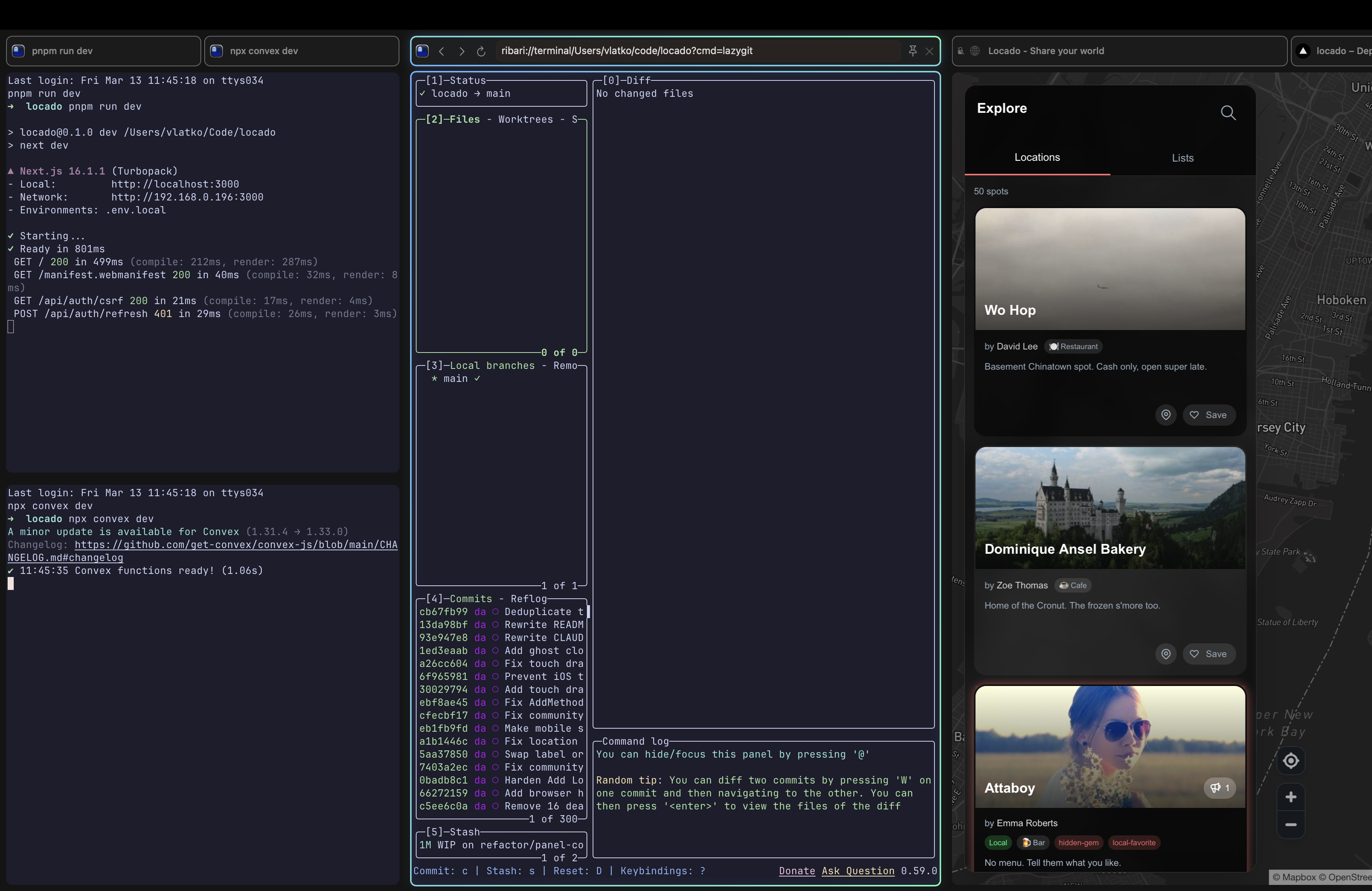
What is Ribari?
Ribari brings niri's scrolling tiling paradigm to the browser. Tabs become tiles on an infinite horizontal strip — spatial navigation first, with a sidebar and tab bar when you want them. Columns sit side by side, tiles stack vertically, and workspaces give you isolated contexts you can swipe between.
Window management on macOS is pretty restrictive, and even the best tiling tools run into walls the OS puts up. Ribari takes a different path — it puts the tiling inside the app. Your browser tabs, ghostty terminals, and code editors (VS Code, Cursor, T3 Code) all tile together on an infinite scrolling workspace, giving you something closer to niri without fighting macOS for control.
Features
- Scrolling tiling layout — tabs are tiles in an infinite horizontal strip (niri paradigm)
- Columns & splits — vertical and horizontal splits, configurable column widths (1/3, 1/2, 2/3, full)
- Multiple workspaces — separate browsing contexts, switch with gestures or shortcuts
- Incognito workspaces — isolated private browsing per workspace
- Keyboard-first — Ctrl as tiling modifier (niri-style), Cmd for browser actions
- Command palette — fuzzy search across tabs, history, URLs, and workspaces (Cmd+K)
- Integrated terminal — GPU-accelerated ghostty terminal tiles, side by side with web tiles
- Code editors — VS Code, Cursor, and T3 Code tile alongside browser and terminal tabs
- Content blocking — built-in ad and tracker filtering (light / balanced / strict)
- Extensions — JS-based extension system for customization
- Workspace templates — save and load workspace layouts
Install
Download the latest release, unzip, and move Ribari Beta.app to /Applications.
Gatekeeper
Ribari beta builds may be blocked by macOS Gatekeeper on first launch. To allow one of these builds:
- Try opening normally — double-click
Ribari Beta.app. macOS may show a dialog saying the app "can't be opened because Apple cannot check it for malicious software." - Open System Settings → Privacy & Security — scroll down to the Security section. You'll see a message like "Ribari Beta.app was blocked from use because it is not from an identified developer."
- Click "Open Anyway" and confirm in the follow-up dialog.
Alternatively, remove the quarantine attribute from the terminal before first launch:
xattr -cr /Applications/Ribari\ Beta.app
You only need to do this once — macOS remembers your choice for subsequent launches.
Public release builds should be Developer ID signed, hardened-runtime enabled, and notarized before distribution. Release security notes, including current native-integration exceptions, live in docs/security-hardening.md.
Tech Stack
Native Swift/AppKit, WKWebView, CoreAnimation, libghostty. macOS 14.0+.
Source Code
Ribari is currently closed source. Open sourcing is being considered once the project reaches a more stable point.
License
Ribari is proprietary software. Third-party licenses will be listed in a future release.
Support
Read development updates for Ribari, give direct feedback, get early access to new versions, and support development by subscribing to the Substack.