🦜️🔗 LangChain.dart
January 20, 2024 · View on GitHub





Build LLM-powered Dart/Flutter applications.
What is LangChain.dart?
LangChain.dart is an unofficial Dart port of the popular LangChain Python framework created by Harrison Chase.
LangChain provides a set of ready-to-use components for working with language models and a standard interface for chaining them together to formulate more advanced use cases (e.g. chatbots, Q&A with RAG, agents, summarization, translation, extraction, recsys, etc.).
The components can be grouped into a few core modules:
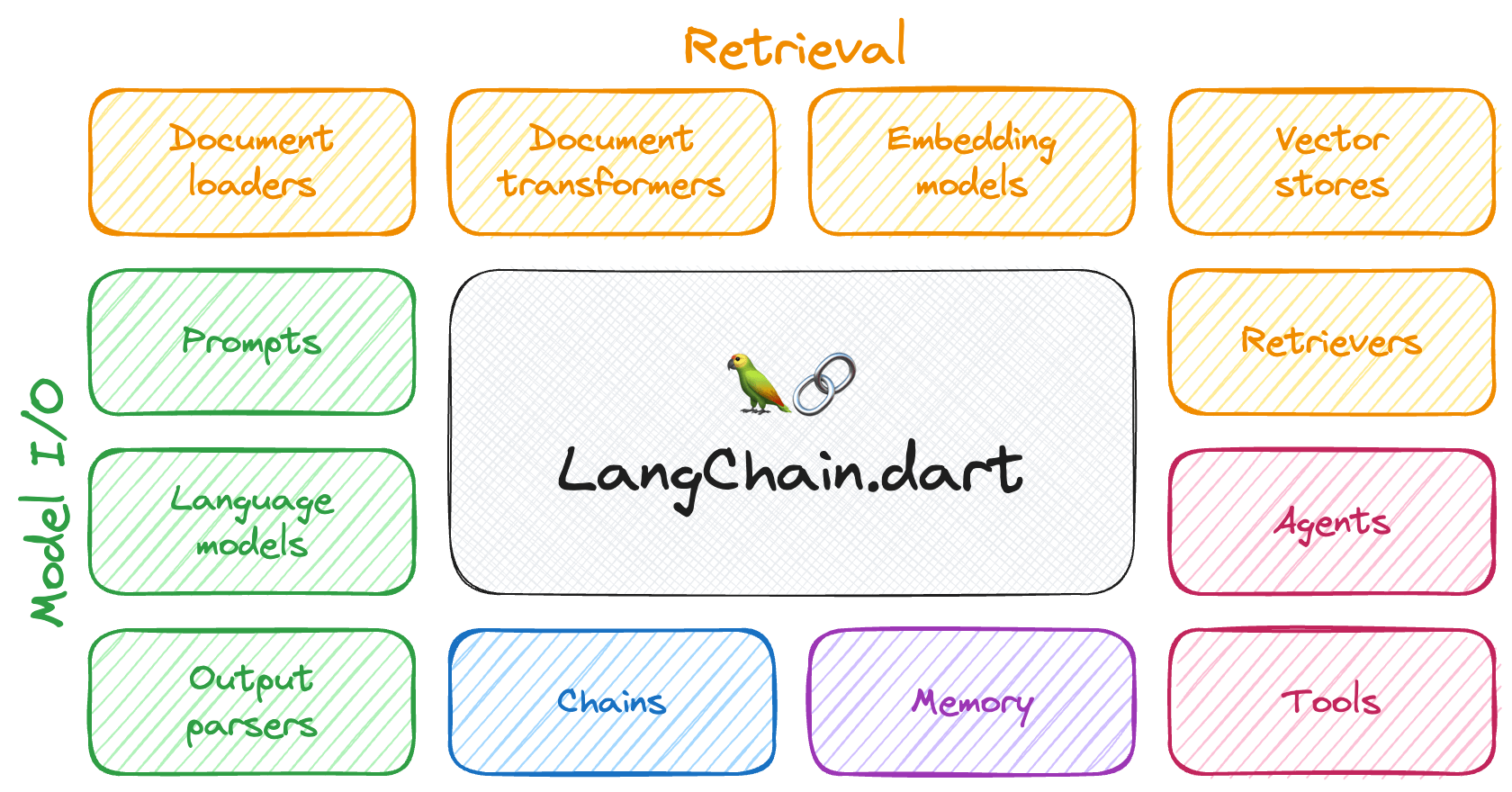
- 📃 Model I/O: LangChain offers a unified API for interacting with various LLM providers (e.g. OpenAI, Google, Mistral, Ollama, etc.), allowing developers to switch between them with ease. Additionally, it provides tools for managing model inputs (prompt templates and example selectors) and parsing the resulting model outputs (output parsers).
- 📚 Retrieval: assists in loading user data (via document loaders), transforming it (with text splitters), extracting its meaning (using embedding models), storing (in vector stores) and retrieving it (through retrievers) so that it can be used to ground the model's responses (i.e. Retrieval-Augmented Generation or RAG).
- 🤖 Agents: "bots" that leverage LLMs to make informed decisions about which available tools (such as web search, calculators, database lookup, etc.) to use to accomplish the designated task.
The different components can be composed together using the LangChain Expression Language (LCEL).
Motivation
Large Language Models (LLMs) have revolutionized Natural Language Processing (NLP), serving as essential components in a wide range of applications, such as question-answering, summarization, translation, and text generation.
The adoption of LLMs is creating a new tech stack in its wake. However, emerging libraries and tools are predominantly being developed for the Python and JavaScript ecosystems. As a result, the number of applications leveraging LLMs in these ecosystems has grown exponentially.
In contrast, the Dart / Flutter ecosystem has not experienced similar growth, which can likely be attributed to the scarcity of Dart and Flutter libraries that streamline the complexities associated with working with LLMs.
LangChain.dart aims to fill this gap by abstracting the intricacies of working with LLMs in Dart and Flutter, enabling developers to harness their combined potential effectively.
Packages
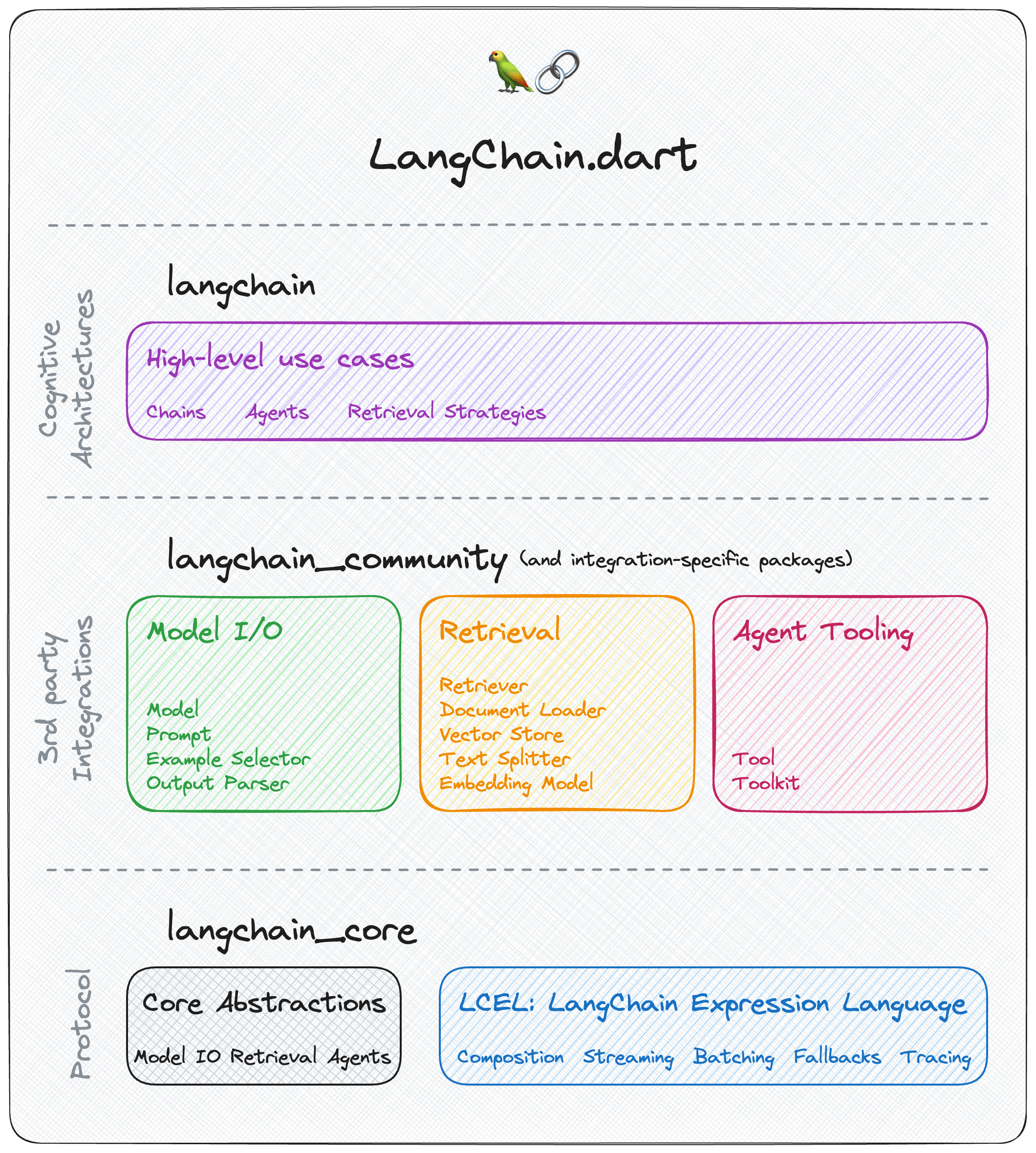
LangChain.dart has a modular design that allows developers to import only the components they need. The ecosystem consists of several packages:
langchain_core 
Contains only the core abstractions as well as LangChain Expression Language as a way to compose them together.
Depend on this package to build frameworks on top of LangChain.dart or to interoperate with it.
langchain
Contains higher-level and use-case specific chains, agents, and retrieval algorithms that are at the core of the application's cognitive architecture.
Depend on this package to build LLM applications with LangChain.dart.
This package exposes
langchain_coreso you don't need to depend on it explicitly.
langchain_community 
Contains third-party integrations and community-contributed components that are not part of the core LangChain.dart API.
Depend on this package if you want to use any of the integrations or components it provides.
Integration-specific packages
Popular third-party integrations (e.g. langchain_openai, langchain_google, langchain_ollama, etc.) are moved to their own packages so that they can be imported independently without depending on the entire langchain_community package.
Depend on an integration-specific package if you want to use the specific integration.
| Package | Version | Description |
|---|---|---|
| langchain_anthropic |  | Anthopic integration (Claude 3.5 Sonnet, Opus, Haiku, Instant, etc.) |
| langchain_chroma |  | Chroma vector database integration |
| langchain_firebase |  | Firebase integration (VertexAI for Firebase (Gemini 1.5 Pro, Gemini 1.5 Flash, etc.)) |
| langchain_google |  | Google integration (GoogleAI, VertexAI, Gemini, PaLM 2, Embeddings, Vector Search, etc.) |
| langchain_mistralai |  | Mistral AI integration (Mistral-7B, Mixtral 8x7B, Mixtral 8x22B, Mistral Small, Mistral Large, embeddings, etc.). |
| langchain_ollama |  | Ollama integration (Llama 3.2, Gemma 2, Phi-3.5, Mistral nemo, WizardLM-2, CodeGemma, Command R, LLaVA, DBRX, Qwen, Dolphin, DeepSeek Coder, Vicuna, Orca, etc.) |
| langchain_openai |  | OpenAI integration (GPT-4o, o1, Embeddings, Tools, Vision, DALL·E 3, etc.) and OpenAI Compatible services (TogetherAI, Anyscale, OpenRouter, One API, Groq, Llamafile, GPT4All, etc.) |
| langchain_pinecone |  | Pinecone vector database integration |
| langchain_supabase |  | Supabase Vector database integration |
API clients packages
The following packages are maintained (and used internally) by LangChain.dart, although they can also be used independently:
Depend on an API client package if you just want to consume the API of a specific provider directly without using LangChain.dart abstractions.
| Package | Version | Description |
|---|---|---|
| anthropic_sdk_dart |  | Anthropic API client |
| chromadb |  | Chroma DB API client |
| googleai_dart |  | Google AI for Developers API client |
| mistralai_dart |  | Mistral AI API client |
| ollama_dart |  | Ollama API client |
| openai_dart |  | OpenAI API client |
| openai_realtime_dart |  | OpenAI Realtime API client |
| tavily_dart |  | Tavily API client |
| vertex_ai |  | GCP Vertex AI API client |
Integrations
The following integrations are available in LangChain.dart:
Chat Models
| Chat model | Package | Streaming | Multi-modal | Tool-call | Description |
|---|---|---|---|---|---|
| ChatAnthropic | langchain_anthropic | ✔ | ✔ | ✔ | Anthropic Messages API (aka Claude API) |
| ChatFirebaseVertexAI | langchain_firebase | ✔ | ✔ | ✔ | Vertex AI for Firebase API (aka Gemini API) |
| ChatGoogleGenerativeAI | langchain_google | ✔ | ✔ | ✔ | Google AI for Developers API (aka Gemini API) |
| ChatMistralAI | langchain_mistralai | ✔ | Mistral Chat API | ||
| ChatOllama | langchain_ollama | ✔ | ✔ | ✔ | Ollama Chat API |
| ChatOpenAI | langchain_openai | ✔ | ✔ | ✔ | OpenAI Chat API and OpenAI Chat API compatible services (GitHub Models, TogetherAI, Anyscale, OpenRouter, One API, Groq, Llamafile, GPT4All, FastChat, etc.) |
| ChatVertexAI | langchain_google | GCP Vertex AI Chat API |
LLMs
Note: Prefer using Chat Models over LLMs as many providers have deprecated them.
| LLM | Package | Streaming | Description |
|---|---|---|---|
| Ollama | langchain_ollama | ✔ | Ollama Completions API |
| OpenAI | langchain_openai | ✔ | OpenAI Completions API |
| VertexAI | langchain_google | GCP Vertex AI Text API |
Embedding Models
Vector Stores
| Vector store | Package | Description |
|---|---|---|
| Chroma | langchain_chroma | Chroma integration |
| MemoryVectorStore | langchain | In-memory vector store for prototype and testing |
| ObjectBoxVectorStore | langchain_community | ObjectBox integration |
| Pinecone | langchain_pinecone | Pinecone integration |
| Supabase | langchain_supabase | Supabase Vector integration |
| VertexAIMatchingEngine | langchain_google | Vertex AI Vector Search (former Matching Engine) integration |
Tools
| Tool | Package | Description |
|---|---|---|
| CalculatorTool | langchain_community | To calculate math expressions |
| OpenAIDallETool | langchain_openai | OpenAI's DALL-E Image Generator |
| TavilyAnswerTool | langchain_community | Returns an answer for a query using the Tavily search engine |
| TavilySearchResultsTool | langchain_community | Returns a list of results for a query using the Tavily search engine |
Getting started
To start using LangChain.dart, add langchain as a dependency to your pubspec.yaml file. Also, include the dependencies for the specific integrations you want to use (e.g.langchain_community, langchain_openai, langchain_google, etc.):
dependencies:
  langchain: {version}
  langchain_community: {version}
  langchain_openai: {version}
  langchain_google: {version}
  ...
The most basic building block of LangChain.dart is calling an LLM on some prompt. LangChain.dart provides a unified interface for calling different LLMs. For example, we can use ChatGoogleGenerativeAI to call Google's Gemini model:
final model = ChatGoogleGenerativeAI(apiKey: googleApiKey);
final prompt = PromptValue.string('Hello world!');
final result = await model.invoke(prompt);
// Hello everyone! I'm new here and excited to be part of this community.
But the power of LangChain.dart comes from chaining together multiple components to implement complex use cases. For example, a RAG (Retrieval-Augmented Generation) pipeline that would accept a user query, retrieve relevant documents from a vector store, format them using prompt templates, invoke the model, and parse the output:
// 1. Create a vector store and add documents to it
final vectorStore = MemoryVectorStore(
  embeddings: OpenAIEmbeddings(apiKey: openaiApiKey),
);
await vectorStore.addDocuments(
  documents: [
    Document(pageContent: 'LangChain was created by Harrison'),
    Document(pageContent: 'David ported LangChain to Dart in LangChain.dart'),
  ],
);

// 2. Define the retrieval chain
final retriever = vectorStore.asRetriever();
final setupAndRetrieval = Runnable.fromMap<String>({
  'context': retriever.pipe(
    Runnable.mapInput((docs) => docs.map((d) => d.pageContent).join('\n')),
  ),
  'question': Runnable.passthrough(),
});

// 3. Construct a RAG prompt template
final promptTemplate = ChatPromptTemplate.fromTemplates([
  (ChatMessageType.system, 'Answer the question based on only the following context:\n{context}'),
  (ChatMessageType.human, '{question}'),
]);

// 4. Define the final chain
final model = ChatOpenAI(apiKey: openaiApiKey);
const outputParser = StringOutputParser<ChatResult>();
final chain = setupAndRetrieval
    .pipe(promptTemplate)
    .pipe(model)
    .pipe(outputParser);

// 5. Run the pipeline
final res = await chain.invoke('Who created LangChain.dart?');
print(res);
// David created LangChain.dart
Documentation
Community
Stay up-to-date on the latest news and updates on the field, have great discussions, and get help in the official LangChain.dart Discord server.
Contribute
| 📢 Call for Collaborators 📢 |
|---|
| We are looking for collaborators to join the core group of maintainers. |
New contributors welcome! Check out our Contributors Guide for help getting started.
Join us on Discord to meet other maintainers. We'll help you get your first contribution in no time!
Related projects
- LangChain: The original Python LangChain project.
- LangChain.js: A JavaScript port of LangChain.
- LangChain.go: A Go port of LangChain.
- LangChain.rb: A Ruby port of LangChain.
Sponsors

License
LangChain.dart is licensed under the MIT License.