DET - Multi Object Detection
September 4, 2020 · View on GitHub
Requirements
- Python 3.6.9
- MATLAB (> R2014b)
- C/C++ compiler
- matlab python engine (https://www.mathworks.com/help/matlab/matlab_external/get-started-with-matlab-engine-for-python.html)
- install requirements.txt
- Note: A compatible Python implementation is available at: https://github.com/cheind/py-motmetrics
Usage
- Compile the matlab evaluation code
matlab matlab_devkit/compile.m
- Run
python DET/evalDET.py
Evaluation
To run the evaluation for your method please adjust the file DET/evalDET.py using the following arguments:
benchmark_name: Name of the benchmark, e.g. MOT20Det
gt_dir: Directory containing ground truth files in <gt_dir>/<sequence>/gt/gt.txt
res_dir: The folder containing the tracking results. Each one should be saved in a separate .txt file with the name of the respective sequence (see ./res/data)
save_pkl: path to output directory for final results (pickle) (default: False)
eval_mode: Mode of evaluation out of ["train", "test", "all"] (default : "train")
eval.run(
    benchmark_name = benchmark_name,
    gt_dir = gt_dir,
    res_dir = res_dir,
    eval_mode = eval_mode)
Visualization
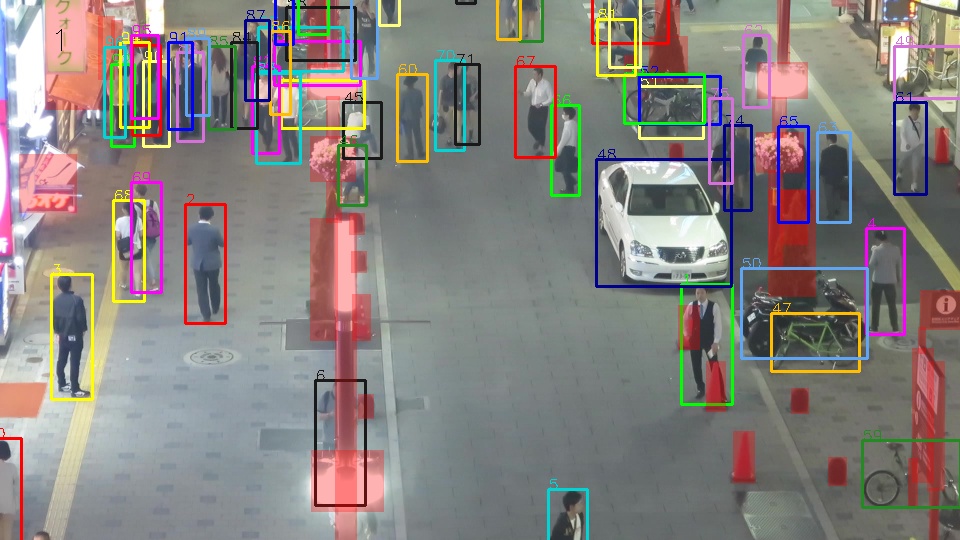
To visualize your results or the annotations run
python DET/DETVisualization.py
Inside the script adjust the following values for the DETVisualizer class:
seqName: Name of the sequence
FilePath: Data file
image_dir: Directory containing images
mode: Video mode. Options: None for method results, raw for data video only, and gt for annotations
output_dir: Directory for created video and thumbnail images
Additionally, adjust the following values for the generateVideo function:
displayTime: If true, display frame number (default false)
displayName: Name of the method
showOccluder: If true, show occluder of gt data
fps: Frame rate
visualizer = DETVisualizer(seqName, FilePath, image_dir, mode, output_dir )
visualizer.generateVideo(displayTime, displayName, showOccluder, fps  )
Data Format
p> The file format should be the same as the ground truth file, which is a CSV text-file containing one object instance per line. Each line must contain 10 values:
<frame>,
<id>,
<bb_left>,
<bb_top>,
<bb_width>,
<bb_height>,
<conf>
The world coordinates x,y,z
are ignored for the 2D challenge and can be filled with -1.
Similarly, the bounding boxes are ignored for the 3D challenge.
However, each line is still required to contain 10 values.
All frame numbers, target IDs and bounding boxes are 1-based. Here is an example:
1, -1, 794.27, 247.59, 71.245, 174.88, 4.56
1, -1, 1648.1, 119.61, 66.504, 163.24, 0.32
1, -1, 875.49, 399.98, 95.303, 233.93, -1.34
...
Citation
If you work with the code and the benchmark, please cite:
MOT 17 Det
@article{MOT16,
   title = {{MOT}16: {A} Benchmark for Multi-Object Tracking},
   shorttitle = {MOT16},
   url = {http://arxiv.org/abs/1603.00831},
   journal = {arXiv:1603.00831 [cs]},
   author = {Milan, A. and Leal-Taix\'{e}, L. and Reid, I. and Roth, S. and Schindler, K.},
   month = mar,
   year = {2016},
   note = {arXiv: 1603.00831},
   keywords = {Computer Science - Computer Vision and Pattern Recognition}
}
MOT 20 Det
@article{MOTChallenge20,
    title={MOT20: A benchmark for multi object tracking in crowded scenes},
    shorttitle = {MOT20},
   url = {http://arxiv.org/abs/1906.04567},
   journal = {arXiv:2003.09003[cs]},
   author = {Dendorfer, P. and Rezatofighi, H. and Milan, A. and Shi, J. and Cremers, D. and Reid, I. and Roth, S. and Schindler, K. and Leal-Taix\'{e}, L. },
   month = mar,
   year = {2020},
   note = {arXiv: 2003.09003},
   keywords = {Computer Science - Computer Vision and Pattern Recognition}
}
Contact
If you find a problem with the code, please open an issue.
For general questions, please contact Patrick Dendorfer (patrick.dendorfer@tum.de) or Aljosa Osep (aljosa.osep@tum.de)