Alfred emoji picker
April 17, 2026 · View on GitHub
Input emojis from Alfred — at a blazing-fast speed!
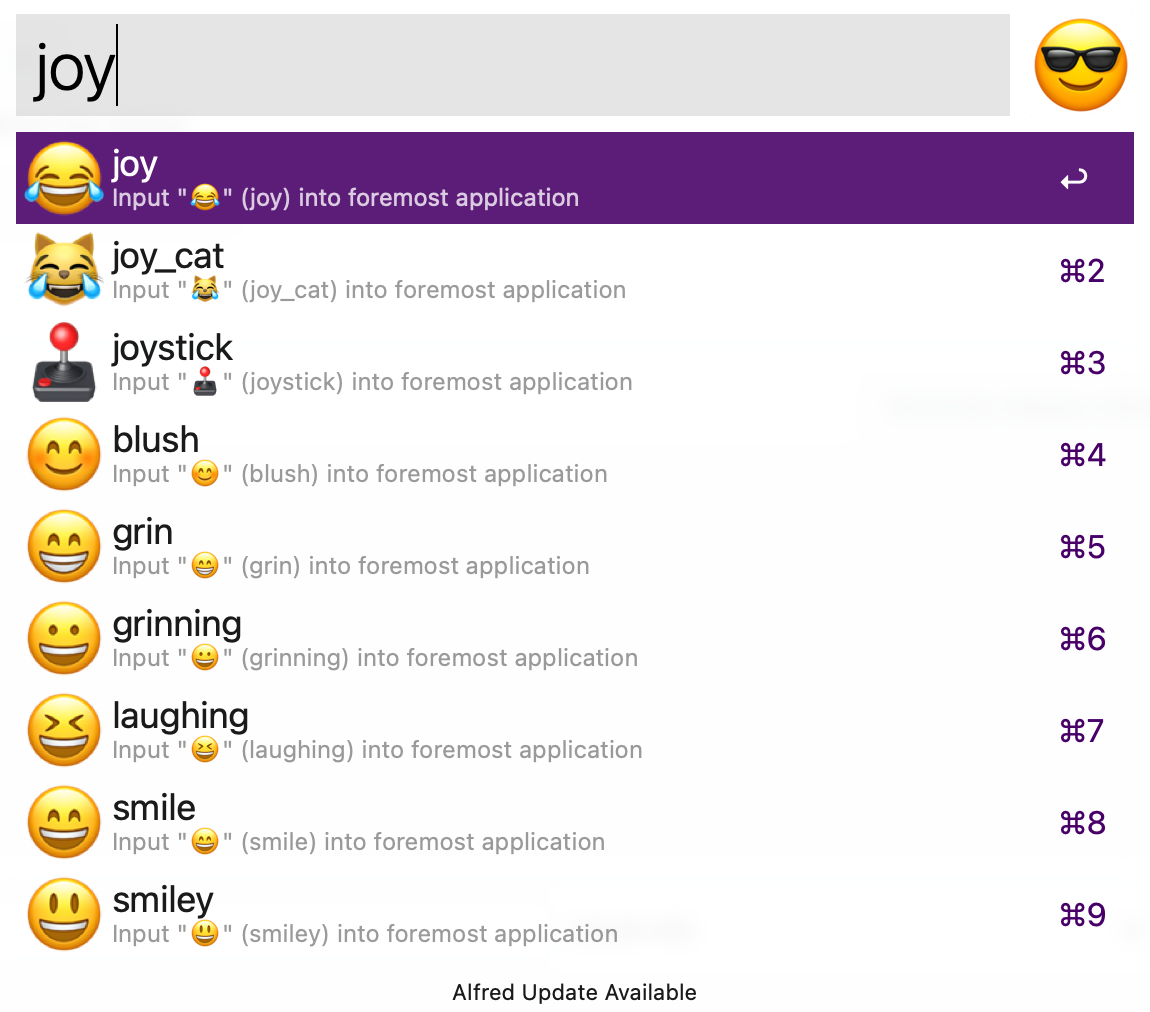
Install
- Download the workflow from the latest release.
- Open the file and import it into Alfred.
- Click on the workflow in Alfred and define a hotkey.
👉 I recommend using Command ⌘ Control ⌃ Space
Build
go install

./build.sh
Copy the executable in the Alfred workflow directory and export the new workflow from Alfred.
Update emojis
-
Emoji metadata (names, slugs, keywords) lives in the
turtlemodule. Check the README on how to regenerateemojis.goto make it up-to-date, and push a new tag. -
Bump the dependency of
alfred-emoji-pickerviago get github.com/devnoname120/turtle@latest. -
Re-render the PNGs from the current Apple Color Emoji font and re-optimize them (macOS only; requires uv,
pngquant, andoxipng):uv run --project scripts scripts/emojis-generator.py ./gen-emojis.sh
TODO
- Restore clipboard after pasting emoji
- Support for multiple words fuzzy search
- Add scoring on results (exact match > partial match at beginning > partial match > keywords, categories, etc…)
- Add scripts to update the emoji database
- Support for auto-updates
- Support for skin tones (note:
Turtledoesn't support them)