README.md
May 17, 2026 · View on GitHub
GO BOILERPLATE
A robust Go boilerplate for API projects using Domain-Driven Design (DDD) and Clean Architecture principles.




Developed with the software and tools below.
Table of Contents
Description
This project serves as a boilerplate for creating API projects in Go, incorporating key principles of Domain-Driven Design (DDD) and Clean Architecture. It aims to provide a solid foundation for building maintainable and scalable Go applications.
The structure reflects best practices gathered from experience, emphasizing separation of concerns and testability. All layers are thoroughly tested to ensure reliability. Contributions and suggestions for improvement are highly encouraged!
Project Architecture
This boilerplate follows the principles of Clean Architecture, organizing code into distinct layers with specific responsibilities.
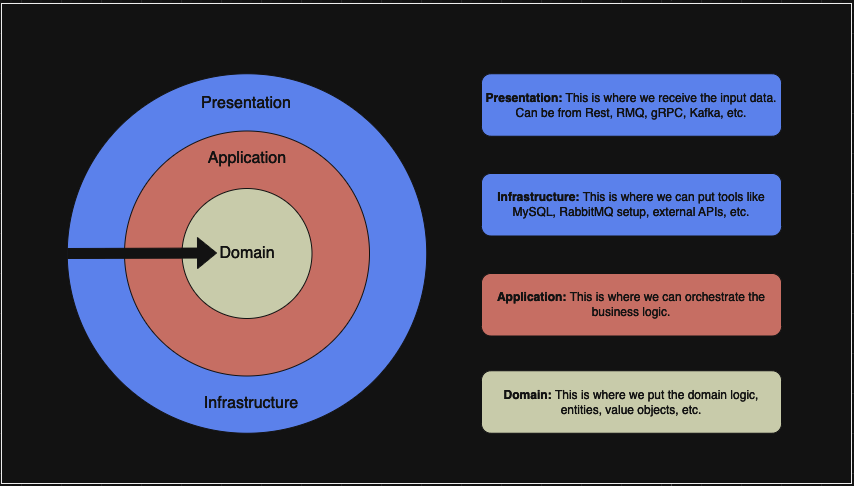
Directory Structure
The project aims to follow standard Go project layout conventions where applicable. The main directories are:
/cmd: Contains the application entry point (cmd/main.go). Responsible for bootstrapping the application: loading configuration (config.toml), setting up dependency injection, and starting the HTTP server./internal: Houses the core application logic, not intended for import by external projects. It's organized by Clean Architecture layers:/internal/domain: The heart of the application. Contains business logic, entities, value objects, aggregates, and repository interfaces. It's independent of external concerns./internal/application: Orchestrates use cases (interactors/services). Depends oninternal/domaininterfaces and defines interfaces for required infrastructure components (like repositories or caches)./internal/transport: Handles incoming requests (HTTP viaechoframework in this case) and outgoing responses. It validates input, callsinternal/applicationuse cases, and formats the output. Depends oninternal/application.
/infra: Provides concrete implementations for interfaces defined ininternal/domainandinternal/application. This includes database repositories (PostgreSQL), caching (Redis), logging, etc. It depends on interfaces defined in/internaland external libraries/drivers./util: Contains common utility functions potentially used across different layers (use with caution to avoid creating unwanted coupling)./migrator: Manages database schema migrations./docs: Stores generated API documentation (Swagger/OpenAPI generated bymake docs)./mocks: Contains mocks generated usinggomock(make mocks) for testing domain and infrastructure interfaces./goswag: A helper tool used internally by themake docscommand to facilitate Swagger generation..docker: Holds Docker volumes data for services like PostgreSQL, Redis and etc..github: Contains GitHub Actions workflows for CI/CD and contribution templates (like issue/PR templates).
(Other files like go.mod, go.sum, Dockerfile, docker-compose.yml, Makefile, config.toml, prometheus.yml, .gitignore, LICENSE are standard configuration or project files.)
Dependency Rule
A fundamental principle of Clean Architecture is the Dependency Rule: source code dependencies can only point inwards towards the core business logic.
- Code within
/internalfollows this rule strictly:transportdepends onapplication, which depends ondomain.domainhas no internal dependencies. - The
/infralayer depends on interfaces defined withininternal/domainandinternal/application. - The
/cmdlayer orchestrates the setup and depends on concrete types from/internaland/infraduring initialization.
This structure ensures that changes in outer layers (like /infra, /transport, UI frameworks, or databases) have minimal impact on the core business logic.
💻 Getting Started
Prerequisites ❗
- Ensure Docker is installed on your machine.
- An installation of Go 1.22 or later. See Installing Go.
- (Optional) Recommended VS Code Extensions: Go, Go Test Explorer, EnvFile.
Configuration
The application loads configuration from config.toml by default. You can override settings using environment variables (prefixed with APP_). For local development, the docker-compose.yml file sets up necessary services (like PostgreSQL, Redis) with default configurations. If you need to customize database credentials or other settings outside of Docker, you can modify config.toml or set environment variables.
▶️ Launching the Application
To start the application and its dependencies (PostgreSQL, Redis, etc.) using Docker Compose, run the Make command:
make start
Wait for the logs to indicate the services are ready. You should see a message like your server started on [::]:5000 from the Go application container (myapp).
First Request Example
Once the application is running, you can send a request to the ping endpoint to verify it's working:
curl -X GET http://localhost:5000/ping
You should receive the following JSON response:
{
    "message": "pong"
}
Testing 🧪
Unit Tests
Unit tests are crucial for ensuring code correctness and maintainability.
- Real Dependencies with Testcontainers: For tests involving databases (PostgreSQL) or caches (Redis), we use Testcontainers. This library spins up real dependencies in Docker containers specifically for the test run, providing a high-fidelity testing environment without mocking the database itself.
- Layer Isolation: Tests are written to respect architectural boundaries. For example, when testing
applicationlayer use cases,infralayer components (like repositories) are typically replaced with mocks.
Mocks
Mocks are generated using gomock to isolate components during testing. They are stored in the /mocks directory. To regenerate mocks after modifying interfaces (typically within /internal/domain/contract or /infra/contract based on the Makefile):
make mocks
This command ensures mockgen is installed and generates mocks based on the interfaces found in specified contract directories.
Running Tests
To run all tests (unit and integration tests using testcontainers):
make tests
This command executes go test with coverage analysis across all modules.
📝 API Documentation
API documentation is generated in Swagger/OpenAPI format and served directly by the application.
- Accessing: Once the application is running (using
make start), you can access the interactive Swagger UI documentation in your browser at:http://localhost:5000/swagger/ - Generation: The documentation is generated automatically from code annotations (specifically in the
/internal/transportlayer handlers) using goswag, an open-source tool developed for this purpose.
Generating Docs
To regenerate the API documentation (Swagger/OpenAPI) using the goswag CLI after making changes to handlers or annotations in the /internal/transport layer:
make docs
This updates the files in the /docs directory.
🤝 Contributing
Contributions are welcome! Improving this boilerplate helps the Go community. Here are ways you can contribute:
- Submit Pull Requests: Review open PRs, and submit your own enhancements or bug fixes.
- Join the Discussions: Share insights, provide feedback, or ask questions.
- Report Issues: Report bugs or suggest new features.
Contributing Guidelines
- Fork the Repository: Start by forking the project repository to your GitHub account.
- Clone Locally: Clone the forked repository to your local machine.
git clone https://github.com/<your_username>/go-boilerplate - Create a New Branch: Use a descriptive branch name.
git checkout -b feature/describe-your-feature