the dva.js Knowledgemap
July 23, 2018 · View on GitHub
-
Original Author: dvajs/dva-knowledgemap@github
-
English Translation by: crunchysoul@github
Notice:if you are using dva.js@2, please ignore the section below about Router, updating on the way...
Some common confusions where first started learning React.js or dva.js:
- should I understand all the ES6 new features?
- There are three different ways to create a React component, should I learn all of them?
- How to add/edit/remove Reducer state?
- How to handle global/local error?
- How to send asynchronous request?
- How to handle rather complex async process logic?
- How to setup Router?
- ...
This article provides you with all the practical information to understand dva.js and it's command line tool dva-cli, so you can start building projects like dva-hackernews in no time without all the unnecessary extras.
Table of Contents
JavaScript
Variables declaration
const vs let
Use const and let instead of var. const means that the identifier can’t be reassigned. let is used for a reassignable variable. Beware the difference that var is scoped to a function, const and let are both scoped to the block。
const DELAY = 1000;

let count = 0;
count = count + 1;
Template literals
Template literals (string interpolation and multi-line strings) provides convenient ways for coding strings
const user = 'world';
console.log(`hello ${user}`);  // hello world

// multi-line string
const content = `
  Hello ${firstName},
  Thanks for ordering ${qty} tickets to ${event}.
`;
Default function parameters
function logActivity(activity = 'skiing') {
  console.log(activity);
}

logActivity();  // skiing
Arrow Function
Concise syntax for writing function expressions, without writing function and return keywords. Arrow functions are anonymous
and change the way this binds in functions.
An arrow function does not have its own this; the this value of the enclosing execution context is used.
For example:
[1, 2, 3].map(x => x + 1); // [2, 3, 4]
Equivalent to:
[1, 2, 3].map((function(x) {
  return x + 1;
}).bind(this));
Module import and export
Use import for module import and export for module export.
For example:
// import whole
import dva from 'dva';

// partial importation
import { connect } from 'dva';
import { Link, Route } from 'dva/router';

// import whole and assign to github
import * as github from './services/github';

// default export
export default App;
// partial exportation and using import { App } from './file'
export class App extend Component {};
ES6 Object and Array
Destructing
Using destructing to extract data from Object or Array, and assign to variable concisely.
// Object
const user = { name: 'guanguan', age: 2 };
const { name, age } = user;
console.log(`${name} : ${age}`);  // guanguan : 2

// Array
const arr = [1, 2];
const [foo, bar] = arr;
console.log(foo);  // 1
destructing can also be applied to variables in function parameter
const add = (state, { payload }) => {
  return state.concat(payload);
};
destructing allows alias assignment for meaningful naming
const add = (state, { payload: todo }) => {
  return state.concat(todo);
};
Object literals improvement
The opposite operation to destructing, used to construct a new Object
const name = 'duoduo';
const age = 8;

const user = { name, age };  // { name: 'duoduo', age: 8 }
The function keyword can be omitted when defining Object methods
app.model({
  reducers: {
    add() {}  // equivalent to add: function() {}
  },
  effects: {
    *addRemote() {}  // equivalent to addRemote: function*() {}
  },
});
Spread Operator
Spread Operator or ... operator, can be used in several scenarios:
Constructing new Array with extra data, equivalent to push
const todos = ['Learn dva'];
[...todos, 'Learn antd'];  // ['Learn dva', 'Learn antd']
Or extracting data from array literal, thinking of slice
const arr = ['a', 'b', 'c'];
const [first, ...rest] = arr;
rest;  // ['b', 'c']

// With ignore
const [first, , ...rest] = arr;
rest;  // ['c']
Constructing Array from function arguments
function directions(first, ...rest) {
  console.log(rest);
}
directions('a', 'b', 'c');  // ['b', 'c'];
Replacing apply
function foo(x, y, z) {}
const args = [1,2,3];

//Two equivalent expression:
foo.apply(null, args);
foo(...args);
Constructing (updating) new Object. (ES2017 stage-2 proposal)
const foo = {
  a: 1,
  b: 2,
};
const bar = {
  b: 3,
  c: 2,
};
const d = 4;

const ret = { ...foo, ...bar, d };  // { a:1, b:3, c:2, d:4 }
Also in JSX, Spread Operator can be used for adding new props, please refer to Spread Attributes.
Promises
Better async request handling with Promise, for example fetch async request:
fetch('/api/todos')
  .then(res => res.json())
  .then(data => ({ data }))
  .catch(err => ({ err }));
Define Promise
const delay = (timeout) => {
  return new Promise(resolve => {
    setTimeout(resolve, timeout);
  });
};

delay(1000).then(_ => {
  console.log('executed');
});
Generators
effects in dva.js are achieved using generator, a generator function returns a Generator object, and it conforms to both the iterable protocol and the iterator protocol, generator function executed until the yield expression.
Below is a typical dva.js effect, which provides asynchronous flow control by using yield:
app.model({
  namespace: 'todos',
  effects: {
    *addRemote({ payload: todo }, { put, call }) {
      yield call(addTodo, todo);
      yield put({ type: 'add', payload: todo });
    },
  },
});
React Component
Stateless Functional Components
There are three different ways to create React Component, React.createClass, class and Stateless Functional Component. Use Stateless Functional Component whenever you can, keep it clear and immutable. Notice that Stateless Functional Component is not a Object, it's functional programming, a pure function, without state, hence no use for this.
To define App Component for instance:
function App(props) {
  function handleClick() {
    props.dispatch({ type: 'app/create' });
  }
  return <div onClick={handleClick}>${props.name}</div>
}
Equivalent to:
class App extends React.Component {
  handleClick() {
    this.props.dispatch({ type: 'app/create' });
  }
  render() {
    return <div onClick={this.handleClick.bind(this)}>${this.props.name}</div>
  }
}
JSX
Component Composition
Similar to HTML tag, Components can be nested in JSX.
<App>
  <Header />
  <MainContent />
  <Footer />
</App>
className
Please beware using className instead of class for JSX styling, as class is preserved in JavaScript.
<h1 className="fancy">Hello dva</h1>
JavaScript Expressions
JavaScript expressions are wrapped inside pairs of curly brackets{} for JSX,
it will execute and return.
For example:
<h1>{ this.props.title }</h1>
Mapping Arrays to JSX
Here is a way to map an array to JSX:
<ul>
  { this.props.todos.map((todo, i) => <li key={i}>{todo}</li>) }
</ul>
Comments in JSX
Avoid using // for single line comments.
<h1>
  {/* multiline comment */}
  {/*
    multi
    line
    comment
    */}
  {
    // single line
  }
  Hello
</h1>
Spread Attributes
A quite useful feature that JSX borrowed from ECMAScript6, using Spread Operator to extend Component's props.
For instance:
const attrs = {
  href: 'http://example.org',
  target: '_blank',
};
<a {...attrs}>Hello</a>
Equivalents to:
const attrs = {
  href: 'http://example.org',
  target: '_blank',
};
<a href={attrs.href} target={attrs.target}>Hello</a>
Props
Data handling is a key concept in React and it can be overwhelming for beginners. Data handles through props, state or context in React. But when using dva.js, all you need is just props, one of strengths that dva.js provides over React.
propTypes
Since JavaScript is weakly typed, please declare props' types using propTypes for type validation.
function App(props) {
  return <div>{props.name}</div>;
}
App.propTypes = {
  name: React.PropTypes.string.isRequired,
};
Built-in props type:
- PropTypes.array
- PropTypes.bool
- PropTypes.func
- PropTypes.number
- PropTypes.object
- PropTypes.string
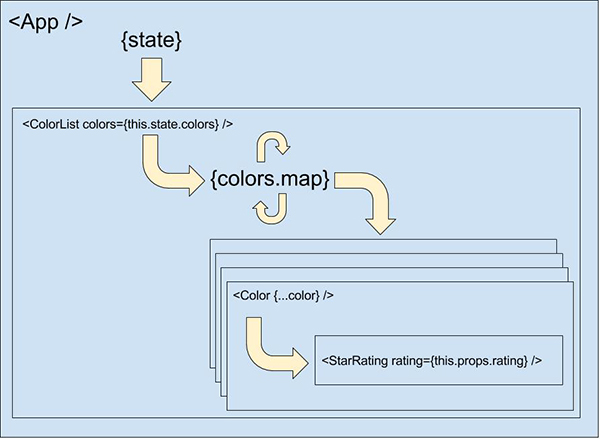
Passing data from parent to child
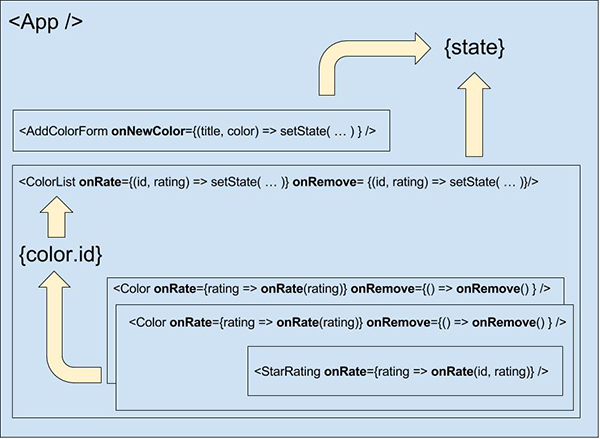
Passing data from child to parent
CSS Modules
Understanding CSS Modules
Visual illustration of CSS Modules mechanism:
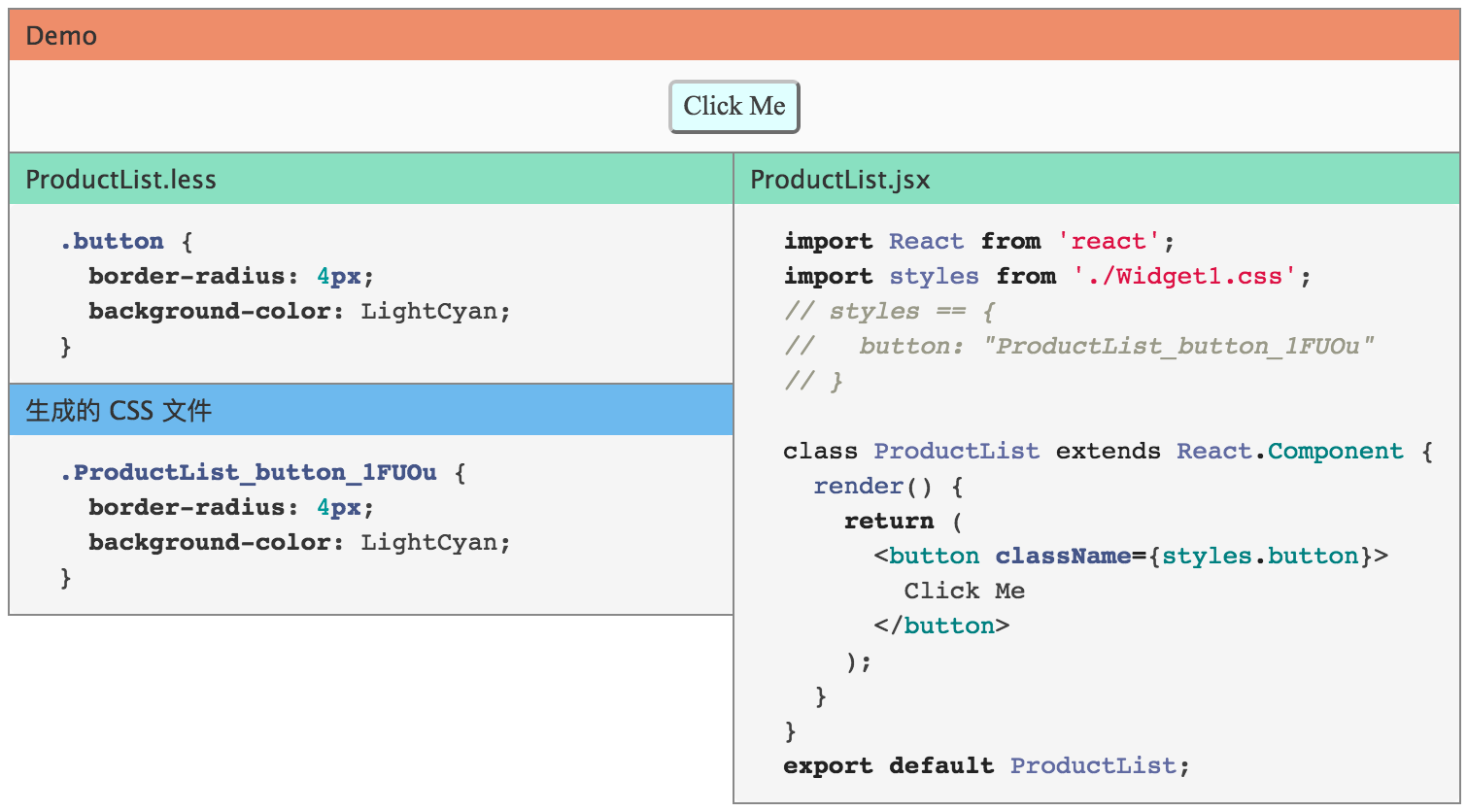
button class will be renamed to ProductList_button_1FU0u after execution,
button is a local name, ProductList_button_1FU0u is the global name.
so you can use simple descriptive name, without worrying about conflict
After that, all you need to do is create related styles of .button {...} in
css/less file, import and refer it by calling styles.button.
Defining Global CSS
CSS Modules are default to local scopes, to declare a global style, using
:global syntax
For example:
.title {
  color: red;
}
:global(.title) {
  color: green;
}
Calling by:
<App className={styles.title} /> // red
<App className="title" />        // green
classnames Package
When dealing with some complex situations, each element can have multiple className and each className may also conditional dependent, when this is the case, classnames library will be handy.
import classnames from 'classnames';
const App = (props) => {
  const cls = classnames({
    btn: true,
    btnLarge: props.type === 'submit',
    btnSmall: props.type === 'edit',
  });
  return <div className={ cls } />;
}
Thus will create different className when passing different types to App Component
<App type="submit" /> // btn btnLarge
<App type="edit" />   // btn btnSmall
Reducer
reducer is a function, which takes a state and a action, output a state: (state, action) => state
add/edit/delete
Using todos as example:
app.model({
  namespace: 'todos',
  state: [],
  reducers: {
    add(state, { payload: todo }) {
      return state.concat(todo);
    },
    remove(state, { payload: id }) {
      return state.filter(todo => todo.id !== id);
    },
    update(state, { payload: updatedTodo }) {
      return state.map(todo => {
        if (todo.id === updatedTodo.id) {
          return { ...todo, ...updatedTodo };
        } else {
          return todo;
        }
      });
    },
  },
};
add/edit/delete in nested data structure
For best practice and keep a flat state, maximum of one layer nesting is recommended, deep nesting are prone to bug and maintenance disaster.
app.model({
  namespace: 'app',
  state: {
    todos: [],
    loading: false,
  },
  reducers: {
    add(state, { payload: todo }) {
      const todos = state.todos.concat(todo);
      return { ...state, todos };
    },
  },
});
Below is an example of deep nesting, try to avoid this:
app.model({
  namespace: 'app',
  state: {
    a: {
      b: {
        todos: [],
        loading: false,
      },
    },
  },
  reducers: {
    add(state, { payload: todo }) {
      const todos = state.a.b.todos.concat(todo);
      const b = { ...state.a.b, todos };
      const a = { ...state.a, b };
      return { ...state, a };
    },
  },
});
Effect
For instance:
app.model({
  namespace: 'todos',
  effects: {
    *addRemote({ payload: todo }, { put, call }) {
      yield call(addTodo, todo);
      yield put({ type: 'add', payload: todo });
    },
  },
});
Effects
put
For action triggering.
yield put({ type: 'todos/add', payload: 'Learn Dva' });
call
For asyncs, with Promise supporting.
const result = yield call(fetch, '/todos');
select
For extract data from state.
const todos = yield select(state => state.todos);
Error Handling
Global Error Handler
Error throws for effects and subscriptions in dva.js are uing onError
hook, hence errors can be handled in batch with onError
const app = dva({
  onError(e, dispatch) {
    console.log(e.message);
  },
});
The error threw out of effects and promise rejects will all be captured.
Local Error Handler
Using try catch inside effects, when special error handling is needed for specific effects.
app.model({
  effects: {
    *addRemote() {
      try {
        // Your Code Here
      } catch(e) {
        console.log(e.message);
      }
    },
  },
});
Asynchronous Request
Asynchronous Requests are based on whatwg-fetch, please refer to the API docs here: https://github.com/github/fetch
GET and POST
import request from '../util/request';

// GET
request('/api/todos');

// POST
request('/api/todos', {
  method: 'POST',
  body: JSON.stringify({ a: 1 }),
});
default error handling
Executing the default error handling when backend promise returns in following format:
{
  status: 'error',
  message: '',
}
Edit utils/request.js, add the following middleware:
function parseErrorMessage({ data }) {
  const { status, message } = data;
  if (status === 'error') {
    throw new Error(message);
  }
  return { data };
}
By this, errors will using onError hook.
Subscription
subscriptions will subscribe to data source, and dispatch according to different actions. Data source can be current time, server's websocket connection, keyboard event, changes in geolocation, changes in history router, etc, with format of ({ dispatch, history }) => unsubscribe.
Initialization with Asynchronous Data
For example: when a user enter /users page, users/fetch action will be
triggered to load user data.
app.model({
  subscriptions: {
    setup({ dispatch, history }) {
      history.listen(({ pathname }) => {
        if (pathname === '/users') {
          dispatch({
            type: 'users/fetch',
          });
        }
      });
    },
  },
});
path-to-regexp Package
For a complex url path, like /users/:userId/search, it's rather hard to match or get userID. path-to-regexp is recommended.
import pathToRegexp from 'path-to-regexp';

// in subscription
const match = pathToRegexp('/users/:userId/search').exec(pathname);
if (match) {
  const userId = match[1];
  // dispatch action with userId
}
Router
Config with JSX Element (router.js)
<Route path="/" component={App}>
  <Route path="accounts" component={Accounts}/>
  <Route path="statements" component={Statements}/>
</Route>
For details: react-router
Route Components
Route Components are referred to files under ./src/routes/, which are matching with the Components under ./src/router.js.
data binding using connect
For example:
import { connect } from 'dva';
function App() {}

function mapStateToProps(state, ownProps) {
  return {
    users: state.users,
  };
}
export default connect(mapStateToProps)(App);
Thus App Component will receive dispatch and users props.
Injected Props (e.g. location)
Route Component will receive router information from extra props.
- location
- params
- children
Please refer to this: react-router
Routing by action
import { routerRedux } from 'dva/router';

// Inside Effects
yield put(routerRedux.push('/logout'));

// Outside Effects
dispatch(routerRedux.push('/logout'));

// With query
routerRedux.push({
  pathname: '/logout',
  query: {
    page: 2,
  },
});
Methods are not limited to push(location), please refer to: react-router-redux
dva configuration
Redux Middleware
For example, adding redux-logger Middleware:
import createLogger from 'redux-logger';
const app = dva({
  onAction: createLogger(),
});
Notice: onAction support array literal, can pass multiple Middlewares.
history
use browserHistory instead of history
import { browserHistory } from 'dva/router';
const app = dva({
  history: browserHistory,
});
disable _k query in hashHistory
import { useRouterHistory } from 'dva/router';
import { createHashHistory } from 'history';
const app = dva({
  history: useRouterHistory(createHashHistory)({ queryKey: false }),
});
Tools
create dva.js app using dva-cli
First, install dva-cli globally.
$ npm install dva-cli -g
Second, create a new dva.js app: myapp.
$ dva new myapp
Then open myapp dict and start
$ cd myapp
$ npm start