Installation
April 16, 2026 · View on GitHub

.. image:: https://img.shields.io/pypi/v/dwave-ocean-sdk.svg :target: https://pypi.python.org/pypi/dwave-ocean-sdk

.. image:: https://img.shields.io/pypi/pyversions/dwave-ocean-sdk.svg :target: https://pypi.python.org/pypi/dwave-ocean-sdk

.. image:: https://readthedocs.com/projects/d-wave-systems-dwave-ocean-sdk/badge :target: https://docs.ocean.dwavesys.com
.. image:: https://circleci.com/gh/dwavesystems/dwave-ocean-sdk.svg?style=svg :target: https://circleci.com/gh/dwavesystems/dwave-ocean-sdk

.. index-start-marker
Ocean SDK <https://docs.dwavequantum.com/en/latest/ocean/>_ is
D-Wave's <https://www.dwavequantum.com/>_ suite of tools for solving hard
problems with quantum computers.
.. index-end-marker
Installation
.. installation-start-marker
Installation from PyPI <https://pypi.org/project/dwave-ocean-sdk/>_:
.. code-block:: bash
pip install dwave-ocean-sdk
For more information, see the Ocean documentation's
installation <https://docs.dwavequantum.com/en/latest/ocean/install.html>_
page.
.. installation-end-marker
Getting Started
Sign up for the Leap quantum cloud service here:
Leap signup <https://cloud.dwavesys.com/leap/signup>_.
Start learning with the following D-Wave resources:
-
D-Wave Documentation <https://docs.dwavequantum.com/en/latest/index.html>_ to learn about quantum computers and how to use them. -
Get Started with Ocean Software <https://docs.dwavequantum.com/en/latest/ocean/index_get_started.html>_ to install and start coding with Ocean software. -
dwave-examples <https://github.com/dwave-examples>_ for code examples and Jupyter Notebooks. -
Resource Library <https://www.dwavequantum.com/learn/resource-library>_ on D-Wave website for whitepapers and additional resources.
Example Quantum Program
The following lines of code solve and visualize a
random <https://docs.dwavequantum.com/en/latest/ocean/api_ref_dimod/generators.html#random>_
problem <https://docs.dwavequantum.com/en/latest/concepts/models.html#binary-quadratic-models>_
on a quantum computer.
.. code-block:: python
import dimod
import dwave.inspector
import dwave.system

bqm = dimod.generators.ran_r(1, 20)
sampler = dwave.system.EmbeddingComposite(dwave.system.DWaveSampler())
sampleset = sampler.sample(bqm, num_reads=100)
dwave.inspector.show(sampleset)
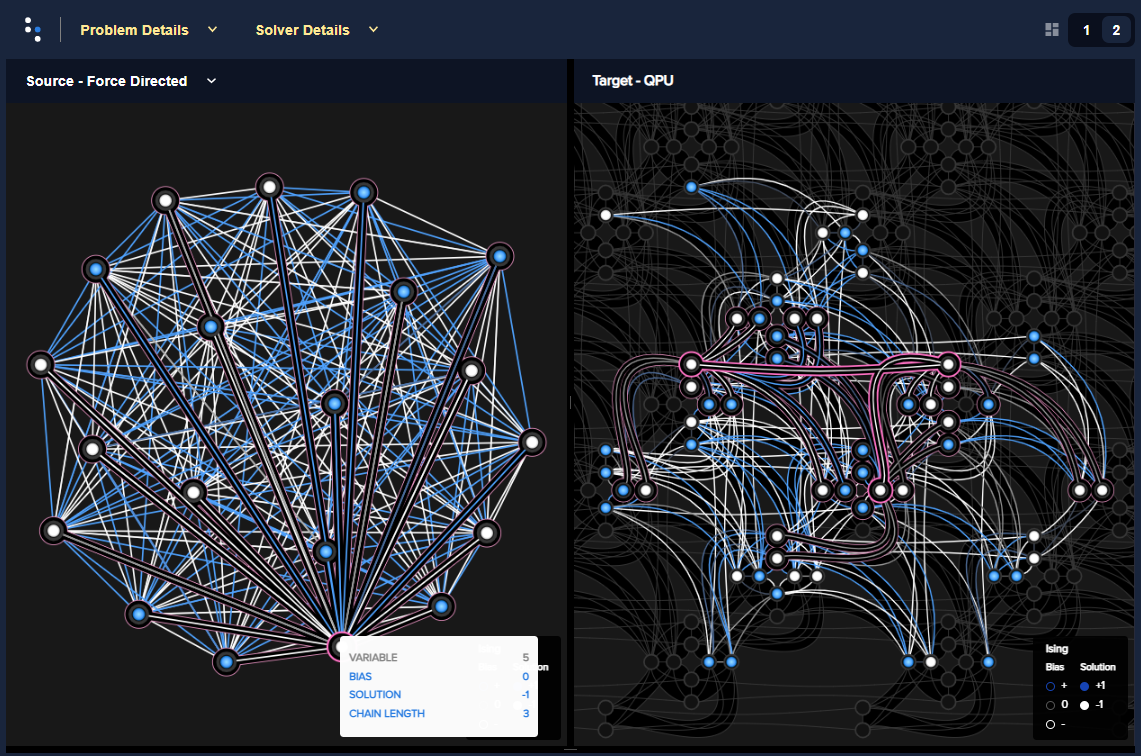
The left side of the
visualized <https://docs.dwavequantum.com/en/latest/quantum_research/embedding_guidance.html>_
solution represents the problem's variables as circles, with white dots for
variables assigned values of -1 and blue dots for values of +1; the colors of the
connecting lines represent values of the quadratic coefficients for each pair of
variables. The right side shows the qubits representing these variables on a
quantum processing unit.
You can find introductory examples in the
documentation <https://docs.dwavequantum.com/en/latest/quantum_research/index_examples_beginner.html>_
and dwave-examples <https://github.com/dwave-examples>_ GitHub repository, and
many customer prototype applications on the
D-Wave website <https://www.dwavequantum.com/learn/featured-applications/>_.
Support
Find support here:
Leap user community <https://support.dwavesys.com/hc/en-us/community/topics>_ to converse with a large community of D-Wave users.Leap help center <https://support.dwavesys.com/hc/en-us>_ to search the Leap knowledge base.SDK GitHub repo <https://github.com/dwavesystems/dwave-ocean-sdk/issues>_ to open issues or request features on the Ocean SDK or on any one of itspackages <https://github.com/dwavesystems>_.
Contributing
Your contributions are welcome!
Ocean's
contributing guide <https://docs.dwavequantum.com/en/latest/ocean/contribute.html>_
has guidelines for contributing to Ocean packages.
License
Released under the Apache License 2.0. See LICENSE file.