README.md
August 3, 2026 · View on GitHub
English | 简体中文
LuCI App Aurora Config
The configuration hub for LuCI Theme Aurora — colors, layout, typography, branding, and updates.





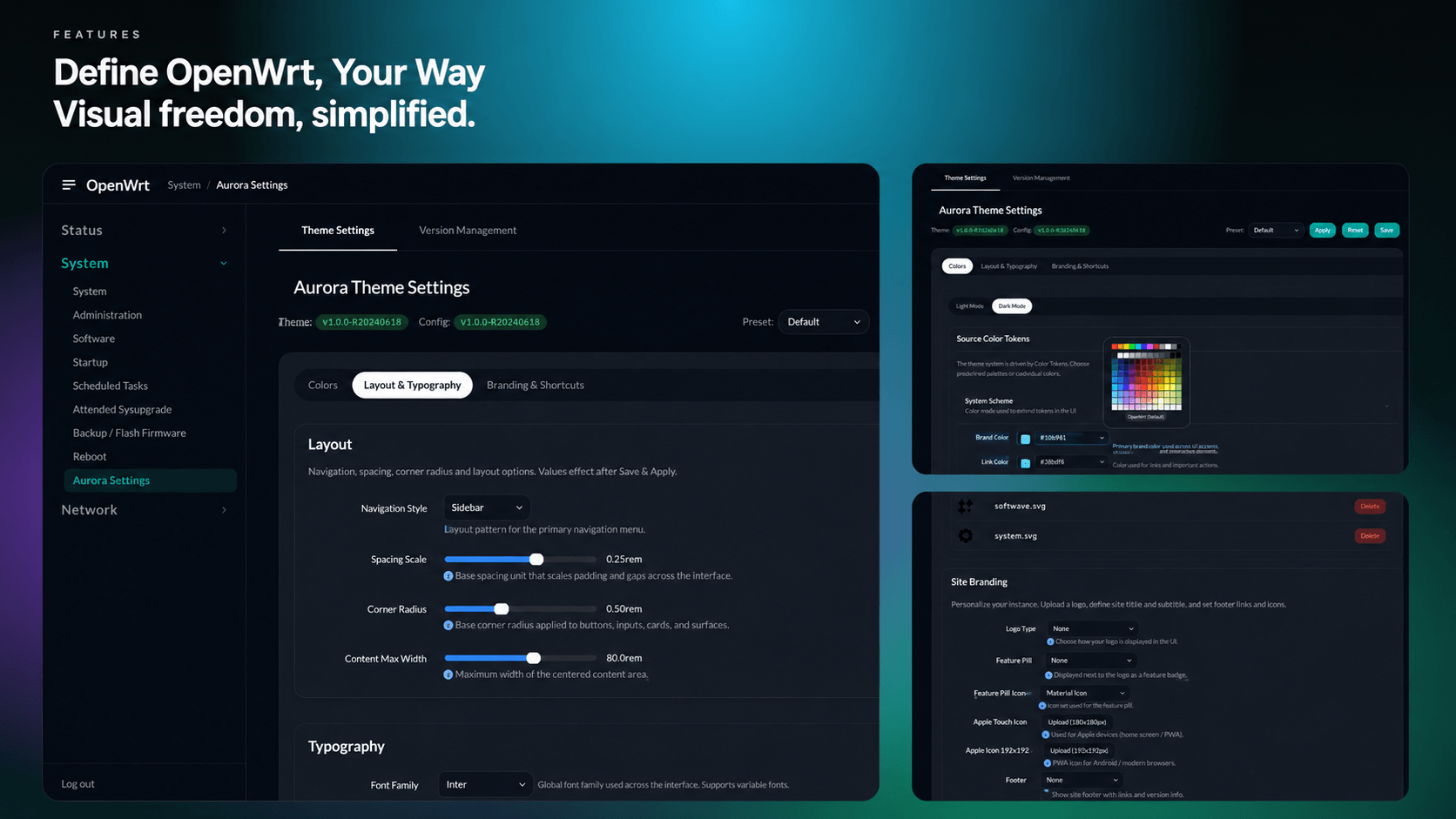
Features
- Color system — five built-in presets plus a live editor with independent light and dark palettes; derived tones are computed automatically.
- Layout — Mega Menu, Dropdown, or Sidebar navigation; sliders for spacing scale, corner radius, and content width.
- Typography — curated webfonts, downloaded once on save from pinned, checksum-verified sources — or upload your own
.woff2files. - Branding & PWA — a drag-and-drop asset library (files can be renamed on upload) feeding the logo, favicons, app icons, and login background; a generated manifest makes the panel installable as a PWA.
- Shortcut toolbar — add, label, and drag-reorder entries in the floating launcher.
- Backup & updates — export, import, or reset the whole configuration and update the theme and app from the interface, no SSH required.
Compatibility
| Component | Requirement | Note |
|---|---|---|
| LuCI Theme Aurora | ≥ v1.1.0 | Older versions will ignore these configurations. |
| OpenWrt | ≥ 23.05 | Lua-based LuCI is not supported. |
Installation
Run these commands on the router itself (e.g. over an SSH session).
Using the eamonxg feed:
wget -qO- https://openwrt.eamonxg.fun/install.sh | sh
That is the whole installation — the script adds the feed and installs whatever you tick from the list it shows, translations included. Upgrade later with the usual commands: apk update && apk upgrade luci-app-aurora-config, or opkg update && opkg upgrade luci-app-aurora-config. Details: openwrt.eamonxg.fun.
Using a GitHub release:
OpenWrt 25.12+ and snapshots use apk; other versions use opkg:
Tip: You can confirm your package manager by running
opkg --versionorapk --version. If it returns output (not "not found"), that's your package manager.
cd /tmp

# opkg
uclient-fetch -O luci-app-aurora-config.ipk https://github.com/eamonxg/luci-app-aurora-config/releases/latest/download/luci-app-aurora-config_1.1.0-r20260711_all.ipk
opkg install luci-app-aurora-config.ipk

# apk
uclient-fetch -O luci-app-aurora-config.apk https://github.com/eamonxg/luci-app-aurora-config/releases/latest/download/luci-app-aurora-config-1.1.0-r20260711.apk
apk add --allow-untrusted luci-app-aurora-config.apk
Build from source
Build the package yourself with the OpenWrt build system. Host prerequisites: Build system setup. The build writes the package to bin/packages/<arch>/base/ (e.g. bin/packages/x86_64/base/luci-app-aurora-config_*_all.ipk); copy it to your router and install it as above.
Via the full source tree or SDK
Get set up — clone the full source tree:
# Full source tree — the openwrt-24.10 branch builds an .ipk, the main branch builds an .apk
git clone https://github.com/openwrt/openwrt.git
cd openwrt
git checkout openwrt-24.10
Or the prebuilt SDK (faster: skips building the toolchain). Grab the archive for your target from downloads.openwrt.org, which splits SDKs into Release and Snapshot builds — Release 24.10.x and earlier build .ipk; Release 25.12+ and Snapshot build .apk (filename, arch and compression vary by target):
wget <sdk-archive-url-from-downloads.openwrt.org>
tar -xf openwrt-sdk-*.tar.*
cd openwrt-sdk-*/
Then, from that directory:
# Add this package and install feeds (provides luci-base)
git clone https://github.com/eamonxg/luci-app-aurora-config.git package/luci-app-aurora-config
./scripts/feeds update -a
./scripts/feeds install -a

# Select the app in menuconfig: LuCI → Applications → luci-app-aurora-config
make menuconfig

# Skip these two lines with the SDK — it already ships a built toolchain
make tools/install -j$(nproc)
make toolchain/install -j$(nproc)

make package/luci-app-aurora-config/compile -j$(nproc) V=s