nuBASIC
July 18, 2026 · View on GitHub
nuBASIC is a modern, open-source BASIC interpreter written in modern C++, available for Windows, Linux, and macOS. It is two things at once: a teaching language — approachable for beginners taking their first steps in programming — and a love letter to the home-computer era for retro-computing enthusiasts, all while staying capable enough for real programs. In the spirit of that era, on Windows it even ships an integrated raycasting engine so you can build classic 90s-style first-person games in BASIC (see WinRaycast).
Three styles in one language
The same nuBASIC interpreter supports three programming styles, and a single program can mix and match them.
-
Classic BASIC — numbered lines, immediate-mode REPL,
GoTo/GoSub/On … GoTo. Type a statement at the prompt and it runs immediately, exactly like the BASICs of the home-computer era.10 For i = 1 To 5 20 Print i 30 Next i -
Structured BASIC —
Sub/FunctionwithByRef/ByValparameters, structured control flow (If/ElIf/Else,For,While,Do…Loop While,Select Case,Exit For/While/Do/Sub/Function),Structfor composite types,Const, anInclude/#Includedirective for multi-file programs, and aFunction main(argc, argv())entry point with command-line arguments.Function average(values() As Double, n As Integer) As Double Dim total As Double For i% = 0 To n - 1 total = total + values(i%) Next i% average = total / n End Function -
Object-oriented BASIC — full classes with
Class/End Class, instance fields and methods, theMeself-reference,Staticclass-level methods, single inheritance viaInherits, virtual dispatch (Overridable/Overrides), explicit base-class dispatch viaMyBase, three-level access control (Public/Protected/Private), constructors (Sub New), and RAII destructors (Sub Delete) called automatically at scope exit.Class Shape Overridable Function Describe$() As String Describe$ = "a shape" End Function End Class Class Circle Inherits Shape Public radius As Double Overrides Function Describe$() As String Describe$ = MyBase.Describe$() + " (radius " + Str$(Me.radius) + ")" End Function End Class -
External native libraries —
Declare Function … Lib "kernel32.dll" | "libc.so.6" | "libSystem.B.dylib" (...) As Typedeclares an exported function from a native shared library. nuBASIC loads it withLoadLibraryW(Windows) ordlopen(Linux/macOS) and dispatches the call through libffi, so a script can reach Win32, POSIX libc, or any user-built.so/.dylibdirectly. Disabled with--disable-native-callsfor untrusted code.Declare Function GetCurrentProcessId Lib "kernel32.dll" () As DWORD Print GetCurrentProcessId()
The classic, structured and OOP styles are not separate dialects: a single source file can use line numbers and GoTo next to a Class hierarchy, and call into native APIs from any of them. This makes nuBASIC equally usable as a teaching tool for beginners and as a small scripting / embedding language for real programs.
Features
- Structured programming —
Sub,Function,For,While,Do…Loop While,If/ElIf/Else,Select Case;Callkeyword;ByRef/ByValparameter passing; open-ended array parameters (param() As Type);Include/#Includefor multi-file programs - Classes with static methods —
Class/End Classwith instance fields, instance methods (Me), andStatic Function/Static Subcallable asClassName.Method()without an instance main()entry point — if aFunction main(...)is defined, execution starts there; CLI arguments are available viaargcandargv() As String- Namespaced modules —
Syntax Modernactivates qualified names (math::sin,string::left$);Using Moduleimports a module for unqualified access;Syntax Legacyrestores classic mode - Rich type system — Integer, Double, Boolean, Long64, String, Byte, Any, user-defined
Struct - Arrays and hash tables built into the language
- Full file I/O — sequential, binary, and random access
- Graphics — lines, rectangles, ellipses, filled shapes, text, bitmaps, pixel access (Windows GDI / Linux X11)
- Screen mode switching —
Screen 0(text/headless) /Screen 1(GDI graphics), like GW-BASICSCREEN;-tCLI flag for CI/scripting - Flicker-free rendering —
ScreenLock/ScreenUnlock/Refreshfor double-buffered animation - WinRaycast engine (Windows) — integrated raycaster for pseudo-3D, Wolfenstein 3D-style first-person scenes, driven from BASIC via the
Ray…API; enabled by default on Windows builds (NUBASIC_WITH_RAYCAST) - Mouse and keyboard input —
GetMouse()returns aMousestruct (x,y,btn) in one call - Date/time —
GetDateTime()returns aDateTimestruct with all fields in one call - UTF-8 string literals and console output
- Hex literals — classic BASIC
&hFF/&HFFsyntax, with optional0xFF/0XFFaccepted for imported C-style constants - Optimized runtime values — scalar
variant_tvalues are stored inline, struct/object metadata is boxed, and struct payload copies use copy-on-write - Built-in help —
Help <keyword>andApropos <topic>accessible from the REPL - Native library calls —
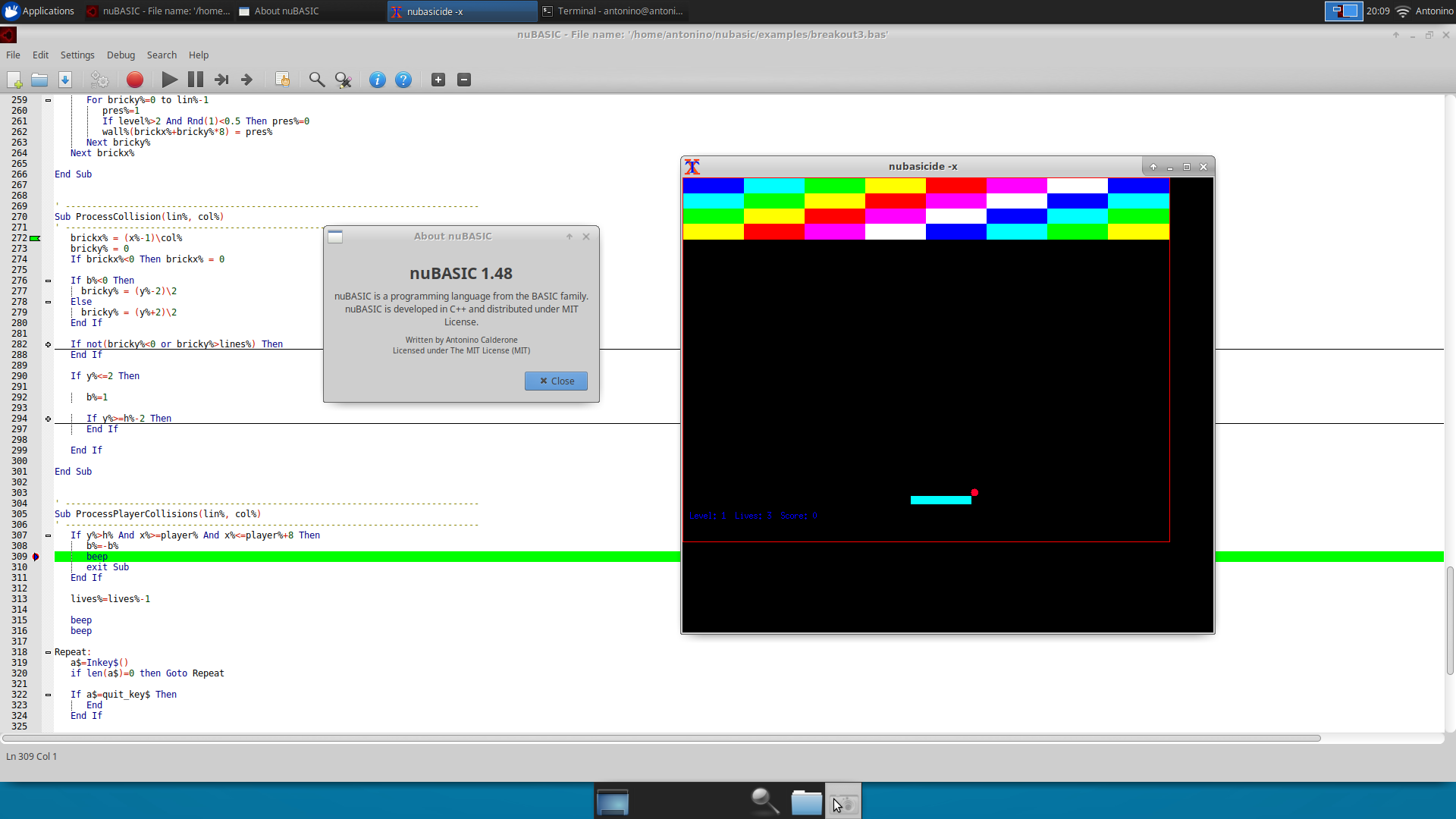
Declare Function name Lib "kernel32.dll" \| "libc.so.6" \| "libSystem.B.dylib" (...) As Typeplus runtime memory helpers (NativeAlloc,NativePoke*,NativePeekStr$); libffi-backed, opt-out via--disable-native-calls - Native IDE for Windows and Linux (GTK+2) with Scintilla-based syntax highlighting, auto-completion, code folding, bookmarks; integrated debugger with breakpoints, Step Into / Step Over / Step Out / Run to Cursor / Pause-Break, watch and call stack
- Multi-source projects —
.nbpproject files (entry point, syntax mode, display name) work across the IDE, the CLI, and the VS Code debugger - VS Code extension — syntax highlighting + debug adapter (breakpoints, step modes, watch, call stack), backed by
nubasicdebugas a console-subsystem debug backend; auto-installed by the Windows MSI's optionalVSCodeExtensioncomponent - Console build for headless/embedded systems (no graphics, no external dependencies)
- MIT License
nuBASIC 2.0 for Windows: WinRaycast Integration
In keeping with its retro spirit, nuBASIC 2.0 for Windows integrates WinRaycast, a lightweight raycasting engine for creating classic 90s-style first-person shooters directly in BASIC.
The integration lets nuBASIC programs render pseudo-3D environments similar to early FPS games such as Wolfenstein 3D, using a simple 2D map representation, textured walls, sprites, player movement, collision detection, and game-loop support.
In practice, WinRaycast provides the low-level rendering and engine logic, while nuBASIC exposes a simpler scripting interface (the Ray… functions) so that users can build playable retro-style games without dealing directly with complex graphics programming. The engine is enabled by default on Windows builds; the full API and render loop are documented in the Raycast Game Engine wiki page, and examples/raycast/eclipse_protocol.bas is a complete playable demo.
Documentation
- Wiki — full language reference, graphics API, IDE guide, interpreter internals, and build instructions
- User Guide — complete guide in a single document (v2.0)
- Raycast Game Engine — WinRaycast render loop and full
Ray…API reference (Windows) - Making nuBASIC 2.0 — developer-oriented internals note about debugger, runtime values, native calls, and performance work (Italiano)
- Windows Installer Diagnostics - checklist and diagnostic collector for MSI dependency/startup issues
- Windows Runtime DLL Dependencies - packaged and system DLL checklist for Windows releases
- Examples — ready-to-run
.basprograms covering games, graphics, fractals, animations, and more
Quick Start
# Interactive REPL
nubasic

# Run a program file
nubasic myprogram.bas
Print "Hello, world!"
Building and Installing
nuBASIC builds with CMake 3.14+ and a C++20 compiler (gcc/clang on POSIX, MSVC 2022 on Windows).
See the Building from Source wiki page for the full CMake option reference.
Generated files are kept under _generated/ by convention. Use the CMake
presets in CMakePresets.json for new local builds, for example
cmake --preset raycast-release followed by
cmake --build --preset raycast-release.
Windows — MSI installer (WiX) or setup.exe (NSIS)
Prerequisites
| Tool | Where to get it |
|---|---|
| Visual Studio 2022 (Desktop C++ workload) | visualstudio.microsoft.com |
| CMake 3.14+ | bundled with VS 2022, or cmake.org |
WiX Toolset v3.x (candle.exe + light.exe on PATH) | wixtoolset.org/releases |
| Node.js 18 LTS+ (optional — VS Code extension only) | see VS Code extension |
NSIS fallback — if WiX is not available, add
-DNUBASIC_INSTALLER=NSISto the cmake command and install NSIS (makensis.exeon PATH) instead.
Generate the Visual Studio solution
git clone https://github.com/eantcal/nubasic.git
cd nubasic
cmake --preset release
Build and create the installer from Visual Studio (recommended)
After generating the solution, open
_generated\build\release\nuBASIC.slnx in Visual Studio 2022.
- Set the configuration to Release (top toolbar drop-down).
- In Solution Explorer, expand the Installer folder.
- Right-click
CreateInstaller→ Build.
The MSI is written to the build directory as nuBASIC_<version>.msi.
The PACKAGE target (also in the Installer folder) is an alternative that runs the standard CPack pipeline without the WiX shortcut patch.
The installer includes four optional components selectable during setup:
Component Contents nuBASIC Runtime (required) nubasic.exe,nubasicdebug.exenuBASIC IDE NuBasicIDE.exe(Scintilla-based IDE)VS Code Extension nubasic-latest.vsix(auto-installed if VS Code is found)Example Programs Sample .bassource files
Build and create the installer from the command line
cmake --build --preset release
cmake --build _generated\build\release --target CreateInstaller --config Release
The CreateInstaller target internally calls cmake/RunCpackInstaller.ps1, which runs CPack and then cmake/PatchWixMSI.ps1 to inject Start Menu and Desktop shortcuts into the MSI.
NSIS variant (setup.exe instead of MSI):
cmake -S . -B _generated\build\nsis-release -G "Visual Studio 17 2022" -A x64 -DNUBASIC_INSTALLER=NSIS
cmake --build _generated\build\nsis-release --config Release
cmake --build _generated\build\nsis-release --target CreateInstaller --config Release
Install
Double-click the generated nuBASIC_<version>.msi and follow the wizard, or install silently:
msiexec /i nuBASIC_2.0.0.msi /quiet /norestart
To uninstall:
msiexec /x nuBASIC_2.0.0.msi /quiet
Ubuntu / Debian — .deb package
The script create_ubuntu_package.sh installs build dependencies, configures, compiles, and packages nuBASIC in one step.
Ubuntu prerequisites
| Tool | Installed automatically by the script |
|---|---|
build-essential, cmake, ninja-build, pkg-config, libffi-dev, dpkg-dev | yes (via apt-get) |
libgtk2.0-dev and related GTK2 libraries (IDE only) | yes, if GTK2 is available |
sudo access | required |
Usage
# Full build (console interpreter + GTK2 IDE):
./create_ubuntu_package.sh

# Console-only (no GTK2 IDE):
./create_ubuntu_package.sh --console-only

# Custom build directory, 8 parallel jobs:
./create_ubuntu_package.sh --build-dir /tmp/nubasic-deb --jobs 8

# Skip apt-get (dependencies already installed):
./create_ubuntu_package.sh --no-install-deps

# Help:
./create_ubuntu_package.sh --help
The script prints the path of the generated .deb on success.
If GTK2 packages are not available in the configured apt sources, the script automatically falls back to a console-only build.
Manual build (without the script)
git clone https://github.com/eantcal/nubasic.git
cd nubasic
mkdir build-deb && cd build-deb
cmake -DCMAKE_BUILD_TYPE=Release -DCMAKE_INSTALL_PREFIX=/usr ..
make -j$(nproc)
cpack -G DEB -D CPACK_PACKAGING_INSTALL_PREFIX=/usr
Ubuntu install
# Inspect package contents and metadata:
dpkg-deb -I nuBASIC_2.0.0.deb

# Install:
sudo dpkg -i nuBASIC_2.0.0.deb

# Resolve any missing runtime dependencies:
sudo apt-get install -f
After installation, nubasic and nubasicdebug are in /usr/bin.
On full builds, nubasicide (the GTK2 IDE) is also installed.
macOS — build and install manually
macOS builds the console interpreter and debug backend only (no IDE).
macOS prerequisites
# Xcode command-line tools (provides clang and make):
xcode-select --install

# CMake via Homebrew:
brew install cmake

# libffi (required for native library calls):
brew install libffi
macOS build and install
git clone https://github.com/eantcal/nubasic.git
cd nubasic
mkdir build-mac && cd build-mac
cmake -DCMAKE_BUILD_TYPE=Release ..
make -j$(sysctl -n hw.logicalcpu)
sudo make install   # installs nubasic and nubasicdebug to /usr/local/bin
Uninstall
sudo xargs rm -f < build-mac/install_manifest.txt
VS Code extension — Node.js dependency
The VS Code extension (vscode-nubasic/) is built from TypeScript and provides syntax highlighting, a debug adapter (breakpoints, step modes, watch, call stack), and project support for .nbp files.
CMake automatically skips the extension targets if node or npm are not found on PATH, emitting a warning at configure time. To enable them, install Node.js 18 LTS or later.
Installing Node.js
Ubuntu / Debian:
# NodeSource repository — installs Node.js 20 LTS
curl -fsSL https://deb.nodesource.com/setup_20.x | sudo -E bash -
sudo apt-get install -y nodejs
macOS:
brew install node
Windows:
winget install OpenJS.NodeJS.LTS
Building the extension manually
cd vscode-nubasic
npm install           # install TypeScript and type definitions
npm run compile       # compile src/extension.ts into ../_generated/vscode-nubasic/out
bash package-vsix.sh  # create nubasic-<version>.vsix
On Windows, use package-vsix.ps1 in place of package-vsix.sh.
Installing the extension
code --install-extension vscode-nubasic/nubasic-latest.vsix --force
Or via CMake after the extension has been built:
cmake --build <build-dir> --target VscodeExtensionInstall
On Windows the MSI installer can optionally install and activate the extension automatically if VS Code is detected on the system.
Running the Test Suite
Tests live in the tests/ directory as test_*.bas files. They use
Screen 0 (text mode) so output goes to stdout without needing a GUI.
Windows (PowerShell):
.\tests\run_tests.ps1 -Interpreter .\build\release\Release\nubasic.exe
From Visual Studio: right-click the RunTests target → Build.
Linux / macOS (Bash):
./tests/run_tests.sh --interpreter ./build/release/nubasic
Or via CMake:
cmake --build build/release --target RunTests
Platforms
| Platform | Interpreter | IDE |
|---|---|---|
| Windows | nubasic.exe (console subsystem) · nubasicgdi.exe (GDI console for graphics) · nubasicdebug.exe (VS Code debug backend) | NuBasicIDE.exe (Scintilla editor) |
| Linux | nubasic · nubasicdebug | nubasicide (GTK+2 + Scintilla editor) |
| macOS | nubasic · nubasicdebug | — |
| iOS (iSH) | nubasic (console build) | — |
License
nuBASIC is open source under the MIT License.
Bug reports and feature requests: antonino.calderone@gmail.com