TypealizR - resource-first
April 14, 2025 · View on GitHub
getting started
- install package via
- modify consuming
csproj(where those precious ResX-files are ;P)

<PropertyGroup>
    <!-- Update the property to include all EmbeddedResource files -->
    <AdditionalFileItemNames>$(AdditionalFileItemNames);EmbeddedResource</AdditionalFileItemNames>
</PropertyGroup>
- rebuild consuming
csprojNOTE: visual-studio might need a fresh restart after installing (or updating) TypealizR in order to work as expected
- start utilizing statically typed resources
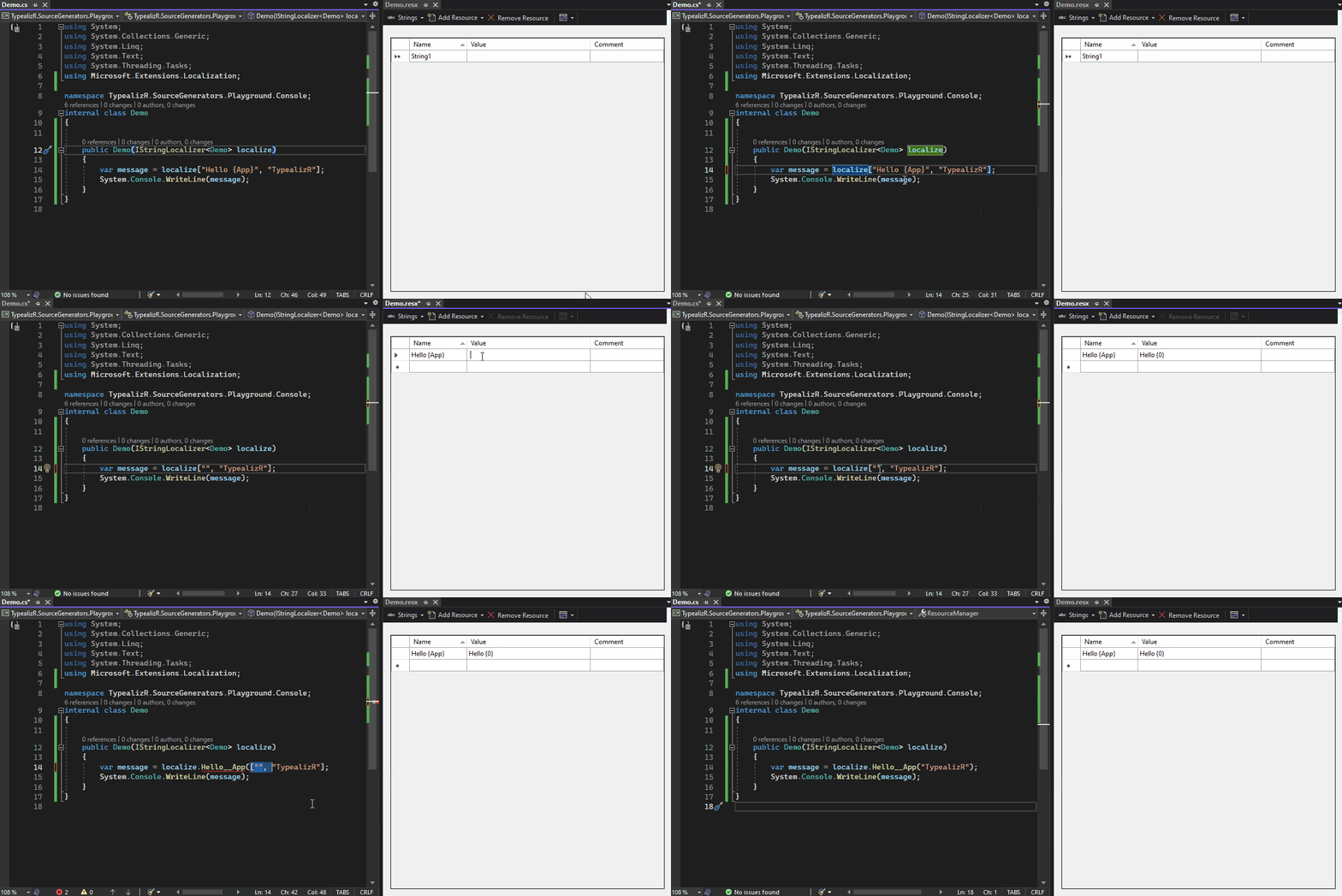
how it works
TypealizR parses ordinary Resx-files and generates extension-classes and -methods using source-generators on the fly.
given the following folder-structure:
root/
+---/Pages/
     +---/HomePage.razor
     +---/HomePage.resx
     +---/HomePage.en-EN.resx
     +---/HomePage.de.resx
where HomePage.resx looks like this:
| key | value |
|---|---|
| Title | Home |
| Welcome back, {userName}, this is your {visitCount:i} visit | Welcome back, {0}, this is your {1} visit to the app |
| Good bye, {userName:s} | See you later, {0} |
TypealizR emits the following class (comments, usings, etc. omitted):
internal static class IStringLocalizerExtensions_Root_Pages_HomePage
{
    public static string Title(
        this IStringLocalizer<Root.Pages.HomePage> that)
        => that["Title"];

    public static string Welcome_back__userName_this_is_your__visitCount__visit(
        this IStringLocalizer<Root.Pages.HomePage> that, object userName, int visitCount)
            => that["Welcome back, {0}, this is your {1} visit to the app", userName, visitCount];

    public static string Good_bye__userName(
        this IStringLocalizer<Root.Pages.HomePage> that, string userName)
            => that["See you later, {0}", userName];
}
which then can be used in favor of the lesser-typed default-syntax of IStringLocalizer<T>
type-annotations ftw
TypealizR assists in spotting translations where specified arguments may mismatch by type / order.
✔️ DO this:
Consider the following call, which might have been wrong right from the start or just became wrong over time.
When applying type-annotations to the parameters, these kind of bugs can be prevented and addressed at compile-time when combined with TypealizRs generated extension methods!
some.resx
<data name="Hello {user:s}, it is {today:d}" xml:space="preserve">
	<value>Hello {0}, today is {1}</value>
</data>
somecode.cs
var userName = "Arthur";
var today = DateOnly.FromDateTime(DateTimeOffset.Now.UtcDateTime);

localize.Hello__user__it_is__today(today, userName);
 // wrong ordering, which would result in the translated string "Hello 2022-01-01, today is Arthur"

 // equivalent of localize["Hello {user:s}, it is {today:d}", today, userName];
With applied type-annotations, this will generate the following compile-time errors:
- CS1503 Argument 2: cannot convert from 'System.DateOnly' to 'string'
- CS1503 Argument 3: cannot convert from 'string' to 'System.DateOnly'

❌ DON´T do that:
There's no way the default usage of IStringLocalizer would discover such things this early in the dev-cycle!
some.resx
<data name="Hello {user}, it is {today}" xml:space="preserve">
	<value>Hello {0}, today is {1}</value>
</data>
somecode.cs
var userName = "Arthur";
var today = DateOnly.FromDateTime(DateTimeOffset.Now.UtcDateTime);

localize["Hello {user}, it is {today}", today, userName];
// wrong parameter-ordering, which would result in the translated string "Hello 2022-01-01, today is Arthur"
Groupings
Grouping resources allows to semantically tie together resources in a meaningful way.
To group resources, prepend resource-keys with [Some.Nested.Group.Name]:

SomeResource.resx
<data name="[Messages.Warnings]: Attention}" xml:space="preserve">
	<value>Attention Message</value>
</data>
<data name="[Messages.Warnings]: {Operation:s} failed" xml:space="preserve">
	<value>Operation '{0}' failed</value>
</data>
✔️ DO this:
Imperative usage
Wherever code may depend on IStringLocalizer<T>, you can do this:
    IStringLocalizer<SomeResource> localizer...; //wherever that instance might came from, most probably through dependency-injection
    var typealized = localizer.Typealize(); //call the generated extension-method, which returns a type exposing groups as properties

    //start using groups
    Console.WriteLine(typealized.Messages.Warnings.Attention);
    // "Attention Message"

    Console.WriteLine(typealized.Messages.Warnings.Operation__failed("some operation name");
    // "Operation 'some operation name' failed"
The generated classes are currently duck-typing IStringLocalizer<T>.
This is done to support gradually adopting the benefits of statically typed localizations, while still beeing able to use the lesser typed default way of using IStringLocalizer<T> during the course of adoption.
    IStringLocalizer<SomeResource> localizer...;
    var typealized = localizer.Typealize();

    void SomeMethod(IStringLocalizer<SomeResource> localizer) {
        //use localizer
    }

    SomeMethod(typealized.Localizer); //still works
Even ordinary usage is still possible:
    IStringLocalizer<SomeResource> localizer...;
    var typealized = localizer.Typealize();

    localizer["[Messages.Warnings]: {Operation:s} failed", "some operation"];
    typealized["[Messages.Warnings]: {Operation:s} failed", "some operation"]; //still works
Microsoft.Extensions.DependencyInjection
manual setup
//normal setup
var services = new ServiceCollection();
services.AddLogging();
services.AddLocalization();

//register typealized resource
services.AddScoped(x => x.GetRequiredService<IStringLocalizer<Resources>>().Typealize());

var provider = services.BuildServiceProvider();
using var scope = provider.CreateScope();

//service-located typealized instance (or better just inject it somewhere)
var typealized = scope.ServiceProvider.GetRequiredService<TypealizedResources>();
The generated types are placed in a seperated namespace to prevent collisions with other types.
Given a *.resx-file with the following FullName:
Some\Folder\Path\Resources.resx
The generated type will be
Some.Folder.Path.TypealizR.TypealizedResources
automatic setup
tbd. There might be a built-in solution for utilizing
IServiceCollectionto register typealized instances, once #63 is done.
❌ DON'T DO this:
All groups are still available as extension-methods for IStringLocalizer<T> as a list of flat members.
IStringLocalizer<SomeResource> localize...;

Console.WriteLine(localize.MessagesWarnings_Attention());
// "Attention Message"


Console.WriteLine(localize.MessagesWarnings_Operation__failed("some operation name");
// "Operation 'some operation name' failed"
Custom Tool Namespaces
If the consuming project of TypealizR utilizes resx-files which specify a CustomToolNameSpace

, the source-generator may produce invalid source-code,
unless the following modifications where made within the consuming csproj-file:
<ItemGroup>
	<CompilerVisibleItemMetadata Include="EmbeddedResource" MetadataName="CustomToolNamespace" />
</ItemGroup>
This is due to the fact that
source-generators may not see msbuild-properties unless developers explicitly opt-in to letsource-generators see those custom properties on a per-file-basis. The above options makes theCustomToolNamespace-property of anyEmbeddedResourcevisible to thesource-generator, so that the generated types may be placed there. See Consume MSBuild properties and metadata for further details.
customize string formatting
Starting with v0.6, TypealizR supports customizing the internal usage of string.Format(), which should enable developers to implement #16 with the technology / library / approach of their choice - Leaving TypelaziR un-opinionated about the actual approach to achieve this.
To customize the formatting, just drop a custom implementation of TypealizR_StringFormatter anywhere in the project. The types namespace MUST match the project´s root-namespace.
example
Given the root-namespace TypealizR.Ockz for the project consuming TypealizR, this partial-class declaration should be enough:
namespace TypealizR.Ockz;
internal static partial class TypealizR_StringFormatter
{
    internal static partial string Format(string s, object[] args) =>
        new(string.Format(s, args).Reverse().ToArray());
}
With this implementation, every localized string would be reversed. (Even if that doesn´t make any sense ;P)
custom annotation extensions
Starting with v0.12, formatting of type-annotatios can be "extended", utilizing custom extensions to type-annotations.
Such extensions are introduced with @within a type-annotation, which then get's passed through to custom implementations, which gives the oppurtunity for interesting use-cases, completely under control of user-code.
example
Give the following resource-keys:
hello {user:string@toUpper}
hello {user:string@toLower}
and a custom partial implementation in TypealizR_StringFormatter like
    internal static partial string Extend(string argument, string extension) => extension switch
    {
        "toUpper" => argument?.ToString().ToUpper() ?? argument,
        "toLower" => argument?.ToString().ToLower() ?? argument,
        // more cases, provider by user code
        _ => argument
    };
See TypealizR_StringFormatter for more showcases.
configuration
parameter names in method names
Per default, TypealizR uses any given parameter name within the name of generated methods.
f.e. the resource-key Hello {world:s} will be populated as Hello__world(string world).
For some naming-strategies, this could be a bit too verbose, so you can opt-out of this behavior either globally or on a per-file basis.
f.e. the resource-key Hello {world:s} will then be populated as Hello(string world).
Both approaches require modifications within the consuming *.csproj-files:
global
<ItemGroup>
	<CompilerVisibleProperty Include="TypealizR_UseParamNamesInMethodNames" />
</ItemGroup>

<PropertyGroup>
	<TypealizR_UseParamNamesInMethodNames>false</TypealizR_UseParamNamesInMethodNames>
</PropertyGroup>
per file
<ItemGroup>
	<CompilerVisibleItemMetadata Include="EmbeddedResource" MetadataName="TypealizR_UseParamNamesInMethodNames" />
</ItemGroup>

<EmbeddedResource Update="Some.resx">
	<TypealizR_UseParamNamesInMethodNames>false</TypealizR_UseParamNamesInMethodNames>
</EmbeddedResource>
the per-file setting takes precedence over the global setting. So you can choose to just opt-out on a per-file basis, or opt-out globally and optin-in on a per-file basis, if needed
customize warnings
During code-generation, the code-generator might emit one of these diagnostics.
To modify the severity of each reported diagnostics, provide a .globalconfig-file in the root directory of the project which consumes TypealizR.
samples
To ignore all diagnostics emitted by TypealizR, provide the following content to .globalconfig:
is_global = true
dotnet_diagnostic_TR0002_severity = hidden
dotnet_diagnostic_TR0003_severity = hidden
dotnet_diagnostic_TR0004_severity = hidden
To treat all diagnostics emitted by TypealizR as a compiler-error, supply the following contents:
is_global = true
dotnet_diagnostic_TR0002_severity = error
dotnet_diagnostic_TR0003_severity = error
dotnet_diagnostic_TR0004_severity = error
See
- global-analyzerconfig for further details about analyzer-configs.
- #12 for details about design-decisssions
- #35 for implementation-details