Watershed Workflow
August 3, 2026 · View on GitHub





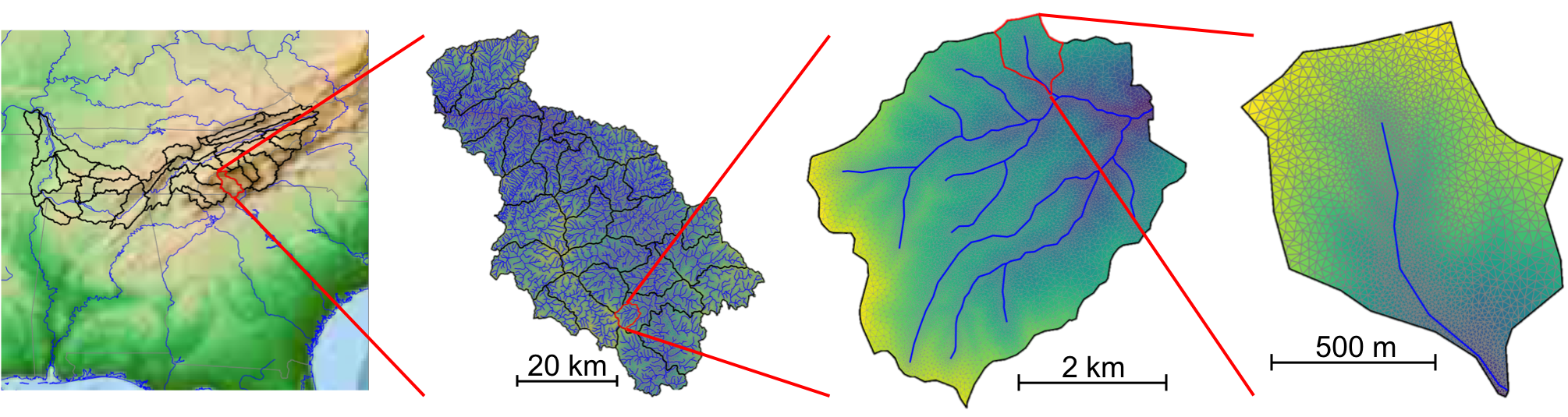 "Example output of the Coweeta Hydrologic Lab watersheds across scales.")
Please prefer to see our documentation.
Watershed Workflow is a python-based, open source chain of tools for generating meshes and other data inputs for hyper-resolution hydrology, anywhere in the (conterminous + Alaska?) US.
Hyper-resolution hydrologic models have huge data requirements, thanks to their large extent (full river basins) and very high resolution (often ~10-100 meters). Furthermore, most process-rich models of integrated, distributed hydrology at this scale require meshes that understand both surface land cover and subsurface structure. Typical data needs for simulations such as these include:
- Watershed delineation (what is your domain?)
- Hydrography data (river network geometry, hydrographs for model evaluation)
- A digital elevation model (DEM) for surface topography
- Surface land use / land cover
- Subsurface soil types and properties
- Meterological data,
and more.
This package is a python library of tools and a set of jupyter notebooks for interacting with these types of data streams using free and open (both free as in freedom and free as in free beer) python and GIS libraries and data. Critically, this package provides a way for automatically and quickly downloading, interpreting, and processing data needed to generate a "first" hyper-resolution simulation on any watershed in the conterminous United States (and most of Alaska/Hawaii/Puerto Rico).
To do this, this package provides tools to automate downloading a wide range of open data streams, including data from United States governmental agencies, including USGS, USDA, DOE, and others. These data streams are then colocated on a mesh which is generated based on a watershed delineation and a river network, and that mesh is written in one of a variety of mesh formats for use in hyper-resolution simulation tools.
Note: Hypothetically, this package works on all of Linux, Mac, and Windows. It has been tested on the first two, but not the third.
Installation
Visit our Installation documentation.
Testing
Tests are run with pytest and pytest-nbmake.
By default, tests marked network (require live data downloads) and integration (require optional
dependencies not present in CI) are excluded. To run different subsets:
# Unit and source manager tests only (default, safe everywhere)
pytest watershed_workflow/test/ watershed_workflow/sources/test/

# Notebook regression tests (no network or integration required)
pytest --nbmake examples/

# All non-network, non-integration tests
pytest --nbmake watershed_workflow/test/ watershed_workflow/sources/test/ examples/

# Include network tests (requires internet access and data service credentials)
pytest -m 'not integration' --nbmake examples/ watershed_workflow/sources/test/

# Run everything including integration notebooks
pytest -m '' --nbmake watershed_workflow/test/ watershed_workflow/sources/test/ examples/
Notebook markers are set via cell tags on the first cell of each notebook:
network—examples/get_AORC_met_data.ipynb,examples/get_Daymet.ipynb,examples/get_MODIS_LAI.ipynbintegration—examples/Coweeta/coweeta_ats.ipynb
For more...
Funding, attribution, etc
This work was supported by multiple US Department of Energy projects, and was mostly developed at the Oak Ridge National Laboratory. Use of this codebase in the academic literature should cite:
The use of stream-aligned mixed-polyhedral mesh should cite:
Collaborators and contributions are very welcome!