Quick Start
August 30, 2025 · View on GitHub
To quickly experience MCPMark, we recommend firstly preparing the environment, and then execute the Postgres tasks.
1. Clone MCPMark
git clone https://github.com/eval-sys/mcpmark.git

cd mcpmark
2. Setup Environment Variables
To setup the model access in environment variable, edit the .mcp_env file in mcpmark/.
# Model Providers (set only those you need)
## Google Gemini
GEMINI_BASE_URL="https://your-gemini-base-url.com/v1"
GEMINI_API_KEY="your-gemini-api-key"

## DeepSeek
DEEPSEEK_BASE_URL="https://your-deepseek-base-url.com/v1"
DEEPSEEK_API_KEY="your-deepseek-api-key"

## OpenAI
OPENAI_BASE_URL="https://your-openai-base-url.com/v1"
OPENAI_API_KEY="your-openai-api-key"

## Anthropic
ANTHROPIC_BASE_URL="https://your-anthropic-base-url.com/v1"
ANTHROPIC_API_KEY="your-anthropic-api-key"

## Moonshot
MOONSHOT_BASE_URL="https://your-moonshot-base-url.com/v1"
MOONSHOT_API_KEY="your-moonshot-api-key"

## xAI
XAI_BASE_URL="https://your-xai-base-url.com/v1"
XAI_API_KEY="your-xai-api-key"
3. Run Quick Example in MCPMark
Suppose you are running the employee query task with gemini-2.5-flash, and name your experiment as test-run-1, you can use the following command to test the size_classification task in file_property, which categorizes files by their sizes.
python -m pipeline
--exp-name test-run-1
--mcp filesystem
--tasks file_property/size_classification
--models gemini-2.5-flash
Here is the expected output (the verification may encounter failure due to model choices).
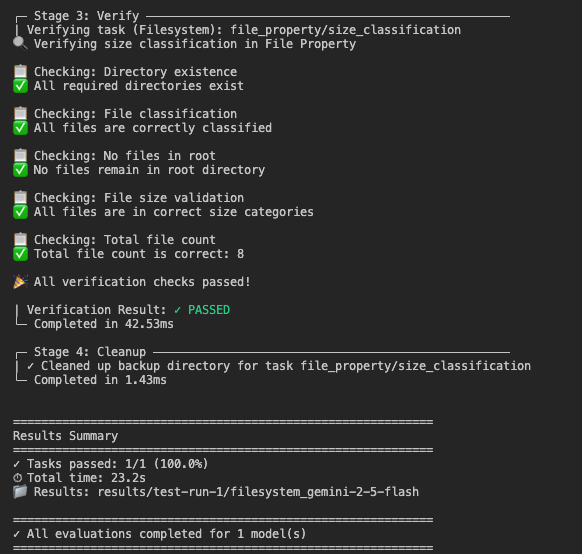
The reuslts are saved under restuls/{exp_name}/{mcp}_{model}/{tasks}, if exp-name is not specified, the default name would be timestamp of the experiment (but specifying the exp-name is useful for resuming experiments).
For other MCP services, please refers to the Installation and Docker Usage Page for detailed instruction.