Zshnip
May 10, 2024 · View on GitHub
A snippet framework for zsh. Create new snippets as you go. Type snippet alias, press key, expand snippet - if snippet did not exist you are prompted to create one and can then carry on editing.
This framework makes creating snippets low enough friction that actually do it.
Comparison
| Features | zsh alias | global alias | zsh-snippets | zshnip |
|---|---|---|---|---|
| Supports pipes | :x: | :white_check_mark: | :white_check_mark: | :white_check_mark: |
| Snippets automatically saved | :x: | :x: | :x: | :white_check_mark: |
| Forgot snippet name 😧 | :grimacing: | :grimacing: | :grimacing: | :smile: (just guess and create a new snippet if wrong) |
| Remembers cursor position | :x: | :x: | :x: | :white_check_mark: (useful for commands with pipes ) |
| How snippets are defined | With an editor | editor | editor | :smile: at shell itself :smile: |
| Tweak command before run | :x: | :x: | :white_check_mark: | ✅ |
| Create snippets while creating snippets | :x: | :x: | :x: | ✅ |
Gallery
This gallery of features provides animated GIFs that document many features.
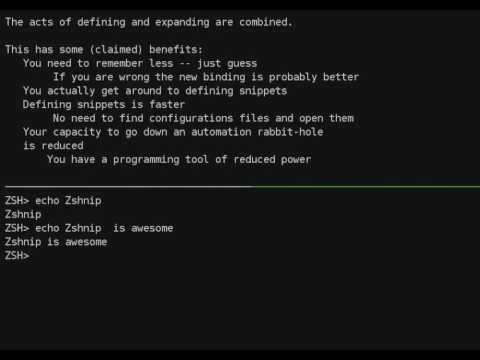
This 20 second animated gif gives a good summary of why you might want to use zshnip.

Attribution
This library uses the same approach and incorporates some code from William G Hatch's (willghatch@gmail.com) original library that was in turn influenced by code on forums. The define-as-you-go features were added by facet@facetframer.com.
Code for rendering the presentation to MP4 is taken from asciinema2gif by tav (public domain).
Installation
Step 1: Get the code
Using zplug
    zplug facetframer/zshnip
    zplug install
    zplug load
Using zgen
    zgen load facetframer/zshnip
    zgen init
Raw installation
    cd ~
    git clone https://github.com/facetframer/zshnip.git .zshnip-repo
    source .zshnip-repo/zshnip.zsh
Step 2: Create some key-bindings
Manually create key-bindings for defining snippets. (you can use different bindings if desired)
bindkey '\ej' zshnip-expand-or-edit # Alt-J
bindkey '\ee' zshnip-edit-and-expand # Alt-E
You will need to add the appropriate commands above to your .zshrc to reload at startup.
Usage
After having installed zshnip and defined key-bindings (see the section above):
- Type your snippet alias (e.g.
gs) - Run
zshnip-expand-or-editwithAlt-J(or your own key-binding) - A prompt will appear within your shell to define your snippet
- Type your snippet (e.g.
git status) and pressENTER. - Your snippet will have expanded.
- After this, when you press
Alt-Jafter your snippet alias (e.g.gs) this expansion will be used.
See this section of the presentation.
Motivation
Defining snippets can be problematic:
- Learning other people's snippets is boring
- One only knows what snippets you want while you are carrying out a task, not later.
- Going to an editor to define a snippet can hijack another task.
Can't you just use aliases?
Certainly, you can even supports pipes etc in your aliases using global aliases (alias -g g='| grep ').
You could also write a wrapper about alias to persist aliases and use something like
https://github.com/jarmo/expand-aliases-oh-my-zsh to expand them.
Using snippets have some benefits
- You can verify that snippets expand to what you want before running them (useful if you have a lot of snippets)
- The define-as-you-go features have various benefits.
Some compelling use cases
Here is a list of the snippets the maintainer uses on a regular basis. These are not built-in, and you might want to phrase them differently, but they could act as inspiration.
gs -> git status
mh -> --help
mf -> --force
g -> | grep -i
gv -> | grep -v
sda -> sed -n '//,$ p'
gap -> git add -p
o -> $(!!)
lm1 -> | tail -n 1
xarm -> xargs -n 1 kill
xarmp -> xargs -p -n 1 kill
sso -> | grep -o ''
sss -> | grep -P '^'
w1 -> | awk '{ print \$1 }'
wm1 -> | rev | awk ' { print \$1 }'
si -> sudo apt-get install
sa -> sudo !!
ag -> !! | grep
Testing
The code for generating the feature gallery also performs consistency testing.
Combining testing and generation of documentation like this has various benefits (see doctest).
To run these tests run animation/record-gallery.sh
Similar projects
- https://github.com/1ambda/zsh-snippets is another extension of willghatch's library.
- I am an extensive user of yasnippet in emacs. This will have without doubt influenced features in this project.
License
LGPLv3 (see LICENSE for details.)
Copyleft licenses can be controversial. This project feels like more of application than a library so a copyleft license seems like a good choice. If there is a compelling reasons to place this under a more permissive license this would not be difficult.