aiinfo.md
July 3, 2025 · View on GitHub
AI info
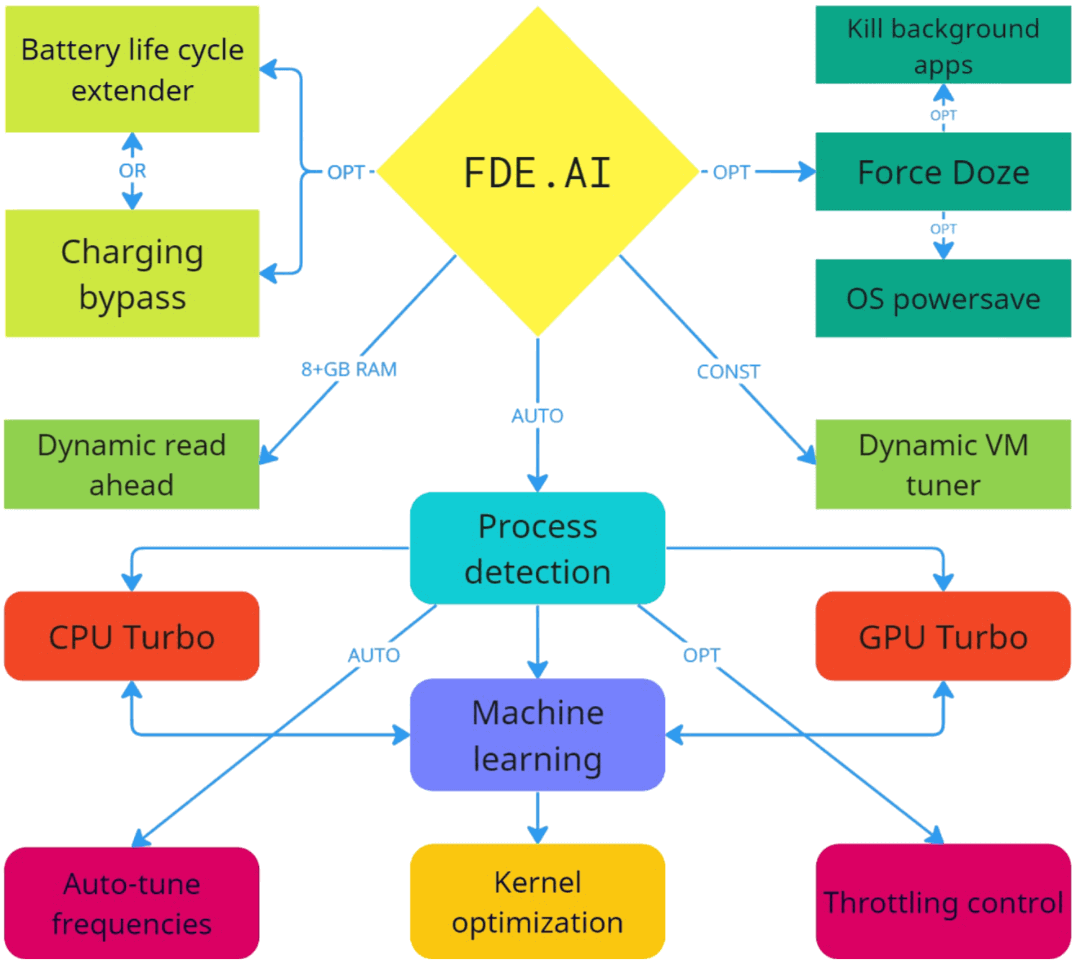
FDE includes an AI that adapts system settings based on device usage to enhance user experience. All boosts are turned off when the screen is off. AI actions are logged.
AI Functions:
Process Detection:
Analyzes foreground apps to boost performance for heavy apps and save power for light ones. Unknown
apps are analyzed in real-time and decided if they are heavy or light. You can manually set which
apps are light and heavy.
CPU Turbo:
Boosts CPU performance by tuning governor when high load is detected. Works when AI is in auto mode
or during heavy app use. Considers device temperature. Reverts to normal when the load decreases.
GPU Turbo:
Maximizes GPU performance under high load. Works when AI is in auto mode or during heavy app use.
Considers device temperature. Reverts to normal when the load decreases.
Machine Learning:
Learns your device usage scenario in AI auto mode to adjust system settings for gaming
(performance), chatting/browsing (power saving) or balance.
DDR/L3/UFS boost:
If supported by device, boosts RAM, CPU cache and UFS memory frequencies when AI is in the
performance mode.
CPU/GPU frequency tuning:
Increases or decreases minimal CPU and GPU frequencies depending on the AI mode.
Throttling control:
Optional feature. Disables OS throttling (frequencies lowering) to maintain performance during heavy
use of device, except when the device heats too much or is charging. You can configure
temperature limits.
Kernel optimization:
Adjusts kernel parameters depending on AI mode.
Dynamic read-ahead:
Active on devices with 8GB+ RAM. Dynamically tunes read-ahead parameters during heavy app/game usage
to improve memory read speed and reverts to optimized defaults when closed.
Dynamic VM tuner:
Adjusts virtual memory subsystem parameters in real time based on RAM usage for better RAM, cache,
and battery management.
Force Doze:
Optional feature. Improves battery life when the screen is off by forcing Doze mode immediately.
System Power Saver:
Optional feature. Activates the system power saver when the screen is off to improve battery life.
ART and FS optimizer:
Semi-optional feature. ART cache optimization with max filter can be triggered manually or
automatically to improve performance. FS optimization occurs when screen is off and device is charging.
System Data Saver:
Optional feature. Activates the system background data saver when the screen is off and frees RAM.
Kill background apps:
Optional feature. Kills background apps when the screen is off.
Battery life cycle extender:
Optional feature. Limits the max charging level to extend battery life. Charging stops at the set
limit and resumes when the battery drops below 6% of the chosen limit. Can't be used together with
Charging bypass function.
Charging bypass:
Optional feature. Extends battery life and reduces heat by directing charger power straight to the
device, bypassing the battery, when a heavy app/game is in use. Can't be used together with
Battery life cycle extender function.