README.md
July 19, 2026 · View on GitHub
Rounded Window Corners Reborn
A GNOME extension that adds rounded corners to all windows

Note
This is the fork of the original rounded-window-corners extension by @yilozt, which is no longer maintained.
Installation
From Gnome Extensions
The extension is available on extensions.gnome.org. You can install it directly from here, or from the Extension Manager app.
From pre-built archives
If you want to install the latest commit of the extension, you can get a pre-built archive from GitHub Actions.
- Sign in to GitHub.
- Go to the build action page
- Click on the latest workflow run
- Download the extension from the "artifacts" section at the bottom
- Install it with the
gnome-extensions installcommand
From source code
-
Install the dependencies:
- Node.js
- npm
- gettext
- just
Those packages are available in the repositories of most linux distros, so you can simply install them with your package manager.
-
Build the extension
git clone https://github.com/flexagoon/rounded-window-corners
cd rounded-window-corners
just install
After this, the extension will be installed to
~/.local/share/gnome-shell/extensions.
From the unofficial AUR package on Arch Linux
If you use Arch, by the way, you can also install from a community-maintained AUR package using paru or yay:
paru gnome-shell-extension-rounded-window-corners-reborn-git
Warning
The gnome-shell-extension-rounded-window-corners-reborn package (without -git) is based on a fork of this extension. If you're using that package, please report all issues to the fork repository instead.
Translation
You can help with the translation of the extension by submitting translations on Weblate
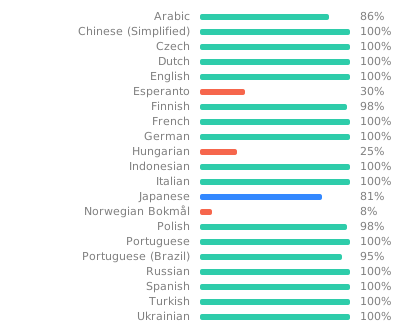
You can also manually edit .po files and submit a PR if you know how to do that.
Development
Here are the avaliable just commands (run just --list to see this message):
Available recipes:
    build   # Compile the extension and all resources
    clean   # Delete the build directory
    install # Build and install the extension from source
    pack    # Build and pack the extension
    pot     # Update and compile the translation files
Credits
Thanks to yotamguttman for making an icon for the extension!