CONTRIBUTING
October 9, 2024 · View on GitHub
TABLE OF CONTENTS
- 1. How to improve this package?
- 2. Setting up development environment
- 3. Package structure
- 4. Developing
- 5. Testing
- 6. Creating new version to pip
- 7. How does dash-uploader work internally?
- 8. More help?
1. How to improve this package?
Maybe you already have an idea. If not, see if there are any open issues that need help.
2. Setting up development environment
- Clone this repository. Change current directory to project root.
- Install npm and Node.js (16.x) for building JS.
- Install the JS dependencies by running
npm installon the project root. This will createnode_modulesdirectory. - Build the NPM modules
npm run build
- Create python virtual environment and activate it
pip installthis package in editable state with the[dev]flag.
python -m pip install -e <path_to_this_folder>[dev]
- Note: If you are using older
pipversion (< 20.3), you will have to use the--use-feature 2020-resolveroption with thepip installcommand! (See: Extras not getting installed when the package that includes the extras has already been installed). You can also just update yourpipwithpython -m pip install --upgrade pip.
3. Package structure
3.1 Highlights of package structure
dash_uploader/
  * python source code of this package
    __init__.py
  _build/
    * Auto-generated python & JS code
    * Do not edit these by hand!
      _imports_.py
      <Component>.py <-- for each component
      dash_uploader.min.js
      dash_uploader.min.js.map
      metadata.json
      package-info.json

devscripts/
  * used during "npm run build"

src/
  lib/
    * React components (The JS/React source code)

package.json
  * Defines JS dependencies
  * Defines npm scripts

usage.py
  * Example file
  * Run with `python usage.py`
3.2 Other (Package structure)
assets/
  * Assets just for the demo (usage.py)
index.html
  * Needed for testing (with npm run)
inst/
  * Some kind of intermediate storage for JS files
    (before copying to dash_uploader)
  * Automatically generated with "npm run build"
node_modules/
  * JS dependencies
  * Automatically created by "npm install"
venv/
  * python dependencies (virtual environment)
  * Created with "python -m venv venv"
4. Developing
4.1 Developing the Python code
- Edit the non-auto-generated files in
dash_uploader - The used code formatter is black.
4.2 Developing the React/JS code
- Edit the react.js files in
src/lib/components/
4.2.1 Building: React.js -> JS & Python
If you edited the JS files, you need to build them. You also need to build the JS files the first time you try to use the cloned package.
Run in the project root
npm run build
This will create all the auto-generated (JS, json, python) files into the dash_uploader/_build folder.
4.2.2 Building: Updating the JS
Javascript libraries tend to get security fixes quite often. To fix the security issues, use
npm install -g npm
npm audit fix
You also might find useful:
npm outdated
which lists the outdated packages and the latest versions. To update all packages to the "Wanted" version, use
npm update
To install a specific version of a package, use:
npm install <package>@<version>
This will also add the package (and version) in the package.json
5. Testing
5.1 Manually
You can test the code manually by running the demo page
- Run
python usage.py - Visit http://127.0.0.1:8050/ in your web browser
5.2 With pytest (automatic tests)
5.2.1 Before trying to run pytest
- Make sure you have built the JS first with
npm run build. - If you face any problems with running the tests, redo the steps described in 2. Setting up development environment and make sure you have the correct virtual environment activated.
5.2.2 Running pytest
- You can test the code automatically by running
python -m pytest
- The
appdefined in theusage.pywill be available to the tests. See the tests in thetests/test_usage.pyto get a grasp on how it works. You could also add otherapps available to the tests in similar manner. - More about testing Dash components here.
6. Creating new version to pip
only applicable to people with access to the PyPI package
- Update version in
package.json - Create new
dash_uploader-x.x.x.tar.gzwith
python .\setup.py sdist
- Upload to pip with
twine upload .\dist\dash_uploader-x.x.x.tar.gz
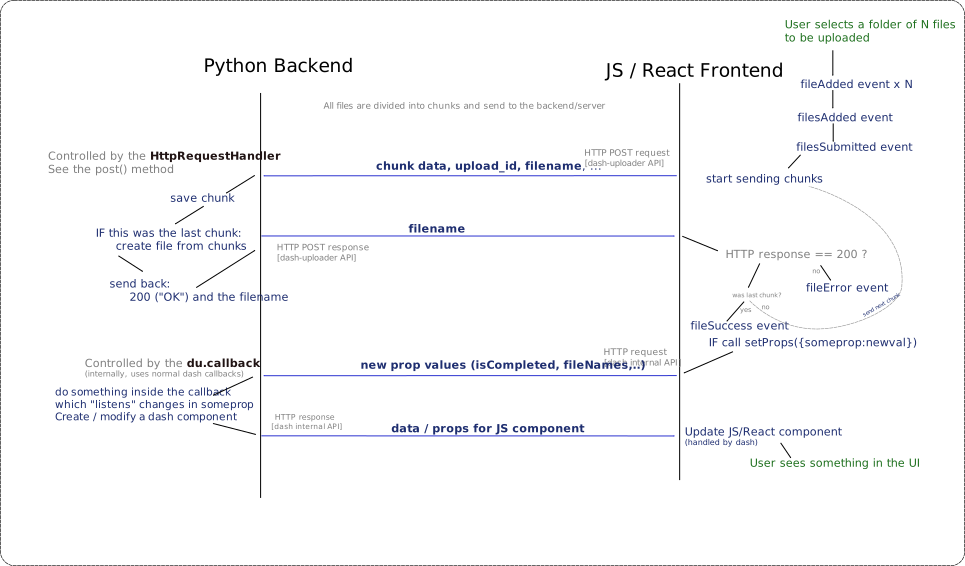
7. How does dash-uploader work internally?
Here is a diagram that tries to explain how dash-uploader works under the hood. If you find a place for improvement, please submit a PR.
8. More help?
Read also the automatically generated README text at README-COOKIECUTTER.md.