@freespace8/dsh-at-file
August 15, 2026 · View on GitHub

Codex-style @ path mentions for the DeepSeek Harness Web GUI. Type @ in the composer to open a picker over the current workspace's files and folders; selecting one drops a readable @path token into the draft. Before sending, the host validates (at the agent/pre-step boundary) that the selected paths actually exist in the workspace and injects a presence-only reference for the model:
<workspace-reference path="docs/spec.pdf" kind="file" />
The plugin only passes paths — it never reads file contents and never expands directory descendants. Whether and how to inspect a reference is up to the agent's existing tools for the current session.
English · 简体中文
Table of contents
- Features
- Preview
- Installation
- Usage
- Configuration
- Project structure
- Dependencies
- Verification
- License
Features
@-triggered picker with a directory-navigation model: the query is split at the last/into "containing directory + filter keyword" — typingplugins/donly lists the direct children ofpluginswhose names containd(no more whole-workspace fuzzy matching). Directories come first, files after, each sorted alphabetically.- Keyboard navigation: Enter on a directory enters it — the menu
immediately refreshes to its direct children (e.g.
@dir/) so you can keep descending; Enter on a file runs the normal selection flow. Tab confirms the selection immediately — for both files and directories it inserts@pathand finishes (a directory is never descended into), so to pick a directory as-is (without entering it), highlight it and press Tab. Mouse click selects directly (inserts@path). - Real text, zero state: the draft holds the readable
@path; the pill is only a decorative layer drawn after mirror-measurement — variable width, no truncation, no overlap, with margin on all sides (not exceeding the line). Selection acts on ordinary text. - Whole-token deletion: after a selection is confirmed (menu closed), when
the caret is inside an
@path, directly adjacent to it, or on its trailing separator space, a single Backspace/Delete removes the whole reference (one press — no need to press twice), and the@picker does not pop up. Everywhere else, editing stays character-by-character. While the@menu is still open (typing a filter, not yet confirmed), Backspace/Delete is not intercepted and trims the filter character-by-character with the menu refreshing live. - Host validation on send: the host checks path existence and marks the references into the model-visible input; the submitted text matches the draft verbatim.
- Settings page (设置 → 文件提及): enable toggle, global file-filter rules (Exact / Regex, each with independent case-sensitivity).
- Built-in ignore list: common version-control, IDE metadata, dependency trees, cache and build-output directories; fully overridable via config.
Preview
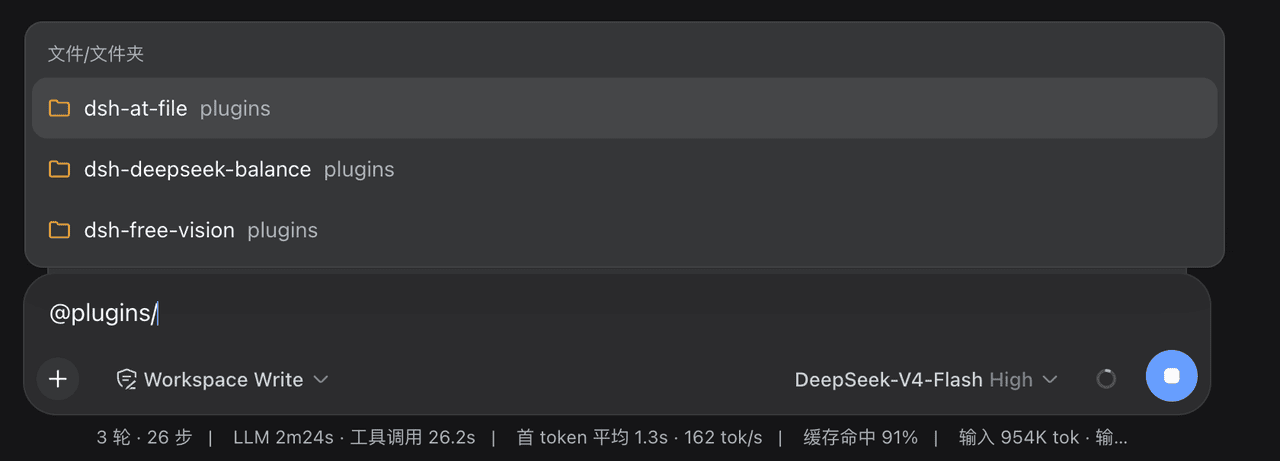
The picker as it appears when you type @ in the composer:
Installation
Published on npm — install with a single command (target profile web):
dsh plugin --profile web add @freespace8/dsh-at-file
After installing, restart dsh web (the host and the browser client load
together). To uninstall:
dsh plugin --profile web remove @freespace8/dsh-at-file
Usage
Type @ in a session composer: candidates render on a single line, the popup
width matches the composer, file names show in full (never truncated), and
the containing directory follows after (same-named files are distinguished by
directory). Directories come first, files after, each sorted
alphabetically.
The query is split at the last / into "directory + keyword": @plugins/d
shows only the direct children of plugins whose names contain d;
@plugins/ shows all direct children of plugins. While the menu is open,
Backspace/Delete edits the filter character-by-character.
Keyboard navigation: Enter on a directory enters it (the menu
refreshes to its children; keep descending, e.g.
@plugins/dsh-at-file/lib/); Enter on a file confirms the normal
selection flow. Tab confirms immediately — for both files and
directories it inserts @path and a directory is never descended into, so
to select a directory without entering it, highlight it and press Tab.
Mouse click selects the highlighted entry directly.
Selecting an entry turns it into a pill whose width hugs the full
@relative-path with at least 2 px of margin (and 2–3 px above/below, never
exceeding its line). Multiple pills are separated by natural spaces and never
overlap; long paths display in full without truncation. After a selection is
confirmed (menu closed), with the caret inside a pill, adjacent to it, or on
its separator space, a single Backspace/Delete removes the whole pill (the
@ list does not pop up); everywhere else editing stays
character-by-character.
Configuration
Override any field in the profile's cordis.patch.yml by id (the config
block is replaced wholesale):
- id: dsh-at-file
  config:
    maxIndexedFiles: 10000   # per-workspace index entry cap (default 5000)
    ignoreDirs: []           # directory basenames skipped during indexing (defaults in src/defaults.js)
The toggle and filter rules in 设置 → 文件提及 are persistent settings that take effect in real time — no restart needed.
Project structure
plugins/dsh-at-file/
├── src/
│   ├── index.js      # host entry: atFile Remote service, Typert manifest, settings namespace, pre-step boundary
│   ├── contract.js   # zod wire contract + invocation descriptors (shared host/client)
│   ├── defaults.js   # default ignored dirs/files + filter-rule normalization
│   ├── files.js      # streaming workspace directory index (no symlinks, bounded truncation)
│   └── mention.js    # @path scanning, validation, <workspace-reference> injection
├── lib/client.js     # client half (zero-build bundle): @ trigger source, PillOverlay (mirror measurement + variable-width pills), settings section, locale
├── cordis.patch.yml  # bundle patch line
└── tests/            # check.mjs artifact gate + unit.mjs pure-logic unit tests
Dependencies
- Host additionally depends on
zod(the Typert registry/gateway requires zod-style schemas with.parse(), which schemastery lacks) and@deepseek-ai/dsh-llm(for constructing user messages). Both resolve from the harness rootnode_modules, so a localfile:install needs nopnpm installinside the plugin directory; on npm,dependencies.zodis installed automatically. - Client: zero external imports —
requirecan only hit platform seed modules (react), so the wire contract, search, icons, and styles are all inlined inlib/client.js(a minimal zod-compatible codec with only.parse(), which is allClientRemoteneeds).
Verification
npm run check # artifact gate + pure-logic unit tests
The client side has been visually verified in the real GUI (dsh web,
installed into the web profile): root-level @ list (directories first,
files after), @plugins/d in-directory keyword filtering, Enter/Tab
directory navigation, file selection, mouse click, pills and whole-token
deletion all work. The host side (pre-step validation and
<workspace-reference> injection) has not been re-run in a real combination
(no host changes this cycle; covered by unit tests).
License
MIT — see LICENSE. This package is an independent implementation of
the @-mention concept from
dsh-at-file (MIT); the upstream
copyright notice is retained in LICENSE and the concept is credited here.