@freespace8/dsh-sidebar-helper
August 16, 2026 · View on GitHub

Right-click context menus for the workspace sidebar of the DeepSeek Harness Web GUI — built by reusing the built-in "⋯" row menus, not by maintaining a second menu:
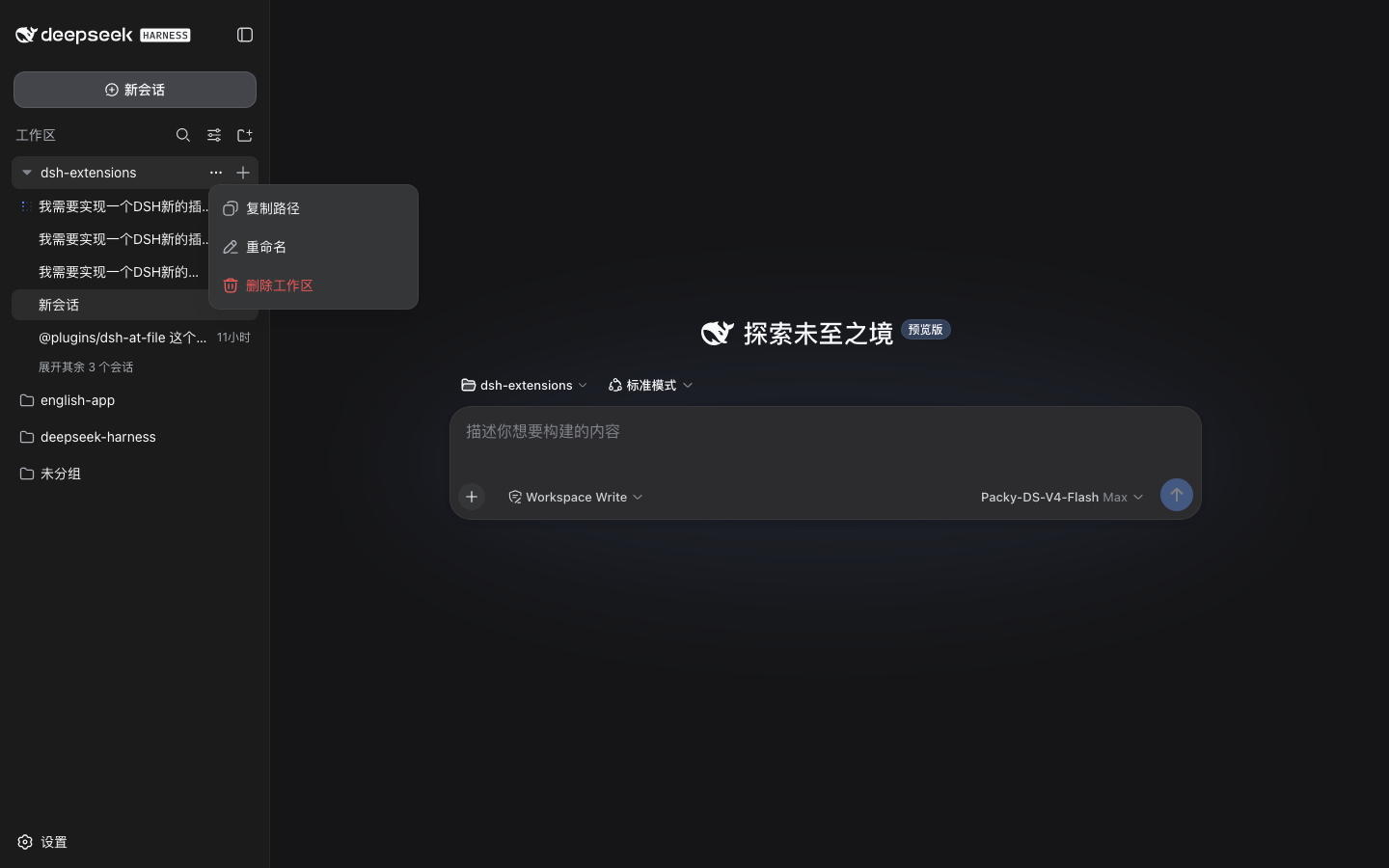
- Workspace (project) rows — the row's own "⋯" menu carries Copy Path (复制路径) as its first entry, right next to Rename. It appears whenever the menu opens — left-click on "⋯", right-click on the row, or keyboard — and copies the workspace directory into the clipboard.
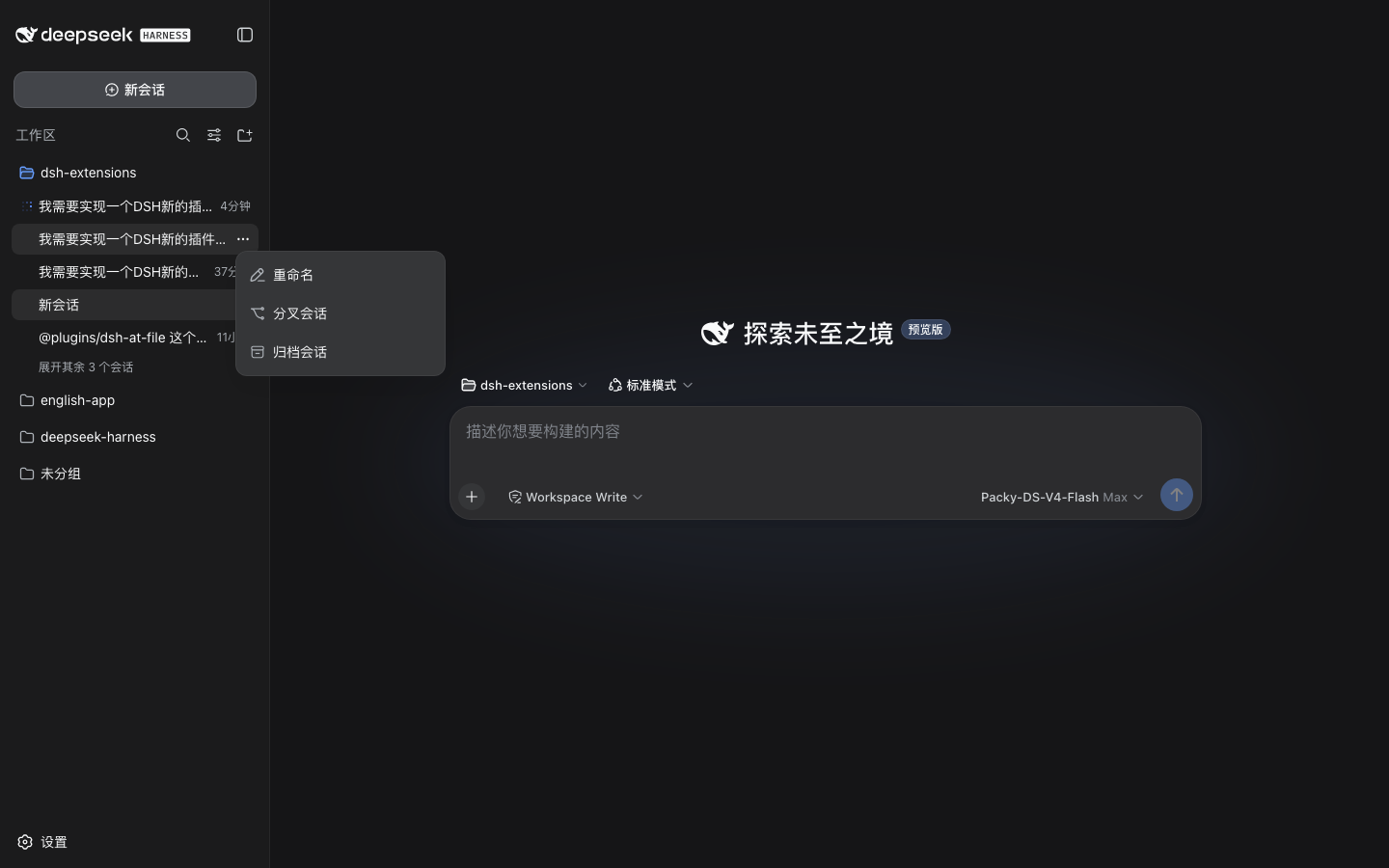
- Conversation (session) rows — left- or right-click opens the exact same menu as the three dots on that row (Rename / Fork / Archive). The plugin only triggers it; it does not maintain a copy and injects nothing.
English · 简体中文
Table of contents
- Features
- Preview
- Installation
- Usage
- Configuration
- How it works
- Project structure
- Dependencies
- Verification
- License
Features
- The workspace "⋯" menu itself carries Copy Path: whether you open a workspace row's three-dots menu by left-clicking the "⋯" button, by right-clicking the row, or by keyboard — the menu is the built-in one, with Copy Path / Rename / Delete Workspace (Copy Path injected as the first item, right next to Rename).
- Conversation rows stay untouched: left- or right-clicking a conversation row opens the exact built-in menu (Rename / Fork / Archive) — byte-for-byte the same menu as the "⋯" button, with nothing injected.
- Copy Path copies the workspace directory into the clipboard, briefly shows "已复制 / Copied" on the item, then closes the menu itself.
- Nothing duplicated to maintain: the injected menu is the built-in one — when the app updates its menu items, this plugin follows automatically. Only the single injected item belongs to the plugin.
- Robust against React re-renders: the injected item is pinned back into
place by a
MutationObserverwhenever the menu re-renders (hover state, repositioning), and it is removed cleanly when the menu closes or the plugin is disposed. - No DOM-style coupling: rows are identified through stable semantic
signals (
role="treeitem"+aria-expanded/aria-selected) — never hashed CSS classes. Same-titled workspaces are disambiguated by row order. - Master switch in Config:
config.enabledis served to the client via a small host route; flip it off to disable the right-click menus without uninstalling.
Preview
A workspace row's "⋯" menu — 复制路径 as the first item (next to Rename), opened here by left-clicking the three dots:
A conversation row's "⋯" menu — identical to the built-in menu (no injected items):
Installation
Published on npm — install with a single command (target profile web):
dsh plugin --profile web add @freespace8/dsh-sidebar-helper
After installing, restart dsh web (the host and the browser client load
together). To uninstall:
dsh plugin --profile web remove @freespace8/dsh-sidebar-helper
Usage
Open a session so the workspace sidebar shows your projects and conversations, then open a row's menu — by left-clicking its "⋯" button or by right-clicking the row itself:
- Workspace (project) row — 复制路径 / 重命名 / 删除工作区.
- Conversation (session) row — 重命名 / 分叉会话 / 归档会话 (the same menu as the "⋯" button).
Right-clicking a blank "New Session" row or the "Ungrouped" bucket does nothing — exactly like the built-in menu, which hides its actions there.
Configuration
Override any field in the profile's cordis.patch.yml by id (the config
block is replaced wholesale):
- id: sidebar-helper
  config:
    enabled: false   # disable all right-click menus without uninstalling
| Field | Type | Default | Meaning |
|---|---|---|---|
enabled | boolean | true | Master switch; delivered to the browser client through the plugin's settings route. |
How it works
- Host half (
src/index.js) is deliberately small: oneConfigfield (enabled) and one HTTP route/plugins/dsh-sidebar-helper/settingsthat serves it. The client has no config channel, so the toggle crosses the wire this way (route registered lazily for latewebServerbinding). - Client half (
lib/client.js) listens forcontextmenu(capture) and only acts on rows inside the workspace browser tree — the first[role="tree"]in the document, which is the sidebar (it renders before the conversation column). Every other tree (JSON tool results, subagent catalogs) is left alone. Right-clicking a row swallows the browser's native context menu and presses the row's "⋯" button instead. - Triggering the built-in menu: each row's "⋯" button is the first
<button>inside the row (session rows have exactly one; workspace rows have the ellipsis first, then the New-Session plus). A programmaticbutton.click()goes through the same ReactonClickthat a real click uses (setMenuOpen(!open)), so the menu that opens is the row's own — same items, same placement, same keyboard behaviour. The plugin just presses the button the user already has. - Injecting Copy Path: the built-in menu's items are hard-coded, so a
global
MutationObserverwatches for any row menu opening (left-click "⋯", right-click, or keyboard), identifies which workspace row the menu belongs to (the row whose ellipsis was last clicked, verified by anchor position), and appends one nativebutton[role=menuitem]into the menu's viewport — styled with the app's own--dsw-*tokens. A secondMutationObserverpins it back to the first position whenever React re-renders the menu, and removes it when the menu closes. Clicking it copies the workspace path, flips the label to "已复制", then dispatches an Escape so the built-in menu closes itself. - Identity resolution is pure and unit-tested: project rows
(
aria-expanded) match their workspace by title against thectx.workspacessnapshot; same-titled workspaces (same basename in different directories) fall back to DOM order.
Project structure
plugins/dsh-sidebar-helper/
├── src/index.js      # host half: Config + settings route
├── lib/client.js     # browser bundle (no build step, zero dependencies)
├── cordis.patch.yml  # bundle patch line
├── tests/check.mjs   # artifact gate + resolution-logic unit tests
└── README.md / README.zh-CN.md
Dependencies
- Host:
@deepseek-ai/schemasteryonly (Config schema); everything else goes throughctxservices, so afile:install needs nopnpm installin the plugin directory. - Client: none — plain DOM, no React, no primitives imports. The clipboard
uses
navigator.clipboardwith anexecCommandfallback.
Verification
From the plugin directory:
npm run check
This validates syntax, export/file consistency, patch lines, host shape, client bundle id, the zero-dependency rule, the use of the app's design tokens for the injected item, plus unit tests for the row-resolution logic (workspace lookup by title, duplicate-title disambiguation, clipboard fallback).