BézierGS: Dynamic Urban Scene Reconstruction with Bézier Curve Gaussian Splatting
September 3, 2025 · View on GitHub
[Project] [Paper]
BézierGS: Dynamic Urban Scene Reconstruction with Bézier Curve Gaussian Splatting
Zipei Ma⚖, Junzhe Jiang⚖, Yurui Chen, Li Zhang✉
Shanghai Innovation Institute; School of Data Science, Fudan University
ICCV 2025
Official implementation of "BézierGS: Dynamic Urban Scene Reconstruction with Bézier Curve Gaussian Splatting".
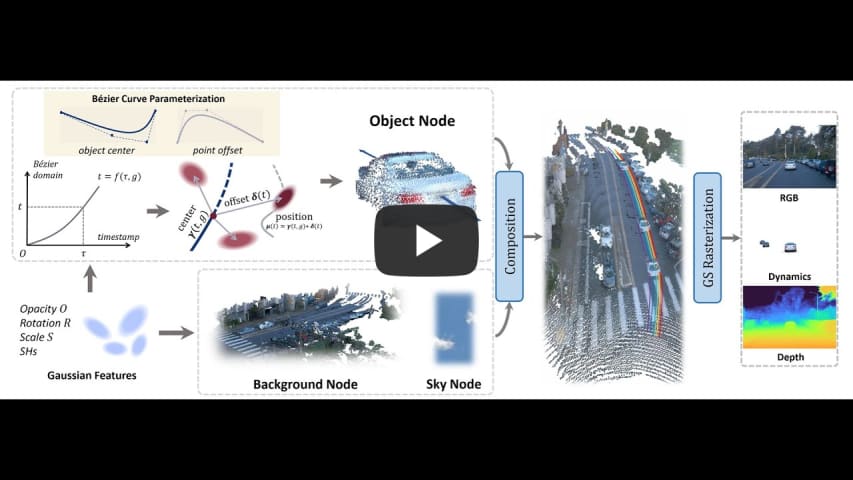
🛠️ Pipeline

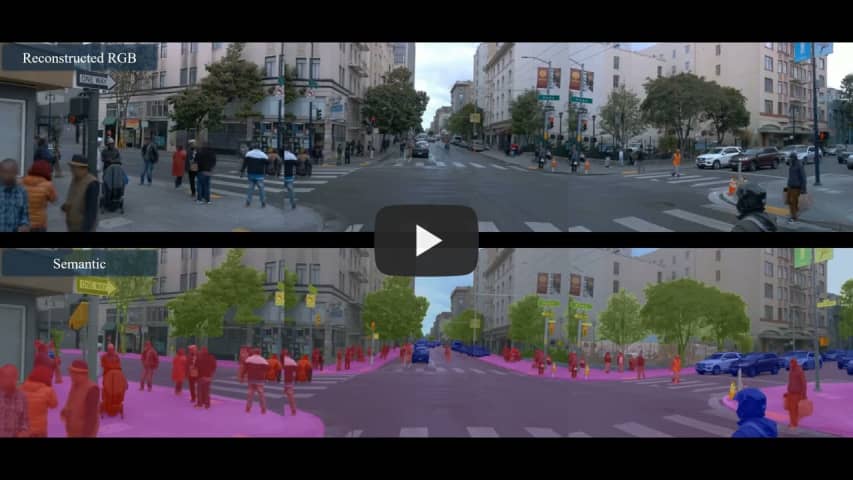
🎞️ Demo
BézierGS.mp4
pedestrian.mp4
🚀 Get started
Environment
# Clone the repo.
git clone https://github.com/fudan-zvg/BezierGS
cd BezierGS

# Make a conda environment.
conda create --name bezier python=3.10 -y
conda activate bezier

# Install requirements.
pip install -r requirements.txt

# Install simple-knn
git clone https://gitlab.inria.fr/bkerbl/simple-knn.git
pip install ./simple-knn

# a modified gaussian splatting (for feature rendering)
git clone --recursive https://github.com/SuLvXiangXin/diff-gaussian-rasterization
pip install ./diff-gaussian-rasterization

# Install nvdiffrast (for Envlight)
git clone https://github.com/NVlabs/nvdiffrast
pip install ./nvdiffrast
Data preparation
Create a directory for the data: mkdir dataset. We provide some processed data here.
Prepare Waymo Open Dataset.
We provide the split file following EmerNeRF. You can refer to this document for download details.
Preprocess the data
Preprocess the example scenes
python script/waymo/waymo_converter.py --root_dir TRAINING_SET_DIR --save_dir SAVE_DIR --split_file script/waymo/waymo_splits/demo.txt --segment_file script/waymo/waymo_splits/segment_list_train.txt
Generating LiDAR depth
python script/waymo/generate_lidar_depth.py --datadir DATA_DIR
Generating sky mask
Install GroundingDINO following this repo and download SAM checkpoint from this link.
python script/waymo/generate_sky_mask.py --datadir DATA_DIR --sam_checkpoint SAM_CHECKPOINT
Generating intance segmentation
git clone https://github.com/xiao10ma/Grounded-Segment-Anything.git
cd Grounded-Segment-Anything
follow the instruction in the repo to install the dependencies.
Run the following command to generate the instance segmentation.
bash waymo_run.sh
Training
CUDA_VISIBLE_DEVICES=0 python train.py \
--config configs/waymo/017.yaml \
source_path=dataset/017 \
model_path=eval_output/waymo_nvs/017
After training, evaluation results can be found in {EXPERIMENT_DIR}/eval_output directory.
Evaluating
You can also use the following command to evaluate.
CUDA_VISIBLE_DEVICES=0 python evaluate.py \
--config configs/waymo/017.yaml \
source_path=dataset/017 \
model_path=eval_output/waymo_nvs/017 \
checkpoint=eval_output/waymo_nvs/017/chkpnt30000.pth
📜 BibTeX
@inproceedings{Ma2025BezierGS,
  title={BézierGS: Dynamic Urban Scene Reconstruction with Bézier Curve Gaussian Splatting},
  author={Ma, Zipei and Jiang, Junzhe and Chen, Yurui and Zhang, Li},
  booktitle={ICCV},
  year={2025},
}