Deploying OpenTelemetry Demo
January 23, 2023 · View on GitHub
This folder contains additional configuration for deploying the OpenTelemetry Shop Demo on Sentry's infrastructure. We're using the official OpenTelemetry Helm chart to deploy the demo on our Kubernetes cluster.
Available Resources
We have two environments at the moment, each having its own set of supporting services.
Note: all links are currently accessible by Sentry employees only.
Staging
This environment used for development and testing.
- Webstore: https://otel-demo-staging.testa.getsentry.net/
- Grafana: https://otel-demo-staging.testa.getsentry.net/grafana/
- Feature Flags UI: https://otel-demo-staging.testa.getsentry.net/feature/
- Load Generator UI: https://otel-demo-staging.testa.getsentry.net/loadgen/
- Jaeger UI: https://otel-demo-staging.testa.getsentry.net/jaeger/ui/
Production
This environment can be used for demos, and should be considered "stable".
- Webstore: https://otel-demo.testa.getsentry.net/
- Grafana: https://otel-demo.testa.getsentry.net/grafana/
- Feature Flags UI: https://otel-demo.testa.getsentry.net/feature/
- Load Generator UI: https://otel-demo.testa.getsentry.net/loadgen/
- Jaeger UI: https://otel-demo.testa.getsentry.net/jaeger/ui/
Configuration Files
You can edit the following files in this directory:
meta.yaml-- contains various meta configuration about the deployment, e.g. the currently used version of the Helm chart.sentry-components.yaml-- a list of components that have Sentry instrumentation. If some service there is commented out, that means that the vanilla version of the service (meaning, a prebuilt Docker image) will be started.global.yaml-- overrides for the Helm chart that is used to deploy the demo. Here you can configure things like allocated CPU/memory for each service.
Enable Sentry Instrumentation
To enable Sentry instrumentation for the component, do the following:
- Uncomment the service section in
sentry-components.yamland provide attribute overrides, if necessasry. - Configure additional non-public parameters (e.g. SENTRY_DSN environment variable) in this file (private repository).
(Re)Deploying Changes
At the moment we maintain two demo environments:
- Staging: https://otel-demo-staging.testa.getsentry.net/
- Production: https://otel-demo.testa.getsentry.net/
The environments can be redeployed via our instance of Argo Workflows. It works as follows:
- Go to https://run.testa.getsentry.net/ (internal-only).
- Click "+ Submit New Workflow" in the upper left corner.
- Select "opentelemetry-demo-deploy" workflow.
- Specify the git revision (branch, commit, etc.) of https://github.com/getsentry/opentelemetry-demo repository that you want to deploy.
- Change the environment via the dropdown, if necessary.
- Click
+ Submit.
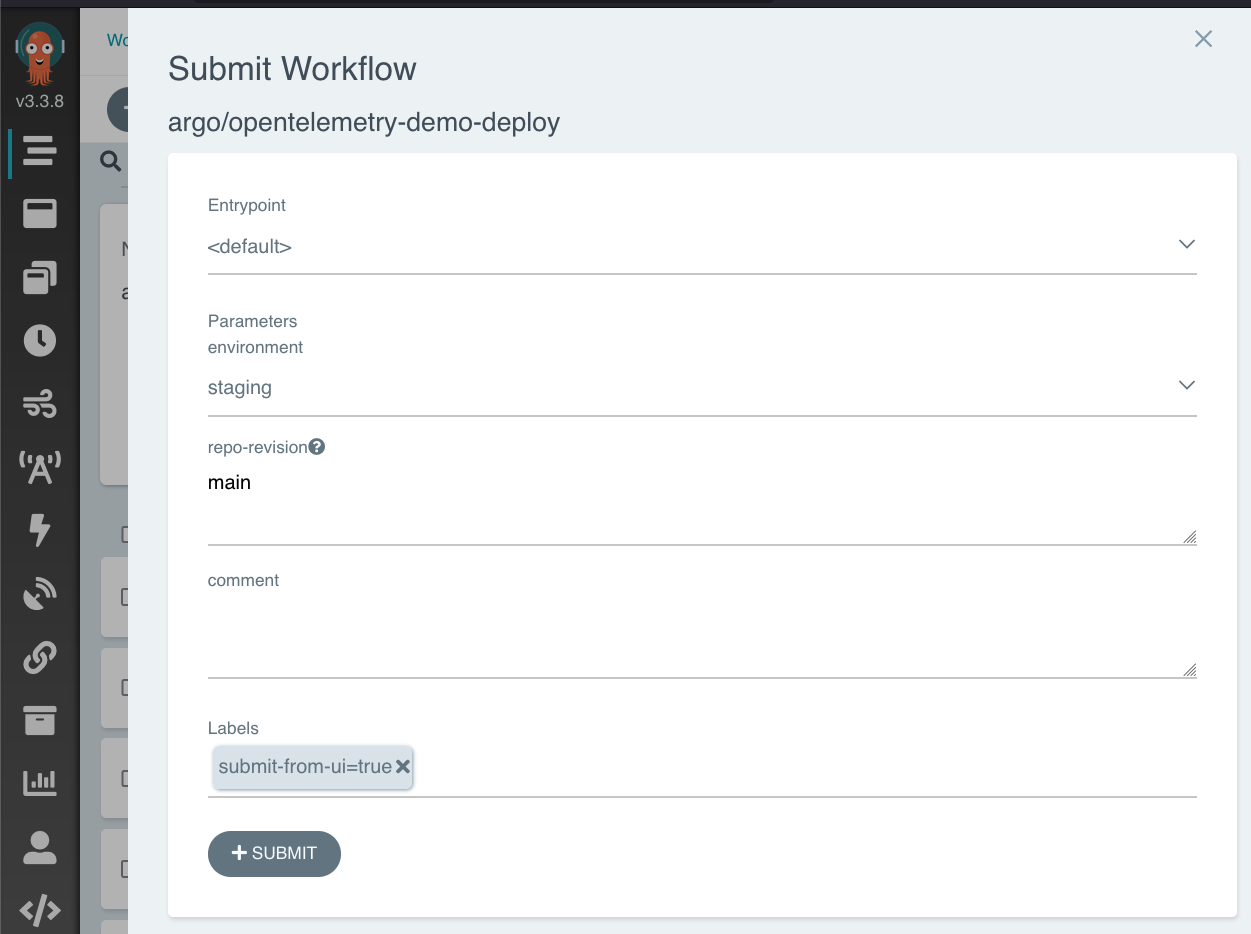
In a few minutes the environment will be recreated.
Note: at the moment we don't persist any data between redeploys.
Troubleshooting
For troubleshooting advice (for example, how to access service logs) see here (private link).