Overview
May 23, 2024 · View on GitHub
..
==============================================================================
author :Ghislain Vieilledent
email :ghislain.vieilledent@cirad.fr, ghislainv@gmail.com
web :https://ecology.ghislainv.fr
license :GPLv3
==============================================================================
.. image:: https://ecology.ghislainv.fr/pywdpa/_static/logo-pywdpa.svg :align: right :target: https://ecology.ghislainv.fr/pywdpa :alt: Logo pywdpa :width: 140px
pywdpa Python package
|Python version| |PyPI version| |GitHub Actions| |License| |Zenodo|
Overview
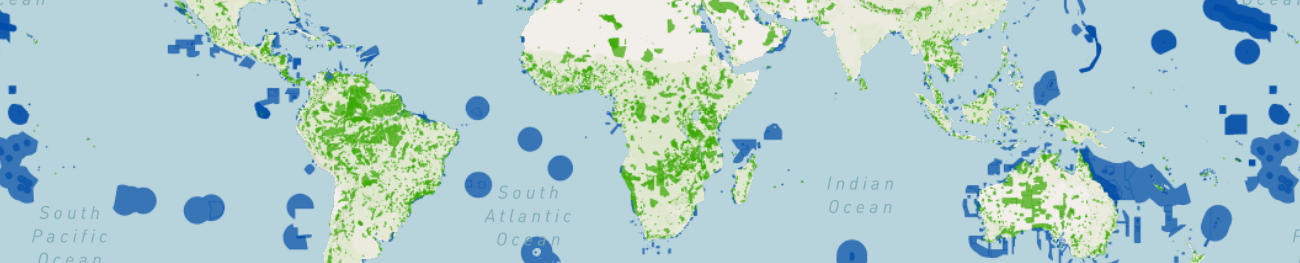
The pywdpa Python package is an interface to the World Database on
Protected Areas (WDPA) hosted on the Protected Planet website at
<https://www.protectedplanet.net>. The pywdpa package provides
functions to download shapefiles of protected areas (PA) for any
countries with an iso3 code using the Protected Planet API at
<https://api.protectedplanet.net>. The pywdpa package
translates some functions of the R package worldpa
(<https://github.com/FRBCesab/worldpa>_) in the Python language.
.. image:: https://ecology.ghislainv.fr/pywdpa/_static/banner_pywdpa.png :align: center :target: https://ecology.ghislainv.fr/pywdpa :alt: protected-planet
Terms and conditions
You must ensure that the following citation is always clearly reproduced in any publication or analysis involving the Protected Planet Materials in any derived form or format:
..
UNEP-WCMC and IUCN (\ ``YEAR``\ ) Protected Planet: The World
Database on Protected Areas (WDPA). Cambridge, UK: UNEP-WCMC and
IUCN. Available at: www.protectedplanet.net (dataset downloaded the
``YEAR/MONTH``\ ).
For further details on terms and conditions of the WDPA usage, please
visit the page: <https://www.protectedplanet.net/en/legal>_.
Prerequisites
Access to Protected Planet API
This package uses the Protected Planet API to access data on world
protected areas. You must first have obtained a Personal API Token by
filling in the form available at
<https://api.protectedplanet.net/request>. Then you need to set an
environment variable (we recommend using the name WDPA_KEY\ )
using either the command os.environ["WDPA_KEY"]="your_token" or
python-dotenv <https://github.com/theskumar/python-dotenv>.
GDAL
GDAL must be installed on your system.
To install GDAL on Windows, use the OSGeo4W <https://trac.osgeo.org/osgeo4w/>_ network installer. OSGeo4W is a binary distribution of a broad set of open source geospatial software for Windows environments (Windows 11 down to 7). Select Express Install and install GDAL. Several Gb of space will be needed on disk to install this programs. This will also install OSGeo4W Shell to execute command lines.
To install GDAL on other systems, use your package manager, for example apt for Debian/Ubuntu Linux distributions.
.. code:: shell
sudo apt update
sudo apt install gdal-bin libgdal-dev
After installing GDAL, you can test the installation by running gdalinfo --version in the command prompt or terminal, which should display the installed GDAL version.
Installation
The easiest way to install the pywdpa Python package is via pip <https://pip.pypa.io/en/stable/>_ in the OSGeo4W Shell for Windows or in a virtual environment for Linux.
For Linux, create and activate a virtual environment before install pywdpa with pip:
.. code-block:: shell
cd ~
Create a directory for virtual environments
mkdir venvs
Create the virtual environment with venv
python3 -m venv ~/venvs/venv-pywdpa
Activate (start) the virtual environment
source ~/venvs/venv-pywdpa/bin/activate
Install Python dependencies and pywdpa in the OSGeo4W Shell or in the newly created virtual environment:
.. code-block:: shell
Upgrade pip, setuptools, and wheel
python3 -m pip install --upgrade pip setuptools wheel
Install numpy
python3 -m numpy
Install gdal Python bindings (the correct version)
python3 -m pip install gdal==$(gdal-config --version)
Install pywdpa. This will install all other dependencies
python3 -m pip install pywdpa
If you want to install the development version of pywdpa, replace the last line with:
.. code-block:: shell
python3 -m pip install https://github.com/ghislainv/pywdpa/archive/master.zip
To deactivate and delete the virtual environment:
.. code-block:: shell
deactivate rm -R ~/venvs/venv-pywdpa # Just remove the repository
In case of problem while installing GDAL Python bindings, try the following command:
.. code-block:: shell
python3 -m pip install --no-cache-dir --force-reinstall gdal==$(gdal-config --version)
Contributing
The pywdpa Python package is Open Source and released under
the GNU GPL version 3 license <https://ecology.ghislainv.fr/pywdpa/license.html>. Anybody
who is interested can contribute to the package development following
our Community guidelines <https://ecology.ghislainv.fr/pywdpa/contributing.html>. Every
contributor must agree to follow the project's Code of conduct <https://ecology.ghislainv.fr/pywdpa/code_of_conduct.html>__.
.. |Python version| image:: https://img.shields.io/pypi/pyversions/pywdpa?logo=python&logoColor=ffd43b&color=306998 :target: https://pypi.org/project/pywdpa :alt: Python version
.. |PyPI version| image:: https://img.shields.io/pypi/v/pywdpa :target: https://pypi.org/project/pywdpa :alt: PyPI version
.. |GitHub Actions| image:: https://github.com/ghislainv/pywdpa/workflows/PyPkg/badge.svg :target: https://github.com/ghislainv/pywdpa/actions :alt: GitHub Actions

.. |License| image:: https://img.shields.io/badge/licence-GPLv3-8f10cb.svg :target: https://www.gnu.org/licenses/gpl-3.0.html :alt: License GPLv3

.. |Zenodo| image:: https://zenodo.org/badge/DOI/10.5281/zenodo.4275513.svg :target: https://doi.org/10.5281/zenodo.4275513 :alt: Zenodo
