洞察
August 30, 2026 · View on GitHub
洞察 · dsh-insight
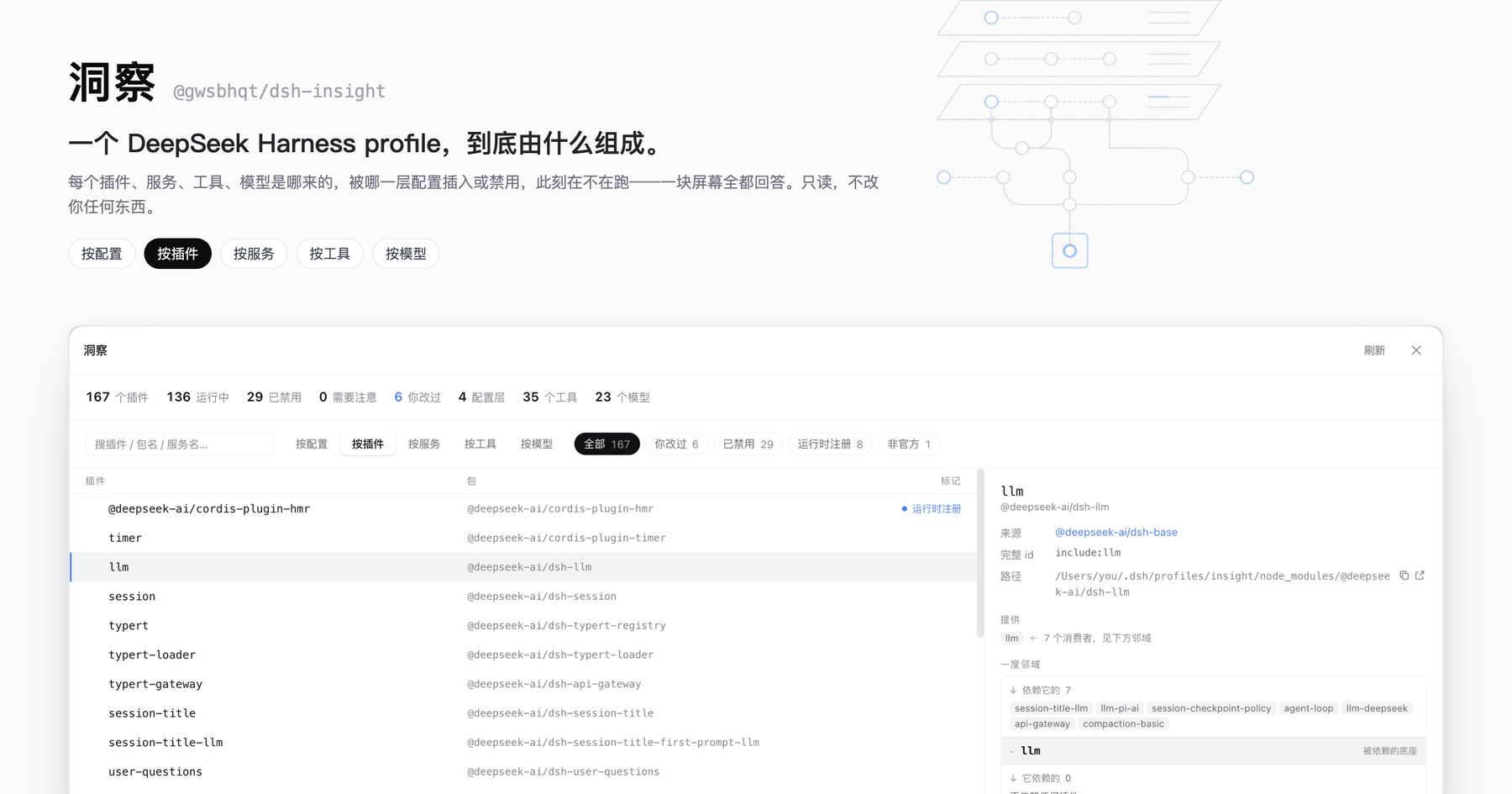
One screen that answers what a DeepSeek Harness profile is actually made of.
Every plugin, service, tool and model — where it came from, which config layer inserted or disabled it, and whether it is running right now. Read-only.




Install · The five axes · Why it refuses to guess · Read-only by design · 简体中文
Install
dsh plugin --profile web add @gwsbhqt/dsh-insight
Update:
dsh plugin --profile web update @gwsbhqt/dsh-insight@latest
Then open Settings → 洞察 / Insight. No build step, no restart. The panel ships both halves: a host plugin that collects the data and a browser plugin that draws it.
The problem
A running dsh profile is assembled from layers you never see side by side:
- each bundle's own
cordis.patch.yml(@deepseek-ai/dsh-base, market packages, your own plugins) - your profile's patch layer,
$DSH_HOME/profiles/<name>/cordis.patch.yml $DSH_HOME/settings.yaml— model providers, the default model, permission presets$DSH_HOME/.credentials.yamland environment variables
Which of it survives is decided by patch semantics (insert / update / disable, by id) and by what the cordis loader actually managed to start. No single file tells you the answer, so "why isn't this plugin running" and "where did this model come from" turn into a hunt across four files and a runtime you cannot see.
洞察 does that derivation for you, live, and shows its work.
The six axes
One dataset, six ways to sort it. The first five are causal: config produces plugins, plugins provide services, services register tools and models. By preset comes last — it is not about what already runs in this process but about a second configuration: the agent-plane one, mounted only when a session starts. Switching axes never clears your selection.
按配置 · By config — which layer wins
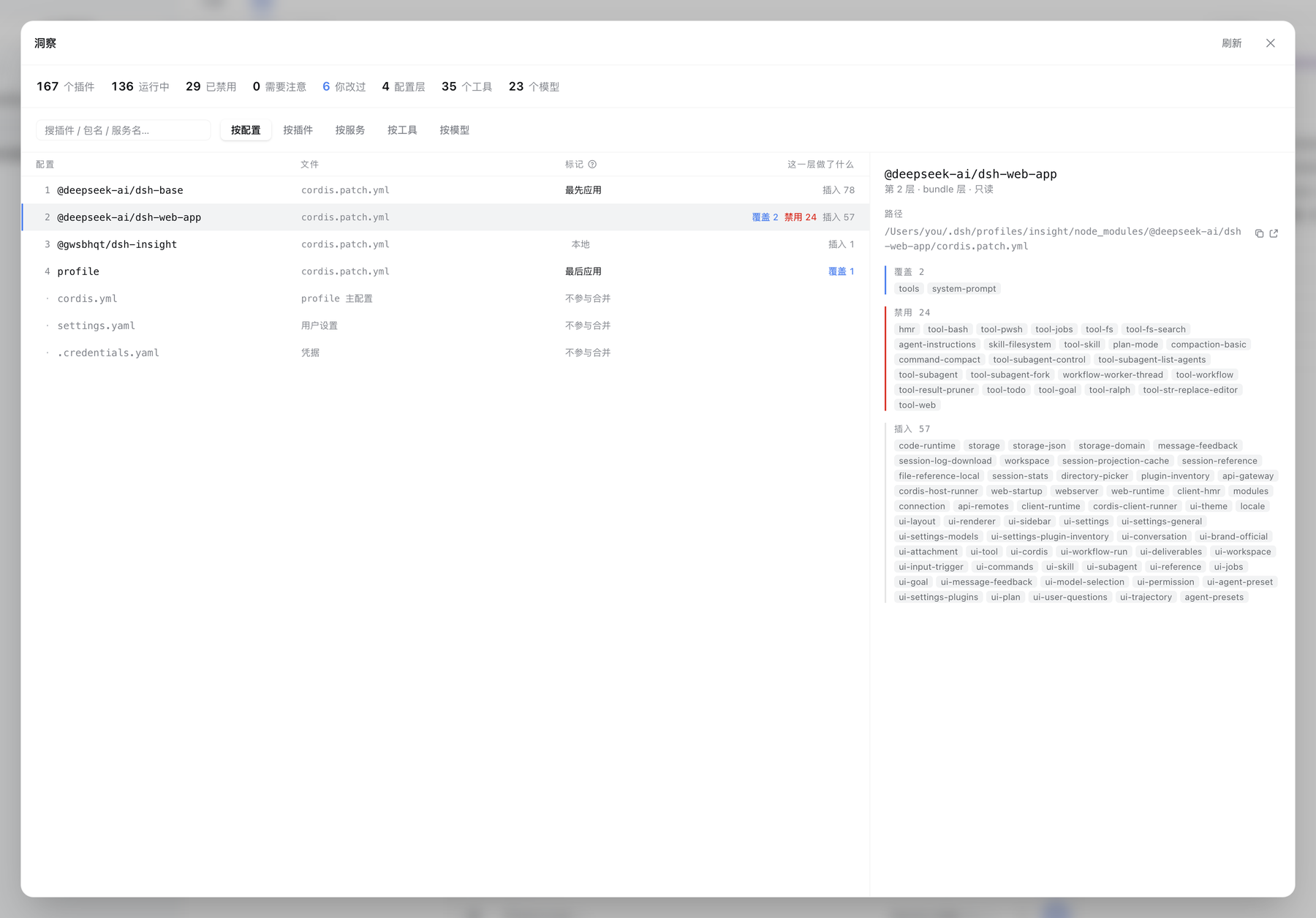
Every config layer in application order, with what it did to the tree — inserted 78, overrode 2, disabled 24. The first and last layers are marked, because a number alone never says which direction wins. Config files that take no part in the merge (the profile's cordis.yml, settings.yaml, .credentials.yaml) are listed in the same table, marked as such — you usually want them for their paths.
Pick a layer and the right pane names every entry it touched, each one a link into the plugin axis.
按插件 · By plugin — the dossier
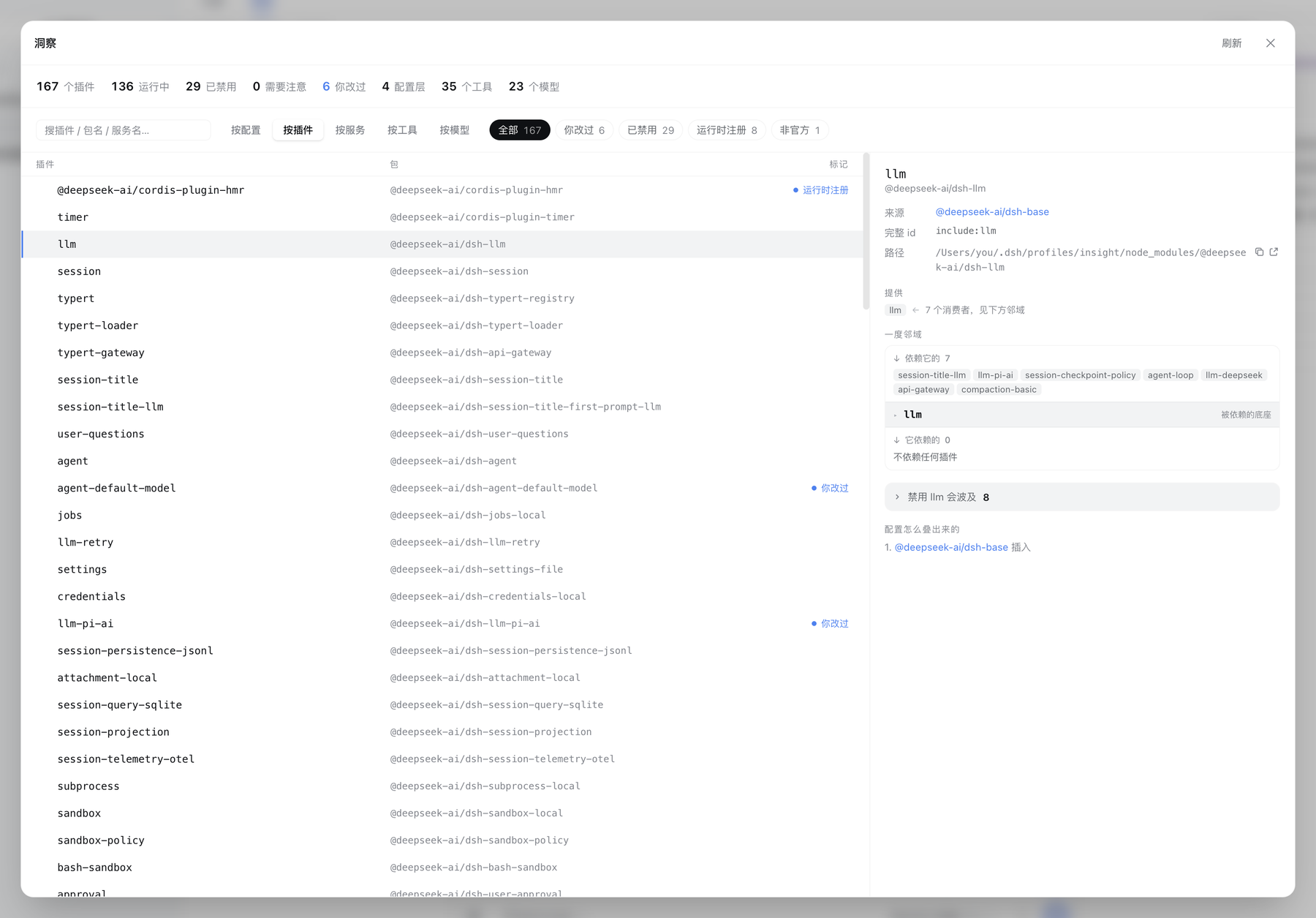
The live loader tree — containers, nested realms, disabled entries folded away at the end of the level they belong to. Select one and get its whole dossier:
- Where it came from — the layer that inserted it, its full entry id, its package and path on disk
- Wiring — services it provides and consumes, each with its counterpart; built-in host services are named as such instead of showing up as a missing provider
- Blast radius — who depends on it, transitively, so "what breaks if I turn this off" is a number and a list rather than a guess
- Its settings — effective value, plugin default, and your override, side by side
- How the config stacked up — the ordered list of layers that touched this entry, and what each one did
Filter chips narrow the same list: needs attention, you changed it, disabled, runtime-registered, not official.
按服务 · By service — what actually connects plugins
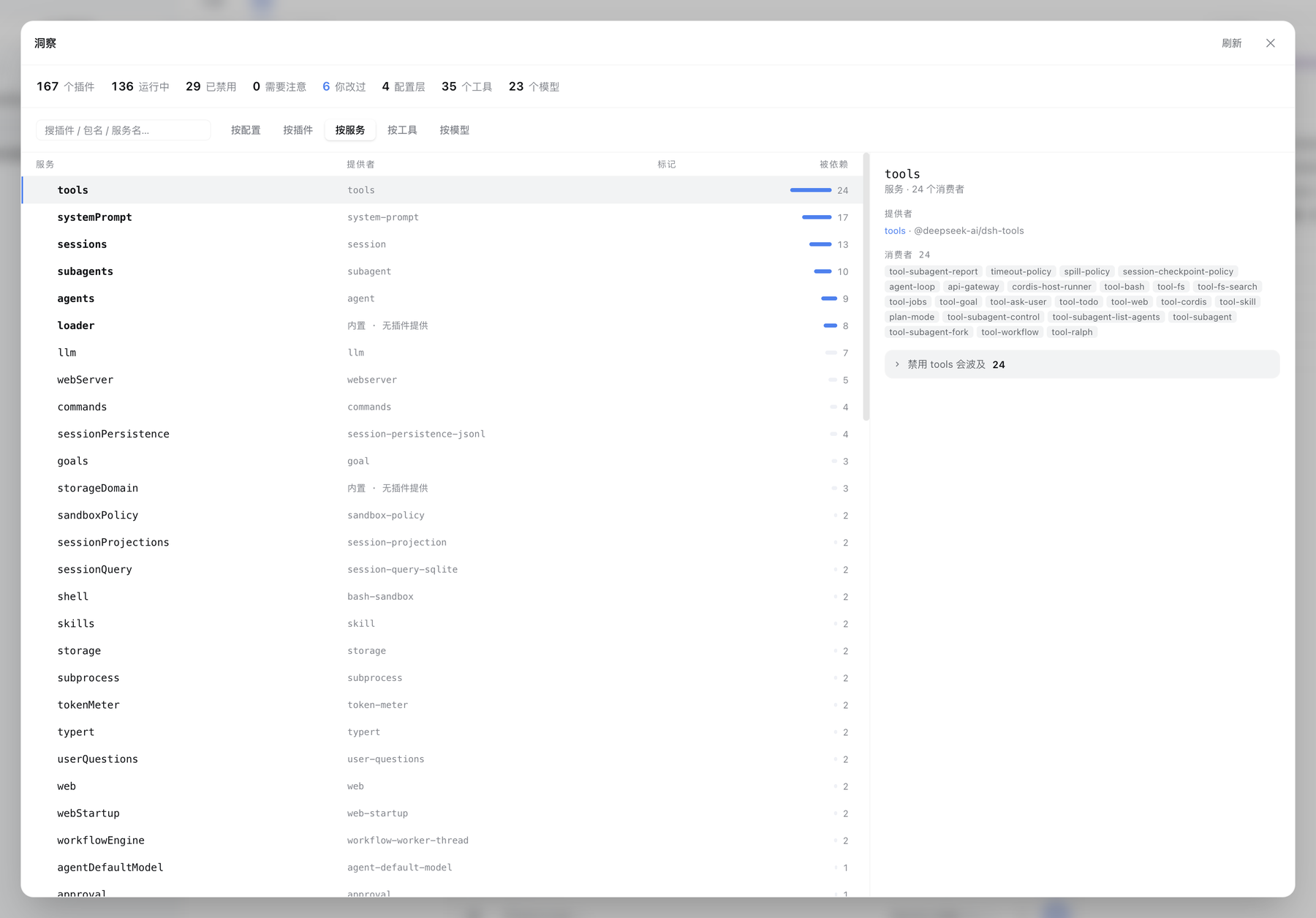
Services are the real edges between plugins, so they get their own axis: who provides each one, how many consume it, and — for a hub — the full impact list. This is a table and not a canvas on purpose: the dependency graph of a real profile is star-shaped, and a hub's edges cross the whole canvas no matter which layout you pick.
按工具 · By tool — what the agent can actually call
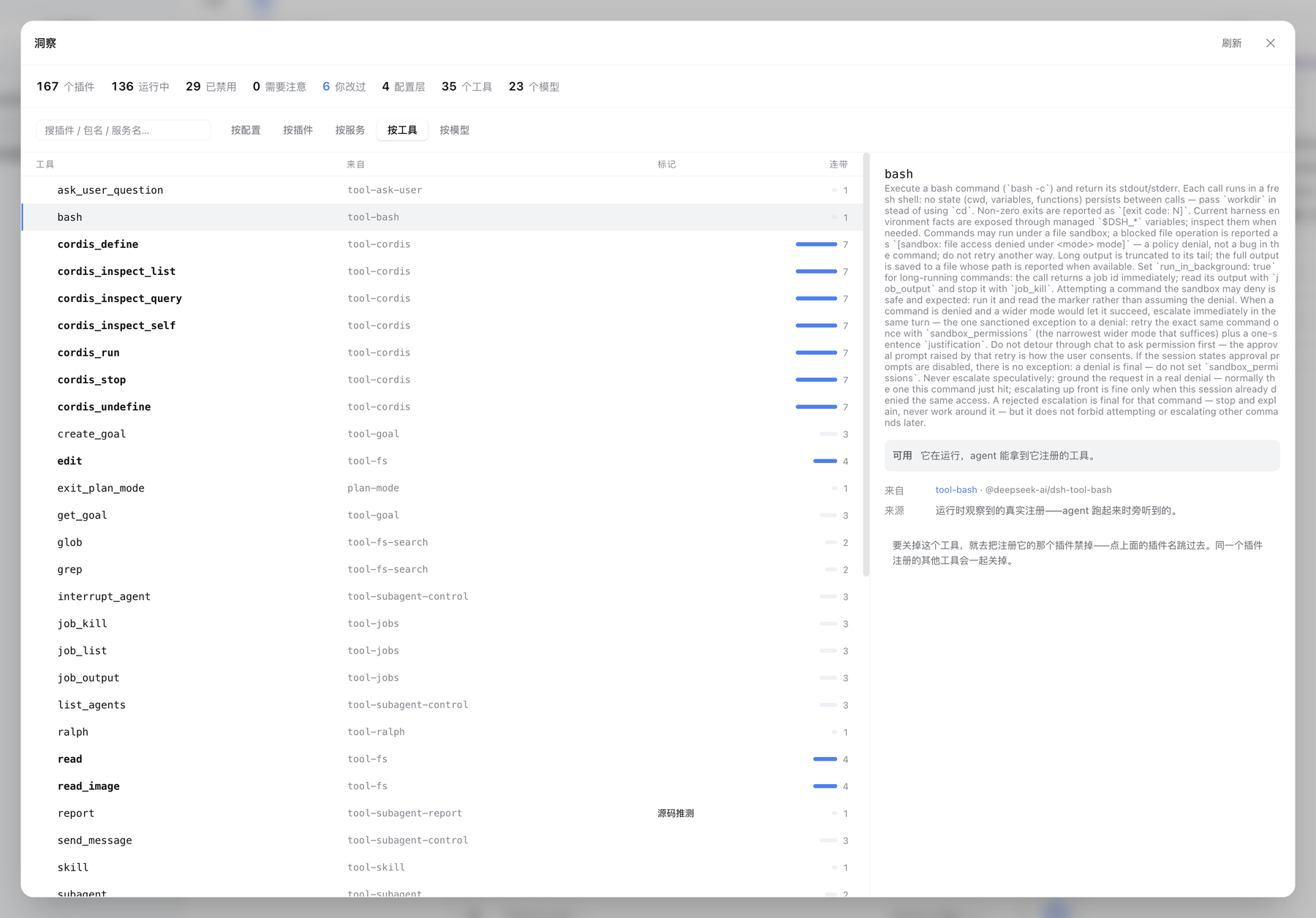
One row per tool name — bash, read, exit_plan_mode — not per plugin. Each one carries the package that registered it, its description, and how many sibling tools would disappear with it, because turning a tool off means disabling the plugin that registers it.
Upstream records no registrant on a tool definition, and tools are not registered until an agent is constructed. So this axis is assembled two ways and says which one it used: observed at runtime (the panel listens in as registration happens and attributes it by call stack) or inferred from source (a scan of the plugin's build output, marked as such — it can miss a name computed at runtime). A request is open upstream for the field that would make the second path unnecessary.
按模型 · By model — every model and how it got here
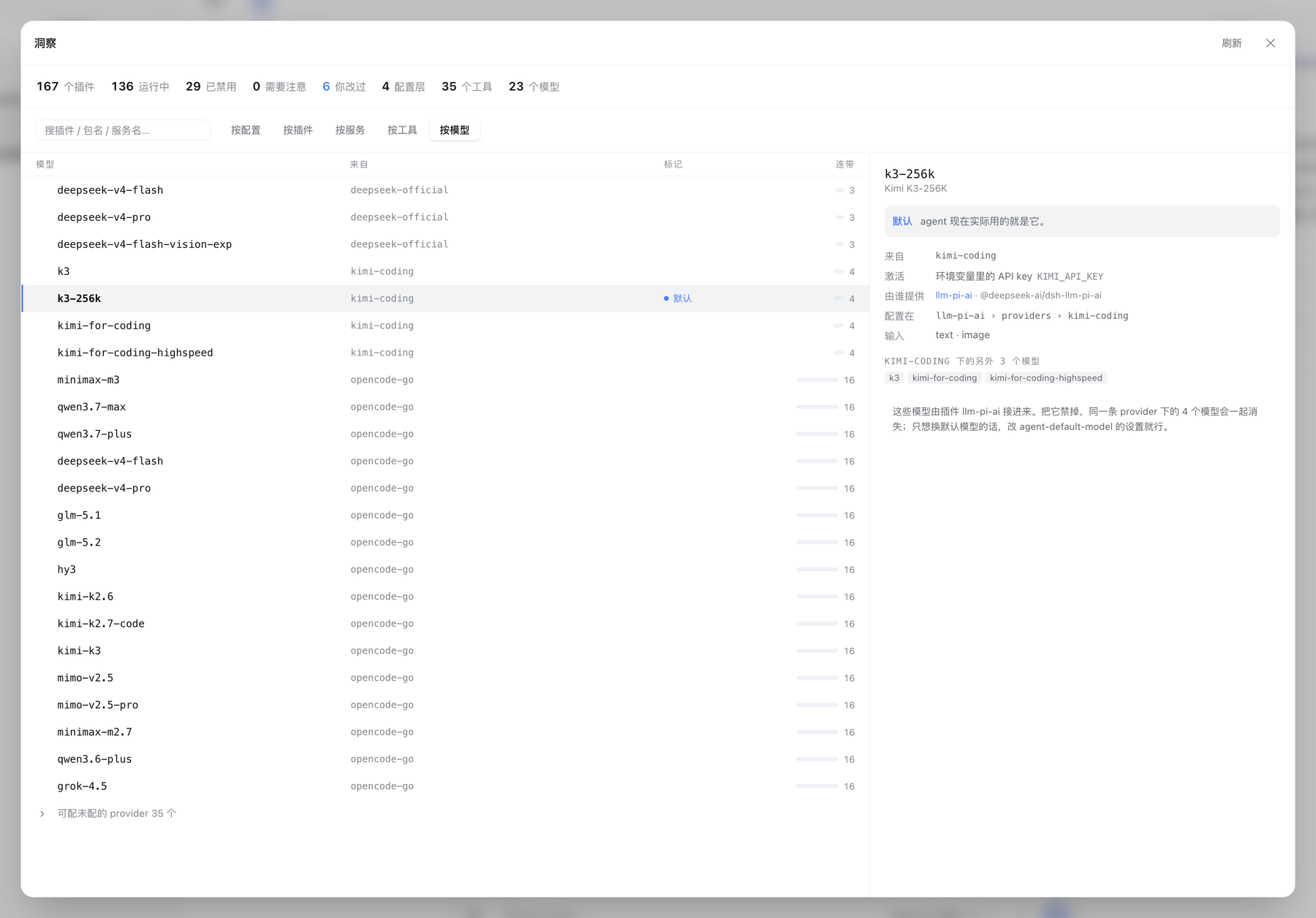
One row per model, with the provider route it belongs to and the plugin that brought that route in. The detail pane names the exact settings path its configuration lives at, and how the route is activated — an API key from an environment variable, a stored API key, or an OAuth grant. Provider routes that upstream declares as configurable but you have not set up are folded away at the end.
Nothing here touches the network: the panel reads the llm service's own read-only faces, never the model-discovery endpoint that would call your providers.
按预设 · By preset — who handed the session its toolkit
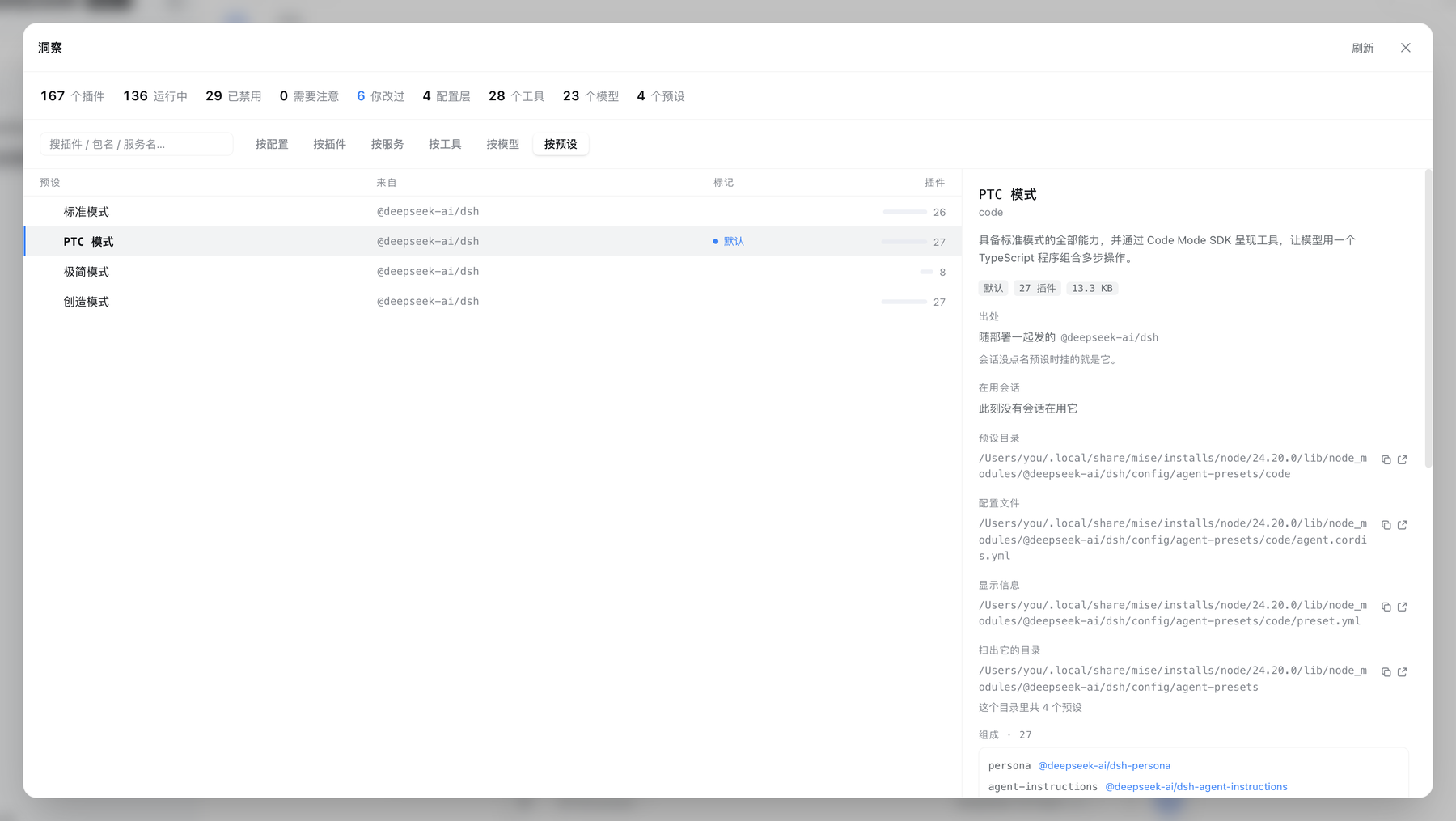
A preset is one agent-plane plugin composition. A session picks one when it starts, and that decides which tools it holds and which prompt sections it sees. One row per preset, answering four things:
- How many, which is the default, and how many sessions are on it right now. Usage follows upstream's
resolveSessionPresetrule: the creation header names the starting preset, every later switch is a logged event, and the last one wins — reading the header alone would count a switched session under the preset it was created with. When live session data is unavailable the panel says so rather than reporting "nobody". - Shipped / third-party / local. Upstream records only
system(shipped with the deployment) anduser(authored locally), which cannot separate "brought in by a third-party plugin". This axis classifies again by where the root directory sits on disk — the same rule every other axis uses — and names which package supplied it. A locally authored preset carries the same trust as shell access: it decides what tools the model holds. - What the configuration actually is. The composition (
agent.cordis.yml) is listed row by row: private realms on container rows, explicitly disabled rows, and rows whose switch is a!!jsexpression are all marked. Expressions are never evaluated: the panel knows an expression exists and refuses to claim the row is on or off. Both files open for reading. - They are not the plugins in the host tree. A preset is mounted only when a session starts, so its rows never appear on the By plugin axis — the detail pane says so, rather than letting you assume something went missing.
A broken preset stays on the roster with its reason: hiding it would leave its directory occupying the id with nothing to see or delete.
Why it refuses to guess
Most of the work in this plugin is in the cases where the honest answer is "I don't know", and saying so instead of showing a plausible number:
- Ambiguous short ids get no attribution. The same short id can exist in two realms (
include:tool-bashandinclude:agent-presets:tool-bash). When a short id is not unique on both sides, the layer that inserted it is left blank rather than guessed. - Unevaluated expressions are not treated as
false.!!jsexpressions in config survive replay as an opaque marker; they are excluded from the drift report instead of being coerced to a boolean. Coercing them produced 22 false "this plugin was disabled" reports before this was fixed. - Multiple candidate providers stay multiple. When two plugins provide the same service name, the panel lists both instead of drawing a confident edge to one.
- Inferred data is labeled. A tool name extracted from build output is marked
inferred; one observed at registration is not. - Settings with no plugin say so. A settings namespace whose owner cannot be identified is labeled as a settings namespace, not shown as a plugin with a blank package.
- Version skew degrades, it does not break. When the host process is older than the browser bundle (a rebuild without a restart), the summary is recomputed in the browser and says so, and an axis whose endpoint the host does not know yet stays empty with an explanation instead of turning the panel red.
Read-only by design
- The panel has exactly one write path: the Disable / Enable action on the By plugin axis. There is no other edit surface, and that one path is fenced:
- It writes one file only — your profile patch layer (
$DSH_HOME/profiles/<name>/cordis.patch.yml) — and the target must resolve inside$DSH_HOMEand outsidenode_modules. Bundle layers belong to the package manager and the home layer is shared across profiles; neither is touched. - It edits text line by line and never re-serializes the YAML. Round-tripping through a YAML library produces valid syntax and erases every comment you wrote — and those comments are the only record of why something was turned off. Only the one line that must change is touched; a newly appended entry carries a comment saying which tool added it.
- It takes two clicks, with the confirm state in red, reverting on its own after 2 seconds.
- An ambiguous short id is refused: a patch targets by id, and when the same short id exists twice at runtime the write would hit both — the panel does not guess. An id that does not exist at runtime is refused too, rather than leaving a patch that can never match.
- The write is atomic: a temp file in the same directory, then a rename.
- It writes one file only — your profile patch layer (
- Credential bodies are never read.
.credentials.yamlis listed for its path and size and is excluded from the preview allowlist. Activation methods are read through the credential service's enumeration face, whose contract is "every stored record, values excluded" — the panel learns that a record is an API key or an OAuth grant, never what it contains. - File preview is allowlisted.
files/readandfiles/openaccept only paths the host itself discovered, validated after resolution. - Only two actions leave the browser, and both take your click:
- Open in editor, on an allowlisted config file or plugin directory.
- Restart now — stop this dsh and start it again exactly the way it was launched (no file is touched; only the process changes). It takes two clicks; it is disabled while any session is running; and it defaults to off when systemd is detected, because restarts belong to the supervisor there.
DSH_INSIGHT_ALLOW_RESTART=0turns it off for good,=1forces it on. The button depends on no other plugin.
- The tool observer wraps
tools.registerin memory only. It writes no files, and touches neithernode_modulesnor the harness installation.
Development
pnpm install
pnpm check          # typecheck + build + 83 tests

dsh plugin --profile <name> add /path/to/dsh-insight   # install the working copy
dsh --profile <name>
pnpm watch rebuilds on change; the harness picks up the new bundle on page reload.