Progressive
November 19, 2025 · View on GitHub

A simple, open-source TODO list and progress tracker for Windows and Linux. Built with ❤️ using Tauri and Svelte.


📋 Table of Contents
- Features
- Getting Started
- Installation
- Usage
- Contributing
- Roadmap
- Frequently Asked Questions
- License
- Acknowledgements
🌟 Features
📊 Nested and slider tasks
Organize your work with hierarchical task structures. Break down complex projects into manageable subtasks and keep exact progress on each of them.
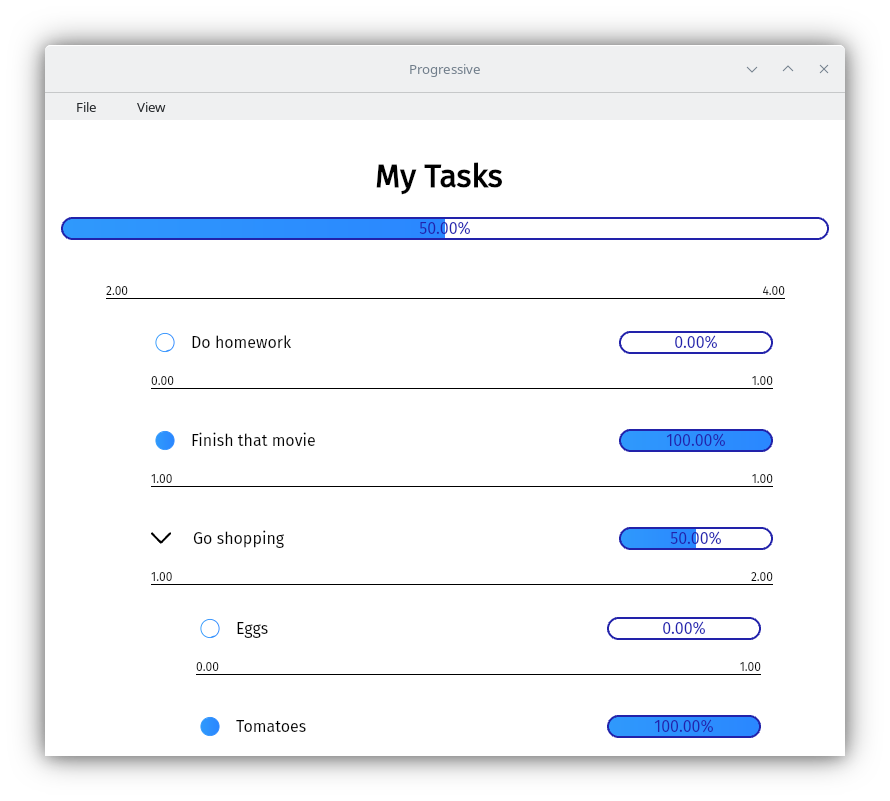
⚖️ Task Weights
Assign importance to your tasks. Heavier tasks contribute more to your overall progress.
🔢 Weight Interpretation
Weights can be interpreted and rendered as different units, making it easier to understand task importance in various contexts.
🎨 Custom Themes
Personalize your experience with custom color schemes.
🚀 Getting Started
System Requirements
- 2 GB RAM
- 100 MB free disk space
📥 Installation
Windows
- Visit the Releases page on GitHub.
- Download the latest version of the application.
- Run the installer and follow the prompts.
Linux
Install the app from its flathub page
Building from source (Windows, Linux and MacOS)
Warning
The application has not been tested in MacOS, it may or may not work correctly.
-
Install dependencies Check tauri's prerequisites and follow the instructions. You will need to install NodeJS, Rust, and a few other platform-dependent dependencies.
-
Clone the repository:
git clone https://github.com/h8moss/progressive cd progressive -
Install dependencies:
npm install -
Build the project:
npm run tauri build
If you encounter any issues during installation or have suggestions for improving cross-platform support, please open an issue on our GitHub repository.
🖱️ Usage
- Launch Progressive from your applications menu or desktop shortcut.
- Here you may start a new tracker or open an existing one
- To add new tasks right click anywhere within the main task and click "new child" or press the big plus button at the bottom.
- To create subtasks first right click any existing task and click "make childful", then right click it and click "new child"
🛠️ Customization
Creating Custom Themes
- Navigate to
AppData/Roaming/com.h8m0ss.progressive/themes. - Create a new JSON file for each theme.
- Define the theme properties:
{
  "name": "My Custom Theme",
  "textColor": "#000000",
  "textColorB": "#FFFFFF",
  "backgroundColor": "#F0F0F0",
  "darkenColor": [10, 10, 10],
  "highlightColorA": "#4CAF50",
  "highlightColorB": "#45a049"
}
For more details, check out the default themes.
🤝 Contributing
We welcome contributions! Here's how you can help:
- Fork the repository.
- Create a new branch:
git checkout -b feature/your-feature-name. - Make your changes and commit them:
git commit -m 'Add some feature'. - Push to the branch:
git push origin feature/your-feature-name. - Submit a pull request.
🗺️ Roadmap
- Custom weight units
- Setting default theme
- Duplicating tasks
❓ Frequently Asked Questions
Q: Can I sync my tasks across multiple devices? A: Progressive is, and will always remain, a fully offline application, we will never send your tasks over to a server, that being said, you can use an application like syncthing to keep your files perpetually synced across devices
Q: Is there a mobile version available? A: Absolutely no!!!! This is something that we do not have planned as it would require a full rewrite of the application
Q: How can I report a bug or request a feature? A: Please use our GitHub Issues page to report bugs or suggest new features.
📄 License
This project is licensed under the GNU GPLv3 License - see the LICENSE file for details.
🙏 Acknowledgements
Icons
- Arrow-right icon by ByPeople (Public Domain)
- Settings icon by Vmware (MIT License)
- Edit and Save icon by Konstantin Filatov (CC Attribution License)
Icons sourced from SVG Repo.
Technologies
Made with ☕ by Daniel Armenta © 2023