Apotrope
July 20, 2026 · View on GitHub
Portable Windows security posture auditor. A Lynis for Windows. A single
executable (or pip install apotrope, MIT-licensed) that runs entirely on the
machine it audits, talks to no network, and is read-only. It checks 50+ controls
across 14 categories against CIS Microsoft Windows Benchmarks (Windows 11 v5.0.0,
Windows 10 v4.0.0), scores the box 0 to 100, and hands back a scored terminal
report or a self-contained HTML report you can send to someone who wasn't in the
room.




Website: apotrope.sh
Why Apotrope?
Most posture tools want something before they'll help you: a cloud account, a license key, an agent to install, your data shipped off to a dashboard somewhere. Apotrope wants none of it. It's a single executable. Drop it on a USB stick, run it on any Windows machine, and you get a 0–100 score plus a list of exactly what's wrong and how to fix it — in plain English, not bare control IDs, with a ready-to-paste PowerShell command for every issue.
Run it as Administrator for the full picture. It works without admin too; a handful of checks (BitLocker, some policy reads) just come back limited.
How Apotrope compares
| Apotrope | CIS-CAT Lite | HardeningKitty | Harden Windows Security (HotCakeX) | Lynis | |
|---|---|---|---|---|---|
| Platform | Windows 10/11 | Windows (+others) | Windows | Windows¹ | Linux/macOS/BSD |
| Install | Single .exe or pip | Java app | PowerShell module | Microsoft Store (MSIX)¹ | Shell script |
| Account / signup | None | Yes¹ | None | None¹ | None |
| Mode | Read-only audit | Read-only audit | Audit and apply¹ | Applies hardening; verifies its own baseline¹ | Read-only audit |
| CIS mapping | CIS Win11 v5.0.0 / Win10 v4.0.0 | CIS (authoritative) | CIS / Microsoft / BSI¹ | Own baseline (not CIS)¹ | CIS / various |
| Automation | JSON, exit codes, baseline diff, TOML profiles | Scripted runs¹ | PowerShell-native¹ | GUI + headless CLI (JSON, exit codes)¹ | CLI + log |
| Output | Score + HTML + JSON | Scored HTML | CSV¹ | GUI score; CLI JSON export¹ | Terminal + log |
| License | MIT | Free tier / paid Pro | MIT¹ | MIT | GPLv3 |
¹ Verify current details with each project before relying on them. Lynis is listed for context; it does not run on Windows. Harden Windows Security does a different job — it applies a hardened baseline (and is excellent at it) rather than auditing against an external benchmark; see the FAQ.
Quick Start — Standalone Executable
No Python required.
- Download
apotrope.exefrom the Releases page - Open Command Prompt or PowerShell as Administrator (Right-click the Start button → Terminal (Admin) or search for cmd → Run as administrator)
- Navigate to the folder where you saved the file — for example, if it's in Downloads:
cd $env:USERPROFILE\Downloads
(in Command Prompt: cd %USERPROFILE%\Downloads)
- Run:
.\apotrope.exe
Note: the
.\prefix is required — PowerShell doesn't run programs from the current folder by bare name..\apotrope.exeworks in Command Prompt too (where plainapotrope.exeis also fine).
For a full HTML report:
.\apotrope.exe --html report.html
Then open report.html in your browser.
Every issue is shown with a copy-paste-ready PowerShell command by default — no extra flags needed.
Verify Your Download
apotrope.exe is not yet Authenticode-signed (no code-signing certificate yet —
expect a SmartScreen warning on first run). PyInstaller-packaged executables
also sometimes trip antivirus machine-learning heuristics, so a few generic
detections on VirusTotal are expected for this class of binary; if your AV
quarantines the exe, pip install apotrope is the alternative channel.
Instead of asking you to trust a bare binary, the downloaded exe is verifiable
two ways — both steps below operate on apotrope.exe, so they apply to the
GitHub release only, not to a pip install.
1. Verify build provenance — releases from v0.1.10 onward are built on GitHub-hosted CI and attested at build time. Requires the GitHub CLI, logged in with any GitHub account:
gh attestation verify .\apotrope.exe --repo hexorcist404/apotrope
A successful result proves the file was built by a GitHub Actions workflow in
this repository and hasn't been altered since — not built on someone's laptop,
not modified in transit. The output shows exactly which workflow, commit, and
tag produced the file: check that it names release.yml and the tag you
downloaded. (This proves origin, not correctness — the source is right here
for that.)
2. Verify the SHA-256 hash against the release notes and the SHA256SUMS
file attached to releases from v0.1.10 onward:
Get-FileHash .\apotrope.exe -Algorithm SHA256
or in Command Prompt:
certutil -hashfile apotrope.exe SHA256
(Hex case differs between tools; the comparison is case-insensitive.) Honest caveat: the hash is published on the same release page as the exe, so this step catches download corruption and tampered mirrors — not a compromised repository. Step 1 is the authenticity check; this is the quick integrity check.
Installed with pip, or prefer not to run a downloaded exe at all? Then
there's no apotrope.exe on disk to hash or attest — the two steps above don't
apply to you. pip install apotrope gets the
same tool from PyPI, where every release is published straight from CI via
trusted publishing (OpenID
Connect, no long-lived tokens) with PEP 740
attestations — visible on the PyPI project page; pip itself doesn't verify
attestations at install time yet.
Note: v0.1.9 and older were built and attached by hand, before CI-built releases existed. They cannot carry build-provenance attestations — verify them by hash instead (v0.1.9's SHA-256 is published in its release notes).
Terminal Output
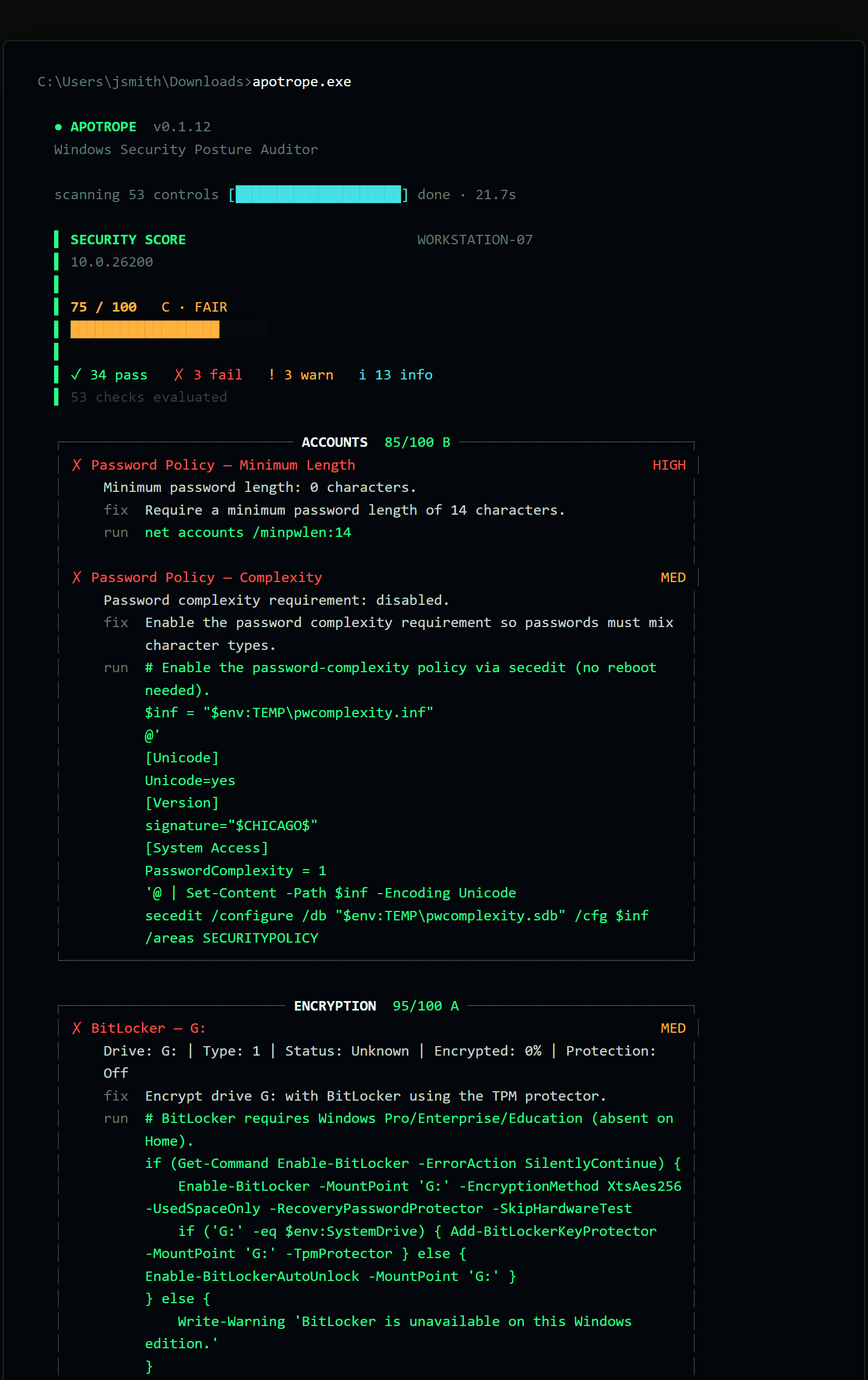
Standard scan (default view) — a triage view: every category with issues gets its own box listing each FAIL/WARN finding with its fix and a ready-to-paste PowerShell command:
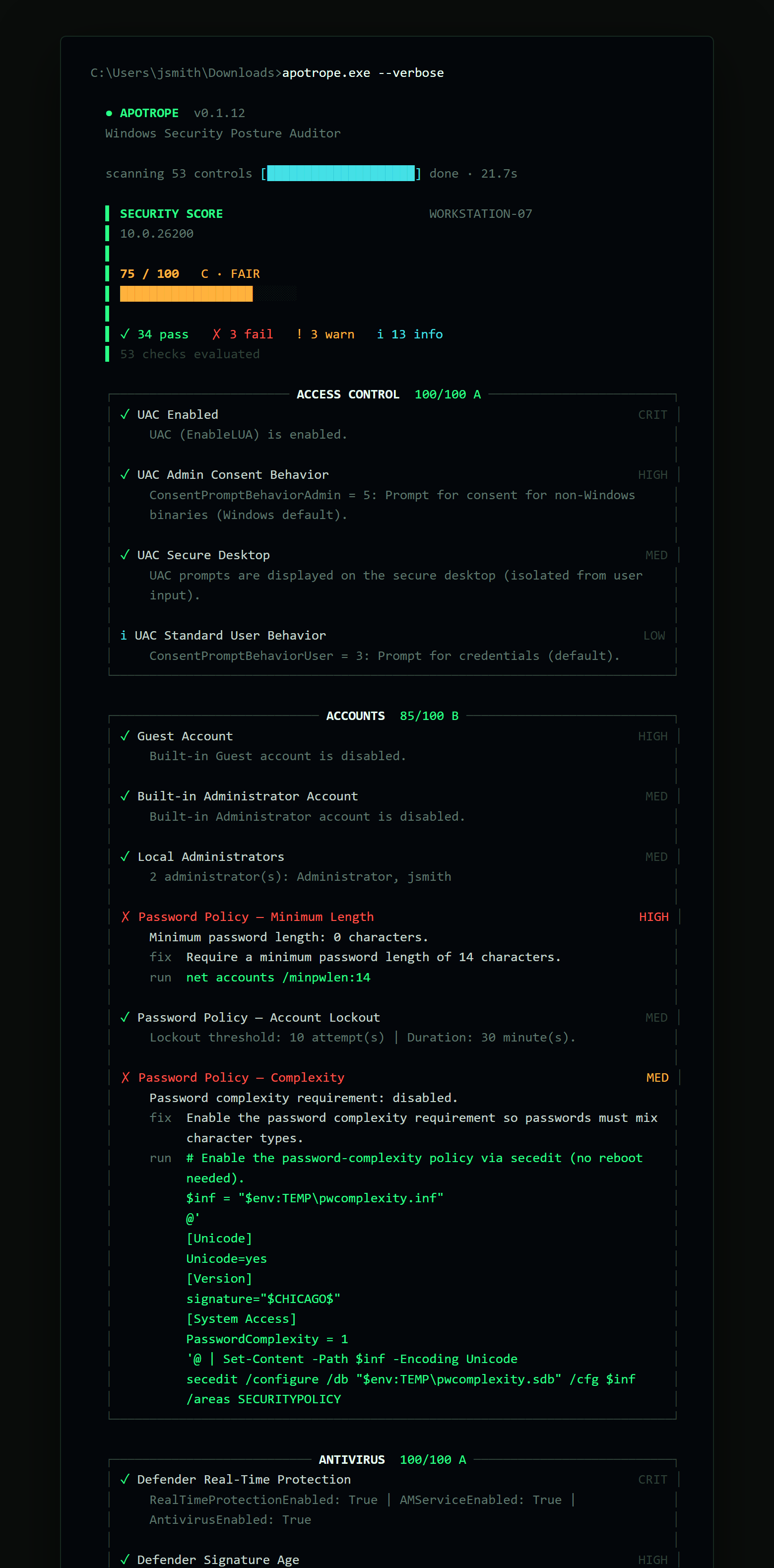
Verbose mode (--verbose) — the same boxes for every category and every check,
passing ones included:
Executive Report
Alongside the technical --html report, --exec-report FILE produces the
Security Posture Assessment — a plain-English, print-first HTML document aimed at
non-technical decision makers (managers, owners, auditors) rather than the engineer
running the scan. It opens with a graded cover and a generated verdict, then an
executive-summary narrative, a posture-at-a-glance panel, a P1/P2/P3 remediation
roadmap, detailed findings that pair each issue with its business impact, and
passed-controls attestation and remediation-command appendices. Every sentence is
generated strictly from your scan data; the business-impact notes are curated,
category-level context — not claims about your specific machine. The file is fully
self-contained and script-free, with letter-size print styling, so it can be handed
off or printed to PDF.
Generate it together with the technical report and the report's header gains an "Executive Report ↗" link to it:
.\apotrope.exe --html report.html --exec-report assessment.html
The two must be different files.
Installation via pip
Requires Python 3.12+ and Windows 10/11 or Server 2019/2022.
Install from PyPI:
pip install apotrope
apotrope
Or install from source:
git clone https://github.com/hexorcist404/apotrope.git
cd apotrope
pip install -e .
apotrope
Authorized Use Notice
Apotrope is a READ-ONLY auditing tool. It does not modify any system settings, write to the registry, or make network connections. All data stays on the machine being audited.
Only run Apotrope on systems you own or have explicit written authorization to audit. Unauthorized use may violate computer fraud laws in your jurisdiction.
How Apotrope queries your system
Apotrope uses PowerShell subprocesses with -ExecutionPolicy Bypass to read system
configuration. This flag is required so the tool can run under any locally configured
execution policy — including the default Restricted — without requiring you to
change your policy. (An execution policy enforced through Group Policy takes
precedence and is not overridden.) No scripts are written to disk. Each command is
a read-only query passed directly to the PowerShell process; the bypass applies only
to that subprocess and does not change the machine's policy setting.
Sharing reports safely
Generated reports (--html / --exec-report / --json) are written only to your
machine — Apotrope never uploads them. But because a report's job is to inventory your security posture, it
embeds machine-identifying and configuration detail: hostname, domain/workgroup, local
administrator account names, listening ports and the processes behind them, service
executable paths, and startup/scheduled-task names. Treat a saved report like any other
sensitive configuration export — review and redact it before sending it outside your
organization (a vendor, a support ticket, a chat). The HTML report repeats this reminder
in its footer.
Usage
apotrope [OPTIONS]

Options:
  --html PATH          Save a self-contained HTML report to PATH
  --exec-report PATH   Save a plain-English executive report (Security Posture
                       Assessment) to PATH — print-first, for decision makers
  --json PATH          Save a JSON report to PATH
  --baseline FILE      Save current scan as a JSON baseline for future comparisons
  --compare  FILE      Compare current scan against a saved baseline
  --profile  FILE      Load a custom check profile from a TOML file
  --category CATS      Comma-separated list of categories to audit
                       (e.g. firewall,encryption,patching)
  --dry-run            List check modules that would run without executing them
  --verbose            Show detail for every check, including PASSes
  --no-color           Disable Rich color output (for CI / log files)
  --log-level LEVEL    Logging verbosity: DEBUG, INFO, WARNING (default), ERROR
  --version            Show version and exit
  -h, --help           Show this help message and exit

Exit codes:
  0  Score >= 70 (passing)
  1  Score < 70 (failing)
  2  Fatal scan error
Note:
--htmland--exec-reportmust point to different files. If both resolve to the same path, Apotrope exits with an argument error before scanning, so the technical report can't silently overwrite the executive one.
Examples
# Full audit, terminal only
apotrope

# Save HTML report
apotrope --html report.html

# Technical report + plain-English executive report (the technical report's
# header links to the executive one when both are generated together)
apotrope --html report.html --exec-report assessment.html

# Save JSON for automation / SIEM integration
apotrope --json report.json

# Audit only firewall and patching
apotrope --category firewall,patching

# Show pass/fail details for every check
apotrope --verbose

# Silent mode for scripts (exits 0 if score>=70, 1 if score<70, 2 on error)
apotrope --no-color --log-level ERROR
echo Exit code: %ERRORLEVEL%

# Save a baseline, then compare on the next run
apotrope --baseline baseline.json
apotrope --compare  baseline.json

# Apply a custom check profile (e.g. for MSP clients)
apotrope --profile myprofile.toml

# List which checks would run without executing anything
apotrope --dry-run
Custom Profiles (apotrope.toml)
Create a apotrope.toml in your working directory (or pass --profile FILE)
to customise scan behaviour:
[profile]
name = "MSP-Baseline"

[disabled_checks]
# Skip checks irrelevant to this environment
checks = [
    "SMBv1 Disabled",
    "Firewall — Public Default Inbound Action",
]

[severity_overrides]
# Downgrade noisy low-risk checks
"Defender Tamper Protection" = "LOW"

[thresholds]
# Allow 45 days between updates before warning (default: 30)
max_update_age_warn = 45
max_update_age_fail = 90
Scoring System
Apotrope calculates a 0–100 security score by starting at 100 and deducting points for failed and warned checks, weighted by severity:
| Outcome | Severity | Deduction |
|---|---|---|
| FAIL | CRITICAL | -15 |
| FAIL | HIGH | -10 |
| FAIL | MEDIUM | -5 |
| FAIL | LOW | -2 |
| WARN | CRITICAL | -7 |
| WARN | HIGH | -5 |
| WARN | MEDIUM | -2 |
| WARN | LOW | -1 |
The score is clamped to [0, 100].
Grade scale:
| Score | Grade | Label |
|---|---|---|
| 90-100 | A | Excellent |
| 80-89 | B | Good |
| 70-79 | C | Fair |
| 60-69 | D | Poor |
| 0-59 | F | Critical |
INFO and ERROR results do not affect the score.
CIS Benchmark Mapping
Where applicable, findings are mapped to CIS Microsoft Windows Benchmark control IDs. These references appear as blue badges in the HTML report's detailed findings section, making Apotrope useful for compliance documentation and audit preparation. Mappings are based on the CIS Microsoft Windows 11 Enterprise Benchmark v5.0.0 and CIS Microsoft Windows 10 Enterprise Benchmark v4.0.0. The correct version is selected automatically based on the OS build number at scan time.
Attribution: CIS Benchmarks are the registered trademarks of the Center for Internet Security, Inc. Apotrope is an independent tool that references CIS Benchmark recommendations for informational purposes. This project is not affiliated with, endorsed by, or sponsored by CIS. To obtain the official CIS Benchmarks, visit cisecurity.org.
Checks Performed
| Category | Check | Description |
|---|---|---|
| Access Control | UAC Admin Consent Behavior | Checks the UAC consent prompt behavior for administrator accounts |
| Access Control | UAC Enabled | Checks whether User Account Control (UAC) is enabled |
| Access Control | UAC Secure Desktop | Checks whether UAC prompts are shown on the isolated secure desktop |
| Access Control | UAC Standard User Behavior | Checks the UAC consent prompt behavior for standard user accounts |
| Accounts | Built-in Administrator Account | Checks whether the built-in Administrator account is enabled or renamed |
| Accounts | Guest Account | Checks whether the built-in Guest account is disabled |
| Accounts | Local Administrators | Counts members of the local Administrators group (warns if > 2) |
| Accounts | Password Policy — Account Lockout | Checks whether account lockout is configured to deter brute-force attacks |
| Accounts | Password Policy — Complexity | Checks whether password complexity requirements are enforced |
| Accounts | Password Policy — Minimum Length | Checks minimum password length (fail < 8 chars, warn < 12 chars) |
| Antivirus | Defender Real-Time Protection | Checks whether Windows Defender real-time protection is active |
| Antivirus | Defender Signature Age | Checks whether virus definitions are less than 7 days old |
| Antivirus | Defender Tamper Protection | Checks whether Tamper Protection prevents unauthorised Defender changes |
| Antivirus | Registered AV Products | Lists antivirus products registered with Windows Security Center |
| Encryption | BitLocker — {drive} * | BitLocker encryption and protection status per fixed drive (one result per drive) |
| File Sharing | SMB Encryption * | Checks whether SMB encryption (EncryptData) is enforced |
| File Sharing | SMB Signing Required * | Checks that SMB message signing is required (mitigates NTLM relay attacks) |
| File Sharing | SMBv1 Disabled * | Checks that SMBv1 is disabled (mitigates EternalBlue/WannaCry/NotPetya) |
| Firewall | Firewall — Domain Default Inbound Action | Checks that the Domain profile does not explicitly allow all inbound connections |
| Firewall | Firewall — Domain Profile Enabled | Checks whether Windows Firewall is enabled for domain networks |
| Firewall | Firewall — Private Default Inbound Action | Checks that the Private profile does not explicitly allow all inbound connections |
| Firewall | Firewall — Private Profile Enabled | Checks whether Windows Firewall is enabled for private networks |
| Firewall | Firewall — Public Default Inbound Action | Checks that the Public profile does not explicitly allow all inbound connections |
| Firewall | Firewall — Public Profile Enabled | Checks whether Windows Firewall is enabled for public networks |
| Hardening | Audit Policy | Checks that key subcategories (Logon, Lockout, etc.) log success/failure events |
| Hardening | AutoPlay Disabled | Checks whether AutoPlay is disabled for all drive types |
| Hardening | Screen Lock Timeout | Checks that the screen automatically locks within 15 minutes of inactivity |
| Hardening | Speculative Execution Mitigations | Checks whether Spectre/Meltdown mitigations have been explicitly disabled |
| Hardening | WinRM Status | Checks whether the Windows Remote Management (WinRM) service is running |
| Network | IPv6 Status | Reports whether IPv6 is active on any network adapter (informational) |
| Network | LLMNR Disabled | Checks whether LLMNR is disabled (susceptible to poisoning/Responder attacks) |
| Network | Listening Port — {port}/{service} | Flags known-dangerous listening ports: FTP (21), Telnet (23), TFTP (69), RDP (3389) |
| Network | Listening Ports — Summary | Enumerates all TCP ports currently in LISTEN state (informational) |
| Network | NetBIOS over TCP/IP | Checks whether NetBIOS over TCP/IP is disabled on all network adapters |
| Patching | Last Windows Update | Checks when the most recent update was installed (warn > 30 days, fail > 60 days) |
| Patching | Pending Windows Updates | Counts Windows Updates that are available but not yet installed |
| Patching | Windows Update Service | Checks whether the Windows Update (wuauserv) service is running |
| Persistence | Scheduled Tasks | Enumerates non-Microsoft scheduled tasks (potential persistence points) |
| Persistence | Startup Programs | Enumerates programs configured to run at startup (registry Run keys + folders) |
| PowerShell | PowerShell Constrained Language Mode | Checks whether PowerShell Constrained Language Mode is active |
| PowerShell | PowerShell Execution Policy | Checks the LocalMachine execution policy (warns on Unrestricted/Bypass) |
| PowerShell | PowerShell Module Logging | Checks whether PowerShell module pipeline logging is enabled |
| PowerShell | PowerShell Script Block Logging | Checks whether Script Block Logging is enabled (critical for forensics/IR) |
| PowerShell | PowerShell v2 | Checks whether PowerShell v2 is installed (downgrade attack vector) |
| Remote Access | RDP Enabled | Checks whether Remote Desktop Protocol is enabled |
| Remote Access | RDP Network Level Authentication † | Checks whether NLA is required for RDP connections |
| Remote Access | RDP Port † | Reports the RDP listening port (informational) |
| Services | Risky Services / Risky Service — {name} | Flags known-dangerous services if running: Remote Registry, Telnet, SNMP |
| Services | Unquoted Service Paths | Detects services with unquoted executable paths containing spaces (privilege-escalation vector) |
| System | Domain Membership | Reports whether the machine is domain-joined or in a workgroup (informational) |
| System | OS End-of-Support Status | Checks whether the installed Windows build is still supported by Microsoft |
| System | OS Version | Reports the installed Windows version and build number (informational) |
| System | Secure Boot | Checks whether UEFI Secure Boot is enabled |
| System | System Uptime | Checks system uptime (warns if > 30 days, suggesting pending patch reboots) |
| System | TPM Status | Checks whether a TPM chip is present and functional |
* Requires Administrator privileges for full results. † Only emitted when RDP is enabled.
Building the Executable
Prerequisites: Python 3.12+, pip install pyinstaller pillow
python build_exe.py
The exe will be at dist/apotrope.exe. To build without the custom icon:
python build_exe.py --no-icon
Contributing
- Fork the repo and create a branch:
git checkout -b feat/my-change - Make your changes — each check module is self-contained in
src/apotrope/checks/ - Add or update tests in
tests/ - Run
pytest tests/ -q— all tests must pass - Open a pull request into
main
Adding a New Check Module
Create src/apotrope/checks/mycheck.py with:
from apotrope.models import CheckResult, Severity, Status

CATEGORY = "MyCategory"
# REQUIRES_ADMIN = True  # uncomment if elevation is needed

def run() -> list[CheckResult]:
    # ... query the system ...
    return [CheckResult(
        category=CATEGORY,
        check_name="My Check Name",
        status=Status.PASS,       # PASS | FAIL | WARN | INFO | ERROR
        severity=Severity.HIGH,   # CRITICAL | HIGH | MEDIUM | LOW | INFO
        description="What this check verifies.",
        details="What was found.",
        remediation="",           # empty string for PASS
    )]
The scanner auto-discovers all modules in checks/ — no registration needed.
FAQ
How is this different from Harden Windows Security (HotCakeX)?
Different job. Harden Windows Security changes your machine to a hardened baseline — it's excellent at that. Apotrope never changes anything; it's a read-only assessor that scores any box against CIS Benchmarks. Audit with Apotrope, harden with Harden Windows Security or Group Policy, then re-audit. They compose.
How do I verify that my download is legitimate?
See Verify Your Download: check the SHA-256 published
with the release, and — from v0.1.10 onward — verify CI build provenance with
gh attestation verify. Or skip the exe entirely with pip install apotrope.
Is Apotrope affiliated with CIS?
No. Apotrope independently references CIS Benchmark control IDs for informational purposes. It is not affiliated with, endorsed by, or sponsored by CIS. For the official benchmarks and tooling, see cisecurity.org.
License
MIT — see LICENSE.