Hyprpunk
March 14, 2026 · View on GitHub
A complete Hyprland desktop environment profile for Fedpunk
Keyboard-driven workspace with live theming, vim-style navigation, and modern development tools


See It In Action
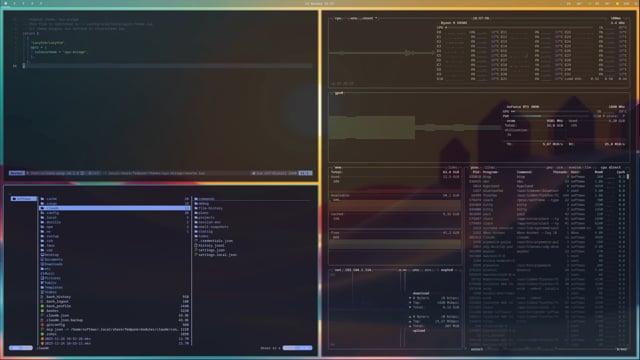
Click to watch: Live theme switching, keyboard-driven workflow, and seamless module deployment
Watch Full Demo on Vimeo
Quick Start
# Install Fedpunk
sudo dnf copr enable hinriksnaer/fedpunk
sudo dnf install fedpunk

# Deploy hyprpunk
fedpunk profile deploy https://github.com/hinriksnaer/hyprpunk.git --mode desktop
Other modes:
# Laptop (no NVIDIA, battery optimized)
fedpunk profile deploy https://github.com/hinriksnaer/hyprpunk.git --mode laptop

# Container (terminal only, no GUI)
fedpunk profile deploy https://github.com/hinriksnaer/hyprpunk.git --mode container
What's Included
Desktop Environment
- Hyprland - Wayland compositor with vim-style navigation
- Kitty - GPU-accelerated terminal
- Rofi - Application launcher
- Hyprlock - Screen locker
- Mako - Notification daemon
Development Tools
- Neovim - Text editor with full LSP support
- Tmux - Terminal multiplexer
- Lazygit - Git TUI
- Yazi - File manager TUI
- GitHub CLI - GitHub integration
Applications
- Zen Browser - Privacy-focused browser
- Bitwarden CLI - Password manager
- Spotify - Music (Flatpak)
- Discord - Communication (Flatpak)
- Slack - Team collaboration (Flatpak)
Themes
12 themes with instant live-reload across all applications:
| Theme | Style |
|---|---|
| aetheria | Ethereal purple/blue gradients |
| ayu-mirage | Warm desert tones |
| catppuccin | Soothing pastel (mocha) |
| catppuccin-latte | Light mode elegance |
| matte-black | Pure minimalism |
| nord | Arctic cool tones |
| osaka-jade | Vibrant teal/green |
| ristretto | Rich espresso browns |
| rose-pine | Soft rose/pine palette |
| rose-pine-dark | Deep rose/pine |
| tokyo-night | Deep blues with neon |
| torrentz-hydra | Bold high contrast |
Theme Commands
hyprpunk-theme-list          # List themes
hyprpunk-theme-set tokyo-night   # Switch theme
hyprpunk-theme-next          # Next theme
hyprpunk-wallpaper-next      # Next wallpaper
Shortcuts:
Super+T- Theme selectorSuper+Shift+T- Next themeSuper+Shift+W- Next wallpaper
Theme Previews
Ayu Mirage

Tokyo Night

Torrentz Hydra

Modes
| Mode | Use Case | Includes |
|---|---|---|
| desktop | Full workstation | GUI, NVIDIA, audio, bluetooth |
| laptop | Mobile use | GUI, no NVIDIA, battery optimized |
| container | Development | Terminal tools only |
Keyboard Shortcuts
Windows
Super+Return- TerminalSuper+Q- Close windowSuper+H/J/K/L- Focus (vim-style)Super+1-9- Switch workspaceSuper+Shift+1-9- Move to workspaceSuper+F- FullscreenSuper+V- Float
Apps
Super+Space- LauncherSuper+B- BrowserSuper+E- File manager
Screenshots
Print- SelectionSuper+Print- Full screen
Structure
hyprpunk/
├── modes/           # desktop, laptop, container
├── themes/          # 12 complete themes
└── modules/         # Desktop-focused modules
Requirements
- Fedora 40+
- x86_64
- 8GB RAM (16GB recommended)
- Wayland-capable GPU
License
MIT License - See LICENSE