Jupyter Server Proxy for Panel
October 10, 2025 · View on GitHub
| Downloads |  |
| Build Status |  |
| Latest dev release |  |
| Latest release |     |
| Support |  
|
jupyter-panel-proxy integrates HoloViz Panel seamlessly with Jupyter environments (Notebook, JupyterLab, and JupyterHub).
When installed, it launches a Panel server automatically at the /panel endpoint of your running Jupyter server.
Visiting /panel will display an index of all available applications, and each application can be accessed at /panel/<name_of_file>.
When to use this project
Use jupyter-panel-proxy when you want to:
- Serve Panel apps alongside Jupyter notebooks or JupyterHub — without managing a separate web server.
- Reuse existing authentication from JupyterHub and optionally integrate OAuth2 for finer-grained control.
- Automatically discover and serve multiple Panel apps in a directory structure (no manual
panel serverequired). - Deploy lightweight dashboards and interactive apps close to your notebooks or lab environment.
- Run Panel behind a reverse proxy with clean URL prefixing (
/panel), and modern server features.
Installation
You can install jupyter-panel-proxy from PyPI:
pip install jupyter-panel-proxy
or from conda:
conda install conda-forge::jupyter-panel-proxy
Once installed, a Panel server will be available at:
https://<your-jupyter-server>/panel
Configuration
You can configure the behavior of the proxy server by creating a jupyter-panel-proxy.yml file in the directory from which your Jupyter server is launched.
Available configuration keys
| Key | Type | Description |
|---|---|---|
apps | list | List of apps or glob patterns to serve. If not set, apps are discovered automatically by file type. |
file_types | list(str) | File extensions to auto-discover apps (default: ipynb, py). |
exclude_patterns | list(str) | Glob/fnmatch patterns to exclude apps. |
launcher_entry | dict | A jupyter-server-proxy launcher entry. |
index | str | Path to a custom Bokeh index template. |
autoreload | bool | Automatically reload sessions when code changes. It is recommended to use dev instead. |
dev | bool | Automatically reload sessions when code changes. |
admin | bool | Enable Panel's admin module. |
warm | bool | Execute apps on startup to warm up the server. |
num_procs | int | Number of worker processes (0 = auto). |
num_threads | int | Number of threads in the thread pool. |
static_dirs | list | Key=value routes for serving static files. |
reuse_sessions | bool | Reuse existing sessions (recommended for JupyterHub). |
keep_alive | int (ms) | Interval for keep-alive pings to clients. |
check_unused_sessions | int (ms) | How often to check for unused sessions. |
unused_session_lifetime | int (ms) | How long unused sessions last. |
websocket_max_message_size | int | Max message size for WebSocket in bytes. |
root_path | str | Root path can be used to handle cases where Panel is served behind a proxy. |
cookie_path | str | Path to apply cookies to. |
log_level | str | Log level (info, debug, etc.). |
liveness | bool | Enable a liveness endpoint. |
liveness_endpoint | str | Path of the liveness endpoint (default: /liveness). |
profiler | str | Profiler to use (e.g. pyinstrument). |
global_loading_spinner | bool | Add a global loading spinner to the UI. |
oauth_provider | str | OAuth2 provider name. |
oauth_key | str | OAuth2 key. |
oauth_secret | str | OAuth2 secret. |
oauth_redirect_uri | str | OAuth2 redirect URI. |
oauth_extra_params | dict | Additional parameters for the OAuth provider. |
oauth_jwt_user | str | JWT key to identify the user. |
oauth_optional | bool | Allow guest access to all endpoints. |
oauth_guest_endpoints | list(str) | List of endpoints accessible without authentication. |
cookie_secret | str | Secret key for secure cookies (can also be set via PANEL_COOKIE_SECRET). |
oauth_encryption_key | str | Encryption key for OAuth user info (can also be set via OAUTH_ENCRYPTION_KEY). |
Launcher
When you install jupyter-panel-proxy, it automatically adds a Panel Launcher card to the JupyterLab and Notebook launcher interface:
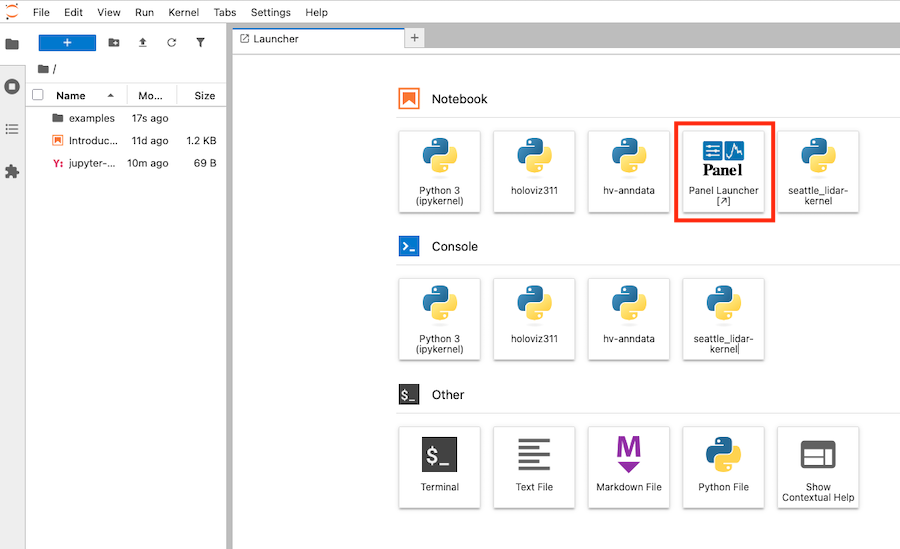
Clicking this Panel tile opens a new browser tab at /panel where your Panel apps are served. This behavior is controlled by the launcher_entry field in the configuration.
Application discovery
By default, jupyter-panel-proxy automatically discovers Panel applications in the current working directory (or in an examples/ subdirectory if present).
The discovery logic works like this:
-
If
appsis defined injupyter-panel-proxy.yml:- Each entry is interpreted as a file path or glob pattern.
- All matching files are included.
-
If
appsis not defined:- The proxy scans the base directory (or
./examplesif it exists) recursively. - It includes files that match any extension listed in
file_types(default:ipynb,py). - It excludes any paths that match
exclude_patterns(by default, this includes common patterns like*setup.pyor*.ipynb_checkpoints*).
- The proxy scans the base directory (or
-
The discovered list of applications is then passed to
panel serve.
Example YAML configuration
# jupyter-panel-proxy.yml

log_level: info
liveness: true
liveness_endpoint: /health
global_loading_spinner: true
How it works
- When the Jupyter server starts, this proxy registers
/panelas a route. - When a user navigates to
/panel, the proxy launchespanel serveinternally with the configured options. - Apps are discovered automatically or defined explicitly.
- The Panel server runs under the same authentication/session as Jupyter, and can optionally integrate OAuth for additional controls.
Further reading
License
BSD-3-Clause