🧰 Flipper Zero Asset Pack Generator
October 19, 2025 · View on GitHub
Overview
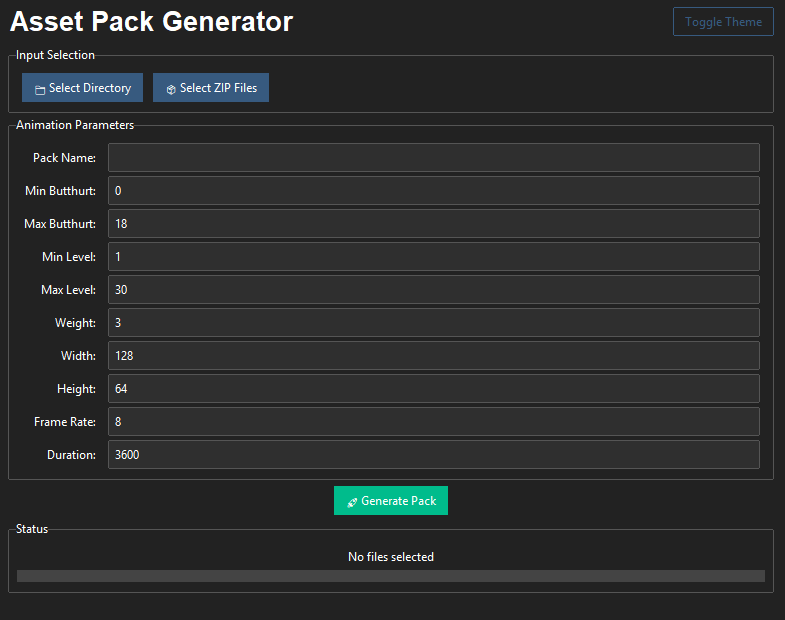
Asset Pack Generator is a Python-based GUI tool designed to transform a collection of GIF-based animation frames into a Flipper Zero-compatible asset pack. This includes proper formatting, frame compression, metadata generation, and packing into a Flipper-usable structure with support for animation parameters.
🔧 Features
-
Friendly GUI interface built with
tkinter -
Accepts either folders or EZGIF zip exports
-
Automatically processes and renames frames
-
Allows customization of:
- Pack name
- Frame size
- Animation metadata (butthurt, level, weight, etc.)
- Duration and frame rate
-
Outputs properly structured Flipper Zero asset packs
-
Compresses frames using Heatshrink2
-
Generates manifest files automatically
🖥️ Requirements & Installation
Required Python Packages
Make sure you are running Python 3.10+ on Windows and have the following packages installed:
pip install pillow heatshrink2
pip install pillow ttkbootstrap
📥 Installation Instructions
You can either clone the repository or manually download and extract the .zip file:
Option 1: Clone from GitHub
git clone https://github.com/hooker01/Flipper-Zero-Asset-Pack-Generator.git
cd Flipper-Zero-Asset-Pack-Generator
Option 2: Download ZIP
- Download the repository ZIP
- Extract it anywhere on your PC
- Open a terminal (CMD or PowerShell) in the folder
🎞️ Preparing the Asset Pack (Image Conversion via EZGIF)
-
Go to: https://ezgif.com
-
Upload a GIF or video file.
-
Convert the video to GIF (if needed).
-
Optionally:
- Crop the image to 2:1 ratio (recommended for 128x64)
- Resize to
128x64pixels - Apply Effects > Monochrome to convert to black & white
- If the output looks broken, try clicking "Unoptimize"
-
Download the ZIP from EZGIF.
- This zip will contain files like:
frame_0_delay-0.1s.png,frame_1_delay-0.1s.png, etc.
- This zip will contain files like:
🚀 Running the Program
Once the setup is complete:
python AssetGenerator.py
⚠️ Note: The selected zip file does NOT need to be in the same folder as the scripts. You can place it anywhere.
🖱️ GUI Instructions & Parameters
Once the GUI window opens, follow these steps:
1. Input Selection
- Click "Select zip file" if you downloaded from EZGIF
- Or click "Select directory" if you manually organized the frames
2. Fill in Configuration
You can customize the following parameters:
| Field | Description | Default |
|---|---|---|
| Pack name | Name of the asset pack folder | N/A |
| Min butthurt | Minimum character trait value | 0 |
| Max butthurt | Maximum character trait value | 18 |
| Min level | Minimum user level | 1 |
| Max level | Maximum user level | 30 |
| Weight | Asset weight (for internal use) | 3 |
| Width | Width of frames (must match input) | 128 |
| Height | Height of frames (must match input) | 64 |
| Frame rate | Frames per second | 8 |
| Duration | Duration in milliseconds | 3600 |
3. Generate the Pack
Click "Generate" to start the process. The program will:
- Rename and sort frames
- Build necessary directories and metadata
- Compress the frames
- Export the result to a selectable directory
🧳 Output Structure
After generation, the output folder (asset_packs) will include:
asset_packs/
└── YourPackName/
    └── Anims/
        ├── manifest.txt
        └── AnimationName/
            ├── frame_0.png
            ├── frame_1.png
            ├── ...
            └── meta.txt
All frames are compressed into .bm format, and manifest files are properly created.
How to Copy Generated Asset Pack to Flipper Zero
To use the generated asset pack on your Flipper Zero device, follow these steps:
-
Locate the generated
YourPackNamefolder inside theasset_packsdirectory on your computer. -
Connect your Flipper Zero device to your computer via USB, or insert its microSD card into your computer.
-
Open the Flipper Zero’s storage and navigate to the
asset_packsdirectory. -
Copy the entire
YourPackNamefolder from your computer’sasset_packsdirectory to the Flipper Zero’sasset_packsdirectory. -
Eject the Flipper Zero or its microSD card from your computer.
-
On the Flipper Zero, the new asset pack will be available for use in the animations section.
⚙️ asset_packer.py - How It Works
This script handles the packing logic including:
- Conversion of
.pngto.bm(1-bit black and white) - Compression via
heatshrink2 - Writing of
.meta,.manifest, and other config files - Ensures Flipper-compatible format
Functions inside:
convert_bm: Converts and compresses image to Flipper-compatible.bmpack_anim: Packs animation frames into correct folderpack_icon_static,pack_icon_animated,pack_font: Handle extra asset types (optional)pack: Main recursive logic that processes entire folders
❓ Notes & Tips
- The image format must be black & white (1-bit), otherwise you’ll encounter errors or visual bugs on Flipper
- If you want to bulk create multiple packs, run
asset_packer.pydirectly - Avoid using special characters in animation or pack names
Credit:
- The
asset_packer.pyscript was adapted from Xtreme-Firmware repository.