alias docker
June 5, 2020 · View on GitHub
[toc]
Shell
MIT 6.NULL课程
https://missing.csail.mit.edu/ ,介绍了如何利用工具提升效率
Lecture1. Course overview + the shell
- shell:空格分割输入,
~is short for "home",.表示当前文件夹.在UNIX系统的遗留问题
- environment variable:
echo $PATH;vim ~/.zshrc$PATH可以作为输入
- connecting programs:
- <和>:rewire the input and output streams; >>可append
cat < hello.txt > hello2.txt- wire:
ls -l | tail -n1,`` curl --head --silent baidu.com | grep --ignore-case content-length | cut -f2 -d ' '
- sudo: super user,linux系统可改/sys下面的sysfs
echo 1 | sudo tee /sys/class/leds/input6::scrolllock/brightness
Lecture2. Shell Tools and Scripting
shell scripting
- foo=bar, $foo 注意等号前后不能有space,否则被当成参数
- 单引号和双引号的区别:同样套在$foo上,前者是literal meaning,而" "会替换成变量值
- shell scripting也有if、case、while、for、function特性
- source mcd.sh后即可使用。cd如果在function内部使用,针对的是子shell,不影响外部,因此直接用./mcd.sh不合适
#!/bin/bash
mcd(){
	mkdir -p "\$1"
	cd "\$1"
}
- for特性的实用例子
POLICIES=("FIFO" "LRU" "OPT" "UNOPT" "RAND" "CLOCK")
for policy in "${POLICIES[@]}"
do
    for i in 1 2 3 4
    do
        ./paging-policy.py -c -f ./vpn.txt -p " <img src="https://www.zhihu.com/equation?tex=policy%22%20-C%20%22" alt="policy" -C "" class="ee_img tr_noresize" eeimg="1"> i"
    done
    echo ""
done
special variables
-
$0- Name of the script -
<img src="https://www.zhihu.com/equation?tex=1%20to%20%5C" alt="1 to \" class="ee_img tr_noresize" eeimg="1"> 9- Arguments to the script. $1 is the first argument and so on. -
$@- All the arguments -
$#- Number of arguments -
$?- Return code of the previous command -
$$- Process Identification number for the current script -
!!- Entire last command, including arguments. A common pattern is to execute a command only for it to fail due to missing permissions, then you can quickly execute it with sudo by doing sudo !! -
$_- Last argument from the last command. If you are in an interactive shell, you can also quickly get this value by typing Esc followed by . -
$!- last backgrounded job -
||和&& operator:机制和error code联系,true和false命令返回固定的error code
false || echo "Oops, fail"
# Oops, fail

true || echo "Will not be printed"
#

true && echo "Things went well"
# Things went well

false && echo "Will not be printed"
#

false ; echo "This will always run"
# This will always run
Linux-shell中各种替换的辨析
- variable substitution:
<img src="https://www.zhihu.com/equation?tex=var%2C%20" alt="var, " class="ee_img tr_noresize" eeimg="1"> {var} - command substitution:
for file in <img src="https://www.zhihu.com/equation?tex=%28ls%29%60%EF%BC%8C%E5%8F%AF%E4%BB%A5%E7%94%A8%60%27%20%27%60%E4%BB%A3%E6%9B%BF%60" alt="(ls),可以用' '代替" class="ee_img tr_noresize" eeimg="1"> ( ),但后者辨识度更高 - process substitution: 生成返回temporary file,
diff <(ls foo) <(ls bar)
#!/bin/bash

echo "Starting program at $(date)" # Date will be substituted

echo "Running program  <img src="https://www.zhihu.com/equation?tex=0%20with%20" alt="0 with " class="ee_img tr_noresize" eeimg="1"> # arguments with pid $$"

for file in $@; do
    grep foobar $file > /dev/null 2> /dev/null
    # When pattern is not found, grep has exit status 1
    # We redirect STDOUT and STDERR to a null register since we do not care about them
    if [[ $? -ne 0 ]]; then
        echo "File $file does not have any foobar, adding one"
        echo "# foobar" >> "$file"
    fi
done
- 2>重定向stderr;引申:>&2,重定向到stderr
- -ne,更多的查看man test
- “test command”, [[和[的区别:http://mywiki.wooledge.org/BashFAQ/031 ,[[是compound command,存在special parsing context,寻找reserved words or control operators
shell globbing 通配
-
wildcard通配符:?和*
ls *.sh -
{}:
mv *{.py,.sh} folder -
touch {foo,bar}/{a..h} -
利用shellcheck检查shell scripts的错误
-
shebangline 进行解释,可以利用env命令
#!/usr/bin/env python#!/usr/bin/env -S /usr/local/bin/php -n -q -dsafe_mode=0
shell函数和scripts的区别:
- Functions have to be in the same language as the shell, while scripts can be written in any language. This is why including a shebang for scripts is important.
- Functions are loaded once when their definition is read. Scripts are loaded every time they are executed. This makes functions slightly faster to load but whenever you change them you will have to reload their definition.
- Functions are executed in the current shell environment whereas scripts execute in their own process. Thus, functions can modify environment variables, e.g. change your current directory, whereas scripts can’t. Scripts will be passed by value environment variables that have been exported using
export- 比如cd只能在function中影响到外界shell
- As with any programming language functions are a powerful construct to achieve modularity, code reuse and clarity of shell code. Often shell scripts will include their own function definitions.
shell tools
帮助文档
- XX -h
- man XX
- :help 或 ? (interactive)
- tldr:比man好用!
shell中的查找
- 查找文件:find, fd, locate,见底部命令解释
- 查找代码:grep, ack, ag and rg
- grep -R can be improved in many ways, such as ignoring .git folders, using multi CPU support, &c
- 代码行数统计工具cloc
# Find all python files where I used the requests library
rg -t py 'import requests'
# Find all files (including hidden files) without a shebang line
rg -u --files-without-match "^#!"
# Find all matches of foo and print the following 5 lines
rg foo -A 5
# Print statistics of matches (# of matched lines and files )
rg --stats PATTERN
-
查找shell指令
-
history | grep find -
zsh-history-substring-search: 键盘上下键寻找历史
-
zsh-autosuggestions:键盘右键快速键入
-
如果输入命令有leading space,不会记入历史数据;如果不慎记入,可修改
.bash_history或.zsh_history
-
-
查找目录
Shell编辑
Ctrl-a光标移动到行前- ESC进入Vim-mode,ESC-v进入Vim直接编辑
Exercises
-
alias ll='ls -aGhlt' -
marco记录directory,polo前往
#!/bin/bash
marco(){
        foo=$(pwd)
        export MARCO=$foo
}
polo(){
        cd "$MARCO" || echo "cd error"
}
- 实用小工具,比如可以抢实验室GPU(实现的功能相对原题有改动)
#!/usr/bin/env bash
debug(){
        echo "start capture the program failure log"
        cnt=-1
        ret=1
        while [[ $ret -eq 1 ]]; do
                sh "\$1" 2>&1
                ret=$?
                cnt=$((cnt+1))
                # let cnt++
                if [[ $# -eq 2 ]];then
                        sleep "\$2"
                fi
        done
        echo "succeed after ${cnt} times"
}
4.fd -e html -0 | xargs -0 zip output.zip
5.返回文件夹下最近修改的文件:fd . -0 -t f | xargs -0 stat -f '%m%t%Sm %N' | sort -n | cut -f2- | tail -n 1 (设成了我的fdrecent命令)
- stackoverflow讨论
find . -exec stat -f '%m%t%Sm %N' {} + | sort -n | cut -f2- | tail -n 1find . -type f -print0 | xargs -0 stat -f '%m%t%Sm %N' | sort -n | cut -f2- | tail -n 1
zsh
- oh-my-zsh
- zsh的10个优点,zsh介绍
- MacOS配置iTerm2+zsh+powerline
- autojump: j, jc, jo, jco, j A B
- zsh-autosuggestions
- zsh-history-substring-search
- zsh-completions: tab自动补全,比如输cd按tab会自动识别文件夹;输git add会自动识别需要add的文件
Aliases
- pyfind
- pyclean [dirs]
- pygrep <text>
Lecture3. Editors(Vim)
- Editor War
- Stack Overflow survey
- Vim emulation for VS code:个人觉得Vim+VSCode是绝配,Vim负责文本编辑,VSCode负责插件等高级功能
- 在VSCode中使用Vim的正确方式
Vim的设计逻辑:a modal editor,多模态的编辑器
- Normal (ESC): for moving around a file and making edits,ESC很重要,我用Karabiner把MacOS的右Command键设成了ESC
- Insert (i): for inserting text
- Replace (R): for replacing text,无需删除,在文本上覆盖编辑;
r替换字符 - Visual (plain (v), line (V), block (C-v)) mode: for selecting blocks of text
^V = Ctrl-v = <C-v>
- Command-line (:): for running a command
Vim基础
- 插入,按i进入,Esc退出
- 概念:Buffers, tabs, and windows
- buffer和window关系:一对多
- Command-line
- :q quit (close window)
- :w save (“write”)
- :wq save and quit =
ZZ - :e {name of file} open file for editing 利用这一命令和:sp在文件间复制粘贴
:E打开netrw文件浏览器- :ls show open buffers
- :help {topic} open help,
Ctrl-D显示补全命令列表 :r提取和合并文件;:r !ls可读取存放外部命令输出
Vim’s interface is a programming language
Movement:也称作“nouns”,因为指代chunks of text
- Basic movement:
hjkl左下上右 - Words:
w(下一个词开头),b(本词或上一个词开头),e(本词或下一个词末尾,常和a搭配) - Lines:
0(beginning of line),^(first non-blank character),$(end of line) - Paragraph (原文没写):
{ and } - Screen:
H(top of screen),M(middle of screen),L(bottom of screen) - Scroll:
Ctrl-U (up), Ctrl-D (down) - File:
gg(beginning of file),G(end of file),Ctrl-G显示行号信息,数字+G移动到某一行 - Line numbers:
:{number}or{number}G(line {number}) - Misc:
%(corresponding item,比如括号匹配) - Find:
f{character},t{character},F{character},T{character}- find/to forward/backward {character} on the current line
,/;for navigating matches
- Search:
/{regex}向后搜索,n/Nfor navigating matches?{regex}向前搜索- 退出查找高亮状态:
:nohl :set ic忽略大小写;:set hls is; 选项前加no可关闭选项:set noic
Selection:Visual modes
- plain (v)
- line (V)
- block (Ctrl-v)
v键提取后按: ... w ABC可以保存文件
Edits: "Verbs"
i进入insert模式o/Oinsert line below / aboved{motion}delete {motion}- e.g.
dwis delete word,d$is delete to end of line,d0is delete to beginning of line
- e.g.
c{motion}change {motion}- e.g.
cwis change word - like
d{motion}followed byi
- e.g.
xdelete character (equal dodl)ssubstitute character (equal toxi)- visual mode + manipulation
- select text,
dto delete it orcto change it
- select text,
uto undo,<C-r>to redo,U撤销行内命令yto copy / “yank” (some other commands likedalso copy)pto paste- Lots more to learn: e.g.
~flips the case of a character - d, y, c均可双写,表示单行操作
A a S s附加操作,相当于操作后移一格y操作符命令会把文本复制到一个寄存器3中。然后可以用p命令把它取回。因为y是一个操作符命令,所以可以用yw来复制一个word. 同样可以使用counting, 如用y2w命令复制两个word,yy命令复制一整行,Y也是复制整行的内容,复制当前光标至行尾的命令是y${ }段首段尾
Counts:
3wmove 3 words forward5jmove 5 lines down7dwdelete 7 words
Modifiers: 接在nouns后面,i=inside,a=around,t=to
ci(change the contents inside the current pair of parenthesesci[change the contents inside the current pair of square bracketsda'delete a single-quoted string, including the surrounding single quotesd2a删除到a之前
Vim拓展
./vimrc: 课程推荐config, instructors’ Vim configs (Anish, Jon (uses neovim), Jose)
plugin: 推荐网站,git clone到~/.vim/pack/vendor/start/
-
ctrlp.vim: fuzzy file finder
-
ack.vim: code search
-
nerdtree: file explorer
- 手动输
vim -u NONE -c "helptags ~/.vim/pack/my_plugs/start/nerdtree/doc" -c q激活帮助插件,配置在了我的dotfiles里
- 手动输
-
vim-easymotion: magic motions
-
:ALEGoToDefinition:ALEFindReferences:ALEHover:ALESymbolSearch
Vim-mode的其它应用
-
Shell:If you’re a Bash user, use
set -o vi. If you use Zsh,bindkey -v. For Fish,fish_vi_key_bindings. Additionally, no matter what shell you use, you canexport EDITOR=vim. This is the environment variable used to decide which editor is launched when a program wants to start an editor. For example,gitwill use this editor for commit messages. -
Readline: Many programs use the GNU Readline library for their command-line interface.
- Readline supports (basic) Vim emulation too, which can be enabled by adding the following line to the
~/.inputrcfile:set editing-mode vi - With this setting, for example, the Python REPL will support Vim bindings.
- Readline supports (basic) Vim emulation too, which can be enabled by adding the following line to the
-
Others:
There are even vim keybinding extensions for web browsers, some popular ones are Vimium for Google Chrome and Tridactyl for Firefox. You can even get Vim bindings in Jupyter notebooks.
Vim的其它特性积累
- buffer操作:
:ls,:b num, :bn(下一个), :bp(前一个), :b#(上次的buffer) - window操作:
:sp / :vspsplit window,C-w + hjkl切换 - tab操作:
gt切换tab Ctrl-O/I进入更旧/新的位置
查找替换:
-
:%s/foo/bar/g- replace foo with bar globally in file
%表示修改全文件而不是第一个匹配串,/g表示全行/全文件匹配,/gc会提示每个匹配串是否替换:#,#s/...表示对行号之间的内容操作
-
:%s/\[.*\](\(.*\))/\1/g- replace named Markdown links with plain URLs
-
:g/pattern/command,对匹配行执行命令 -
.复制操作 -
外部命令:
:!
Macros
-
q{character}to start recording a macro in register{character} -
qto stop recording -
@{character}replays the macro -
Macro execution stops on error
-
{number}@{character}executes a macro {number} times -
Macros can be recursive
- first clear the macro with
q{character}q - record the macro, with
@{character}to invoke the macro recursively (will be a no-op until recording is complete)
- first clear the macro with
-
Example: convert xml to json (file)
-
Array of objects with keys “name” / “email”
-
Use a Python program?
-
Use sed / regexes
g/people/d%s/<person>/{/g%s/<name>\(.*\)<\/name>/"name": "\1",/g- …
-
Vim commands / macros
-
Gdd,ggdddelete first and last lines -
Macro to format a single element (register
e)- Go to line with
<name> qe^r"f>s": "<ESC>f<C"<ESC>q
- Go to line with
-
Macro to format a person
- Go to line with
<person> qpS{<ESC>j@eA,<ESC>j@ejS},<ESC>q
- Go to line with
-
Macro to format a person and go to the next person
- Go to line with
<person> qq@pjq
- Go to line with
-
Execute macro until end of file
999@q
-
Manually remove last
,and add[and]delimiters
-
-
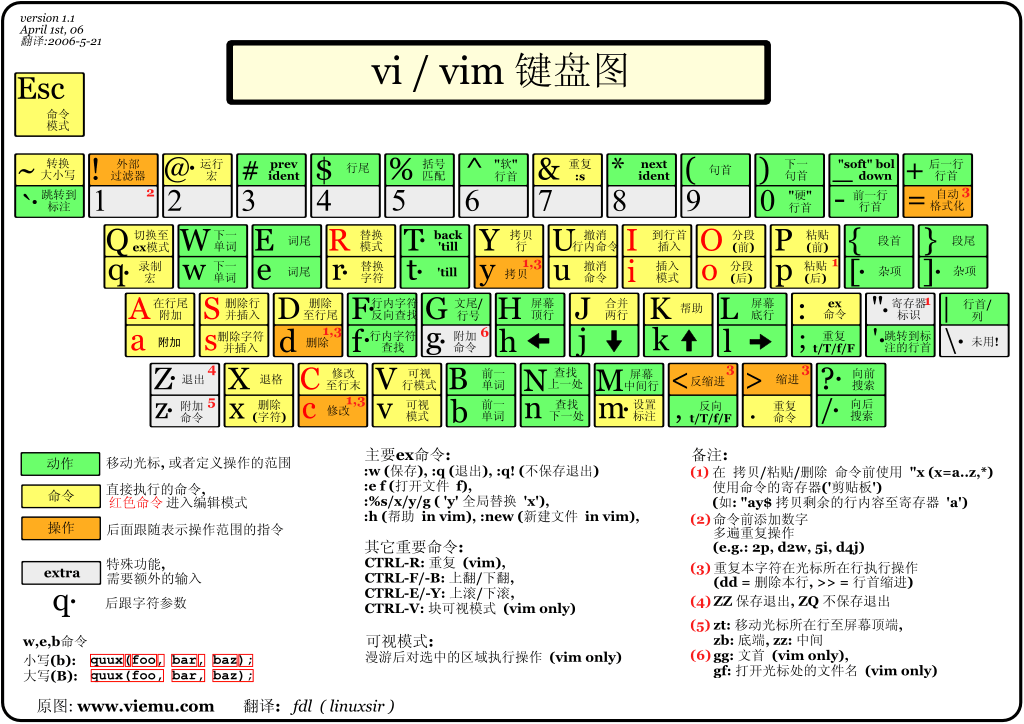
Resources
vimtutoris a tutorial that comes installed with Vim- Vim Adventures is a game to learn Vim
- Vim Tips Wiki
- Vim Advent Calendar has various Vim tips
- Vim Golf is code golf, but where the programming language is Vim’s UI
- Vi/Vim Stack Exchange
- Vim Screencasts
- Practical Vim (book)
Lecture 4.Data Wrangling
Lecture 5.Command-line Environment
Job Control
杀进程
-
signals: software interrupts
-
Ctrl-C:SIGINT;Ctrl-\:SIGQUIT;kill -TERM PID:SIGTERM
#!/usr/bin/env python
import signal, time

def handler(signum, time):
    print("\nI got a SIGINT, but I am not stopping")

signal.signal(signal.SIGINT, handler)
i = 0
while True:
    time.sleep(.1)
    print("\r{}".format(i), end="")
    i += 1
Pausing and backgrounding processes
- 暂停并放入后台:
Ctrl-Z,SIGTSTP - 继续暂停的job:
fg和bg;jobs搭配pgrep $!- last backgrounded job- 命令行后缀
&在背景运行命令 - 关闭终端发出
SIGHUP信号,使子进程终止,解决方案:- 运行前
nohup - 运行后
disown tmux
- 运行前
SIGKILL和SIGSTOP都不能被相关的系统调用阻塞,因此SIGKILL不会触发父进程的清理部分,可能导致子进程成为孤儿进程;如果是SIGINT,可能会有handler处理资源,比如有些数据还在内存,需要刷新到磁盘上。
tmux: terminal multiplexer
基于我的键位(配置文件)
-
Sessions - a session is an independent workspace with one or more windows
tmuxstarts a new session.tmux new -s NAMEstarts it with that name.tmux rename-session -t 0 database重命名tmux lslists the current sessions- Within
tmuxtyping<C-a> d/Ddetaches the current session tmux aattaches the last session. You can use-tflag to specify which
-
Windows
- Equivalent to tabs in editors or browsers, they are visually separate parts of the same session
<C-a> cCreates a new window. To close it you can just terminate the shells doing<C-d> / exit<C-a> NGo to the N th window. Note they are numbered<C-a> pGoes to the previous window<C-a> nGoes to the next window<C-a> ,Rename the current window<C-a> wList current windows
-
Panes
- Like vim splits, panes let you have multiple shells in the same visual display.
- 配置下可以用鼠标选取/缩放pane
<C-a> -Split the current pane horizontally<C-a> |Split the current pane vertically<Alt> <direction>Move to the pane in the specified direction. Direction here means arrow keys.<C-a> zmake a pane go full screen. Hit<C-a> zagain to shrink it back to its previous size<C-a> [Start scrollback. You can then press<space>to start a selection andenterto copy that selection.<C-a> <space>Cycle through pane arrangements.
-
其它操作
<C-a> rreload配置文件Shift + Command + c,配合iTerm2复制文件
-
For further reading, here is a quick tutorial on
tmuxand this has a more detailed explanation that covers the originalscreencommand. You might also want to familiarize yourself withscreen, since it comes installed in most UNIX systems. -
tmux是client-server的实现模式
Aliases
alias ll可print出alias的对象unalias ll可解除alias
# alias base
alias v='vim'
alias ll='ls -aGhlt'
alias la='ls -a'
alias l='ls -CF'
alias cls='clear'

alias gs='git status'
alias gc='git commit'
alias gqa='git add .'

alias v="vim"
alias mv="mv -i" # -i prompts before overwrite
alias mkdir="mkdir -p" # -p make parent dirs as needed
alias df="df -h" # -h prints human readable format

alias vfzf='vim $(fzf)' #vim打开搜索到的结果文件
alias cdfzf='cd $(find * -type d | fzf)'
alias gitfzf='git checkout $(git branch -r | fzf)'


# alias docker
alias dkst="docker stats"
alias dkps="docker ps"
alias dklog="docker logs"
alias dkpsa="docker ps -a"
alias dkimgs="docker images"
alias dkcpup="docker-compose up -d"
alias dkcpdown="docker-compose down"
alias dkcpstart="docker-compose start"
alias dkcpstop="docker-compose stop"
Dotfiles
e.g.
bash-~/.bashrc,~/.bash_profilegit-~/.gitconfigvim-~/.vimrcand the~/.vimfolderssh-~/.ssh/configtmux-~/.tmux.conf
管理方法:单独的文件夹,版本控制,symlinked into place using a script
-
用git的submodule
-
Easy installation: if you log in to a new machine, applying your customizations will only take a minute.
-
Portability: your tools will work the same way everywhere.
-
Synchronization: you can update your dotfiles anywhere and keep them all in sync.
-
Change tracking: you’re probably going to be maintaining your dotfiles for your entire programming career, and version history is nice to have for long-lived projects.
一些有用的构造代码块:
# $HOME/dotfiles
BASEDIR=" <img src="https://www.zhihu.com/equation?tex=%28cd%20%22" alt="(cd "" class="ee_img tr_noresize" eeimg="1"> (dirname "${BASH_SOURCE[0]}")" && pwd)"

if [[ "$(uname)" == "Linux" ]]; then {do_something}; fi

# Check before using shell-specific features
if [[ "$SHELL" == "zsh" ]]; then {do_something}; fi

# You can also make it machine-specific
if [[ "$(hostname)" == "myServer" ]]; then {do_something}; fi

# Test if ~/.aliases exists and source it
if [ -f ~/.aliases ]; then
    source ~/.aliases
fi
在~/.gitconfig里加
[include]
    path = ~/.gitconfig_local
Remote Machines
- 装虚拟机
sudo apt-get install --reinstall lightdm && sudo systemctl start lightdm图形界面Ctrl+Alt+A打开终端- 自动/手动设置共享文件夹:
sudo mkdir -p /media/sf_<FolderName> && sudo mount -t vboxsf -o rw,gid=vboxsf FolderName /media/sf_FolderName
- ssh可执行命令
ssh foobar@server ls | grep PATTERNls | ssh foobar@server grep PATTERN
- 用SSH连GitHub
ssh-keygen -t rsa -b 4096 -C "huangrt01@163.com"
eval "$(ssh-agent -s)"
ssh-add -K ~/.ssh/id_rsa
pbcopy < ~/.ssh/id_rsa.pub  #适合MacOS , Linux用xclip
# 上github添加SSH Key

ssh -T git@github.com

ssh-keygen -y -f ~/.ssh/id_rsa
- ssh agent及其forwarding特性
- ssh连虚拟机
ssh -p 2222 cs144@localhost
# ssh will look into .ssh/authorized_keys to determine which clients it should let in.
ssh-copy-id -i ~/.ssh/id_rsa.pub -p 2222 cs144@localhost
# or
cat .ssh/id_ed25519.pub | ssh foobar@remote 'cat >> ~/.ssh/authorized_keys'
-
ssh传文件
ssh+tee, the simplest is to usesshcommand execution and STDIN input by doingcat localfile | ssh remote_server 'tee serverfile'. Recall thatteewrites the output from STDIN into a file.scpwhen copying large amounts of files/directories, the secure copyscpcommand is more convenient since it can easily recurse over paths. The syntax isscp -P 2075 -r path/to/local_file remote_host:path/to/remote_filersyncimproves uponscpby detecting identical files in local and remote, and preventing copying them again. It also provides more fine grained control over symlinks, permissions and has extra features like the--partialflag that can resume from a previously interrupted copy.rsynchas a similar syntax toscp.
-
Port Forwarding:
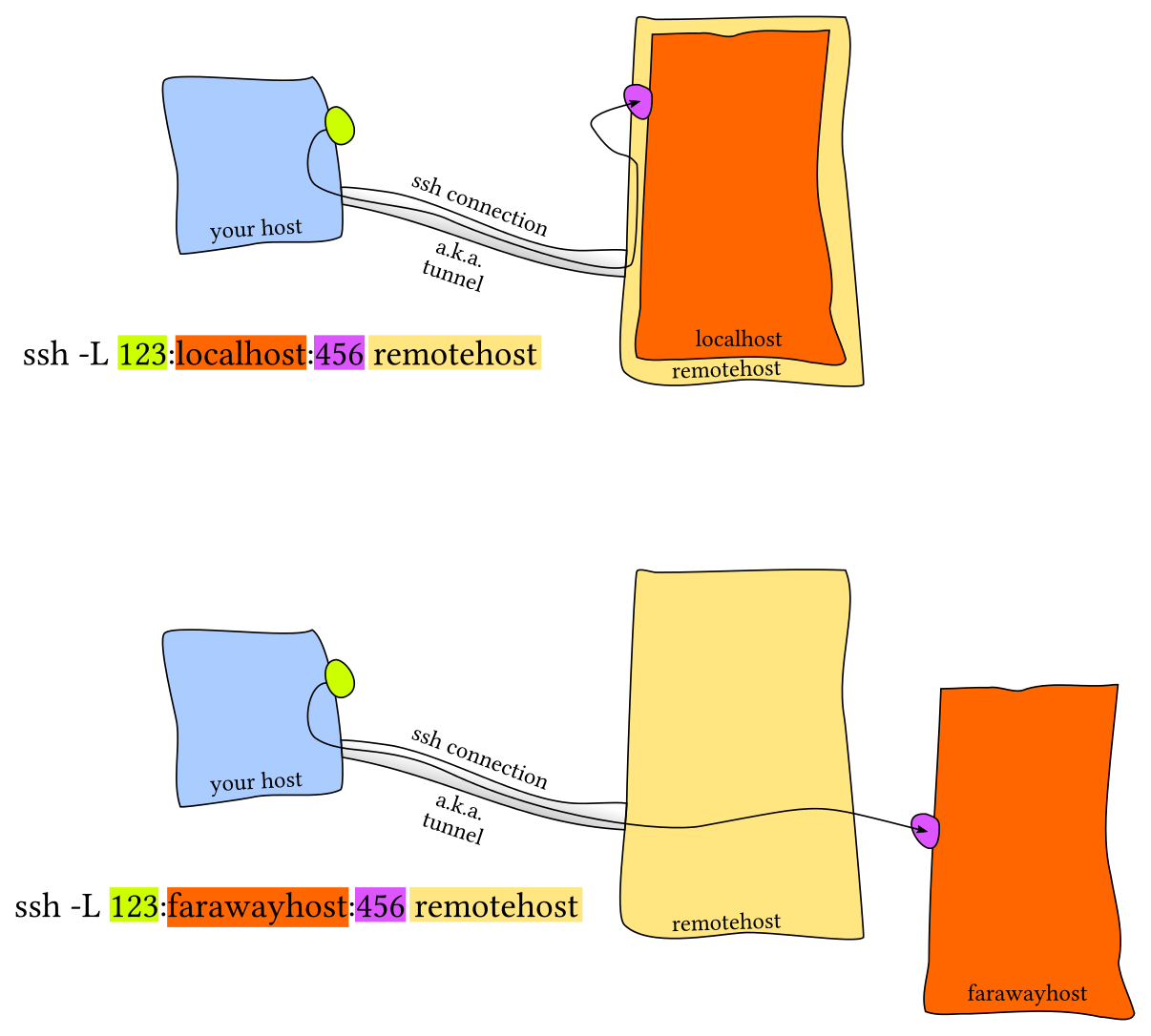
localhost:PORT or 127.0.0.1:PORT- Local Port Forwarding: ssh端口重定向:
-L 9999:127.0.0.1:8097,比如在服务器开jupyter notebook` -
- Remote Port Forwarding
-
- Local Port Forwarding: ssh端口重定向:
-
ssh configuration:
~/.ssh/config,server side:/etc/ssh/sshd_config,调端口、X11 forwarding等

Host vm
    User foobar
    HostName 172.16.174.141
    Port 2222
    IdentityFile ~/.ssh/id_ed25519
    LocalForward 9999 localhost:8888

# Configs can also take wildcards
Host *.mit.edu
    User foobaz
- 其它
-
openconnect:
sudo openconnect --juniper https://sslvpn.tsinghua.edu.cn -u 2015010356 -
vscode remote-ssh中ssh_config的配置细节
-
Mosh, the mobile shell, improves upon ssh, allowing roaming connections, intermittent connectivity and providing intelligent local echo.
-
sshfs can mount a folder on a remote server locally, and then you can use a local editor.
-
Shells & Frameworks
zsh的新特性
- Smarter globbing,
**:**/README.md可递归地列出相应文件 - Inline globbing/wildcard expansion
- Spelling correction
- Better tab completion/selection (
XXX -加tab会列出说明,很贴心) - Path expansion (
cd /u/lo/bwill expand as/usr/local/bin)
Terminal Emulators
重点:
- Font choice
- Color Scheme
- Keyboard shortcuts
- Tab/Pane support
- Scrollback configuration
- Performance (some newer terminals like Alacritty or kitty offer GPU acceleration).
Exercises
- pidwait,用于跨终端的控制
#!/bin/bash
pidwait(){
	try=0
	while [[ $try -eq 0 ]]; do
		kill -0 "\$1" || try=1
		sleep 1
	done
}
history | awk '{ <img src="https://www.zhihu.com/equation?tex=1%3D%22%22%3Bprint%20substr%28" alt="1="";print substr(" class="ee_img tr_noresize" eeimg="1"> 0,2)}' | sort | uniq -c | sort -n | tail -n 10可得到使用频率最高的10个命令- background port forwarding
Lecture 6.Version Control (Git)
Lecture 7.Debugging and Profiling
Lecture 8.Metaprogramming
Lecture 9.Security and Cryptography
Lecture 10.Potpourri
Linux命令按字母分类
a
- awk: 一种控制台编程工具,寻找和处理pattern
b
- bg: resume后台暂停的命令
c
- cat
- cd
- chmod:sudo chmod 777 文件修改为可执行
Permissions 0644 for ‘~/.ssh/id_rsa’ are too open=>chmod 0600 ~/.ssh/id_rsa
- cloc: 代码行数统计
- curl
- -I/--head: 只显示传输文档,经常用于测试连接本身
curl --head --silent baidu.com | grep --ignore-case content-length | cut -f2 -d ' '
- -I/--head: 只显示传输文档,经常用于测试连接本身
- cut
- 使用 -f 选项提取指定字段:
cut -f2,3 test.txt
- 使用 -f 选项提取指定字段:
- cp
d
- d: zsh的特点,可显示最近10个目录,然后
cd -数字进入 - date:日期
- df: disk情况
- disown
- diff:Linux中diff的渊源
- dmesg: kernel log
e
- echo: 输出输入,空格分割
- env: 进入环境
- 读man env,
#!/usr/bin/env -S /usr/local/bin/php -n -q -dsafe_mode=0,利用env来传参。(FreeBSD 6.0之后不能直接传参,解释器会把多个参数合成一个参数)
- 读man env,
- export
f
-
fd:作为find的替代品
- colorized output, default regex matching, Unicode support, more intuitive syntax
-
fg: Run jobs in foreground
-
find:1)寻找文件; 2)机械式操作
- -iname:大小写不敏感
-
fuck:流行的纠正工具
# Find all directories named src
find . -name src -type d
# Find all python files that have a folder named test in their path
find . -path '**/test/**/*.py' -type f
# Find all files modified in the last day
find . -mtime -1
# Find all zip files with size in range 500k to 10M
find . -size +500k -size -10M -name '*.tar.gz'

# Delete all files with .tmp extension
find . -name '*.tmp' -exec rm {} \;
# Find all PNG files and convert them to JPG
find . -name '*.png' -exec convert {} {.}.jpg \;
g
h
i
- icdiff: 分屏比较文档
icdiff button-{a,b}.css
- ifconfig
j
- jobs
k
l
- locate
- Most would agree that
findandfdare good but some of you might be wondering about the efficiency of looking for files every time versus compiling some sort of index or database for quickly searching. That is whatlocateis for.locateuses a database that is updated usingupdatedb. In most systemsupdatedbis updated daily viacron. Therefore one trade-off between the two is speed vs freshness. Moreoverfindand similar tools can also find files using attributes such as file size, modification time or file permissions whilelocatejust uses the name. A more in depth comparison can be found here.
- Most would agree that
- ls
- -l: long listing format; drwxr-xr-x,d代表文件夹,后面3*3代表owner、owning group、others的权限
- r:read,w:modify,x:execute
m
- man: q退出
- mkdir
- mv
n
- nc(netcat): TCP/IP 的瑞士军刀
- 端口测试
- nohup
o
p
- pandoc
pandoc test1.md -f markdown -t html -s -o test1.htmlpandoc -s --toc -c pandoc.css -A footer.html MANUAL.txt -o example3.html
- pbcopy: 复制到剪贴板
pbcopy < file - ping
- pgrep: 配合jobs
pgrep -f 100全命令行匹配
- pkill = pgrep + kill
*
pkill -9 -f 100 - ps aux
- pwd: print cwd
q
r
s
- script
- 记录终端操作记录,按
C-d退出 - 可用于demo演示终端操作
- 记录终端操作记录,按
t
-
tail
ls -l | tail -n1- -f:不断读最新内容,实时监视
-
tee: Read from standard input and write to standard output and files (or commands).
- 和
xargs有相似之处,都是转化stdin用于他用 echo "example" | tee /dev/tty | xargs printf "[%s]"
- 和
-
tig
-
tig是一个基于ncurses的git文本模式接口。它的功能主要是作为一个Git存储库浏览器,但也可以帮助在块级别上分段提交更改,并充当各种Git命令输出的分页器。
-
-
tmux
-
traceroute: -w 1
-
tree: 显示树形文件结构,
-L设置层数
u
v
w
- wait:
wait pid,不加pid则等待所有进程 - which:找到程序路径
- wget: 断点续传-c 后台-b
x
- xargs:解决命令的输入来源问题:命令参数有标准输入和命令行参数两大来源,有的命令只接受命令行参数,需要xargs来转换标准输入
- e.g.
ls | xargs rm
- e.g.
y
- youget
- 自动补全:
curl -fLo ~/.zplug/repos/zsh-users/zsh-completions/src/_youget https://raw.githubusercontent.com/soimort/you-get/develop/contrib/completion/_you-get
- 自动补全:
z
some bugs
_arguments:450: _vim_files: function definition file not found
rm ~/.zcompdump*
rm ~/.zplug/zcompdump*
exec zsh