README.md
September 26, 2026 · View on GitHub
LoopX
Give your agents a goal. Keep the work moving.
The open, local-first control plane for long-horizon agents and personal agent teams.
Keep goals, decisions and evidence across sessions. Work with Codex, Claude Code, DeepSeek Harness and other supported runtimes.



Get started · Workspace · LHTB results · Docs · 简体中文
LHTB · 46 tasks · GPT-5.6 Sol: LoopX 1.0.3 Heartbeat reaches 0.4948 mean reward — +17.3% vs Plain Codex, +10.6% vs native Codex Goal.
Results and pass rates ↓
More verified work. Less human attention. LoopX gives agents durable goals, bounded continuation, peer ownership and recoverable handoffs. Your runtime provides the model and tools; LoopX keeps track of what to do next, what is accepted, and when to ask you.
| What you want to do | Start here |
|---|---|
| Keep a coding or research agent working across sessions | Install and connect |
| Manage personal projects, schedules and decisions in one place | Personal Agent Workspace |
| Let agents collaborate and deliver verifiable results | Agent collaboration guide |
Meet the Personal Agent Workspace
Keep long-horizon goals in one local-first workspace. Goals, attention, conversations, tasks, files, schedules, and recovery stay durable across days, restarts, and harnesses. Reopen a project, inspect the previous turn’s state and evidence, and continue the next permitted action.

LoopX 1.0 brings these long-horizon control states into the Personal Workspace. It gives you one place to:
- see what needs you, what is running, what is being watched, and what is scheduled or stopped;
- configure Goal capabilities, distinguish machine defaults from Goal overrides, and preview changes before applying them;
- steer a live turn, queue a message, or use the async inbox from a connected Lark conversation with explicit Goal/Agent/session routing;
- inspect deliverable files, periodic reports, and their supporting evidence;
- continue across Codex, Claude Code, direct-model, and other registered Agent sessions without losing Goal state or evidence;
- review protected changes through typed preview, explicit confirmation, and receipts while LoopX state—not the browser—remains authoritative.
For Manager group conversations, LoopX keeps message visibility separate from Turn authority; see the bilingual Lark Manager context and authority contract.
loopx dashboard
loopx dashboard is the supported browser/PWA launch path. You can also download
native desktop previews from the 1.0 release;
they reuse the same loopback services and Goal state. Apple Silicon macOS supports
signed App updates that pair the shell with its bundled runtime, plus repair and
recovery. Python 3.11+ is required; the App is ad-hoc signed, not notarized.
Windows preview installers currently use manual updates and a separately installed CLI.
Desktop installation, updates, and source development.
Capability settings and reproducible workspace scenarios

From a source checkout, run python -m demo.workspace serve to explore a community
event, a home-energy comparison, and a neighborhood website release. Each has four
work roles, 18 tasks, two decisions, and two watches. The screenshot above comes
from this reproducible workspace. Scenarios and replay instructions.
Watch the full 32-second walkthrough · Read the workspace guide · Try the five-minute tour
Why LoopX
An agent can finish a task in one session. Long-running work is harder: objectives change, owner decisions appear, evidence goes stale, agents hand work to peers, and a scheduler can keep spending after no useful transition remains. Chat memory and a timer are not enough to govern that.
LoopX keeps the durable control state in one compact layer:
objective / issue / project
   │
   ▼
LoopX state: objective + gates + todos + scope + evidence + quota
   │
   ├─ human judgment needed? ── yes ─▶ ask a concrete question and wait
   │
   ├─ safe fallback available? ──────▶ run one bounded agent slice
   │
   ▼
Codex / Claude Code / Cursor / shell agent executes one turn
   │
   ▼
write evidence + handoff + next todo ─▶ quota decides the next tick
Agent runtimes execute the work. LoopX governs the state that lets engineering, research, discovery, and operations loops continue across runs. It is not another agent framework or a provider-specific orchestration runtime.

A useful mental model is an agent-native Kanban for long-running work. Cards carry identity, authority, evidence, and continuation. Moves are validated operators such as claim, gate, monitor, and writeback. The board is a projection; LoopX state remains the source of truth.
Registered agents are peers. Claims, leases, task boundaries, capabilities, and typed continuation decide who acts next; no durable leader identity is required.
LoopX is useful when you run:
- multi-day engineering, research, benchmark, or experiment objectives;
- issue and PR loops that must preserve scope, evidence, and review state;
- recurring heartbeat or monitor work;
- projects with owner, safety, publication, or private-data gates;
- peer-agent teams where ownership, leases, and handoff matter;
- creator, research, or operations workflows whose progress must remain legible to a non-engineering operator.
LoopX is not an autonomous production controller. Dangerous permissions, publishing, production writes, and final ownership stay with the human.
Personal Agents, Teams, and Self-Improving Workflows
Meta Muse and Grok Bot make persistent personal agents and delegated work a familiar product idea. LoopX approaches that space as an open, provider-neutral control plane for agents you already run—not as a hosted replacement for either product.
- Personal agent: use the shipped Workspace and connected Lark surfaces to inspect goals, steer work and resolve decisions. The persistent steward and semantic handoff RFC extends this toward one capable front door for a team; the complete journey remains under qualification.
- Agent team: share goals without erasing worker ownership. Claims, evidence and explicit returns keep implementation and review connected. See the three-agent collaboration demo for a bounded example, including corrections and two review rounds.
- Self-improving workflows: connect feedback to the next attempt through Reward Memory, and evaluate candidate changes through Explore. Both are optional. The link to recursive self-improvement (RSI) is the engineering loop—propose, test, review, retain—not a claim that LoopX has demonstrated autonomous model improvement or compounding capability gains.
A personal steward is an interaction role, not a second source of authority. Background execution still needs an available host and configured runtime. The overall roadmap separates shipped foundations from the next end-to-end acceptance milestones.
Evidence
LHTB: Higher Mean Reward With the Same Model
LoopX 1.0.3 Heartbeat reaches 0.4948 mean reward across 46 matched tasks: +17.3% over Plain Codex and +10.6% over native Codex Goal. All three use GPT-5.6 Sol, max reasoning effort, and disabled Web Search. Long-Horizon Terminal-Bench goes beyond coding: these tasks span research reproduction, scientific simulation, multimodal analysis, professional workflows, games, and systems work.
| Execution mode | Mean reward ↑ | Strict pass rate (≥0.95) | Pass rate (≥0.80) |
|---|---|---|---|
| Plain Codex | 0.4218 | 7/46 (15.2%) | 12/46 (26.1%) |
| Native Codex Goal | 0.4475 | 4/46 (8.7%) | 14/46 (30.4%) |
| LoopX 1.0.3 Heartbeat | 0.4948 | 7/46 (15.2%) | 15/46 (32.6%) |
The ≥0.80 threshold is a supplementary, post-hoc view; ≥0.95 remains the benchmark's strict solved threshold. No score in this study equals 0.80, so these counts also match the study brief's >0.80 view.
Against native Goal, task-level rewards improve on 23, tie on 13, and regress on 10 tasks. Strict solves match Plain Codex, so the mean gain is not a claim that every task improves or that more tasks are fully solved than Plain. Mean reward also credits partial progress.
One effective trial per task and mode; designated replacement trials and unequal runtime/budgets, including longer budgets for some Heartbeat replacements. These are observed system results, not an equal-budget efficiency result or an isolated causal estimate of LoopX's effect.
Interactive results, task comparisons and methodology · Five-arm study and limits · Public task-level scores
Beyond benchmarks, LoopX also has inspectable long-running project evidence. The public OpenViking contribution sequence and the redacted, owner-run Auto ML showcase each span 200+ hours of elapsed loop lifetime, preserving bounded turns, decisions, and evidence updates. This measures wall-clock project time, not continuous model execution or unattended production autonomy. Open each visual to inspect the public-safe task graph, evidence branches, and cross-turn decisions; each case states its source and reproducibility boundary.
Earlier 200+ hour project trajectories: OpenViking and ML experiments
Open-Source Issue Fix
200+ hour public contribution arc: PR delivery and reusable fix knowledge evolve together.

LoopX's creator uses this path as an OpenViking contributor. The represented public contribution sequence spans more than 200 elapsed hours from its first PR creation to the latest represented review or update. The Issue-Fix capability keeps rolling repository context, revision-stamped fix knowledge, and reviewer-facing preferences separate; linked PRs plus current checkout source and tests remain authoritative.
Auto ML Experiment
Redacted owner-run showcase: a 200+ hour experiment arc keeps hypotheses, matched evidence, invalid lineages, running replicates, and promote/stop gates visible in one graph.

The redacted public-safe graph preserves decision lineage across that 200+ hour elapsed window. It is an owner-run showcase, not a claim of continuous compute, independent reproduction, or a production result.
Used In Real Projects
- Independent user ·
>13hC++ accuracy run. The user reported that a multi-stage task stayed aligned, triggered public research, adopted a public code-memory tool, and improved final precision. Read the evidence boundary. - Independent user ·
4dunattended run. The user reported four days without human intervention, useful ongoing work, and a periodic report surface. Read the redacted case. - Independent user ·
7merged PRs. A LoopX-attributed Engine refactor is visible in a public issue and seven merged PRs; attribution and the reported1B+token scale remain user reports. Inspect the case.
These are the three strongest current cases, not the full inventory. Browse the complete Showcase catalog for contributor cases, creator dogfooding, reproducible demos, and explicit evidence-strength labels.
Exploratory Benchmark Studies
- SWE-Marathon: Five execution modes on 15 matched tasks compare self-verification, scores, and cost. More self-verification did not consistently yield higher scores.
- LHTB × LoopX: The results above lead into five execution mechanisms, task-level comparisons, regressions, and exploratory task-type analysis.
- DeepSWE behavior analysis (Chinese): Selected cases examine how domain hints relate to requirement retention and verification choices, offering mechanism hypotheses for further testing.
SWE-Marathon and LHTB have one effective trial per task and mode; DeepSWE uses selected cases and post-hoc analysis.
More inspectable surfaces:
- the public homepage for the product narrative, quick start, and long-running evidence;
- the complete Showcase catalog and its bilingual hosted index;
- the Agent collaboration guide for dependent artifacts, independent review and returned results;
- the public user manual.
Try LoopX
Requirements: Python 3.11+ and Node.js 22.22.3+; Node.js 24 LTS is recommended.
Use an active Python environment whose console scripts are on PATH; macOS and
Linux use a POSIX shell, while native Windows uses PowerShell 7. Node.js runs
the managed, idle-exiting TypeScript Effect core; LoopX starts it automatically.
Git is only needed for contributor clone/canary workflows.
Install from PyPI without cloning:
python3 -m pip install --upgrade loopx
loopx workflow-skills --install
loopx doctor
Existing installs can use loopx update plan and loopx update apply; LoopX
keeps the detected pip, pipx, or archive owner instead of switching channels.
On native Windows PowerShell 7, use the same PyPI release without a POSIX compatibility layer:
py -3.11 -m pip install --upgrade loopx
loopx workflow-skills --install
loopx doctor
Restart your agent host after first install so it reloads the workflow skills.
See Installing LoopX for pipx, host
command surfaces, native Windows checkout installation, upgrade, rollback,
uninstall, and the archive fallback.
Then connect from your project root:
cd /path/to/your-project
loopx connect
loopx status
If the project has not been initialized and connect tells you state is
missing, use the guided path:
loopx start-goal --guided --project . --goal-text "Your long-running objective"
LoopX should reuse existing state rather than overwrite it. Keep .loopx/,
.codex/goals/, and .local/ ignored.
Start From Your Agent
| Host | Recommended start | Loop driver |
|---|---|---|
| Codex App | Ask the agent to connect this project to LoopX, run loopx doctor, preserve existing state, and report the current gate and next todo. Then use $loopx <complex task> or choose loopx from /skills. | Codex App heartbeat automation, refreshed from quota should-run.scheduler_hint |
| Codex App over SSH | loopx agent-onboard --agent-type codex-app-ssh --project . | The returned visible /goal <task_body> |
| Codex CLI | Start codex in the project, ask it to connect and diagnose LoopX, then use $loopx <complex task> or /skills. | Visible /goal <task_body>; no hidden headless execution by default |
| Claude Code | Install the opt-in adapter, then run /loopx <task> followed by /loop. | Native Claude Code /loop gated by LoopX |
| KunlunCode | Run loopx-kunluncode connect --project . --goal-id <goal-id> --agent-id <registered-agent-id>, add a bounded todo, then run loopx-kunluncode run --project .. | Native Goal Pro through app-server; LoopX writes completion and quota only after strict verification |
| OpenCode | Install the static command facade; opt in to --with-goal-bridge for recurring goals. | OpenCode command facade and explicit goal bridge |
| Pi | Install the opt-in goal extension with loopx slash-commands --install --surface pi, then use /loopx <task> from a trusted Pi session. | Visible Pi goal extension gated by LoopX quota (loopx_goal_activate + agent_settled continuation) |
| ZCode | Install the skill facade with loopx slash-commands --install --surface zcode, then invoke the $loopx skill (or /loopx <complex task>) from a ZCode session in the project. | The ZCode session's own turn loop; every continuation enters through quota should-run |
| Antigravity CLI (agy) | Install the skill facade with loopx slash-commands --install --surface agy, then invoke the loopx skill (or /loopx <complex task>) from an agy session in the project. | The session's native /goal loop (audited until <!-- GOAL_COMPLETE -->) with schedule self-wakes while the session lives; the facade instructs every turn/wake to re-enter through quota should-run — advisory pacing, not a host-enforced gate |
| Kiro CLI | Install the skill facade with loopx slash-commands --install --surface kiro-cli, then run /loopx <complex task> from a kiro-cli session in the project. | The session's native /goal --max <N> <task_body> Done when: <criteria> loop, with the acceptance criteria stated inside the goal statement because the host derives them from it, bounded by the host's own iteration budget (default 5) and settled through the built-in goal completion contract; the facade instructs every turn and iteration to re-enter through quota should-run — advisory pacing, not a host-enforced gate |
| DeepSeek Harness (dsh) | Install the native DSH plugin, select the loopx skill, and describe the task. The dsh goal-mode adapter remains available for headless turns. | Native same-session continuation and GoalBar, or headless dsh segments; both remain gated by LoopX authority |
| Cursor, shell, or custom runner | Use the installer and loopx doctor; connect manually or call LoopX from your runner. | Your shell, scheduler, or runner |
The exact, copy-ready setup messages and host recovery paths live in Getting Started. Host integrations can inspect the Codex App host command registry contract, the Codex CLI packaged install path, the Claude Code adapter, the KunlunCode native Goal adapter, the Kiro CLI goal-mode adapter, or the DeepSeek Harness turn adapter.
See the 60-second DSH × LoopX Replan recording and reproducible fixture for the native path: install the plugin, select one skill, change a material constraint, and inspect the preserved decision trail.
For custom runners, start with the
minimal custom runtime example
(python3 examples/custom-runtime-minimal-cli-turn-smoke.py), then the full
Embed LoopX in Your Agent Runner
guide and the worker bridge install contract.
The core tick is deliberately small:
loopx quota should-run      # should this registered agent act now?
loopx todo claim            # who owns this slice?
loopx todo update           # what changed?
loopx refresh-state         # what should the next turn see?
loopx quota spend-slot      # account for a completed, validated slice
First-Run Feedback
If LoopX works for you, a one-minute public issue helps us learn what a real first run looks like. It is optional, contains no telemetry, and should not include logs, paths, credentials, internal project names, or goal contents:
loopx first-run-report prints the same prefilled link locally without
sending anything.
Separately, loopx usage-ping enable opts this machine into one anonymous
ping per day (a random id, LoopX version, OS family, Python version, and
install channel) so we can count active installations. It is off unless you
enable it; see Usage ping.
A successful connection has:
loopx doctorpassing;.loopx/registry.jsonand a projected active goal state;loopx statusshowing the current objective, concrete user gate, and next agent todo;- a visible loop driver or an exact activation instruction;
- local runtime state ignored rather than committed.
Clone-based install is only for contributors who want the live canary wrapper:
git clone https://github.com/loopx-project/loopx ~/loopx
~/loopx/scripts/install-local.sh
loopx doctor
Capabilities
LoopX keeps the architecture explicit so the same governed outcome can survive a change of agent harness or external provider. The terms describe different boundaries rather than interchangeable kinds of plugin:
| Boundary | Meaning | Go deeper |
|---|---|---|
| Kernel | Owns durable goal, todo, gate, evidence, quota, recovery, and scheduling truth. | Architecture |
| Capability | Defines a stable, provider-neutral contract for producing one bounded, verifiable caller outcome from LoopX state. | Capability catalog |
| Provider | Calls an external system or local implementation and returns bounded observations, effect results, and readback. | Provider responsibilities |
| Extension | Packages and operates an optional provider through explicit install, readiness, enable, upgrade, disable, and rollback lifecycle. | Extension lifecycle |
Host declarations such as --available-capability shell describe observed
execution support. They are runtime capacities in this product map, not product
capabilities and not permission grants. The effective capability still applies
its own policy and authority checks before proposing a transition.
Core Control-Plane Promises
The Kernel folds its mechanics into five questions. Each question delivers one product promise on top of any agent harness: objective → long-horizon state; next → semantic decisions; human judgment → human-agent collaboration; evidence → recovery; continuation → governance.
| Question | What LoopX keeps visible |
|---|---|
| What is the objective? | The active goal, explicit scope, and current authority. |
| What happens next? | Ordered user and agent todos, ownership, claims, and leases. |
| What needs human judgment? | Concrete user gates instead of a vague "waiting for owner." |
| What evidence changed? | Compact run history, validation, blockers, and accepted writeback. |
| May the loop continue? | Quota, capabilities, safe fallback, scheduler hints, and stop conditions. |
Control-Plane Surface
| Surface | What it does | Start with |
|---|---|---|
| Goal state and status | Tracks active state, todos, claims, gates, evidence, run history, and first-screen attention. | loopx status, loopx diagnose, loopx review-packet |
| Quota and interaction contract | Decides whether a turn should deliver, ask, wait, self-repair, or stay quiet. | loopx quota should-run, quota allocation |
| Agent runtime bridges | Keeps Codex App, Codex CLI, Claude Code, and generic workers aligned with the same guard. | loopx heartbeat-prompt, loopx codex-cli-bootstrap-message, loopx worker-bridge |
| Operator surfaces | Renders compact status without making the browser the state authority. | loopx serve-status, dashboard |
| Session dash | Starts a live single-page panel that tracks fleet progress: sessions, their goals, and each goal's status/todo progress, with result statistics; auto-refreshes in place. | loopx dash, session dash design |
| External projections | Projects todos and gates into collaboration surfaces while LoopX remains authoritative. | loopx lark-kanban, Lark Kanban adapter |
| Domain capabilities | Packages repeatable work lanes such as issue fixing, content operations, value connector planning, ML experiment advice, benchmark evidence, and Explore. | loopx issue-fix, loopx content-ops, loopx value-connectors, loopx ml-experiment, loopx benchmark, Explore |
| Experimental context learning | Lets named registered agents trial provider-neutral Reward Memory through ignored, default-off project configuration. OpenViking is one provider option, not a global dependency. | loopx reward-memory experiment-status, Reward Memory architecture |
| Governance patterns | Captures reusable routing, gate, evidence, projection, and planning shapes. | interaction patterns, state model |
The shipped primitives include lifetime goals, concrete user gates, audited safe fallbacks, peer todo ownership, quota and steering, compact run history, evidence-backed handoff, a read-first management surface, project-level value signals, and public/private boundary checks.
Product Capability Paths
Capabilities turn those generic primitives into outcome-owned work lanes. Start from the outcome, then inspect the current registered implementation and its write boundary:
| You need to... | Capability | Start with |
|---|---|---|
| Turn a public issue into a reviewable, evidence-backed change | Issue Fix | loopx capability show issue-fix --format json |
| Qualify the exact final diff before delivery | Change Quality | loopx capability show change-quality-qualification --format json |
| Notice busy-but-off-goal work rounds before the periodic review | Progress-Review Sentinel | loopx capability show progress-review-sentinel --format json |
| Preserve a changing stack of already reviewed branches | Integration Branch | loopx capability show integration-branch-reconcile --format json |
| Explore uncertain research without losing hypotheses and findings | Explore | loopx capability show explore --format json |
| Rebase decisions on current evidence and verified outcomes | Decision Context | loopx capability show decision-context --format json |
| Produce scheduled or progress-triggered reports with receipts | Periodic Report | loopx capability show periodic-report --format json |
Run loopx capability list --format json for the authoritative catalog in the
installed release. A capability detail reports its user value, maturity,
provider readiness, entry commands, write boundaries, protocols, and durable
validation. Browse the human-readable capability index
to choose by outcome; use Extensions and Capabilities
when installing or building a provider.
Runtime Responsibilities
| Role | Responsibility |
|---|---|
| Agent | Plans, analyzes, uses tools, and performs one bounded action through a host/runtime. |
| Provider | Calls external systems and returns observations, effect results, and readback. |
| Capability | Defines the caller outcome, normalizes provider output, validates it, and proposes a typed transition. |
| Kernel | Owns durable todos, gates, monitors, accepted writeback, quota, recovery, and scheduling. |
The execution path is Agent -> Capability -> Provider; the control path
returns Provider readback -> Capability transition -> Kernel. An extension is
how an optional provider is packaged and managed, not another control-plane
owner. See Architecture and
Extensions and Capabilities.
Advanced Paths
The first useful loop does not require every optional surface. Add these only when the work needs them.
Inspect the current goal's read-only capability catalog before enabling an advanced path:
loopx configure-goal --goal-id <goal-id>
Without --execute, this reports current/default state, fit, boundaries, and
copyable commands without changing project state.
Recurring Work Presets
Safe presets cover daily triage, changelog drafts, and PR watching. Start with the beginner preset guide.
loopx preset list
loopx preset show daily-triage
Preset inspection is read-only. For a connected recurring goal,
loopx ready-score --goal-id <goal-id> --agent-id <agent-id> reports whether
the loop is ready to run repeatedly.
Governed Turns
LoopX can generate one pure, bounded turn decision from a validated receipt, fresh quota state, and a provider-neutral budget. The current Codex CLI quickstart and activation contract are documented in LoopX Turn for Codex CLI.
Explore Graph and Harness
Explore is supported, optional, and default-off. It works best when a task has a measurable offline evaluation, baseline, treatment, and guardrails; it is not a substitute for production approval. Start with the Explore capability and its Lark presentation mapping.
Review Agent Work
Use loopx review-packet for a compact owner-facing view of decisions,
evidence, validation, and unresolved gates. The
intelligent management surface
describes the operator model; the
project-level reward model
describes conservative value signals across output quantity, quality, token
cost, and user attention cost.
For a concrete peer workflow, start with the Agent collaboration guide: a builder consumes an analyst's artifact, obtains independent review, handles an owner correction and returns the checked result. The guide distinguishes the runnable same-host example from the earlier cross-runtime design sketch.
App and Projection Paths
- Local read-first UI: dashboard guide
- Public product overview: public homepage
- Documentation portal: hosted docs
- Feishu/Lark projection: Lark Kanban adapter
- Generic host integration: integration guide
- Custom multi-agent runner: minimal custom runtime example, then custom runner integration
Optional projections make state easier to inspect; they do not become the source of truth.
Operating and Recovery
Start daily inspection with:
loopx status
loopx history --goal-id your-project-goal
loopx quota should-run --goal-id your-project-goal
Automatic turns must check quota first and append spend only after validated writeback. Quiet skips, preflight failures, and dry-run previews do not spend. When a user gate blocks one lane, a separately audited safe fallback may continue, but it must not bypass the gate.
Peer agents use loopx todo claim before delivery and loopx todo update
after validation so ownership and evidence remain visible.
Scheduler cadence follows quota should-run.scheduler_hint; installed Codex
App automations acknowledge the current hint through the returned
ack_hint.cli_args. Collision recovery, monitor semantics, self-repair, and
the exact operator commands are maintained in
Getting Started,
Quota Allocation, and
Long-Task Cadence Policy.
Before publishing public docs or examples:
loopx check \
  --scan-path README.md \
  --scan-path docs/ \
  --scan-path examples/
Current Technical Directions
LoopX has three active strategic programs plus an architecture and research
incubator. These are direction signals, not delivery promises; main, released
artifacts, and stable reference contracts remain the source of shipped truth.
- Long-Horizon Benchmarks and Evidence: reproducible capability evidence and controlled mechanism research across complementary benchmark environments. Direction tracker
- Operator Surface and IM Integration: an operator workspace, session
records, and bounded collaboration surfaces. The Personal Workspace is
shipped; unified steward, execution, and recovery journeys remain under
qualification, with
@maxliux5as implementation lead. Direction tracker - Shared Goal Authority and Cross-host Coordination: provider-neutral coordination for explicitly shared goals, with NoKV as an unpromoted provider candidate rather than a new control-plane authority. Direction tracker
- Architecture and Research Incubator: Effect Program hardening, TypeScript parity migration, hierarchical stride, research exploration, human attention, artifact lifecycle, and memory utility work at explicitly different maturity levels. Direction tracker
Read the canonical Technical Directions map for stages, promotion gates, contributor-safe cuts, and ownership boundaries. Use the pinned GitHub Discussion for community discussion. Core control-plane reliability continues as the shared foundation beneath these programs.
Advanced Documentation
Product website · Blog · Developer Book
Start with the path that matches your current task. Use the hosted documentation portal for the published docs site; the documentation index remains the complete source map. This list stays selective; each category index owns its deeper documents and versioned protocols.
Use and Operate
- Getting Started: install, connect, diagnose, daily workflow, heartbeats, dashboard, development, and commands.
- User Manual: public onboarding, concepts, FAQ, and selected cases.
- Operations: goal continuation, todo, cadence, attention, and authority workflows.
- Quota Allocation and Heartbeat Automation Prompt: scheduler eligibility, spend, and scheduled continuation.
- Dashboard and Status Data Contract: operator-facing state and projection contracts.
- Release Readiness: install/update paths, compatibility gates, release notes, and safe-to-depend-on surfaces.
Understand the Control Plane
- Architecture: lifetime-goal invariant and kernel.
- State Interaction Model: actors, stores, interaction contract, and writeback.
- Concepts: reusable routing, gate, evidence, projection, and planning patterns.
- Product Foundations: Loop Engineering principles, project-level reward, and reward-style replanning.
- Product Vision: the broader Loop Agent direction.
Integrate and Extend
- Integration Guide
- Minimal Custom Runtime Example
- Custom Agent Runner Integration
- Integrations: runtime, host, collaboration, and external-system adapters, including worker bridge and Lark.
- Extensions and Capabilities
Build and Review LoopX
- Developer Guide: contributor workflows, benchmark development, documentation layout, and quality gates.
- Reference and Protocols: stable contracts and versioned implementation protocols, including host command and reward memory architecture.
- Control-Plane Developer Course: nine Chinese, code-led lectures.
- Testing and Quality: validation layers and risk-based checks.
- Public/Private Boundary: safe fixtures, examples, evidence, and publication.
Inspect Outcomes
- Showcase Catalog: public-safe cases and evidence labels.
- Research and Evidence: benchmark investigations and source-backed findings.
- Update Notes: public-safe progress notes.
Project and Community
- Current Technical Directions
- Project Governance
- Contributing and Contributor Tasks
- Authors and Contributors
- Project History
- Name and Marks
- Brand Guide for External Use: how projects and companies may reference LoopX, its integrations, and its artwork
- ADOPTERS: voluntary self-attested adoption directory
- Ecosystem Adoption - integrations, sampling, and derivatives we observe and track
Partner Projects
LoopX welcomes collaboration with other open-source projects to build the long-running agent ecosystem. Our confirmed partners include:
- OpenViking - Self-evolving context database for AI agents
- NoKV - AI native distributed file system
Community and Feedback
LoopX is already running real long-running agent goals and is under active development. The most useful feedback comes from real long-running agent projects: where the control plane helped, where it felt heavy, and which gates or handoffs disappeared from view.
- Use GitHub Issues for reproducible bugs, install problems, and feature requests.
- Open PRs for docs fixes, showcase writeups, and small public-safe examples.
- Join the Discord community, or use Lark or WeChat below.
See Support for channel routing, service boundaries, and official publication sources.


Lark: scan to join directly
WeChat: huangrt00 · mention LoopX in the friend request
Contributing
External contributors should start with Contributor Tasks for public, claimable work and Contributing for setup, validation, and boundary rules. Project roles and public history are recorded in Governance, Authors and Contributors, and Project History.
LoopX keeps local active state separate from the public repository. Do not
commit .loopx/, .codex/goals/, live ACTIVE_GOAL_STATE.md, raw benchmark
traces, credentials, private logs, or operator artifacts.
Current Status
LoopX 1.0 is a usable local control plane for long-running agent work and is entering broader adoption. It is not a full agent platform, an agent runtime, or an autonomous production controller.
Today LoopX ships a durable state kernel for goals, typed todos and decision scopes, peer claims and leases, evidence and writeback, quota-aware scheduling, and cross-turn continuation. Guided start, recurring heartbeat, isolated Codex CLI turns, evidence-backed Issue-Fix admission, optional Explore and auto research paths, public validation canaries, and the multi-project Personal Workspace all build on that shared control state.
Support levels remain explicit. The state and CLI contracts are the stable center; several host integrations and advanced paths are optional, default-off, or experimental. LoopX does not grant credentials, approve destructive or production actions, publish on a user's behalf without authorization, or turn an unverified run into evidence of success.
Current investment is organized through the Technical Directions map: long-horizon benchmark evidence, operator surface and IM integration, shared-goal cross-host coordination, and an explicitly staged architecture and research incubator.
Star History
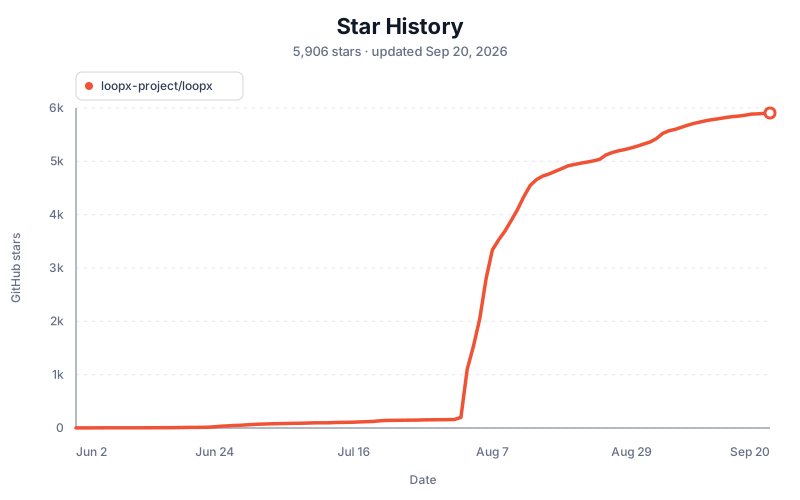
Generated every six hours from GitHub's official stargazer timestamps using a repository-authorized workflow. A snapshot is published only when the fetched rows match GitHub's current star count; GitHub's image cache may delay refreshes.
License
Apache License 2.0 beginning with v0.4.8. See LICENSE and
NOTICE. Releases through v0.4.7 remain under their original MIT
terms; the historical text and notice are preserved in
LICENSE-MIT. The licensing policy
explains the version, contribution, patent-grant, and open-core boundaries.