DuckDB MSSQL Extension
September 18, 2026 · View on GitHub
A DuckDB extension for connecting to Microsoft SQL Server databases using native TDS protocol - no ODBC, JDBC, or external drivers required.
📈 Community Extension Downloads
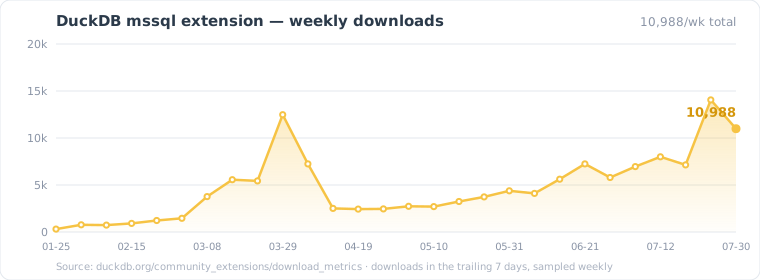
📊 Interactive chart — queried live in your browser with DuckDB-Wasm.
Regenerated weekly and served from GitHub Pages, so it stays current without a commit. Counts are a Cloudflare estimate of
INSTALL mssql FROM communityevents, aggregated across DuckDB versions and platforms. Source: DuckDB Community Extensions download metrics.
Experimental: This extension is under active development. APIs and behavior may change between releases. We welcome contributions, bug reports, and testing feedback!
Documentation
Full documentation lives at hugr-lab.github.io/mssql-extension — connections and authentication (SQL, Azure AD / Entra ID, Kerberos, Windows SSPI), catalog integration, query pushdown, bulk loading over BCP, DML, transactions, the complete settings reference, and performance tuning.
Quick pointers:
| Getting Started | install, ATTACH, first queries |
| Connections & Auth | connection strings, secrets, Azure AD, Kerberos |
| Writing Data | COPY (bulk load), CTAS, INSERT/UPDATE/DELETE |
| Settings Reference | every mssql_* setting with defaults |
| Troubleshooting | common errors and limitations |
| Articles | Medium deep dives on design and performance |
Contributor docs stay in the repository: DATAMODEL.md (layered architecture), docs/ (internals), docs/TESTING.md, CLAUDE.md (development guidelines).
Features
- Native TDS protocol implementation (no external dependencies)
- Stream query results directly into DuckDB without buffering
- Full DuckDB catalog integration with three-part naming and lazy metadata loading
- Filter pushdown:
WHEREclauses are translated to T-SQL and evaluated by SQL Server, including mapped functions (year,lower,LIKEpatterns, arithmetic). Anything the translator declines is applied locally instead — with the string-comparison caveat below - Row-count estimates reported to the DuckDB optimizer, so join order around an MSSQL scan is planned rather than guessed
- Row identity (
rowid) for tables with a primary key or a usable unique index, which is whatUPDATE/DELETEtarget rows by - Connection pooling with configurable limits and automatic session reset
- TLS with the server certificate verified by default;
Encrypt,TrustServerCertificateandHostNameInCertificatemean what they mean in the Microsoft drivers - Full DML support: INSERT (with RETURNING), UPDATE, DELETE — every statement atomic; an INSERT above 1000 rows loads through the BCP protocol
- CREATE TABLE AS SELECT (CTAS) with streaming and type mapping
- High-performance COPY TO via TDS BulkLoadBCP protocol
- Transaction support: BEGIN/COMMIT/ROLLBACK with connection pinning
- Multi-statement SQL batches via
mssql_scan()(e.g., temp table workflows) - DuckDB secret management for secure credential storage
- Azure AD authentication (service principal, CLI, interactive device code flow)
- Kerberos / Windows SSPI integrated authentication — POSIX (
kinit/ keytab / raw credentials) and Windows (current logon session viasecur32.dll) - Custom
Application Namepropagated to SQL ServerAPP_NAME()/sys.dm_exec_sessions.program_name - ATTACH-time credential validation (opt-out via
lazy_validation true) - Experimental: ORDER BY pushdown to SQL Server (opt-in via
mssql_order_pushdownsetting)
A note on string comparisons. A pushed predicate is evaluated by SQL Server, so it follows the column's collation, not DuckDB's byte comparison: on a case-insensitive collation
WHERE name = 'abc'matches'ABC'— the same answer SSMS gives. This applies toUPDATEandDELETEtoo, where it changes which rows are modified. It also means a predicate that pushes and the same predicate evaluated locally can disagree on a case-insensitive column (#272). See String comparisons and collation.
Quick Start
Prerequisites
- DuckDB v1.4.1 or later (minimum supported version)
- SQL Server 2019 or later accessible on network
Step 1: Install Extension
INSTALL mssql FROM community;
LOAD mssql;
Step 2: Connect to SQL Server
Option A: Using a Secret (Recommended)
CREATE SECRET my_sqlserver (
    TYPE mssql,
    host 'localhost',
    port 1433,
    database 'master',
    user 'sa',
    password 'YourPassword123'
);

ATTACH '' AS sqlserver (TYPE mssql, SECRET my_sqlserver);
Option B: Using Connection String
ATTACH 'Server=localhost,1433;Database=master;User Id=sa;Password=YourPassword123'
    AS sqlserver (TYPE mssql);
Step 3: Query Data
-- List schemas
SELECT schema_name FROM duckdb_schemas() WHERE database_name = 'sqlserver';

-- List tables in dbo schema
SELECT table_name FROM duckdb_tables() WHERE database_name = 'sqlserver' AND schema_name = 'dbo';

-- Query a table
FROM sqlserver.dbo.my_table LIMIT 10;
Step 4: Disconnect
DETACH sqlserver;
DROP SECRET my_sqlserver;
Support MSSQL Extension
MSSQL Extension is an open-source DuckDB extension maintained in spare time.
If it helps you or your organization, consider sponsoring its development through GitHub Sponsors.
Your support helps fund maintenance, bug fixes, testing, and new features.
Contributing
Issues and pull requests are welcome. Build and test instructions: Development · docs/TESTING.md.
Third-Party Licenses
The hugr-lab/mssql-extension release binaries statically link the following third-party components:
- OpenSSL (TLS / cryptography), licensed under the Apache
License, Version 2.0. © The OpenSSL Project Authors and
contributors. Version pinned via
vcpkg.json. License text: LICENSES/openssl-LICENSE.txt - The simdutf library (Unicode transcoding via SIMD), used under the MIT License option of its dual Apache-2.0/MIT licensing. © Daniel Lemire and simdutf contributors. License text: LICENSES/simdutf-LICENSE-MIT.txt
License
This project is licensed under the MIT License. See the LICENSE file for details.