angular-scan
June 7, 2026 · View on GitHub

angular-scan
Automatically detects and highlights Angular components that are re-rendering — the Angular equivalent of react-scan.
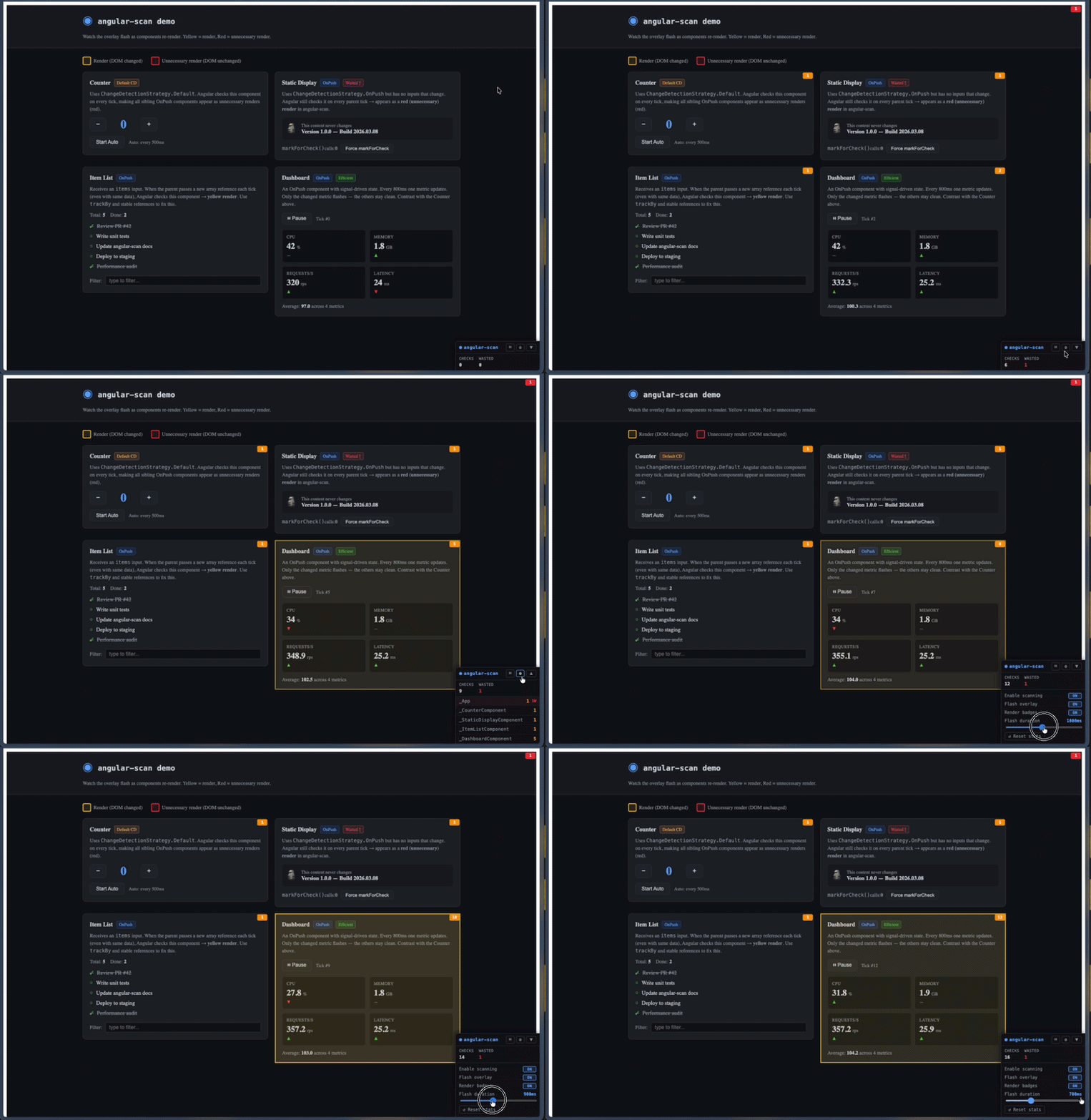
- Yellow flash — component was checked and its DOM changed (normal re-render)
- Red flash — component was checked but its DOM did not change (unnecessary render)
- Counter badge — cumulative render count on each component host element
- Toolbar HUD — draggable floating panel with live stats, runtime toggles, flash-duration slider, reset, and a per-component inspector
Zero overhead in production — the entire library is tree-shaken when isDevMode() returns false.
Works with both zone.js and zoneless Angular applications.
Chrome Extension
Prefer zero setup? Install the angular-scan Chrome extension to scan any Angular dev app right from your browser — no code changes or dependencies required.
Installation
npm install angular-scan --save-dev
Usage
Provider-based (recommended)
Add provideAngularScan() to your application providers:
// app.config.ts
import { ApplicationConfig } from '@angular/core';
import { provideAngularScan } from 'angular-scan';

export const appConfig: ApplicationConfig = {
  providers: [provideAngularScan()],
};
Imperative API
For micro-frontends or apps where you can't modify providers, call scan() before bootstrapApplication:
// main.ts
import { bootstrapApplication } from '@angular/platform-browser';
import { scan } from 'angular-scan';
import { AppComponent } from './app/app.component';
import { appConfig } from './app/app.config';

scan();
bootstrapApplication(AppComponent, appConfig);
scan() returns a teardown function:
const stop = scan();
// later...
stop(); // removes overlay and stops tracking
Options
provideAngularScan({
  enabled: true, // set false to disable entirely (default: true)
  flashDurationMs: 500, // how long the flash animation lasts in ms (default: 500)
  showBadges: true, // show render count badges on host elements (default: true)
  showToolbar: true, // show the floating toolbar HUD (default: true)
});
The same options are accepted by scan().
How it works
Angular exposes window.ng.ɵsetProfiler() in development mode — the same hook used by Angular DevTools in Chrome. angular-scan registers a profiler callback to intercept every change detection cycle:
ChangeDetectionStart— aMutationObserverbegins recording all DOM mutationsChangeDetectionSyncStart/End— gates whichTemplateUpdateStartevents count as real renders (excludes the dev-modecheckNoChangespass)TemplateUpdateStart— the exact component instance being checked is capturedChangeDetectionEnd—MutationObserver.takeRecords()flushes synchronously; each captured instance is mapped to its host element viang.getHostElement(); components whose subtree had DOM mutations are marked as renders, the rest as unnecessary renders
All Angular signal writes are deferred via queueMicrotask() to avoid triggering a new CD cycle from inside the profiler callback.
The canvas overlay (position: fixed, full viewport, pointer-events: none) uses a requestAnimationFrame loop to draw and fade rectangles over component host elements. The toolbar is created via createComponent() and attached to ApplicationRef outside the normal component tree, so its own renders are excluded from tracking.
Interpreting the output
| Signal | Meaning | Common cause |
|---|---|---|
| Yellow flash | Component re-rendered (DOM changed) | Normal update — signal/input changed |
| Red flash | Component checked but DOM unchanged | Parent uses Default CD strategy; child is OnPush with no changed inputs |
| High wasted count on a component | It's being checked unnecessarily on every tick | Wrap it in OnPush; ensure parent isn't Default CD |
| Counter badge turns red | More unnecessary than necessary renders | Same as above — component is OnPush but still gets walked |
Toolbar HUD
The floating toolbar mounts in the bottom-right corner and can be dragged anywhere on screen. The panel is clamped inside the viewport on drag, resize, and when expanding sections near a screen edge.
Header
| Button | Action |
|---|---|
| ⏸ / ▶ | Pause or resume scanning |
| ⚙ | Open the settings panel |
| ▲ / ▼ | Expand or collapse the per-component inspector |
The header itself is the drag handle — grab anywhere outside the buttons to move the panel.
Stats
- CHECKS — total components checked since the last reset
- WASTED — total unnecessary renders (turns red when > 0)
Settings panel (⚙)
- Enable scanning — mirrors the header pause button
- Flash overlay — show/hide the canvas flashes
- Render badges — show/hide the counter badges on host elements
- Flash duration — slider, 100 ms – 2000 ms
- ↺ Reset stats — clears all render counts and the inspector list
Inspector (▲) lists each tracked component with its name, total render count, and a nW wasted suffix. Rows whose most recent render was "unnecessary" are highlighted red.
Pass showToolbar: false to disable the HUD entirely while keeping flashes and badges.
Requirements
- Angular ≥ 20 — tested on 20, 21, and 22
- Must be used in development mode (
ng serve/ng build --configuration development) - The Angular debug APIs (
window.ng) are only available in dev mode —angular-scanis silently disabled otherwise