This project moved to Codeberg
May 3, 2026 · View on GitHub
Warning
Development of File Browser has moved to Codeberg. Please update your bookmarks and local clones to point to the new URL.
git remote set-url origin https://codeberg.org/ichthyosaurus/harbour-file-browser
git fetch
git branch -u origin/main main




This repository contains the development of version 2.0.0 and upwards of File Browser. See below for this project's history.
Features
- Browse and search files and folders
- Share files and open files in an external app
- Preview contents of images files, audio files, video files, compressed archives, databases, etc.
- Select multiple files (by tapping the file icons)
- Quickly copy, link, or move large amounts of files at once
- Bulk rename, delete, or edit files and folders
- Edit file and folder permissions
- Create new files and folders
- Show and hide hidden files (filenames starting with a dot)
- Open multiple windows and move files between them
- Copy, edit, or manually enter paths
- Quickly filter files from the top pulley menu
- Set per-folder view preferences
- Save custom quick shortcuts for navigating and moving files
... and much more.
Remember: this is a power tool, so be careful.
Limitations in Jolla's Harbour store
File Browser in Jolla's Harbour store cannot show all files due to mandatory sandboxing (Sailjail) since Sailfish OS 4.4. Inaccessible folders appear empty as there is no way for the app to determine if a folder is actually empty or simply presented as empty by the system.
Additionally, some file previews and integrated access to storage settings are disabled.
The version on OpenRepos is not affected by these limitations.
Root mode
File Browser can run with administrator privileges to give you unrestricted access to your system. To use this feature, you must install Root mode for File Browser from OpenRepos. Root mode is protected by your lock code.
You can find screenshots here.
Permissions
File Browser requires the following Sailjail permissions:
Audio: for playing previews of audio filesMediaIndexing: to list all documentsPublicDir: to show as many files as possible while restricted by SailjailRemovableMedia: for browsing USB sticks and SD cardsUserDirs: to show as many files as possible while restricted by Sailjail
Note
sandboxing is only enabled for builds in Jolla's Harbour store. The version on OpenRepos has no such restrictions and can show all files.
Help and support
There is a FAQ about some common questions. If your question is not listed there, you are welcome to leave a comment in the forum if you have any questions or ideas.
Translations
It would be wonderful if the app could be translated in as many languages as possible!
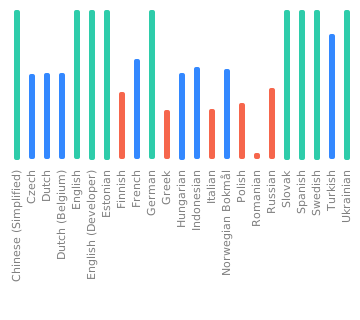
Translations are managed using Weblate. Please prefer this over pull requests (which are still welcome, of course). If you just found a minor problem, you can also open an issue.
Manually updating translations
Please prefer using Weblate over this.
You can follow these steps to manually add or update a translation:
- If it did not exist before, create a new catalog for your language by copying the base file translations/harbour-file-browser.ts. Then add the new translation to harbour-file-browser.pro.
- Add yourself to the list of translators in TRANSLATORS.json,
in the section
extra. - (optional) Translate the app's name in harbour-file-browser.desktop if there is a (short) native term for it in your language.
See the Qt documentation for details on how to translate date formats to your local format.
Building and contributing
Bug reports, and contributions for translations, bug fixes, or new features are always welcome!
- Clone the repository by running
git clone --recursive https://codeberg.org/ichthyosaurus/harbour-file-browser - Open
harbour-file-browser.proin QtCreator for Sailfish (SailfishOS SDK) - To run on emulator, select the
i486target and press the run button - To build for the device, select the
aarch64orarmv7hltarget and click “deploy all”; the RPM packages will be in theRPMSfolder
If you contribute, please do not forget to add yourself to the list of contributors in qml/pages/AboutPage.qml!
Acknowledgements
File Browser had been developed since 2013 by karip up until version 1.8.0. Source code and compiled packages of legacy versions (which were released into the public domain) are still available in karip's repository on Github.
Exif data embedded in image files is displayed with JHead, which is a public domain Exif manipulation tool.
Donations

I am always happy if you buy me a cup of coffee through Liberapay if you want to support my work.
Of course it would be much appreciated as well if you support this project by contributing to translations or code! See above how you can contribute 🎕.
Please consider also supporting the SailfishOS Community Team on Liberapay to reach more developers.
Anti-AI policy
Important
- LLM/“AI”-generated contributions are forbidden.
- Using this project in whole or in part for AI training or data mining is likewise forbidden.
Please be transparent, respect the Free Software community, and adhere to the licenses. This is a welcoming place for human creativity and diversity, but LLM/“AI”-generated slop is going against these values.
Apart from all the ethical, moral, legal, environmental, societal, social, political, technical, and overall human, reasons against LLMs/“AI”, I also simply don't have any spare time to review generated contributions.
See also this list for more reasons against supporting “AI”.
License
Copyright (C) 2019-2026 Mirian Margiani
Copyright (C) 2013-2019 karip
File Browser is Free Software released under the terms of the GNU Affero General Public License v3 (or later). The source code is available on Codeberg. All documentation is released under the terms of the GNU Free Documentation License v1.3 (or later).
File Browser and related materials must not be used for AI training and/or data mining.
This project follows the REUSE specification.