Prometheus BCI
March 20, 2026 · View on GitHub


A comprehensive GitBook user manual is currently being created. This README will soon be complemented by a full online documentation! A scientific article will soon be published detailing our research and EEG classification methods underlying Prometheus BCI.
Prometheus BCI
Overview
Prometheus BCI is an advanced platform for the collection and analysis of multimodal data, designed to support applications in neuroscience, biofeedback, and brain-computer interfaces (BCIs), based on Timeflux. It processes data from various devices and sensors — EEG, PPG, ECG, and camera — converting raw input into actionable metrics and insights for cognitive and physiological analysis.
A Tribute to Nathalie and Pierre
Prometheus BCI's first interface was born from a unique challenge: enabling Nathalie Labregere to interact with an exoskeleton arm and carry the Olympic flame on May 9, 2024, in Marseille.
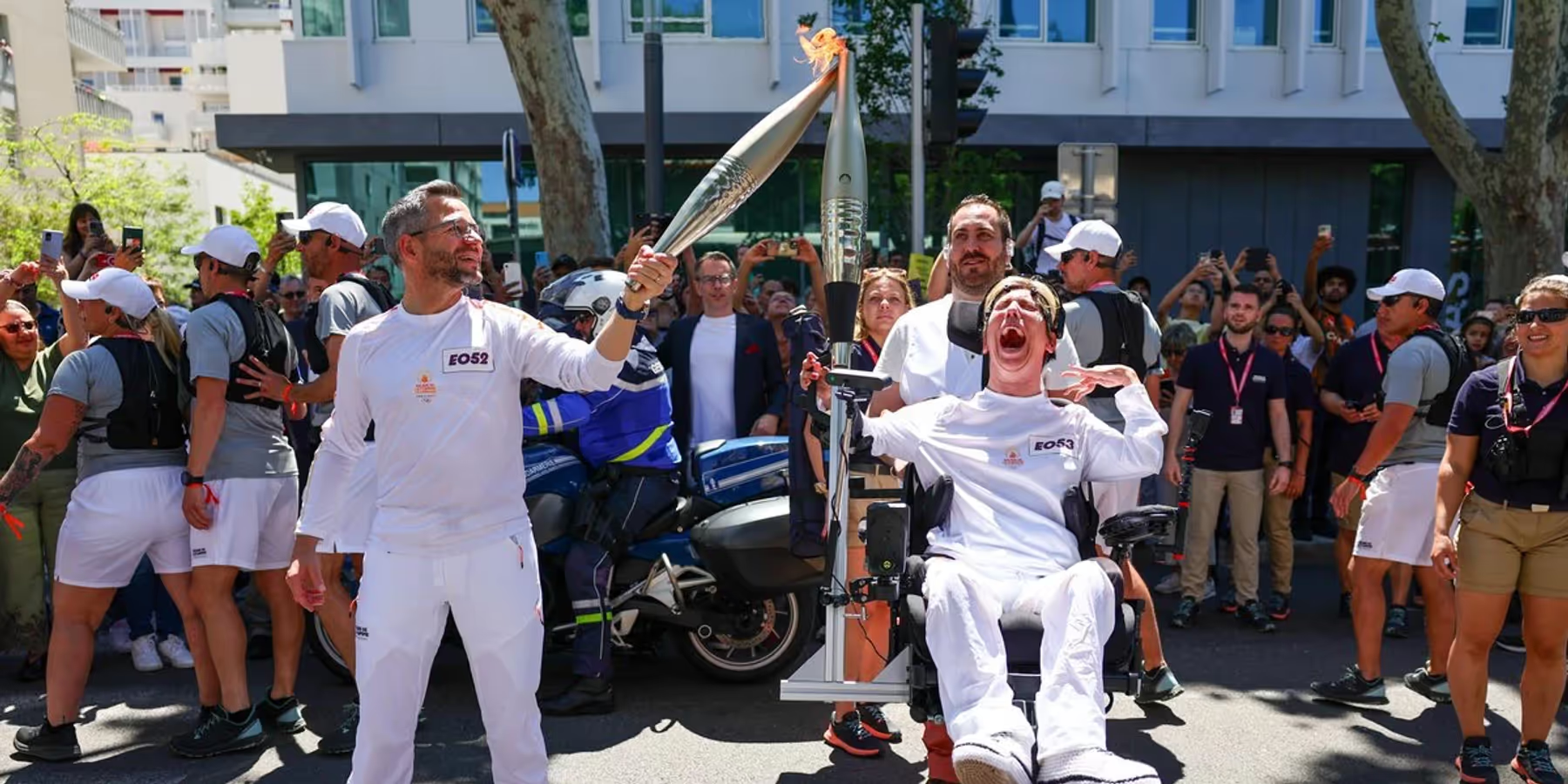
Due to severe motor and cerebral disabilities, Nathalie could not use motor imagery commands; her only means of interacting with the world is through her facial expressions. Thanks to her determination, Prometheus BCI allowed her to control the exoskeleton arm using just those subtle facial movements.
A few weeks later, on July 24, 2024, Pierre Landerretche -- also living with motor disabilities -- carried the Olympic flame in Versailles, on the eve of the opening ceremony.
Their journeys are a tribute to the spirit of inclusion, resilience, and innovation. Prometheus BCI exists because of pioneers like Nathalie and Pierre, whose courage and stories inspire us to push the boundaries of assistive neurotechnology -- for everyone.
This project is made possible thanks to the support of Allianz Trade, whose commitment to innovation and inclusion helps turn advanced AI and neurotechnology into real-world solutions for people with disabilities.
Contributing
Prometheus BCI is open source with a purpose: to be improved, forked, and reimagined by the community. We want this platform to evolve through collective intelligence -- whether you're passionate about neuroscience, creative signal processing, innovative machine learning, UX design, or simply exploring new ways to use multimodal data.
Feel free to open an issue or submit a pull request.
Any contribution -- from advanced Riemannian geometry, CSP or deep learning, to interface tweaks or documentation -- will help make Prometheus BCI better for all.
To get started, simply fork the repository, create a feature branch, and propose your changes. If you are a researcher and want to add or benchmark new classification pipelines, please document your methods clearly (and share references if relevant).
Testing policy
Every new feature or bug fix must include corresponding unit tests. Pull requests without tests will not be merged.
- Add tests in
tests/following the existing naming convention (test_<module>.py) - Run the full suite before submitting:
python -m pytest tests/ -v - For new processing nodes or estimators: test the core logic (pure functions, calculations, edge cases)
- For changes to default values or schemas: add a non-regression test in
tests/test_regression.py - Tests must pass without hardware dependencies — use the mocks provided in
tests/conftest.py
Let's advance open science and BCI innovation together!
Key Features
-
Multimodal Data Collection EEG, PPG, ECG, and facial expressions -- connect Emotiv, OpenBCI, BITalino, EmotiBit, or cameras.
-
Signal Processing Filtering, feature extraction (EEG bands, HRV), state computation (stress, attention, cognitive load, arousal).
-
Real-Time Monitoring Live dashboards for EEG signal quality, brain metrics, heart metrics, facial expressions, and head motions.
-
Metrics & Experiments Multimodal metrics, N-back cognitive tasks, mental command classification (Riemannian geometry, CSP and non-linear features soon).
-
Exoskeleton & Robotic Arm Control Integrates EEG and facial signals for robotic exoskeleton and robotic arm control, including for users with limited mobility.
Installation
Quick Start (recommended)
A Makefile is provided to simplify installation and usage:
git clone https://github.com/inclusive-brains/prometheus-bci.git
cd prometheus-bci
make setup    # Creates the conda environment and installs all dependencies
make run      # Opens the configuration UI, then launches the application
Available Make Commands
| Command | Description |
|---|---|
make setup | Create the conda environment (Python 3.10) and install dependencies |
make install | Install Python dependencies only |
make config | Open the interactive .env configuration UI |
make run | Configure and launch the Timeflux application |
make update | Update all dependencies |
make clean | Remove the conda environment |
make sync-ui | Synchronize shared UI assets (CSS, nav component) to all routes |
make logs | Display the latest log file |
make help | Show all available commands |
Docker
Prometheus BCI can also run in a Docker container — useful for reproducible deployments, CI, or running on a server without installing dependencies locally.
Quick Start (simulation mode)
make docker-build   # Build the image
make docker-run     # Launch with dummy EEG + fake PPG (no hardware needed)
The Timeflux UI is then available at http://localhost:8002/.
Available Docker Commands
| Command | Description |
|---|---|
make docker-build | Build the Docker image |
make docker-run | Launch in simulation mode (dummy EEG, fake PPG) |
make docker-run-hw | Launch with hardware access (USB/Bluetooth EEG, camera) |
make docker-stop | Stop the container |
make docker-test | Run the unit tests inside a container |
make docker-logs | Follow the container logs |
Hardware Mode (Linux only)
To use real EEG headsets, cameras, or BITalino in Docker, you need direct access to host devices. This is only supported on Linux — Docker Desktop on macOS and Windows does not support USB/Bluetooth passthrough.
make docker-run-hw
This starts the prometheus-hw service with:
privileged: true— full device accessnetwork_mode: host— direct Bluetooth/network (needed for EMOTIV Cortex API)/dev/video0mapped — webcam access/var/run/dbusmounted — host Bluetooth stack (EMOTIV, OpenBCI Ganglion)
To add your USB serial device (OpenBCI Cyton, BITalino), edit deploy/docker-compose.yml and uncomment the relevant line:
devices:
  - /dev/video0:/dev/video0
  # - /dev/ttyUSB0:/dev/ttyUSB0    # OpenBCI Cyton
  # - /dev/ttyACM0:/dev/ttyACM0    # BITalino
Tip: Run
ls /dev/tty*after plugging in your device to find the correct path.
macOS / Windows Users
On macOS and Windows, Docker Desktop runs inside a lightweight VM and cannot forward USB or Bluetooth devices to containers. For real hardware on these platforms, use the native installation:
make setup && make run
Manual Installation
1. Prerequisites
First, install Timeflux in a clean environment:
conda create --name timeflux python=3.10 pytables
conda activate timeflux
2. Setup
Then, install the application from the Git repository:
git clone https://github.com/inclusive-brains/prometheus-bci.git
cd prometheus-bci
pip install -r requirements.txt
Updating
make update
Or manually:
cd prometheus-bci
git pull
pip install -U -r requirements.txt
Running
By default, the application uses random data. It can therefore be fully tested without an actual EEG headset.
make run
Or manually:
conda activate timeflux
timeflux -d app.yaml
You can use the classic Timeflux monitoring interface or the Inclusive Brains UI to check the signal or start a new BCI session:
Configuration
The application is fully configurable via the app.yaml file and sub-graphs. The essential options are exposed in a .env environment file. You can edit this file directly or use the interactive configuration UI:
make config
Devices
| Setting | Description | Default |
|---|---|---|
| EEG_DEVICE | EEG headset: dummy (random data), consciouslabs, openbci, emotiv_insight, emotiv_epochX | dummy |
| PPG_DEVICE | PPG device: fake (random data), emotibit | fake |
| ECG | BITalino serial port (leave empty to disable) | (disabled) |
| CAMERA_ENABLE | Enable or disable camera facial expression detection | false |
Training
| Setting | Description | Default |
|---|---|---|
| BASELINE_ENABLE | Record a resting-state baseline before training | false |
| BASELINE_DURATION | Baseline duration in milliseconds | 45000 |
| MOTOR_ENABLE | Enable motor imagery training paradigm | true |
| MOTOR_IMAGERY | Motor imagery illustration: generic (arrows), rotation, extension, flexion | generic |
| MOTOR_BLOCKS | Number of blocks per session | 20 |
| MOTOR_TRIALS | Number of trials per block | 10 |
| BLINK_ENABLE | Enable blink detection training | true |
| BLINK_TRIALS | Total number of blink trials | 12 |
Output
| Setting | Description | Default |
|---|---|---|
| OSC_ENABLE | Stream data via Open Sound Control protocol | false |
| OSC_IP | Target OSC server IP | 127.0.0.1 |
| OSC_PORT | Target OSC server port | 5005 |
Paths & Models
| Setting | Description | Default |
|---|---|---|
| WARMUP_BLINK | Path to warmup data for blink detection (optional) | (disabled) |
| WARMUP_MOTOR | Path to warmup data for motor imagery (optional) | (disabled) |
| MODEL_BLINK | Pre-computed blink model (skips training if set) | (disabled) |
| MODEL_MOTOR | Pre-computed motor model (skips training if set) | (disabled) |
| TIMEFLUX_LOG_FILE | Log file path pattern | ./logs/%Y%m%d-%H%M%S.log |
| TIMEFLUX_DATA_PATH | Directory for recorded data | ./data |
Devices
This application is hardware-agnostic, as long as the EEG system provides high-quality data and a consistent electrode montage. Each device is defined as a sub-graph and should provide its own preprocessing pipeline (filtering, channel selection, etc.).
Supported Devices
| Type | Devices |
|---|---|
| EEG | Emotiv Insight, Emotiv Epoch X, Emotiv Epoch+, Emotiv MN8, OpenBCI, ConsciousLabs |
| PPG | EmotiBit |
| ECG | BITalino |
| Camera | Any webcam (via MediaPipe + DeepFace) |
Generic LSL devices can be added easily.
A random data graph is also available to test the interface without a real EEG device.
Web Interfaces
Prometheus BCI provides several real-time web interfaces, accessible at http://localhost:8002/:
| Interface | Description |
|---|---|
| EEG Quality | Real-time EEG signal quality monitoring |
| Brain Metrics | Live cognitive metrics (attention, cognitive load, arousal) |
| Heart Metrics | Heart rate, HRV, and stress monitoring |
| Facial Expressions | Real-time facial expression and emotion detection |
| Head Motions | Head movement tracking |
| Motor Imagery Training | Motor imagery calibration and training paradigm |
| Robotic Arm | 3D visualization and robotic arm control interface |
| N-back Task | Cognitive experiment for working memory assessment |
| Data Monitoring | Raw data stream inspection |
UI Architecture
The frontend uses vanilla JavaScript with a native Web Component (<nav-sidebar>) to centralize the navigation sidebar across all 12 pages.
Why this approach?
Timeflux UI serves each route as an isolated static directory (/{route}/assets/). It uses aiohttp's add_static() which does not follow symlinks and reserves the /common/assets/ path for its own built-in files (like timeflux.js). This makes it impossible to use a single shared directory or absolute paths for custom assets.
Our solution: shared UI files live in ui/common/ (the single source of truth) and are copied into each route's assets/ folder via make sync-ui. This preserves Timeflux compatibility while eliminating sidebar duplication (~80 lines of HTML × 12 pages).
Editing shared UI files:
- Edit the source in
ui/common/assets/css/prometheus.cssorui/common/assets/js/nav-sidebar.js - Run
make sync-uito propagate to all routes - Page-specific styles remain in each route's own
assets/css/prometheus.css
Calibration
A typical session begins with a calibration phase:
- Baseline: Records a resting-state baseline for reference (optional).
- Motor imagery: With an Emotiv Epoch X headset (14 channels), 100 to 120 repetitions per class are needed.
- Blinks: Around 10-15 blinks followed by a rest period are sufficient for accurate classification.
Pre-computed models can be loaded via the MODEL_BLINK and MODEL_MOTOR environment variables to skip calibration.
Recording
Raw EEG data and calibration events are recorded in HDF5 format in the data directory. Log files are stored in the logs directory.
AI Models
Motor Imagery
- Segment EEG -> 900ms windows (100ms step)
- Covariance Matrix -> Tangent space projection (Riemannian geometry)
- Classification -> Logistic regression
- Decision -> Probability buffer -> prediction if >75%
- Refractory period 1.5s
Blinks
- Segment EEG -> 1500ms windows (200ms step)
- Preprocessing -> Frontal channels, normalization, stats
- Classification -> SVM (RBF kernel), >80% confidence
- UI detection -> Double/triple blinks in 1200ms
- Refractory 800ms
Facial Expressions
- Capture -> Webcam via OpenCV
- Detection -> MediaPipe Face Landmarker (52 blendshapes)
- Emotion -> DeepFace emotion recognition
- Smoothing -> Kalman filtering
More models are coming soon: In the coming months, additional methods will be implemented, including non-linear techniques and CSP (Common Spatial Patterns).
Tech Stack
| Component | Technologies |
|---|---|
| Signal processing | Timeflux, Timeflux DSP, SciPy |
| EEG classification | pyRiemann (Riemannian geometry), scikit-learn |
| Physiological metrics | NeuroKit2, FilterPy |
| Computer vision | MediaPipe, OpenCV, DeepFace |
| Communication | ZeroMQ, WebSocket, OSC, Lab Streaming Layer (LSL) |
| Data storage | HDF5 (PyTables) |
| Frontend | HTML5, JavaScript (vanilla + Web Components), Smoothie Charts, Chart.js, Three.js |
Project Structure
prometheus-bci/
├── app.yaml                # Main Timeflux configuration
├── .env                    # Environment variables
├── Makefile                # Build & run automation
├── requirements.txt        # Python dependencies
├── deploy/                 # Docker deployment files
│   ├── Dockerfile          # Production container (multi-stage)
│   ├── Dockerfile.test     # Test runner container
│   ├── docker-compose.yml  # Simulation, hardware & test services
│   └── .dockerignore       # Docker build exclusions
├── nodes/                  # Custom Timeflux processing nodes
│   ├── classification/     # Accumulator, Bayesian classifiers
│   ├── eeg/                # Band power, metrics, ratios
│   ├── physio/             # PPG / HRV processing
│   ├── vision/             # Camera, multimodal metrics
│   └── output/             # OSC publisher
├── estimators/             # ML feature extractors (EOG, MNE)
├── graphs/                 # Timeflux signal processing pipelines
│   ├── sources/            # Device-specific graphs (EEG, PPG, ECG, camera)
│   ├── classification/     # Motor imagery & blink detection
│   ├── metrics/            # EEG, PPG, multimodal metrics
│   └── output/             # Debug & OSC output
├── tests/                  # Unit & regression tests (pytest)
├── ui/                     # Web interfaces (vanilla JS + Web Components)
│   ├── common/             # Shared design system & nav component (source of truth)
│   ├── real_time_detections/   # EEG quality, brain/heart metrics, facial expressions, head motions
│   ├── mind_control/       # Motor imagery training UIs
│   ├── robotic_arm/        # Robotic arm control
│   ├── experiments/        # N-back cognitive task
│   └── data_monitoring/    # Stream inspection
├── scripts/                # Setup & configuration scripts
├── data/                   # Recorded sessions (HDF5)
└── logs/                   # Application logs
Known Issues
RuntimeError: Set changed size during iteration (timeflux_ui)
A race condition in timeflux_ui causes a crash when a WebSocket client disconnects while the UI node is broadcasting to subscribers. The error originates in timeflux_ui/nodes/ui.py line 230.
Workaround: patch the installed package to iterate over a copy of the set:
# In site-packages/timeflux_ui/nodes/ui.py, line 230
# Replace:
for uuid in self._subscriptions[topic]:
# With:
for uuid in self._subscriptions[topic].copy():
This prevents concurrent disconnections from modifying the set during iteration. Note that pip install --upgrade timeflux_ui will overwrite this fix.
License
Creative Commons Attribution-NonCommercial 4.0 International
Copyright (c) 2025 Inclusive Brains
This work is licensed under the Creative Commons Attribution-NonCommercial 4.0 International License.
To view a copy of this license, visit http://creativecommons.org/licenses/by-nc/4.0/
Contributors
- Paul Barbaste
- Olivier Oullier
- Pierre Clisson
- Sylvain Chevallier