examples.md
March 9, 2023 · View on GitHub
This document starts with simple native python examples and native spark examples, which is an easy way to verify if the Trusted PPML environment is correctly set up. Then Trusted Data Analysis, Trusted ML, Trusted DL and Trusted FL examples are given.
Python Examples
Run Trusted Python Helloworld
This example shows how to run trusted native python Helloworld.
Run the script to run trusted Python Helloworld:
bash work/start-scripts/start-python-helloworld-sgx.sh
Open another terminal and check the log:
sudo docker exec -it spark-local cat /ppml/trusted-big-data-ml/test-helloworld-sgx.log | egrep "Hello World"
The result should look something like this:
Hello World
Run Trusted Python Numpy
This example shows how to run trusted native Python NumPy.
Run the script to run trusted Python Numpy:
bash work/start-scripts/start-python-numpy-sgx.sh
Open another terminal and check the log:
sudo docker exec -it spark-local cat /ppml/trusted-big-data-ml/test-numpy-sgx.log | egrep "numpy.dot"
The result should look something like this:
numpy.dot: 0.034211914986371994 sec
Spark Examples
Run Trusted Spark Pi
This example runs a simple Spark PI program.
Run the script to run trusted Spark Pi:
bash work/start-scripts/start-spark-local-pi-sgx.sh
Open another terminal and check the log:
sudo docker exec -it spark-local cat /ppml/trusted-big-data-ml/test-pi-sgx.log | egrep "roughly"
The result should look something like this:
Pi is roughly 3.146760
mode * 4
Run Trusted Spark Wordcount
This example runs a simple Spark Wordcount program.
Run the script to run trusted Spark Wordcount:
bash work/start-scripts/start-spark-local-wordcount-sgx.sh
Open another terminal and check the log:
sudo docker exec -it spark-local cat /ppml/trusted-big-data-ml/test-wordcount-sgx.log | egrep "print"
The result should look something like this:
print("Hello: 1
print(sys.path);: 1
Spark local & k8s
Trusted Data Analysis
Run Trusted Spark SQL
This example shows how to run trusted Spark SQL.
First, make sure that the paths in /ppml/trusted-big-data-ml/work/spark-2.4.6/examples/src/main/python/sql/basic.py are the same as the paths of people.json and people.txt.
Run the script to run trusted Spark SQL:
bash work/start-scripts/start-spark-local-sql-sgx.sh
Open another terminal and check the log:
sudo docker exec -it spark-local cat /ppml/trusted-big-data-ml/test-sql-basic-sgx.log | egrep "Justin"
The result should look something like this:
| 19| Justin|
| Justin|
| Justin| 20|
| 19| Justin|
| 19| Justin|
| 19| Justin|
Name: Justin
| Justin|
Run Trusted Spark SQL (TPC-H)
TPC-H with Trusted SparkSQL on Kubernetes
https://bigdl.readthedocs.io/en/latest/doc/PPML/QuickStart/tpc-h_with_sparksql_on_k8s.htmlRun Trusted Spark SQL (TPC-DS)
TPC-DS with Trusted SparkSQL on Kubernetes
https://bigdl.readthedocs.io/en/latest/doc/PPML/QuickStart/tpc-ds_with_sparksql_on_k8s.htmlRun Trusted SimpleQuery
Trusted SimpleQuery With Single Data source/KMS
Spark native mode

bash bigdl-ppml-submit.sh \
        --sgx-enabled false \
        --master local[2] \
        --driver-memory 32g \
        --driver-cores 8 \
        --executor-memory 32g \
        --executor-cores 8 \
        --num-executors 2 \
        --name simplequery \
        --verbose \
        --class com.intel.analytics.bigdl.ppml.examples.SimpleQuerySparkExample \
        --jars local://$SPARK_HOME/examples/jars/scopt_2.12-3.7.1.jar,local://$BIGDL_HOME/jars/bigdl-dllib-spark_3.1.2-2.1.0-SNAPSHOT.jar \
        local://$BIGDL_HOME/jars/bigdl-ppml-spark_3.1.2-2.1.0-SNAPSHOT.jar \
        --inputPath /ppml/trusted-big-data-ml/work/data/ppml_e2e_demo/input_data/ \
        --outputPath /ppml/trusted-big-data-ml/work/data/ppml_e2e_demo/input_data/people.csv.encrypted.decrypted1 \
        --inputPartitionNum 8 \
        --outputPartitionNum 8 \
        --inputEncryptModeValue AES/CBC/PKCS5Padding \
        --outputEncryptModeValue AES/CBC/PKCS5Padding \
        --primaryKeyPath /ppml/trusted-big-data-ml/work/data/ppml_e2e_demo/key/ehsm_encrypted_primary_key \
        --dataKeyPath /ppml/trusted-big-data-ml/work/data/ppml_e2e_demo/key/ehsm_encrypted_data_key \
        --kmsType EHSMKeyManagementService \
        --kmsServerIP kms_server_ip \
        --kmsServerPort kms_server_port \
        --ehsmAPPID appid \
        --ehsmAPIKEY apikey
Spark native mode, SGX enabled

bash bigdl-ppml-submit.sh \
        --master local[2] \
        --sgx-enabled true \
        --sgx-driver-jvm-memory 12g \
        --sgx-executor-jvm-memory 12g \
        --driver-memory 32g \
        --driver-cores 8 \
        --executor-memory 32g \
        --executor-cores 8 \
        --num-executors 2 \
        --name simplequery \
        --verbose \
        --class com.intel.analytics.bigdl.ppml.examples.SimpleQuerySparkExample \
        --jars local://$SPARK_HOME/examples/jars/scopt_2.12-3.7.1.jar,local://$BIGDL_HOME/jars/bigdl-dllib-spark_3.1.2-2.1.0-SNAPSHOT.jar \
        local://$BIGDL_HOME/jars/bigdl-ppml-spark_3.1.2-2.1.0-SNAPSHOT.jar \
        --inputPath /ppml/trusted-big-data-ml/work/data/ppml_e2e_demo/input_data/ \
        --outputPath /ppml/trusted-big-data-ml/work/data/ppml_e2e_demo/input_data/people.csv.encrypted.decrypted1 \
        --inputPartitionNum 8 \
        --outputPartitionNum 8 \
        --inputEncryptModeValue AES/CBC/PKCS5Padding \
        --outputEncryptModeValue AES/CBC/PKCS5Padding \
        --primaryKeyPath /ppml/trusted-big-data-ml/work/data/ppml_e2e_demo/key/ehsm_encrypted_primary_key \
        --dataKeyPath /ppml/trusted-big-data-ml/work/data/ppml_e2e_demo/key/ehsm_encrypted_data_key \
        --kmsType EHSMKeyManagementService \
        --kmsServerIP kms_server_ip \
        --kmsServerPort kms_server_port \
        --ehsmAPPID appid \
        --ehsmAPIKEY apikey
k8s client mode, SGX enabled

bash bigdl-ppml-submit.sh \
        --master $RUNTIME_SPARK_MASTER \
        --deploy-mode client \
        --sgx-enabled true \
        --sgx-driver-jvm-memory 12g \
        --sgx-executor-jvm-memory 12g \
        --driver-memory 32g \
        --driver-cores 4 \
        --executor-memory 32g \
        --executor-cores 4 \
        --conf spark.kubernetes.container.image=$RUNTIME_K8S_SPARK_IMAGE \
        --num-executors 2 \
        --conf spark.cores.max=8 \
        --name simplequery \
        --verbose \
        --class com.intel.analytics.bigdl.ppml.examples.SimpleQuerySparkExample \
        --jars local://$SPARK_HOME/examples/jars/scopt_2.12-3.7.1.jar,local://$BIGDL_HOME/jars/bigdl-dllib-spark_3.1.2-2.1.0-SNAPSHOT.jar \
        local://$BIGDL_HOME/jars/bigdl-ppml-spark_3.1.2-2.1.0-SNAPSHOT.jar \
        --inputPath /ppml/trusted-big-data-ml/work/data/ppml_e2e_demo/input_data/ \
        --outputPath /ppml/trusted-big-data-ml/work/data/ppml_e2e_demo/input_data/people.csv.encrypted.decrypted1 \
        --inputPartitionNum 8 \
        --outputPartitionNum 8 \
        --inputEncryptModeValue AES/CBC/PKCS5Padding \
        --outputEncryptModeValue AES/CBC/PKCS5Padding \
        --primaryKeyPath /ppml/trusted-big-data-ml/work/data/ppml_e2e_demo/key/ehsm_encrypted_primary_key \
        --dataKeyPath /ppml/trusted-big-data-ml/work/data/ppml_e2e_demo/key/ehsm_encrypted_data_key \
        --kmsType EHSMKeyManagementService \
        --kmsServerIP kms_server_ip \
        --kmsServerPort kms_server_port \
        --ehsmAPPID appid \
        --ehsmAPIKEY apikey
k8s cluster mode, SGX enabled

bash bigdl-ppml-submit.sh \
        --master $RUNTIME_SPARK_MASTER \
        --deploy-mode cluster \
        --sgx-enabled true \
        --sgx-driver-jvm-memory 12g \
        --sgx-executor-jvm-memory 12g \
        --driver-memory 32g \
        --driver-cores 4 \
        --executor-memory 32g \
        --executor-cores 4 \
        --conf spark.kubernetes.container.image=$RUNTIME_K8S_SPARK_IMAGE \
        --num-executors 2 \
        --conf spark.cores.max=8 \
        --name simplequery \
        --verbose \
        --class com.intel.analytics.bigdl.ppml.examples.SimpleQuerySparkExample \
        --jars local://$SPARK_HOME/examples/jars/scopt_2.12-3.7.1.jar,local://$BIGDL_HOME/jars/bigdl-dllib-spark_3.1.2-2.1.0-SNAPSHOT.jar \
        local://$BIGDL_HOME/jars/bigdl-ppml-spark_3.1.2-2.1.0-SNAPSHOT.jar \
        --inputPath /ppml/trusted-big-data-ml/work/data/ppml_e2e_demo/input_data/ \
        --outputPath /ppml/trusted-big-data-ml/work/data/ppml_e2e_demo/input_data/people.csv.encrypted.decrypted1 \
        --inputPartitionNum 8 \
        --outputPartitionNum 8 \
        --inputEncryptModeValue AES/CBC/PKCS5Padding \
        --outputEncryptModeValue AES/CBC/PKCS5Padding \
        --primaryKeyPath /ppml/trusted-big-data-ml/work/data/ppml_e2e_demo/key/ehsm_encrypted_primary_key \
        --dataKeyPath /ppml/trusted-big-data-ml/work/data/ppml_e2e_demo/key/ehsm_encrypted_data_key \
        --kmsType EHSMKeyManagementService \
        --kmsServerIP kms_server_ip \
        --kmsServerPort kms_server_port \
        --ehsmAPPID appid \
        --ehsmAPIKEY apikey
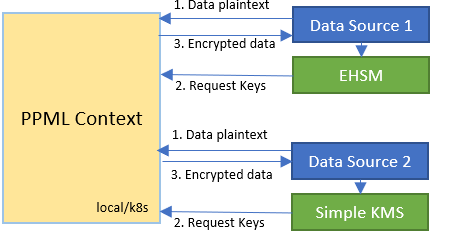
Trusted SimpleQuery With Multiple Data source/KMS
You can specify multi-KMS configurations through --conf parameter at bigdl-ppml-submit CLI, or ppmlArgs at initPPMLContext in application codes:
-
bigdl-ppml-submit:
bash bigdl-ppml-submit.sh \ ... --conf spark.bigdl.primaryKey.AmyPK.kms.type=SimpleKeyManagementService \ --conf spark.bigdl.primaryKey.AmyPK.kms.appId=${SimpleAPPID} \ --conf spark.bigdl.primaryKey.AmyPK.kms.apiKey=${SimpleAPIKEY} \ --conf spark.bigdl.primaryKey.AmyPK.material=${AmyEncryptedPrimaryKeyPath}, \ --conf spark.bigdl.primaryKey.BobPK.kms.type=EHSMKeyManagementService \ --conf spark.bigdl.primaryKey.BobPK.kms.ip=${EHSMIP} \ --conf spark.bigdl.primaryKey.BobPK.kms.port=${EHSMPORT} \ --conf spark.bigdl.primaryKey.BobPK.kms.appId=${EHSMAPPID} \ --conf spark.bigdl.primaryKey.BobPK.kms.apiKey=${EHSMAPIKEY} \ --conf spark.bigdl.primaryKey.BobPK.material=${BobEncryptedPrimaryKeyPath} ... -
initPPMLContext:
import com.intel.analytics.bigdl.ppml.PPMLContext

val ppmlArgs: Map[String, String] = Map(
  "spark.bigdl.primaryKey.AmyPK.kms.type" -> "SimpleKeyManagementService",
  "spark.bigdl.primaryKey.AmyPK.kms.appId" -> simpleAPPID,
  "spark.bigdl.primaryKey.AmyPK.kms.apiKey" -> simpleAPIKEY,
  "spark.bigdl.primaryKey.AmyPK.material" -> AmyEncryptedPrimaryKeyPath,
  "spark.bigdl.primaryKey.BobPK.kms.type" -> "EHSMKeyManagementService",
  "spark.bigdl.primaryKey.BobPK.kms.ip" -> ehsmIP,
  "spark.bigdl.primaryKey.BobPK.kms.port" -> ehsmPort,
  "spark.bigdl.primaryKey.BobPK.kms.appId" -> ehsmAPPID,
  "spark.bigdl.primaryKey.BobPK.kms.apiKey" -> ehsmAPIKEY,
  "spark.bigdl.primaryKey.BobPK.material" -> BobEncryptedPrimaryKeyPath
)

val sc = PPMLContext.initPPMLContext("MyApp", ppmlArgs)
- PPMLContext provides spark-style dataframe-read/write APIs, and users can use write to save data frames in ciphertext and load plaintext ones into memory by read API. This can be operated with parameters below:
- primaryKey: name of the primary key applied to crypto codec on a dataframe. Names are specified in section 2 above.
- encryptMode: the status of input file for read API or output mode for write API.
plain_textfor plaintext input files or save without encryption,AES/CBC/PKCS5Paddingfor csv, json and textFile, andAES_GCM_CTR_V1orAES_GCM_V1for parquet. - path: the file system path of the dataframe read from or write to.
scala
import com.intel.analytics.bigdl.ppml.crypto.AES_CBC_PKCS5PADDING

// save df in ciphertext
sc.write(dataFrame = df, cryptoMode = AES_CBC_PKCS5PADDING, primaryKeyName = "AmyPK")
  .csv(path = "./encrypted_amy_data_file")

// load and decrypt encrypted file
val decryptedDF = sc.read(cryptoMode = AES_CBC_PKCS5PADDING, primaryKeyName = "AmyPK")
                    .csv(path = "./encrypted_amy_data_file")
python
from bigdl.ppml.ppml_context import *

ppml_args =  {
    "spark.bigdl.primaryKey.AmyPK.kms.type": "SimpleKeyManagementService",
    "spark.bigdl.primaryKey.AmyPK.kms.appId": simple_app_id,
    "spark.bigdl.primaryKey.AmyPK.kms.apiKey": simple_api_key,
    "spark.bigdl.primaryKey.AmyPK.material": amy_encrypted_primary_key_path,
    "spark.bigdl.primaryKey.BobPK.kms.type": "EHSMKeyManagementService",
    "spark.bigdl.primaryKey.BobPK.kms.ip": ehsm_ip,
    "spark.bigdl.primaryKey.BobPK.kms.port": ehsm_port,
    "spark.bigdl.primaryKey.BobPK.kms.appId": ehsm_app_id,
    "spark.bigdl.primaryKey.BobPK.kms.apiKey": ehsm_api_key,
    "spark.bigdl.primaryKey.BobPK.material": bob_encrypted_primary_key_path
}

sc = PPMLContext("MyApp", None, ppml_args)
# save df in ciphertext
sc.write(dataframe = df, crypto_mode = AES_CBC_PKCS5PADDING,
         primary_key_name = "AmyPK")
  .csv(path = "./encrypted_amy_data_file")

# load and decrypt encrypted file
decrypted_df = sc.read(crypto_mode = AES_CBC_PKCS5PADDING, primary_key_name = "AmyPK")
                 .csv(path = "./encrypted_amy_data_file")
-
Run end-to-end multi-party example
First, following here to encrypt input data of each party in their own safe client container and upload to k8s. Note that
AmyPKshould be a plaintext primary key andBobPKshould be one from EHSM KMS. If you do not have a k8s cluster, you are allowed to run in Spark local mode.
- Local mode:
export amyPKPlaintext=amyPK_plaintext_base64_string
export bobEncryptedPrimaryKeyPath=path_to_bob_encrypted_primary_key_file
export bobEhsmIP=bob_ehsm_ip
export bobEhsmPort=bob_ehsm_port
export bobEhsmAppId=bob_ehsm_appid
export bobEhsmApiKey=bob_ehsm_apikey
export amyEncryptedDataFilePath=encrypted_amy_input_data_file_like_file://xxx_or_hdfs://xxx
export bobEncryptedDataFilePath=encrypted_bob_input_data_file_like_file://xxx_or_hdfs://xxx
export bobEncryptedPrimaryKeyPath=bob_encrypted_primary_key_path_which_is_got_from_ehsm

bash bigdl-ppml-submit.sh \
    --master local[2] \
    --sgx-enabled false \
    --driver-memory 32g \
    --driver-cores 4 \
    --executor-memory 32g \
    --executor-cores 4 \
    --num-executors 2 \
    --conf spark.cores.max=8 \
    --verbose \
    --class com.intel.analytics.bigdl.ppml.examples.MultiPartySparkQueryExample \
    --conf spark.network.timeout=10000000 \
    --conf spark.executor.heartbeatInterval=10000000 \
    --conf spark.bigdl.primaryKey.AmyPK.plainText=${amyPKPlaintext} \
    --conf spark.bigdl.primaryKey.BobPK.kms.type=EHSMKeyManagementService \
    --conf spark.bigdl.primaryKey.BobPK.kms.ip=${bobEhsmIP} \
    --conf spark.bigdl.primaryKey.BobPK.kms.port=${bobEhsmPort} \
    --conf spark.bigdl.primaryKey.BobPK.kms.appId=${bobEhsmAppId} \
    --conf spark.bigdl.primaryKey.BobPK.kms.apiKey=${bobEhsmApiKey} \
    --conf spark.bigdl.primaryKey.BobPK.material=${bobEncryptedPrimaryKeyPath} \
    --jars  /ppml/trusted-big-data-ml/bigdl-ppml-spark_${SPARK_VERSION}-${BIGDL_VERSION}-jar-with-dependencies.jar,local:///ppml/trusted-big-data-ml/bigdl-ppml-spark_${SPARK_VERSION}-${BIGDL_VERSION}-jar-with-dependencies.jar \
    /ppml/trusted-big-data-ml/bigdl-ppml-spark_${SPARK_VERSION}-${BIGDL_VERSION}-jar-with-dependencies.jar \
    ${amyEncryptedDataFilePath} ${bobEncryptedDataFilePath}
- K8S cluster mode:
export amyPKPlaintext=amyPK_plaintext_base64_string
export bobEncryptedPrimaryKeyPath=path_to_bob_encrypted_primary_key_file
export bobEhsmIP=bob_ehsm_ip
export bobEhsmPort=bob_ehsm_port
export bobEhsmAppId=bob_ehsm_appid
export bobEhsmApiKey=bob_ehsm_apikey
export amyEncryptedDataFilePath=encrypted_amy_input_data_file_like_file://xxx_or_hdfs://xxx
export bobEncryptedDataFilePath=encrypted_bob_input_data_file_like_file://xxx_or_hdfs://xxx
export bobEncryptedPrimaryKeyPath=bob_encrypted_primary_key_path_which_is_got_from_ehsm

bash bigdl-ppml-submit.sh \
    --master $RUNTIME_SPARK_MASTER \
    --deploy-mode cluster \
    --sgx-enabled true \
    --sgx-driver-jvm-memory 20g \
    --driver-memory 10g \
    --driver-cores 4 \
    --sgx-executor-jvm-memory 15g \
    --executor-memory 10g \
    --executor-cores 4 \
    --num-executors 2 \
    --conf spark.cores.max=8 \
    --conf spark.network.timeout=10000000 \
    --conf spark.executor.heartbeatInterval=10000000 \
    --conf spark.kubernetes.container.image=$RUNTIME_K8S_SPARK_IMAGE \
    --conf spark.kubernetes.node.selector.icx-1=true \
    --conf spark.bigdl.primaryKey.AmyPK.plainText=${amyPKPlaintext} \
    --conf spark.bigdl.primaryKey.BobPK.kms.type=EHSMKeyManagementService \
    --conf spark.bigdl.primaryKey.BobPK.kms.ip=${bobEhsmIP} \
    --conf spark.bigdl.primaryKey.BobPK.kms.port=${bobEhsmPort} \
    --conf spark.bigdl.primaryKey.BobPK.kms.appId=${bobEhsmAppId} \
    --conf spark.bigdl.primaryKey.BobPK.kms.apiKey=${bobEhsmApiKey} \
    --conf spark.bigdl.primaryKey.BobPK.material=${bobEncryptedPrimaryKeyPath} \
    --verbose \
    --class com.intel.analytics.bigdl.ppml.examples.MultiPartySparkQueryExample \
    --jars  /ppml/trusted-big-data-ml/bigdl-ppml-spark_${SPARK_VERSION}-${BIGDL_VERSION}-jar-with-dependencies.jar,local:///ppml/trusted-big-data-ml/bigdl-ppml-spark_${SPARK_VERSION}-${BIGDL_VERSION}-jar-with-dependencies.jar \
    ${amyEncryptedDataFilePath} ${bobEncryptedDataFilePath}
Trusted ML
Please be noted that the XGBoost examples listed here are deprecated due to the fact that Rabit's network (contains gradient, split and env) is not protected.
(Deprecated) Run Trusted Spark XGBoost Regressor
This example shows how to run the trusted Spark XGBoost Regressor.
First, make sure that Boston_Housing.csv is under work/data directory or the same path in the start-spark-local-xgboost-regressor-sgx.sh.
Run the script to run the trusted Spark XGBoost Regressor and it would take some time to show the final results:
bash work/start-scripts/start-spark-local-xgboost-regressor-sgx.sh
Open another terminal and check the log:
sudo docker exec -it spark-local cat /ppml/trusted-big-data-ml/test-bigdl-xgboost-regressor-sgx.log | egrep "prediction" -A19
The result should look something like this:
| features|label| prediction|
+--------------------+-----+------------------+
|[41.5292,0.0,18.1...| 8.5| 8.51994514465332|
|[67.9208,0.0,18.1...| 5.0| 5.720333099365234|
|[20.7162,0.0,18.1...| 11.9|10.601168632507324|
|[11.9511,0.0,18.1...| 27.9| 26.19390106201172|
|[7.40389,0.0,18.1...| 17.2|16.112293243408203|
|[14.4383,0.0,18.1...| 27.5|25.952226638793945|
|[51.1358,0.0,18.1...| 15.0| 14.67484188079834|
|[14.0507,0.0,18.1...| 17.2|16.112293243408203|
|[18.811,0.0,18.1,...| 17.9| 17.42863655090332|
|[28.6558,0.0,18.1...| 16.3| 16.0191593170166|
|[45.7461,0.0,18.1...| 7.0| 5.300708770751953|
|[18.0846,0.0,18.1...| 7.2| 6.346951007843018|
|[10.8342,0.0,18.1...| 7.5| 6.571983814239502|
|[25.9406,0.0,18.1...| 10.4|10.235769271850586|
|[73.5341,0.0,18.1...| 8.8| 8.460335731506348|
|[11.8123,0.0,18.1...| 8.4| 9.193297386169434|
|[11.0874,0.0,18.1...| 16.7|16.174896240234375|
|[7.02259,0.0,18.1...| 14.2| 13.38729190826416|
(Deprecated) Run Trusted Spark XGBoost Classifier
This example shows how to run the trusted Spark XGBoost Classifier.
Before running the example, download the sample dataset from pima-indians-diabetes dataset. After downloading the dataset, make sure that pima-indians-diabetes.data.csv is under work/data directory or the same path in the start-spark-local-xgboost-classifier-sgx.sh. Replace path_of_pima_indians_diabetes_csv with your path of pima-indians-diabetes.data.csv.
Run the script to run the trusted Spark XGBoost Classifier and it would take some time to show the final results:
bash start-spark-local-xgboost-classifier-sgx.sh
Open another terminal and check the log:
sudo docker exec -it spark-local cat /ppml/trusted-big-data-ml/test-xgboost-classifier-sgx.log | egrep "prediction" -A7
The result should look something like this:
| f1| f2| f3| f4| f5| f6| f7| f8|label| rawPrediction| probability|prediction|
+----+-----+----+----+-----+----+-----+----+-----+--------------------+--------------------+----------+
|11.0|138.0|74.0|26.0|144.0|36.1|0.557|50.0| 1.0|[-0.8209581375122...|[0.17904186248779...| 1.0|
| 3.0|106.0|72.0| 0.0| 0.0|25.8|0.207|27.0| 0.0|[-0.0427864193916...|[0.95721358060836...| 0.0|
| 6.0|117.0|96.0| 0.0| 0.0|28.7|0.157|30.0| 0.0|[-0.2336160838603...|[0.76638391613960...| 0.0|
| 2.0| 68.0|62.0|13.0| 15.0|20.1|0.257|23.0| 0.0|[-0.0315906107425...|[0.96840938925743...| 0.0|
| 9.0|112.0|82.0|24.0| 0.0|28.2|1.282|50.0| 1.0|[-0.7087597250938...|[0.29124027490615...| 1.0|
| 0.0|119.0| 0.0| 0.0| 0.0|32.4|0.141|24.0| 1.0|[-0.4473398327827...|[0.55266016721725...| 0.0|
Trusted DL
Run Trusted Spark BigDL
This example shows how to run trusted Spark BigDL.
Run the script to run trusted Spark BigDL and it would take some time to show the final results:
bash work/start-scripts/start-spark-local-bigdl-sgx.sh
Open another terminal and check the log:
sudo docker exec -it spark-local cat /ppml/trusted-big-data-ml/test-bigdl-lenet-sgx.log | egrep "Accuracy"
The result should look something like this:
creating: createTop1Accuracy
2021-06-18 01:39:45 INFO DistriOptimizer$:180 - [Epoch 1 60032/60000][Iteration 469][Wall Clock 457.926565s] Top1Accuracy is Accuracy(correct: 9488, count: 10000, accuracy: 0.9488)
2021-06-18 01:46:20 INFO DistriOptimizer$:180 - [Epoch 2 60032/60000][Iteration 938][Wall Clock 845.747782s] Top1Accuracy is Accuracy(correct: 9696, count: 10000, accuracy: 0.9696)
Run Trusted Spark Orca Data
This example shows how to run trusted Spark Orca Data.
Before running the example, download the NYC Taxi dataset in Numenta Anomaly Benchmark from here for demo. After downloading the dataset, make sure that nyc_taxi.csv is under work/data directory or the same path in the start-spark-local-orca-data-sgx.sh. Replace path_of_nyc_taxi_csv with your path of nyc_taxi.csv in the script.
Run the script to run trusted Spark Orca Data and it would take some time to show the final results:
bash start-spark-local-orca-data-sgx.sh
Open another terminal and check the log:
sudo docker exec -it spark-local cat /ppml/trusted-big-data-ml/test-orca-data-sgx.log | egrep -a "INFO data|Stopping" -A10
The result should contain the content look like this:
INFO data collected: [ timestamp value
0 2014-07-01 00:00:00 10844
1 2014-07-01 00:30:00 8127
2 2014-07-01 01:00:00 6210
3 2014-07-01 01:30:00 4656
4 2014-07-01 02:00:00 3820
... ... ...
10315 2015-01-31 21:30:00 24670
10316 2015-01-31 22:00:00 25721
10317 2015-01-31 22:30:00 27309
10318 2015-01-31 23:00:00 26591
--
INFO data2 collected: [ timestamp value datetime hours awake
0 2014-07-01 00:00:00 10844 2014-07-01 00:00:00 0 1
1 2014-07-01 00:30:00 8127 2014-07-01 00:30:00 0 1
2 2014-07-01 03:00:00 2369 2014-07-01 03:00:00 3 0
3 2014-07-01 04:30:00 2158 2014-07-01 04:30:00 4 0
4 2014-07-01 05:00:00 2515 2014-07-01 05:00:00 5 0
... ... ... ... ... ...
5215 2015-01-31 17:30:00 23595 2015-01-31 17:30:00 17 1
5216 2015-01-31 18:30:00 27286 2015-01-31 18:30:00 18 1
5217 2015-01-31 19:00:00 28804 2015-01-31 19:00:00 19 1
5218 2015-01-31 19:30:00 27773 2015-01-31 19:30:00 19 1
--
Stopping orca context
Run Trusted Spark Orca Learn TensorFlow Basic Text Classification
This example shows how to run Trusted Spark Orca learn TensorFlow basic text classification.
Run the script to run Trusted Spark Orca learn TensorFlow basic text classification and it would take some time to show the final results. To run this example in standalone mode, replace -e SGX_MEM_SIZE=32G \ with -e SGX_MEM_SIZE=64G \ in start-distributed-spark-driver.sh
bash start-spark-local-orca-tf-text.sh
Open another terminal and check the log:
sudo docker exec -it spark-local cat test-orca-tf-text.log | egrep "results"
The result should be similar to:
INFO results: {'loss': 0.6932533979415894, 'acc Top1Accuracy': 0.7544000148773193}