Deploy to IPFS Action
July 9, 2026 · View on GitHub
This GitHub Action owns the merkleization stage of an IPFS deploy: it turns your static site into a CAR file with a deterministic root CID under your CI. Once the CAR exists, pinning is composable. Pin to your own IPFS Cluster or Kubo node natively, or pass the same CAR to Filecoin, Pinata, Filebase, or any other service as a follow-up step (see recipes). The action also creates preview links and posts PR comments and commit status.
This action is built and maintained by Interplanetary Shipyard.
The composite action makes no assumptions about your build process. You should just run your build and then call this action (as a step in an existing job) with the path-to-deploy input set to the path of your build output directory.
Important
v2 changed scope. Native support for Pinata, Filebase, and Storacha was removed. If you were on @v1 with any of those, see the migration in CHANGELOG.md and the recipes. Users on @v1 are unaffected until they bump to @v2.
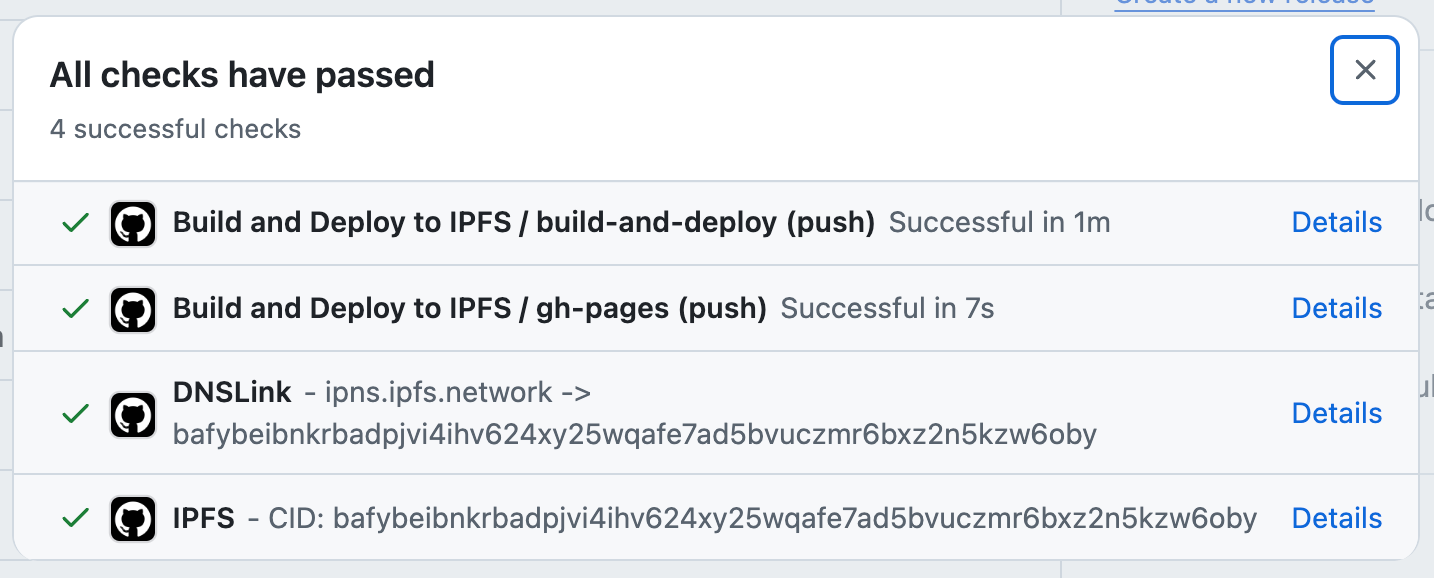
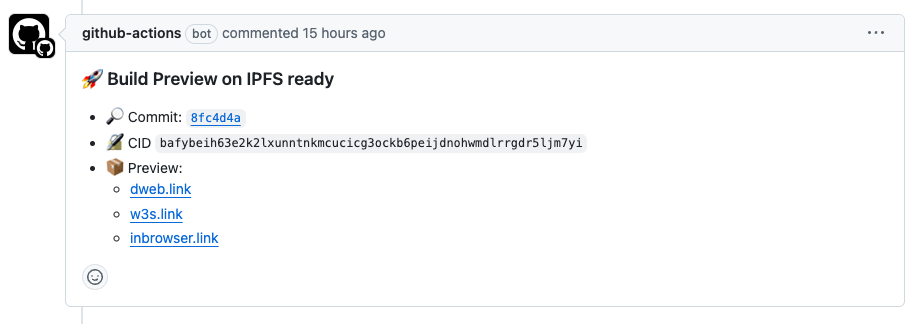
Table of Contents
- Features
- How does this compare to the other IPFS actions?
- Inputs
- Outputs
- Usage
- Pinning to external services
- FAQ
Features
- 📦 Merkleizes your static site into a CAR file
- 🚀 Uploads CAR to your own IPFS Cluster or Kubo node when configured
- 🧩 Composable with any third-party pinning service via recipes
- 📤 CAR attached to GitHub Action run Summary page
- 🔗 Automatic preview links
- 💬 PR comments with CID and preview links (auto-enabled when pinning to Cluster or Kubo)
- ✅ Commit status updates with build CID (auto-enabled when pinning to Cluster or Kubo)
How does this compare to the other IPFS actions?
This action owns one stage: merkleizing your build into a deterministic CAR under your CI. Everything else (pinning, archival) is composition.
- Merkleizes the build in GitHub Actions using Kubo, so chunker, CID version, and Kubo version are pinned in your workflow rather than a vendor's API.
- Uploads the CAR to your own IPFS Cluster or Kubo node when configured.
- Treats third-party pinning (Pinata, Filebase, Filecoin, anything else) as a follow-up step that consumes the same CAR. The action does not pick winners; support for each service stays upstream.
- Updates the PR comment and commit status with the CID and preview links.
Inputs
Required Inputs
| Input | Description |
|---|---|
path-to-deploy | Path to the directory containing the frontend build to merkleize into a CAR file and deploy to IPFS |
github-token | GitHub token for updating commit status and PR comments |
Native Pinning Providers (optional)
Note
Pinning is optional. With only path-to-deploy and github-token set, the action produces a CAR (path is exposed as the car-path output, also uploaded as a workflow artifact) and exits cleanly so that follow-up steps or jobs can pin it. See Pinning to external services.
Important
Partial Cluster or Kubo configuration is a hard error, not a silent skip. If you set cluster-url you must also set cluster-user and cluster-password; same rule for Kubo's kubo-api-url and kubo-api-auth. Leave all inputs of a provider empty to skip that provider entirely.
IPFS Cluster
| Input | Description |
|---|---|
cluster-url | IPFS Cluster URL to pass to ipfs-cluster-ctl --host |
cluster-user | IPFS Cluster username for basic http auth |
cluster-password | IPFS Cluster password for basic http auth |
Kubo
github.com/ipfs/kubo · RPC API docs
| Input | Description |
|---|---|
kubo-api-url | Kubo RPC API URL to pass to ipfs --api, e.g. /dns/YOUR_DOMAIN/tcp/443/https |
kubo-api-auth | Kubo RPC API auth secret to pass to ipfs --api-auth, e.g. basic:hello:world (defined as AuthSecret in API.Authorizations config) |
Optional Inputs
| Input | Description | Default |
|---|---|---|
kubo-version | Kubo CLI version used to merkleize, create the CAR, and pin via Kubo RPC. Must support the chosen cid-profile (>= v0.40 for unixfs-v1-2025) | 'v0.42.0' |
cid-profile | Kubo CID profile applied before merkleizing. Valid values: unixfs-v1-2025 (IPIP-0499, recommended) or unixfs-v0-2015 (legacy). Pass '' to skip applying any profile. | 'unixfs-v1-2025' |
ipfs-add-options | Extra options to pass to ipfs add. Default is empty so the chosen cid-profile governs CID version, chunker, raw-leaves, and link fanout. See ipfs add docs | '' |
set-github-status | Set GitHub commit status with build CID. Use 'true' or 'false'. If unset, the status is posted only when kubo-api-url or cluster-url is configured. | '' (auto) |
set-pr-comment | Set PR comments with IPFS deployment information. Use 'true' or 'false'. If unset, the comment is posted only when kubo-api-url or cluster-url is configured. | '' (auto) |
github-status-gw | Gateway to use for the commit status link (the green checkmark with the CID) | 'inbrowser.link' |
upload-car-artifact | Upload and publish the CAR file on GitHub Action Summary pages | 'true' |
car-file-name | Local filename for the produced CAR. Useful when this action runs more than once in the same job, or when downstream steps expect a specific filename. Exposed via the car-path output. | 'build.car' |
ipfs-cluster-ctl-version | IPFS Cluster CLI version to use | 'v1.1.6' |
cluster-retry-attempts | Number of retry attempts for IPFS Cluster uploads, must be a positive integer | '3' |
cluster-timeout-minutes | Timeout in minutes for each IPFS Cluster upload attempt | '5' |
cluster-pin-expire-in | Time duration after which the pin will expire in IPFS Cluster (e.g. 720h for 30 days). If unset, the CID is pinned with no expiry. | - |
pin-name | Custom name for the IPFS Cluster pin. If unset, defaults to {repo-name}-{commit-sha-short}. | - |
Outputs
| Output | Description |
|---|---|
cid | Root CID of the produced CAR |
car-path | Workspace-relative path to the produced CAR file. Use this in follow-up steps instead of hard-coding the filename. |
car-artifact-name | Name under which the CAR was uploaded as a GitHub workflow artifact. Empty when upload-car-artifact: 'false'. |
Usage
CAR Only (No Pinning)
The minimal setup: merkleize the build into a CAR and hand it to follow-up steps you own. No pinning secrets required; PR comments and commit status stay off unless you enable them explicitly.
name: Build IPFS DAG

permissions:
  contents: read

on:
  push:
    branches:
      - main

jobs:
  build-ipfs-dag:
    runs-on: ubuntu-latest
    steps:
      - name: Checkout code
        uses: actions/checkout@v4

      - name: Build site
        # Replace with your own build command (npm run build, hugo, mkdocs build, etc.).
        # Whatever directory your build writes to, pass it as `path-to-deploy` below.
        run: make build

      - name: Create IPFS CAR
        uses: ipfs/ipfs-deploy-action@v2
        id: deploy
        with:
          path-to-deploy: 'out' # change to wherever your build step puts the site (e.g. 'dist', 'public', '_site')
          github-token: ${{ github.token }}

      - name: Upload CAR to your storage of choice
        # Replace with a real upload step; see the recipes linked below for
        # Filecoin, Pinata, and Filebase.
        env:
          CAR_PATH: ${{ steps.deploy.outputs.car-path }}
          CID: ${{ steps.deploy.outputs.cid }}
        run: echo "CAR at $CAR_PATH with root CID $CID"
Ready-made follow-up steps live in docs/recipes/.
Simple Workflow (No Fork PRs)
For repositories that don't accept PRs from forks, you can use a single workflow:
name: Build and Deploy to IPFS

permissions:
  contents: read
  pull-requests: write
  statuses: write

on:
  push:
    branches:
      - main
  pull_request:

jobs:
  build-and-deploy:
    runs-on: ubuntu-latest
    outputs:
      cid: ${{ steps.deploy.outputs.cid }}
    steps:
      - name: Checkout code
        uses: actions/checkout@v4

      - name: Build site
        # Replace with your own build command (npm run build, hugo, mkdocs build, etc.).
        # Whatever directory your build writes to, pass it as `path-to-deploy` below.
        run: make build

      - name: Deploy to IPFS # create CAR and Pin to cluster
        uses: ipfs/ipfs-deploy-action@v2
        id: deploy
        with:
          path-to-deploy: 'out' # change to wherever your build step puts the site (e.g. 'dist', 'public', '_site')
          cluster-url: ${{ secrets.CLUSTER_URL }}
          cluster-user: ${{ secrets.CLUSTER_USER }}
          cluster-password: ${{ secrets.CLUSTER_PASSWORD }}
          github-token: ${{ github.token }}
Dual Workflows (With Fork PRs)
For secure deployments of PRs from forks, use two separate workflows that pass artifacts between them:
.github/workflows/build.yml - Builds without secrets access:
name: Build

permissions:
  contents: read

on:
  push:
    branches:
      - main
  pull_request:
    branches:
      - main

env:
  BUILD_PATH: 'out'  # change to wherever your build step puts the site (e.g. 'dist', 'public', '_site')

jobs:
  build:
    runs-on: ubuntu-latest
    steps:
      - name: Checkout code
        uses: actions/checkout@v4
        with:
          ref: ${{ github.event_name == 'pull_request' && github.event.pull_request.head.sha || github.sha }}

      - name: Build site
        # Replace with your own build command (npm run build, hugo, mkdocs build, etc.).
        # Make sure it writes the site into ${{ env.BUILD_PATH }}.
        run: make build

      - name: Upload build artifact
        uses: actions/upload-artifact@v4
        with:
          name: website-build-${{ github.run_id }}
          path: ${{ env.BUILD_PATH }}
          retention-days: 1
.github/workflows/deploy.yml - Deploys with secrets access:
name: Deploy

permissions:
  contents: read
  pull-requests: write
  statuses: write

on:
  workflow_run:
    workflows: ["Build"]
    types: [completed]

env:
  BUILD_PATH: 'website-build'  # Directory where artifact from build.yml will be unpacked

jobs:
  deploy-ipfs:
    if: github.event.workflow_run.conclusion == 'success'
    runs-on: ubuntu-latest
    outputs:
      cid: ${{ steps.deploy.outputs.cid }}
    steps:
      - name: Download build artifact
        uses: actions/download-artifact@v4
        with:
          name: website-build-${{ github.event.workflow_run.id }}
          path: ${{ env.BUILD_PATH }}
          run-id: ${{ github.event.workflow_run.id }}
          github-token: ${{ github.token }}

      - name: Deploy to IPFS # create CAR and Pin to cluster
        uses: ipfs/ipfs-deploy-action@v2
        id: deploy
        with:
          path-to-deploy: ${{ env.BUILD_PATH }}
          cluster-url: ${{ secrets.CLUSTER_URL }}
          cluster-user: ${{ secrets.CLUSTER_USER }}
          cluster-password: ${{ secrets.CLUSTER_PASSWORD }}
          github-token: ${{ github.token }}
Warning
Do not use github.event.workflow_run.head_branch alone for production deployment gates.
In workflow_run context, head_branch reflects the branch name of the triggering workflow, which is controlled by the PR author. A fork PR with a branch named main will pass a head_branch == 'main' check.
For production-only jobs (e.g., GitHub Pages deploy, DNSLink update), always gate on github.event.workflow_run.event == 'push' in addition to the branch name. Only repository collaborators with write access can trigger push events on the default branch.
  production-deploy:
    needs: deploy-ipfs
    if: |
      github.event.workflow_run.event == 'push' &&
      github.event.workflow_run.head_branch == 'main'
See GitHub docs on security hardening and GitHub Security Lab: keeping workflows secure for more details.
See real-world examples:
- IPFS Specs - Uses the secure two-workflow pattern
- IPFS Docs - Uses the secure two-workflow pattern
Pinning to external services
The CAR is finished before any third-party sees it; pinning services store the bytes, they don't re-derive the CID. Pass the same CAR to as many services as you like. Each recipe below is a copy-pasteable step that consumes steps.deploy.outputs.car-path and steps.deploy.outputs.cid.
Recipes:
The CAR is also available as a workflow artifact (upload-car-artifact: 'true', default), so a pinning step can also run in a separate job that downloads it. If you only configure path-to-deploy and github-token, the action stops after producing the CAR; the PR comment and commit status stay silent unless you set set-pr-comment: 'true' or set-github-status: 'true' explicitly.
FAQ
- How can I safely build on PRs from forks?
- Use the two-workflow pattern shown above. The build workflow runs on untrusted fork code without secrets access, while the deploy workflow only runs after a successful build and has access to secrets but never executes untrusted code. This pattern uses GitHub's
workflow_runevent to securely pass artifacts between workflows. If your deploy workflow has production-only jobs gated on a branch name, always checkgithub.event.workflow_run.event == 'push'rather than relying solely ongithub.event.workflow_run.head_branch, since fork PRs can use any branch name.
- Use the two-workflow pattern shown above. The build workflow runs on untrusted fork code without secrets access, while the deploy workflow only runs after a successful build and has access to secrets but never executes untrusted code. This pattern uses GitHub's
- Why should I check
workflow_run.event == 'push'for production deployments?- In a
workflow_runevent,head_branchreflects the branch name of the triggering workflow run. For fork PRs, this is the fork's branch name, which is controlled by the PR author. A fork PR with a branch namedmainwill passhead_branch == 'main'. Checkingevent == 'push'is safe because only collaborators with write access can push to the default branch. See GitHub Security Lab for details.
- In a
- What's the difference between uploading a CAR and using the Pinning API?
- Since the CAR is like a tarball of the full build with some additional metadata (merkle proofs), the upload is as big as the build output. Pinning with the Pinning API in contrast is just a request to instruct the pinning service to retrieve and pin the data over IPFS. This action uploads the CAR to Kubo and IPFS Cluster natively; the recipes show CAR upload (Filebase, Pinata V3 Files) and Filecoin archival via
filecoin-pin.
- Since the CAR is like a tarball of the full build with some additional metadata (merkle proofs), the upload is as big as the build output. Pinning with the Pinning API in contrast is just a request to instruct the pinning service to retrieve and pin the data over IPFS. This action uploads the CAR to Kubo and IPFS Cluster natively; the recipes show CAR upload (Filebase, Pinata V3 Files) and Filecoin archival via
- I bumped to
@v2and the action now errors onpinata-*/filebase-*/storacha-*inputs. What do I do? - How can I update DNSLink?
- See https://github.com/ipfs/dnslink-action as a complement to this action.