aws-lambda.md
May 12, 2026 · View on GitHub
import Tabs from '@theme/Tabs'; import TabItem from '@theme/TabItem';
Description
The aws-lambda Plugin eases the integration of APISIX with AWS Lambda and Amazon API Gateway to proxy for other AWS services.
The Plugin supports authentication and authorization with AWS via IAM user credentials and API Gateway's API key.
Attributes
| Name | Type | Required | Default | Valid values | Description |
|---|---|---|---|---|---|
| function_uri | string | True | AWS Lambda function URL or Amazon API Gateway endpoint that triggers the Lambda function. | ||
| authorization | object | False | Credentials used in authentication and authorization on AWS to invoke Lambda function. | ||
| authorization.apikey | string | False | API key for the REST API Gateway when API key is selected as the security mechanism. | ||
| authorization.iam | object | False | IAM credentials to be authenticated using AWS Signature Version 4 and authorized. | ||
| authorization.iam.accesskey | string | False | IAM user access key. Required when authorization.iam is configured. | ||
| authorization.iam.secretkey | string | False | IAM user secret access key. Required when authorization.iam is configured. | ||
| authorization.iam.aws_region | string | False | "us-east-1" | AWS region where the request is being sent. | |
| authorization.iam.service | string | False | "execute-api" | Service receiving the request. To integrate with AWS API Gateway, set to execute-api. To integrate with Lambda function directly, set to lambda. | |
| timeout | integer | False | 3000 | [100,...] | Proxy request timeout in milliseconds. |
| ssl_verify | boolean | False | true | If true, perform SSL verification. | |
| keepalive | boolean | False | true | If true, keep the connection alive for reuse. | |
| keepalive_pool | integer | False | 5 | [1,...] | Maximum number of connections in the keepalive pool. |
| keepalive_timeout | integer | False | 60000 | [1000,...] | Time for connection to remain idle without closing in milliseconds. |
Examples
The examples below demonstrate how you can configure aws-lambda for different scenarios.
To follow along the examples, please first log into your AWS console and create a Lambda function with any runtime. You do not need to customize the function and by default, the function should return Hello from Lambda! when called.
:::note
You can fetch the admin_key from config.yaml and save to an environment variable with the following command:
admin_key=$(yq '.deployment.admin.admin_key[0].key' conf/config.yaml | sed 's/"//g')
:::
Invoke Lambda Function Securely using IAM Access Keys
The following example demonstrates how you can integrate APISIX with the Lambda function and configure IAM access keys for authorization. The aws-lambda Plugin implements AWS Signature Version 4 for IAM access keys. You will be first creating IAM access keys and the Lambda function URL on AWS console.
For IAM access keys, go to AWS Identity and Access Management (IAM) and click into the user you would like to use for integration.
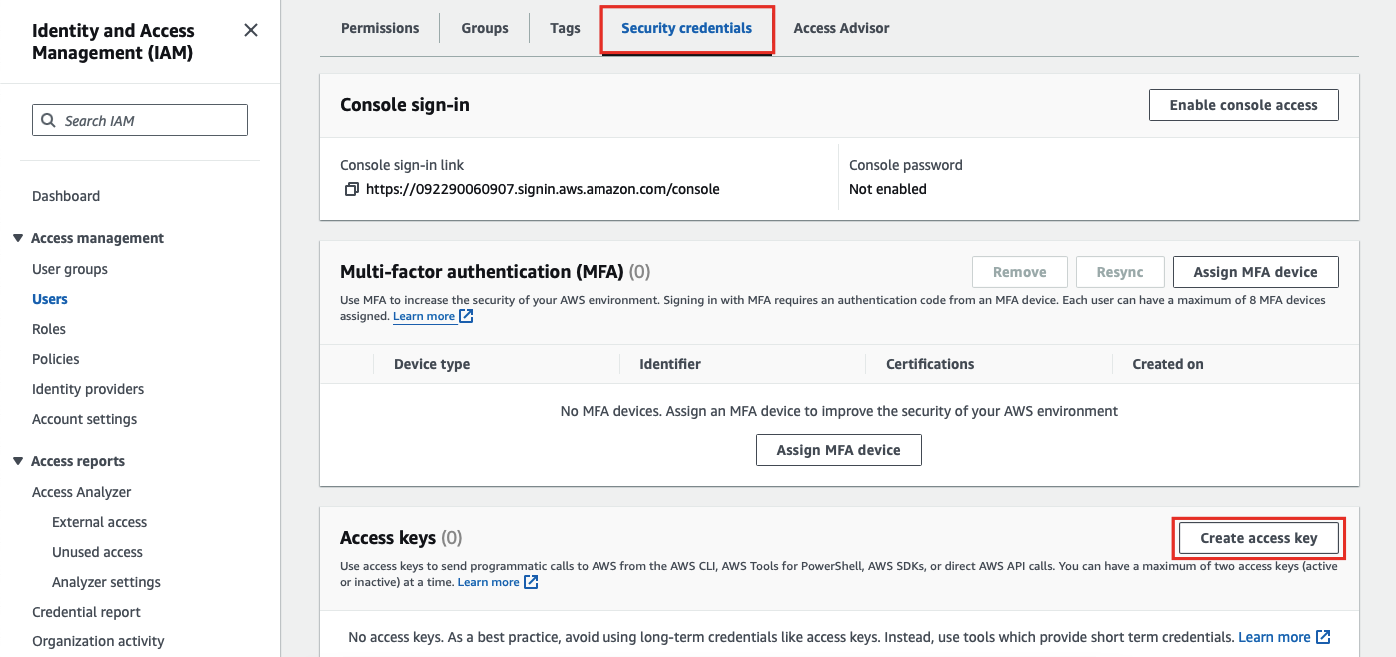
Next, in the Security credentials tab, select Create access key:
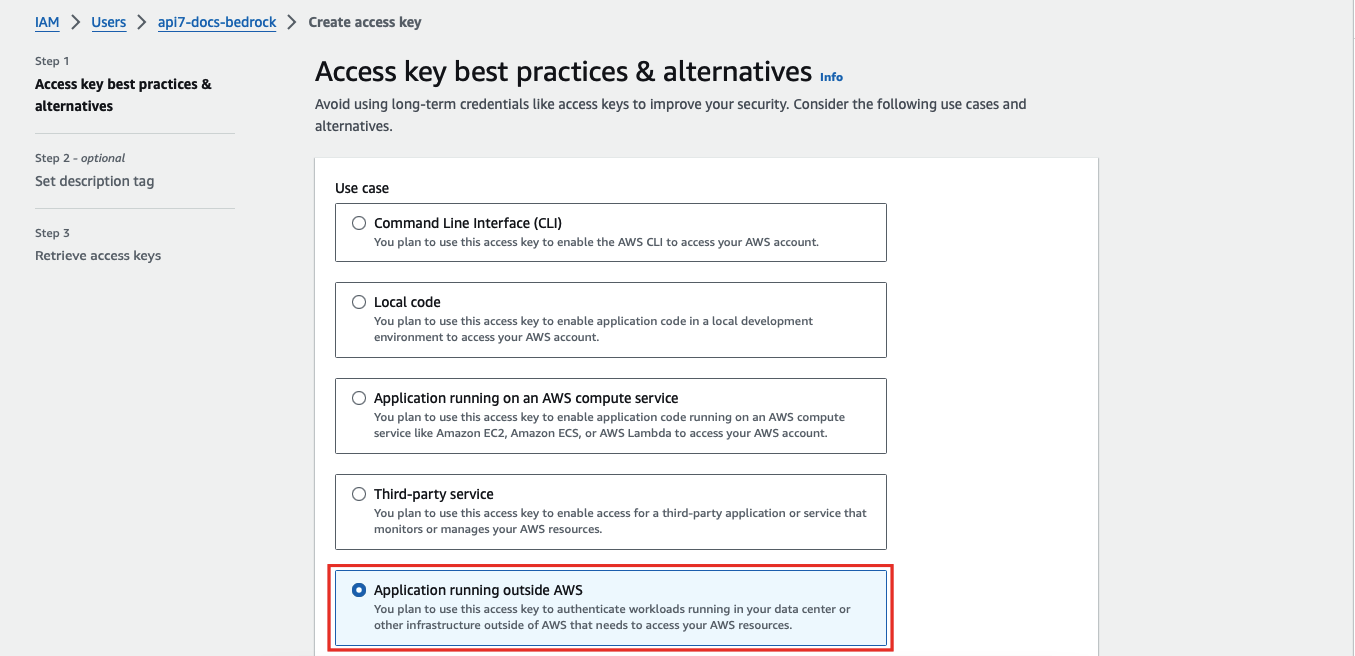
Select Application running outside AWS as the use case:
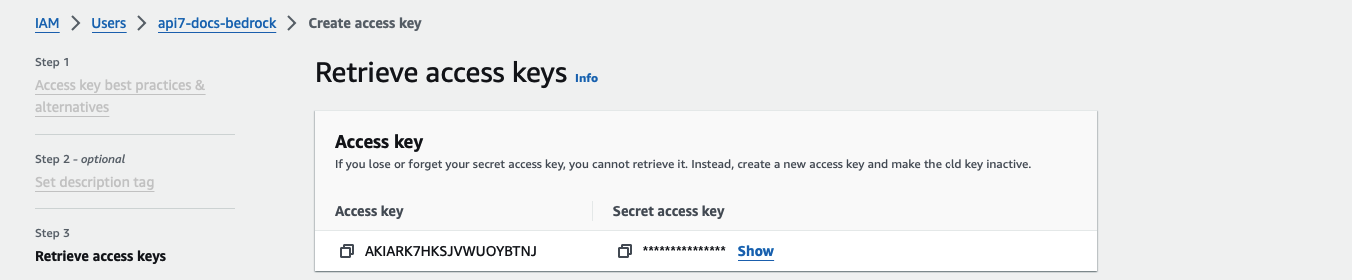
Continue the credential creation and note down the access key and secret access key:
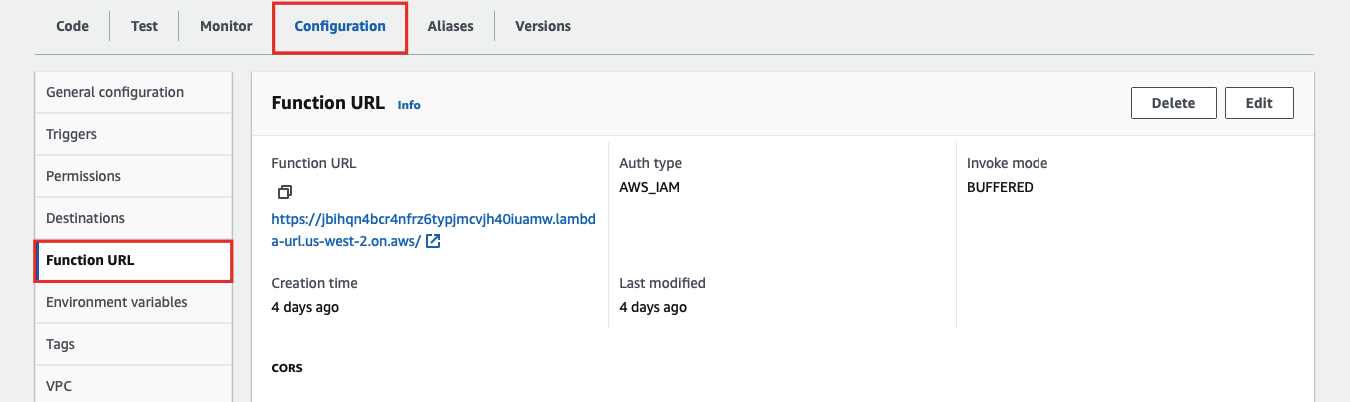
To create the Lambda function URL, go to the Configuration tab of the Lambda function and under Function URL, create a function URL:
Finally, create a Route in APISIX with your function URL and IAM access keys:
<Tabs groupId="api" defaultValue="admin-api" values={[ {label: 'Admin API', value: 'admin-api'}, {label: 'ADC', value: 'adc'}, {label: 'Ingress Controller', value: 'aic'} ]}>
curl "http://127.0.0.1:9180/apisix/admin/routes" -X PUT \
  -H "X-API-KEY: ${admin_key}" \
  -d '{
    "id": "aws-lambda-iam-route",
    "uri": "/aws-lambda",
    "plugins": {
      "aws-lambda": {
        "function_uri": "https://your-lambda-function-url.lambda-url.us-west-2.on.aws/",
        "authorization": {
          "iam": {
            "accesskey": "YOUR_IAM_ACCESS_KEY",
            "secretkey": "YOUR_IAM_SECRET_KEY",
            "aws_region": "us-west-2",
            "service": "lambda"
          }
        },
        "ssl_verify": false
      }
    }
  }'
services:
  - name: aws-lambda-service
    routes:
      - name: aws-lambda-route
        uris:
          - /aws-lambda
        plugins:
          aws-lambda:
            function_uri: https://your-lambda-function-url.lambda-url.us-west-2.on.aws/
            authorization:
              iam:
                accesskey: YOUR_IAM_ACCESS_KEY
                secretkey: YOUR_IAM_SECRET_KEY
                aws_region: us-west-2
                service: lambda
Synchronize the configuration to the gateway:
adc sync -f adc.yaml
<Tabs groupId="k8s-api" defaultValue="gateway-api" values={[ {label: 'Gateway API', value: 'gateway-api'}, {label: 'APISIX CRD', value: 'apisix-crd'} ]}>
apiVersion: apisix.apache.org/v1alpha1
kind: PluginConfig
metadata:
  namespace: aic
  name: aws-lambda-plugin-config
spec:
  plugins:
    - name: aws-lambda
      config:
        function_uri: https://your-lambda-function-url.lambda-url.us-west-2.on.aws/
        authorization:
          iam:
            accesskey: YOUR_IAM_ACCESS_KEY
            secretkey: YOUR_IAM_SECRET_KEY
            aws_region: us-west-2
            service: lambda
        ssl_verify: false
---
apiVersion: gateway.networking.k8s.io/v1
kind: HTTPRoute
metadata:
  namespace: aic
  name: aws-lambda-route
spec:
  parentRefs:
    - name: apisix
  rules:
    - matches:
        - path:
            type: Exact
            value: /aws-lambda
      filters:
        - type: ExtensionRef
          extensionRef:
            group: apisix.apache.org
            kind: PluginConfig
            name: aws-lambda-plugin-config
apiVersion: apisix.apache.org/v2
kind: ApisixRoute
metadata:
  namespace: aic
  name: aws-lambda-route
spec:
  ingressClassName: apisix
  http:
    - name: aws-lambda-route
      match:
        paths:
          - /aws-lambda
      plugins:
        - name: aws-lambda
          enable: true
          config:
            function_uri: https://your-lambda-function-url.lambda-url.us-west-2.on.aws/
            authorization:
              iam:
                accesskey: YOUR_IAM_ACCESS_KEY
                secretkey: YOUR_IAM_SECRET_KEY
                aws_region: us-west-2
                service: lambda
            ssl_verify: false
Apply the configuration:
kubectl apply -f aws-lambda-ic.yaml
Send a request to the Route:
curl -i "http://127.0.0.1:9080/aws-lambda"
You should receive an HTTP/1.1 200 OK response with the following message:
"Hello from Lambda!"
Integrate with Amazon API Gateway Securely with API Key
The following example demonstrates how you can integrate APISIX with Amazon API Gateway and configure the gateway to trigger the execution of Lambda function.
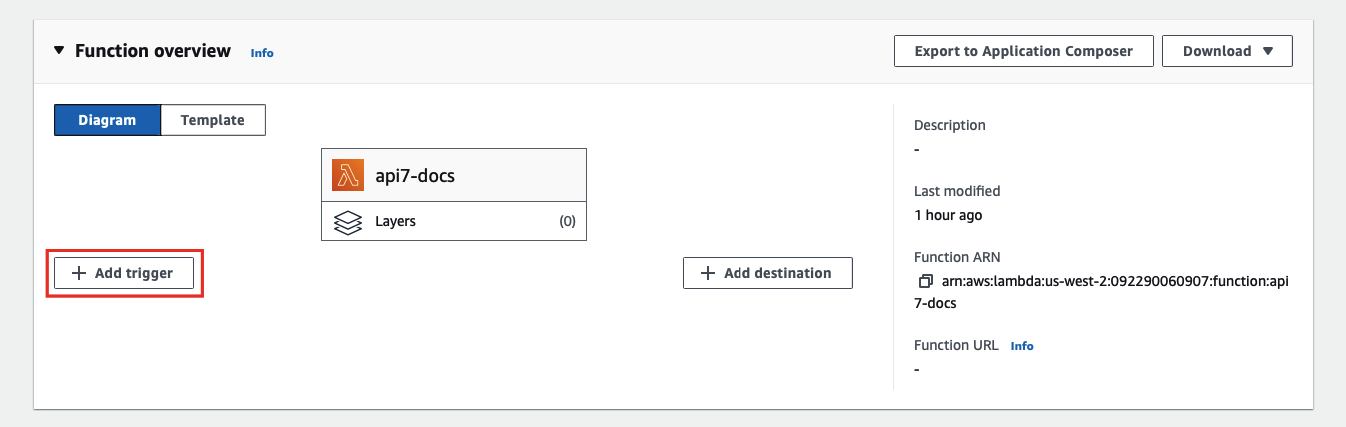
To configure an API Gateway as a Lambda trigger, go to your Lambda function and select Add trigger:
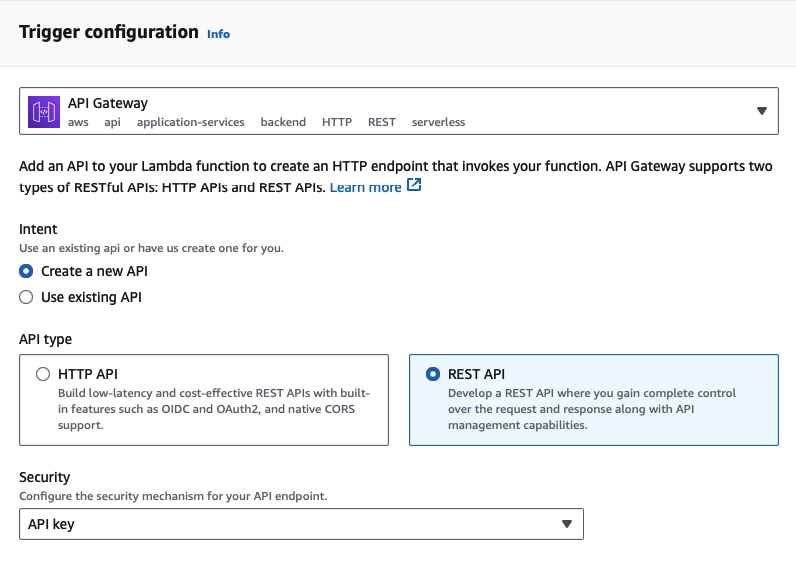
Next, select API Gateway as the trigger and REST API as the API type, and finish adding the trigger:
:::info
Amazon API Gateway supports HTTP APIs and REST APIs. API key support is available only for REST APIs, which is why this example uses a REST API trigger.
:::
You should now be redirected back to the Lambda interface. To find the API key and gateway API endpoint, go to the Configuration tab of the Lambda function and under Triggers, you can find the details of the API Gateway:
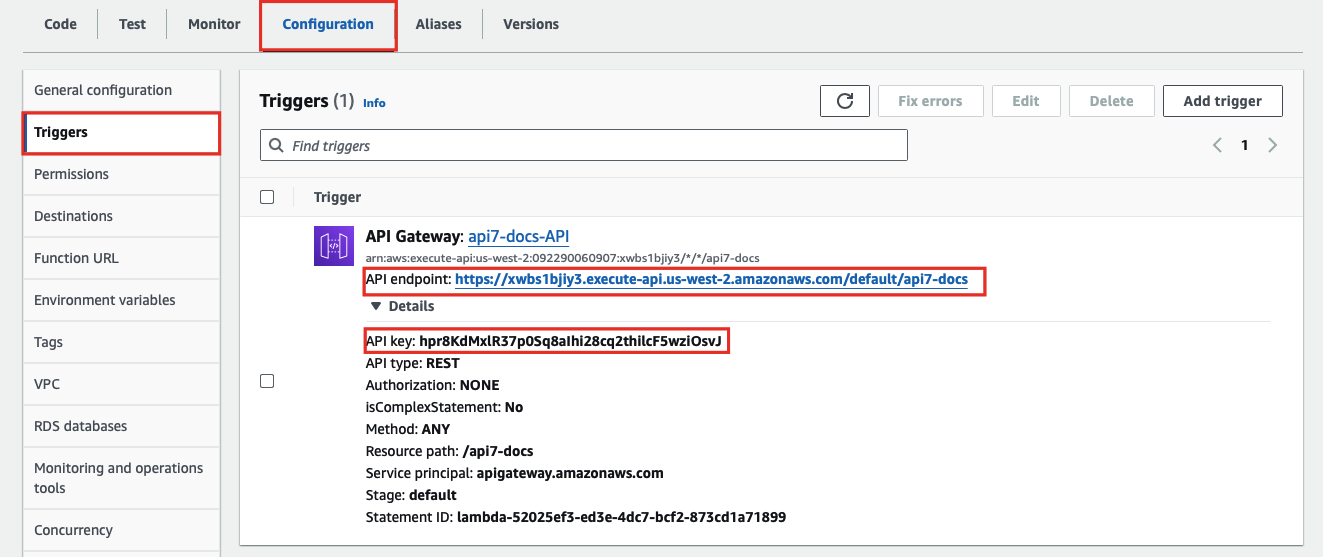
Finally, create a Route in APISIX with your gateway endpoint and API key:
<Tabs groupId="api" defaultValue="admin-api" values={[ {label: 'Admin API', value: 'admin-api'}, {label: 'ADC', value: 'adc'}, {label: 'Ingress Controller', value: 'aic'} ]}>
curl "http://127.0.0.1:9180/apisix/admin/routes" -X PUT \
  -H "X-API-KEY: ${admin_key}" \
  -d '{
    "id": "aws-lambda-apikey-route",
    "uri": "/aws-lambda",
    "plugins": {
      "aws-lambda": {
        "function_uri": "https://your-api-id.execute-api.us-west-2.amazonaws.com/default/your-resource",
        "authorization": {
          "apikey": "YOUR_API_GATEWAY_API_KEY"
        },
        "ssl_verify": false
      }
    }
  }'
services:
  - name: aws-lambda-service
    routes:
      - name: aws-lambda-route
        uris:
          - /aws-lambda
        plugins:
          aws-lambda:
            function_uri: https://your-api-id.execute-api.us-west-2.amazonaws.com/default/your-resource
            authorization:
              apikey: YOUR_API_GATEWAY_API_KEY
            ssl_verify: false
Synchronize the configuration to the gateway:
adc sync -f adc.yaml
<Tabs groupId="k8s-api" defaultValue="gateway-api" values={[ {label: 'Gateway API', value: 'gateway-api'}, {label: 'APISIX CRD', value: 'apisix-crd'} ]}>
apiVersion: apisix.apache.org/v1alpha1
kind: PluginConfig
metadata:
  namespace: aic
  name: aws-lambda-plugin-config
spec:
  plugins:
    - name: aws-lambda
      config:
        function_uri: https://your-api-id.execute-api.us-west-2.amazonaws.com/default/your-resource
        authorization:
          apikey: YOUR_API_GATEWAY_API_KEY
        ssl_verify: false
---
apiVersion: gateway.networking.k8s.io/v1
kind: HTTPRoute
metadata:
  namespace: aic
  name: aws-lambda-route
spec:
  parentRefs:
    - name: apisix
  rules:
    - matches:
        - path:
            type: Exact
            value: /aws-lambda
      filters:
        - type: ExtensionRef
          extensionRef:
            group: apisix.apache.org
            kind: PluginConfig
            name: aws-lambda-plugin-config
apiVersion: apisix.apache.org/v2
kind: ApisixRoute
metadata:
  namespace: aic
  name: aws-lambda-apikey-route
spec:
  ingressClassName: apisix
  http:
    - name: aws-lambda-apikey-route
      match:
        paths:
          - /aws-lambda
      plugins:
        - name: aws-lambda
          enable: true
          config:
            function_uri: https://your-api-id.execute-api.us-west-2.amazonaws.com/default/your-resource
            authorization:
              apikey: YOUR_API_GATEWAY_API_KEY
            ssl_verify: false
Apply the configuration:
kubectl apply -f aws-lambda-ic.yaml
Send a request to the Route:
curl -i "http://127.0.0.1:9080/aws-lambda"
You should receive an HTTP/1.1 200 OK response with the following message:
"Hello from Lambda!"
If your API key is invalid, you should receive an HTTP/1.1 403 Forbidden response.
Forward Requests to Amazon API Gateway Sub-Paths
The following example demonstrates how you can forward requests to a sub-path of the Amazon API Gateway API and configure the API to trigger the execution of Lambda function.
Please follow the previous example to set up an API Gateway first.
To create a sub-path, go to the Configuration tab of the Lambda function and under Triggers, click into the API Gateway:

Next, select Create resource to create a sub-path:
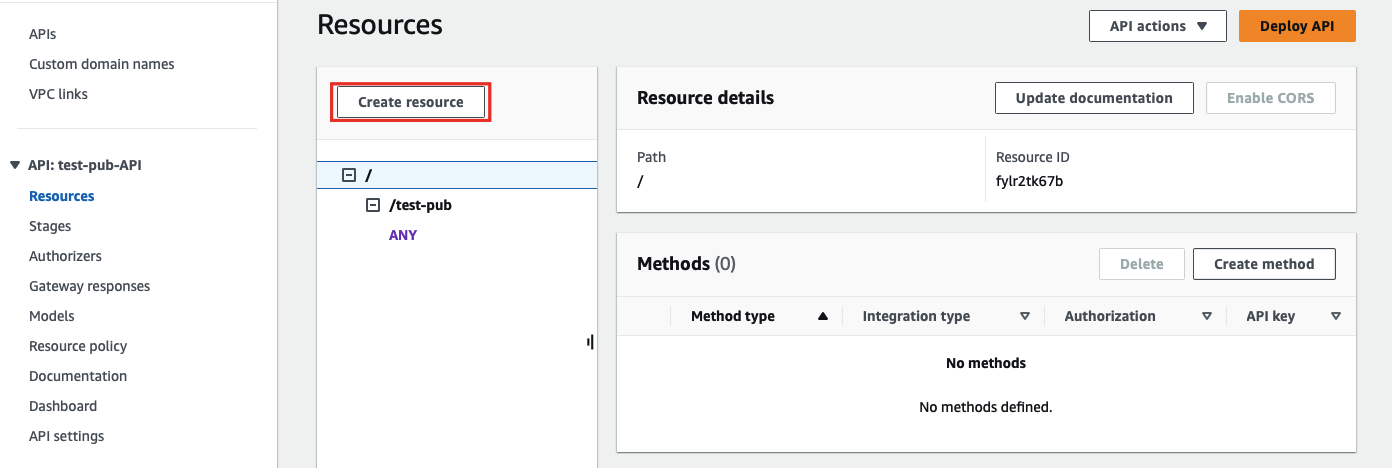
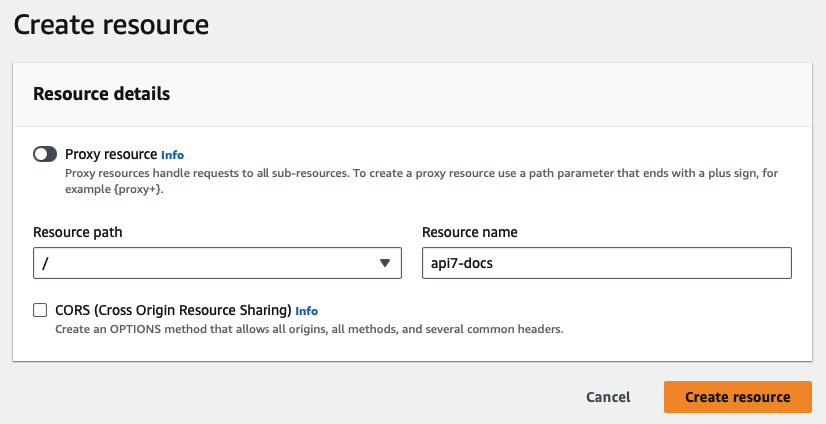
Enter the sub-path information and complete creation:
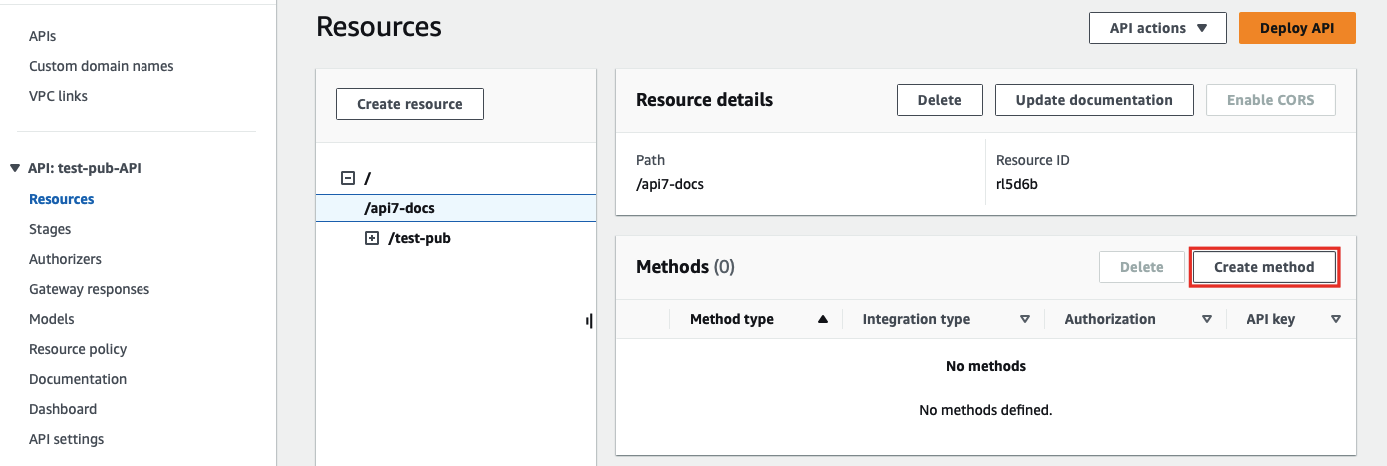
Once redirected back to the main gateway console, you should see the newly created path. Select Create method to configure HTTP methods for the path and the associated action:
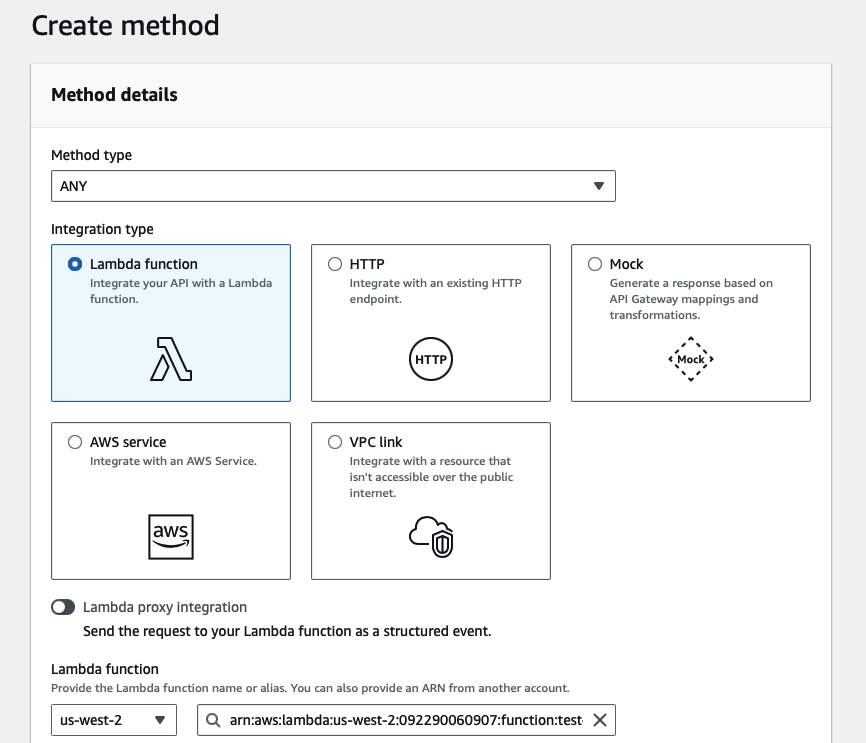
Select the allowed HTTP method in the dropdown. For the purpose of demonstration, this example continues to use the same Lambda function as the triggered action when the path is requested:
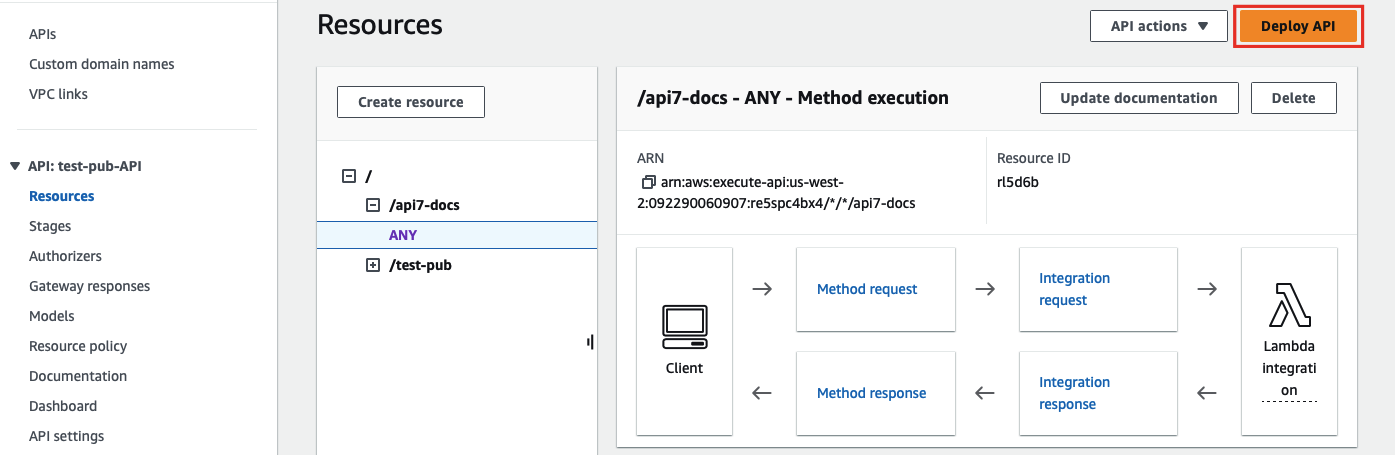
Finish the method creation. Once redirected back to the main gateway console, click on Deploy API to deploy the path and method changes:
Finally, create a Route in APISIX with your gateway endpoint and API key:
<Tabs groupId="api" defaultValue="admin-api" values={[ {label: 'Admin API', value: 'admin-api'}, {label: 'ADC', value: 'adc'}, {label: 'Ingress Controller', value: 'aic'} ]}>
curl "http://127.0.0.1:9180/apisix/admin/routes" -X PUT \
  -H "X-API-KEY: ${admin_key}" \
  -d '{
    "id": "aws-lambda-subpath-route",
    "uri": "/aws-lambda/*",
    "plugins": {
      "aws-lambda": {
        "function_uri": "https://your-api-id.execute-api.us-west-2.amazonaws.com/default",
        "authorization": {
          "apikey": "YOUR_API_GATEWAY_API_KEY"
        },
        "ssl_verify": false
      }
    }
  }'
services:
  - name: aws-lambda-service
    routes:
      - name: aws-lambda-subpath-route
        uris:
          - /aws-lambda/*
        plugins:
          aws-lambda:
            function_uri: https://your-api-id.execute-api.us-west-2.amazonaws.com/default
            authorization:
              apikey: YOUR_API_GATEWAY_API_KEY
            ssl_verify: false
Synchronize the configuration to the gateway:
adc sync -f adc.yaml
<Tabs groupId="k8s-api" defaultValue="gateway-api" values={[ {label: 'Gateway API', value: 'gateway-api'}, {label: 'APISIX CRD', value: 'apisix-crd'} ]}>
apiVersion: apisix.apache.org/v1alpha1
kind: PluginConfig
metadata:
  namespace: aic
  name: aws-lambda-plugin-config
spec:
  plugins:
    - name: aws-lambda
      config:
        function_uri: https://your-api-id.execute-api.us-west-2.amazonaws.com/default
        authorization:
          apikey: YOUR_API_GATEWAY_API_KEY
        ssl_verify: false
---
apiVersion: gateway.networking.k8s.io/v1
kind: HTTPRoute
metadata:
  namespace: aic
  name: aws-lambda-subpath-route
spec:
  parentRefs:
    - name: apisix
  rules:
    - matches:
        - path:
            type: PathPrefix
            value: /aws-lambda/
      filters:
        - type: ExtensionRef
          extensionRef:
            group: apisix.apache.org
            kind: PluginConfig
            name: aws-lambda-plugin-config
apiVersion: apisix.apache.org/v2
kind: ApisixRoute
metadata:
  namespace: aic
  name: aws-lambda-subpath-route
spec:
  ingressClassName: apisix
  http:
    - name: aws-lambda-subpath-route
      match:
        paths:
          - /aws-lambda/*
      plugins:
        - name: aws-lambda
          enable: true
          config:
            function_uri: https://your-api-id.execute-api.us-west-2.amazonaws.com/default
            authorization:
              apikey: YOUR_API_GATEWAY_API_KEY
            ssl_verify: false
Apply the configuration:
kubectl apply -f aws-lambda-ic.yaml
Send a request to the Route:
curl -i "http://127.0.0.1:9080/aws-lambda/api7-docs"
APISIX will forward the request to https://your-api-id.execute-api.us-west-2.amazonaws.com/default/api7-docs and you should receive an HTTP/1.1 200 OK response with the following message:
"Hello from Lambda!"
If your API key is invalid or if the requested path is not associated with any method, you should receive an HTTP/1.1 403 Forbidden response.