emacs-neotree
February 26, 2025 · View on GitHub
A Emacs tree plugin like NerdTree for Vim.


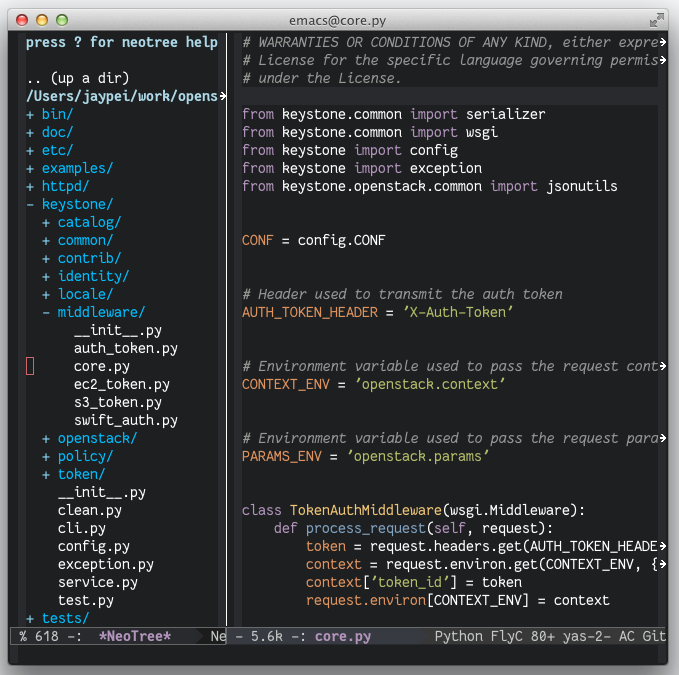
Screenshots
Installation
Melpa
You can install the plugin using the packages on melpa.
Make sure you have something like the following in your Emacs startup file (~/.emacs.d/init.el, or ~/.emacs):
    (add-to-list 'package-archives
                 '("melpa" . "http://melpa.org/packages/"))
To make that take effect, either evaluate that elisp expression or restart Emacs.
Then use M-x package-list-packages, select neotree from
the list by pressing i, then press x to execute the changes. At
that point, the package will be installed.
Source
Clone project:
$ cd /some/path
$ git clone https://github.com/jaypei/emacs-neotree.git neotree
$ cd neotree
$ git checkout dev
Add config to emacs:
(add-to-list 'load-path "/some/path/neotree")
(require 'neotree)
(global-set-key [f8] 'neotree-toggle)
Open (toggle) NeoTree:
<F8>
Keybindings
Only in Neotree Buffer:
nnext line,pprevious line。SPCorRETorTABOpen current item if it is a file. Fold/Unfold current item if it is a directory.UGo up a directorygRefreshAMaximize/Minimize the NeoTree WindowHToggle display hidden filesORecursively open a directoryC-c C-nCreate a file or create a directory if filename ends with a ‘/’C-c C-dDelete a file or a directory.C-c C-rRename a file or a directory.C-c C-cChange the root directory.C-c C-pCopy a file or a directory.
Configurations
Theme config
NeoTree provides following themes:
Theme can be configed by setting neo-theme. For example, use icons for window system and arrow terminal.
(setq neo-theme (if (display-graphic-p) 'icons 'arrow))
- all-the-icons theme screenshots

More documentation
Footnotes
-
For users who want to use the
iconstheme. Please make sure you have installed the all-the-icons package and its fonts. ↩ -
For users who want to use the
nerd-iconstheme. Please make sure you have installed the nerd-icons package and one of its fonts. ↩