Integration Tests
June 23, 2026 · View on GitHub
The pkg/integration package is for integration testing: that is, actually running a real lazygit session and having a robot pretend to be a human user and then making assertions that everything works as expected.
TL;DR: integration tests live in pkg/integration/tests, and we run them through the just recipes in the repo's justfile. Run the whole suite headlessly with:
just e2e
or open a terminal UI to browse and run individual tests with:
just e2e-tui
Writing tests
The tests live in pkg/integration/tests. Each test is registered in pkg/integration/tests/test_list.go which is an auto-generated file. You can re-generate that file by running just generate at the root of the Lazygit repo.
Each test has two important steps: the setup step and the run step.
Setup step
In the setup step, we prepare a repo with shell commands, for example, creating a merge conflict that will need to be resolved upon opening lazygit. This is all done via the shell argument.
When the test runs, lazygit will open in the same working directory that the shell ends up in (so if you want to start lazygit somewhere other than the default location, you can use shell.Chdir() at the end of the setup step to set that working directory.
Run step
The run step has two arguments passed in:
t(the test driver)keys
t is for driving the gui by pressing certain keys, selecting list items, etc.
keys is for use when getting the test to press a particular key e.g. t.Views().Commits().Focus().PressKey(keys.Universal.Confirm)
Running tests
We drive the integration tests through the just recipes in the repo's justfile, so you'll want just installed to run them as described here. (The recipes are thin wrappers, so if you can't install just, the underlying commands are right there in the justfile.)
just e2e— run the whole suite headlessly, with no visible UI. This is what CI does, and the fastest way to run everything.just e2e <name>— run a single test headlessly, e.g.just e2e commit/new_branch; the fastest way to run one test. You can pass several names at once, or a full file path likepkg/integration/tests/commit/new_branch.go.just e2e-cli [--slow|--sandbox|--debug] <name>— run a single test in a visible lazygit UI, so you can watch it (see slow mode below, and sandbox mode and debugging in the following sections).just e2e-tui— open a terminal UI for browsing and running tests; the easiest way to find and run a test without having to type its name.
The name of a test is based on its path, so the name of the test at pkg/integration/tests/commit/new_branch.go is commit/new_branch.
zsh users can get tab-completion of these test names — just e2e sub<Tab> expands to submodule/… — by sourcing scripts/just_e2e_completion.zsh from their .zshrc; see the comment at the top of that file for details.
To watch a test run at a realistic speed, pass --slow to just e2e-cli; it sets a pre-set delay between keypresses and mouse clicks. For finer control, set the INPUT_DELAY env var to a number of milliseconds instead, e.g. INPUT_DELAY=200 just e2e-cli commit/new_branch. In the TUI you can press 't' to run a test in slow mode.
The resultant repo will be stored in test/_results, so if you're not sure what went wrong you can go there and inspect the repo.
Running tests in VSCode
If you've opened an integration test file in your editor you can run that file by bringing up the command panel with cmd+shift+p and typing 'run task', then selecting the test task you want to run

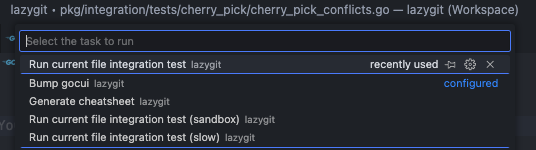 The test will run in a VSCode terminal:

Debugging tests
Debugging an integration test is possible in two ways:
- Pass
--debugtojust e2e-cli, e.g.just e2e-cli --debug tag/reset. - Select a test in
just e2e-tuiand hit "d" to debug it.
In both cases the test runner will print to the console that it is waiting for a debugger to attach, so now you need to tell your debugger to attach to a running process with the name "test_lazygit". If you are using Visual Studio Code, an easy way to do that is to use the "Attach to integration test runner" debug configuration. The test runner will resume automatically when it detects that a debugger was attached. Don't forget to set a breakpoint in the code that you want to step through, otherwise the test will just finish (i.e. it doesn't stop in the debugger automatically).
Sandbox mode
Say you want to do a manual test of how lazygit handles merge-conflicts, but you can't be bothered actually finding a way to create merge conflicts in a repo. To make your life easier, you can simply run a merge-conflicts test in sandbox mode, meaning the setup step is run for you, and then instead of the test driving the lazygit session, you're allowed to drive it yourself.
To run a test in sandbox mode, press 's' on a test in just e2e-tui, or pass --sandbox to just e2e-cli, e.g. just e2e-cli --sandbox conflicts/resolve_multiple_files.
Tips for writing tests
Handle most setup in the shell part of the test
Try to do as much setup work as possible in your setup step. For example, if all you're testing is that the user is able to resolve merge conflicts, create the merge conflicts in the setup step. On the other hand, if you're testing to see that lazygit can warn the user about merge conflicts after an attempted merge, it's fine to wait until the run step to actually create the conflicts. If the run step is focused on the thing you're trying to test, the test will run faster and its intent will be clearer.
Create helper functions for (very) frequently used test logic
If within a test directory you find several tests need to share some logic, you can create a file called shared.go in that directory to hold shared helper functions (see pkg/integration/tests/filter_by_path/shared.go for an example).
If you need to share test logic across test directories you can put helper functions in the tests/shared package. If you find yourself frequently doing the same thing from within a test across test directories, for example, responding a particular popup, consider adding a helper method to pkg/integration/components/common.go. If you look around the code in the components directory you may find another place that's sensible to put your helper function.
Don't do too much in one test
If you're testing different pieces of functionality, it's better to test them in isolation using multiple short tests, compared to one larger longer test. Sometimes it's appropriate to have a longer test which tests how various different pieces interact, but err on the side of keeping things short.
Testing against old git versions
Our CI tests against multiple git versions. If your test fails on an old version, then to troubleshoot you'll need to install the failing git version. One option is to use rtx (see installation steps in the readme) with the git plugin like so:
rtx plugin add git
rtx install git 2.20.0
rtx local git 2.20.0