ccglass
June 19, 2026 · View on GitHub
See exactly what your coding agent sends to the model. A lightweight
local logging reverse-proxy + web dashboard for Claude Code, Codex,
OpenCode, DeepSeek-TUI, Reasonix, CodeBuddy, Kimi, Ollama, OpenRouter, and more.
One command, like ollama:
npm install -g ccglass     # or: brew install jianshuo/tap/ccglass
ccglass
Run with no arguments and ccglass asks which client to inspect:
  Which client do you want to inspect?

    1) Claude Code
    2) Codex (OpenAI)
    3) DeepSeek-TUI
    4) Reasonix
    5) Kimi (Moonshot, via Claude Code)
    6) OpenCode
    7) CodeBuddy (Tencent)

  >
Or name it directly: ccglass claude, ccglass codex, ccglass deepseek,
ccglass deepseek-tui, ccglass reasonix, ccglass dsnix, or ccglass kimi.
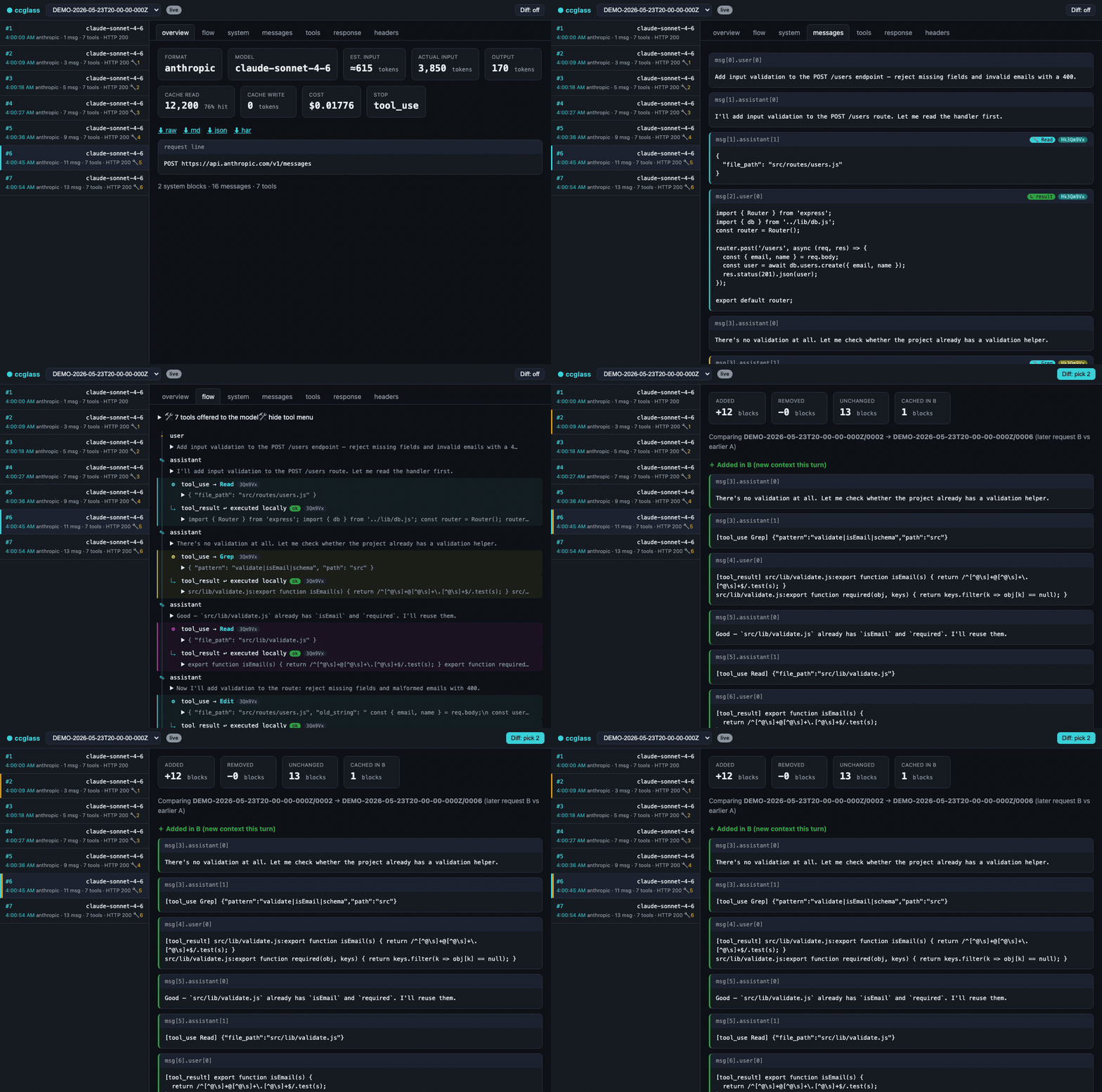
ccglass starts a proxy, points the client at it via the right base-URL env var,
launches it for you, and opens a dashboard where you watch every request in real
time — the full system prompt, every tool schema, the message history,
token/cache/cost numbers, and a turn-to-turn diff.
  ● ccglass watching Codex (OpenAI) → https://api.openai.com
    dashboard: http://127.0.0.1:57633
Why
These CLIs are Node/native apps that ignore HTTP_PROXY/HTTPS_PROXY — so
Charles/mitmproxy never see the traffic, and fetch-patching tools break across
updates. ccglass sidesteps all of it: the client does the HTTPS to the real API
itself; you only intercept the plain HTTP hop to localhost. No CA certs, no TLS
pinning.
Providers
ccglass <provider> or --provider | Wraps | Env var | Upstream | Format |
|---|---|---|---|---|
claude | Claude Code | ANTHROPIC_BASE_URL | api.anthropic.com | Anthropic Messages |
codex | Codex | OPENAI_BASE_URL | api.openai.com | OpenAI Responses / Chat |
deepseek | DeepSeek-TUI dispatcher | DEEPSEEK_BASE_URL | api.deepseek.com | OpenAI Chat |
deepseek-tui | DeepSeek-TUI runtime | DEEPSEEK_BASE_URL | api.deepseek.com | OpenAI Chat |
reasonix | Reasonix | DEEPSEEK_BASE_URL | api.deepseek.com | OpenAI Chat |
dsnix | Reasonix (dsnix alias) | DEEPSEEK_BASE_URL | api.deepseek.com | OpenAI Chat |
kimi | Claude Code → Moonshot | ANTHROPIC_BASE_URL | api.moonshot.ai/anthropic | Anthropic Messages |
opencode | OpenCode | OPENAI_BASE_URL | auto (from env) | OpenAI Chat |
qoder | Qoder | OPENAI_BASE_URL | auto (from env) | OpenAI Chat |
ollama | any Ollama-backed client | OPENAI_BASE_URL | 127.0.0.1:11434 | OpenAI Chat |
lmstudio | any LM Studio-backed client | OPENAI_BASE_URL | 127.0.0.1:1234 | OpenAI Chat |
openrouter | any OpenRouter-backed client | OPENAI_BASE_URL | openrouter.ai/api | OpenAI Chat |
glm | any GLM/Zhipu-backed client | OPENAI_BASE_URL | auto (from env) | OpenAI Chat |
bedrock | Claude Code → AWS Bedrock | ANTHROPIC_BEDROCK_BASE_URL | auto (from env) | Anthropic Messages |
vertex | Claude Code → Google Vertex AI | ANTHROPIC_BASE_URL | auto (from env) | Anthropic Messages |
codebuddy | CodeBuddy (IDE / VS Code / JetBrains) | forward-proxy | copilot.tencent.com | OpenAI Chat |
run --provider <p> -- <cmd> | any client | per provider | per provider | per provider |
Notes by provider:
- Codex — captures traffic when Codex is in API-key mode (
OPENAI_API_KEY). If Codex is authenticated via ChatGPT login, it uses a WebSocket transport (wss://chatgpt.com/...) that bypassesOPENAI_BASE_URL— the dashboard will be empty. Runcodex doctorto check your auth mode; if it showsauth mode: chatgpt, switch to API-key mode to use ccglass. - Kimi — runs through Claude Code against Moonshot's Anthropic-compatible endpoint; set
ANTHROPIC_AUTH_TOKENto your Moonshot key. - DeepSeek-TUI — OpenAI-compatible Chat Completions; set
DEEPSEEK_API_KEY. - Reasonix — OpenAI-compatible Chat Completions; set
DEEPSEEK_API_KEY. - OpenCode — auto-detects upstream from
OPENAI_BASE_URL; set it before running. Use--env-varif your OpenCode provider uses a different env var name. - Qoder — OpenAI-compatible; pass
--upstream <url>to point at your Qoder endpoint (e.g.ccglass qoder --upstream https://your-qoder-endpoint.com). - Ollama / LM Studio — no key needed for local models; pass
--upstreamif your server runs on a non-default address. - OpenRouter — set
OPENAI_API_KEYto your OpenRouter key. - GLM/Zhipu — set
OPENAI_BASE_URLto your Zhipu endpoint (e.g.https://open.bigmodel.cn/api/paas/v4) andOPENAI_API_KEYto your Zhipu key. - AWS Bedrock — set
ANTHROPIC_BEDROCK_BASE_URLto your Bedrock endpoint before running. Claude Code in Bedrock mode reads its endpoint from this var (notANTHROPIC_BASE_URL). Works against Bedrock-compat gateways (bearer / mTLS auth). Direct AWS endpoints (*.amazonaws.com) will fail through the proxy because SigV4 signs the Host header — ccglass prints a warning if it detects this. - Google Vertex AI — set
ANTHROPIC_BASE_URLto your Vertex AI endpoint (e.g.https://us-east5-aiplatform.googleapis.com) before running; GCP credentials are forwarded as-is. - CodeBuddy — uses a forward-proxy mode (HTTP CONNECT + TLS MITM) because CodeBuddy's built-in models hardcode their upstream URL. See CodeBuddy setup below.
Custom provider recipe
Any tool that reads a base-URL env var can be inspected with the generic escape hatch:
# OpenAI-compatible tool with a custom endpoint
ccglass run \
  --upstream https://my.custom.api/v1 \
  --env-var MY_CUSTOM_BASE_URL \
  -- my-tool [args...]

# Shorthand alias
ccglass run --base-url https://my.custom.api/v1 --env-var MY_BASE_URL -- my-tool

# Reuse an existing provider's format but point at a different upstream
ccglass run --provider openai --upstream https://my.openai-compat.api -- my-tool
IDE Support (Cursor, Cline, Continue…)
IDE extensions that let you configure a custom API base URL (e.g. Cursor in BYOK mode, Cline, Continue.dev, Copilot Chat with custom models) can be inspected with the proxy subcommand — it starts the proxy + dashboard without spawning any child process:
ccglass proxy --provider openai   # OpenAI-compatible IDEs (Cursor, Cline, Continue…)
ccglass proxy --provider claude   # Anthropic-compatible IDEs
Output:
  ● ccglass proxy → https://api.openai.com
    Set your IDE's API base URL to: http://127.0.0.1:PORT
    dashboard: http://127.0.0.1:DASHPORT
    (Ctrl-C to stop)
Point your IDE's API base URL at the printed proxy address, then open the dashboard URL to watch every request in real time.
Limitation: This only works when the IDE is configured to use your own API key with a custom base URL (BYOK mode). Cursor's built-in subscription models route through Cursor's own backend (api2.cursor.sh) and cannot be intercepted this way.
CodeBuddy
CodeBuddy (Tencent) uses built-in models whose API endpoint (copilot.tencent.com) is hardcoded — it cannot be redirected via environment variables. ccglass uses a forward-proxy mode to intercept these requests: it accepts HTTP CONNECT tunnels, performs TLS MITM on targeted hosts only, and forwards the decrypted traffic to the real upstream.
This works with CodeBuddy IDE, VS Code plugin, JetBrains plugin, and Visual Studio plugin — any form factor that supports HTTP proxy settings.
Quick start
ccglass codebuddy
Output:
  ● ccglass forward-proxy watching CodeBuddy (Tencent)
    proxy:     http://127.0.0.1:9999
    dashboard: http://127.0.0.1:56181
    intercepting: copilot.tencent.com

    Add to your client settings:
      "http.proxy": "http://127.0.0.1:9999"
      "http.proxyStrictSSL": false

    Press Ctrl-C to stop.
Configure your IDE
CodeBuddy IDE / VS Code plugin — open settings.json (Cmd+, or Ctrl+,, then "Open Settings (JSON)") and add:
{
  "http.proxy": "http://127.0.0.1:9999",
  "http.proxyStrictSSL": false
}
JetBrains plugin — go to Settings → Appearance & Behavior → System Settings → HTTP Proxy, select Manual proxy configuration, and set Host: 127.0.0.1, Port: 9999.
Visual Studio plugin — go to Tools → Options → Environment → Network, configure the proxy address.
Use the port number from the
ccglass codebuddyoutput (or fix it with--proxy-port 9999).
How it works
CodeBuddy → http.proxy → ccglass forward-proxy (CONNECT + TLS MITM)
                              │
                              ├─ intercept & log POST /v2/chat/completions
                              │
                              └─ forward → copilot.tencent.com:443
- Only
copilot.tencent.comtraffic is intercepted; all other HTTPS traffic (npm, git, etc.) passes through transparently without decryption. - A local CA certificate is auto-generated on first run (stored in the session directory). Setting
http.proxyStrictSSL: falsetells the IDE to accept it without system-level trust. - Request bodies are gzip-compressed by CodeBuddy; ccglass decompresses them for display in the dashboard.
Cleanup
When you're done, remove the proxy settings from your IDE and press Ctrl-C to stop ccglass. Your captured logs remain available via ccglass view.
What you get
- Live request stream — every call appears instantly; click to expand the system prompt, messages, and tools with all escaped strings unescaped. Long blocks fold behind a show/hide toggle; each row shows its timestamp and a tool-call count.
- Conversation flow — a top-to-bottom sequence diagram of the agent loop:
which tool the model picked from the menu, how it ran locally, and how the
result was fed back.
tool_useandtool_resultare paired bycall_idand color-coded; skill calls are flagged. - Turn-to-turn diff — pick two requests, see exactly what context was added this turn and which blocks carry a cache breakpoint.
- Token / cache / cost — exact input/output/cache tokens from the response
usage, cache-hit rate, and estimated USD per request (per-provider pricing). - Response reassembly + export — streamed SSE rebuilt into the final message
(
stop_reason, tool calls, usage), for both the Anthropic and OpenAI wire formats; export any request to a readable raw HTTP transcript, Markdown, JSON, or HAR. - Session summary — for the selected session, the header shows rolled-up input and output tokens, cache-hit %, and estimated cost.
- Per-model filter — scope the request list, session summary, errors count, and latency trend to one model from the session (All models by default), including models seen on failed requests.
- Per-request latency — end-to-end time on each list row; Overview also shows total time, TTFT, generation window, and approximate input/output tok/s.
- Latency trend — sparkline above the request list (avg / max per session).
- Copy as cURL — from the Overview tab, copy a shell-ready replay of the proxied request.
- Light / dark theme — System, Light, or Dark in the header; choice is saved in the browser.
- Self-inspection (MCP) — when wrapping Claude Code, ccglass registers its
own query tools so the agent can inspect the very requests it just made, right
inside the chat (
--no-mcpto skip).
Usage
ccglass                       # pick a client interactively
ccglass claude [args...]      # inspect Claude Code (args pass through, e.g. --resume)
ccglass codex  [args...]      # inspect Codex
ccglass deepseek [args...]    # inspect DeepSeek-TUI (dispatcher)
ccglass deepseek-tui [args...] # inspect DeepSeek-TUI runtime directly
ccglass reasonix [args...]    # inspect Reasonix
ccglass dsnix    [args...]    # inspect Reasonix (dsnix alias)
ccglass kimi   [args...]      # inspect Kimi (via Claude Code)
ccglass opencode [args...]    # inspect OpenCode (auto-detects upstream from OPENAI_BASE_URL)
ccglass codebuddy             # inspect CodeBuddy (forward-proxy mode)
ccglass run --provider openai -- <cmd...>   # inspect any client
ccglass proxy --provider openai            # proxy only — point your IDE at the proxy URL
ccglass view                  # re-open the dashboard over saved logs (global + ./.ccglass)
ccglass migrate               # copy this project's ./.ccglass into the global store
ccglass repack [session]      # force-migrate existing captures to content-addressed (v2) format
ccglass rm <session>          # delete a session and reclaim its orphaned blobs
ccglass usage [--by-session|--by-timestamp] [--format json]   # token + USD rollup; lists each session
ccglass export <session>/<seq> --format raw|md|json|har   # e.g. 2026-05-25T12-00-00-000Z/0003
With --by-session, each row is labelled by the agent's own session name when it
can be recovered — Claude Code's /rename title, else its auto-generated title,
else the first prompt — falling back to the capture timestamp otherwise. Use
--by-timestamp to label rows by the raw capture-timestamp id instead (handy for
ccglass rm/export, which take that id).
Options
| Flag | Default | Meaning |
|---|---|---|
--provider <p> | from command | Force format/env for run (claude/codex/deepseek/reasonix/kimi/openai) |
--upstream <url> | per provider | Override the upstream API |
--port <n> | auto | Dashboard port |
--proxy-port <n> | auto | Proxy port |
--dir <path> | ~/.ccglass/sessions/<full-path>-<hash> | Where new logs are written; also used as migrate destination. Dashboard still reads ./.ccglass in the project. |
--no-open | off | The dashboard opens in your browser by default; pass this to skip it |
--no-mcp | off | Don't inject ccglass's self-inspection tools into Claude Code |
--no-settings-override | off | Don't force Claude Code onto the proxy via --settings (for when a provider switcher set ANTHROPIC_BASE_URL) |
--no-redact | off | Keep auth tokens unmasked in saved logs |
--env-var <name> | per provider | Override the environment variable used to set the proxy URL |
Logs & secrets
New captures are written under ~/.ccglass/sessions/, one directory per project.
The folder name is the full resolved project path (slashes become --, Unicode
kept) plus a short hash suffix, for example:
~/.ccglass/sessions/Users--you--Coding--ccglass-a1b2c3d4/<session>/NNNN.json
While you inspect a client, the dashboard merges logs from that global directory
and from ./.ccglass in the current project (if it still exists from older
runs). The first time ccglass sees ./.ccglass with data but no logs in the new
global store yet, it prints a note suggesting ccglass migrate.
ccglass migrate copies .json files from this project's ./.ccglass into
the store for the current directory (default: the global path above, or --dir if
you passed it). It skips files that already exist at the destination, only runs in
the current working directory, and exits with a clear message if there are no
.json logs to copy (empty session folders alone are not enough).
Storage format
Captures are stored content-addressed (git-style): each message, the tools
array, and the system block are written once to <root>/blobs/ and referenced
by hash from per-request manifests. This keeps long sessions from growing
quadratically. Legacy captures are migrated to this format automatically the
first time they are read.
ccglass repack [session]— force-migrate existing captures now.ccglass rm <session>— delete a session and reclaim its orphaned blobs.
Auth tokens (authorization, x-api-key) are masked by default — pass
--no-redact to keep them. Treat the log directory as sensitive regardless.
Requirements
Node ≥ 18. The core proxy + dashboard have no runtime dependencies; the
optional MCP self-inspection feature (ccglass claude) pulls in
@modelcontextprotocol/sdk and zod.
Issues
Open an issue and Claude picks
it up automatically — it investigates against the code, and if it's a real,
well-scoped bug or small feature, opens a fix PR that references your issue. Keep
iterating by commenting @claude on the issue or the PR. Claude only ever opens
PRs for review; a maintainer merges and releases.
Acknowledgments
ccglass is better because of the people who took the time to open a PR. Thank you, all of you. 🙏
庄表伟 (@zhuangbiaowei) contributed
first-class DeepSeek-TUI support (#1).
DeepSeek-TUI ships as a dual-binary coding agent — a deepseek dispatcher and a
deepseek-tui runtime. 庄表伟 wired up both as native ccglass providers, pointing
them at the proxy via DEEPSEEK_BASE_URL and reusing the existing
OpenAI-compatible Chat Completions adapter, so every DeepSeek request now shows up
in the dashboard with zero extra setup. The contribution also added them to the
interactive picker, documented usage across the README, and shipped provider
regression tests to keep it working. Thank you for making ccglass better for the
whole DeepSeek community.
And huge thanks to everyone else who shipped improvements:
- @KorenKrita — built the richer dashboard with
latency, theming, model filtering, and session stats
(#50), added the Reasonix CLI
provider (#49), moved captured logs
into
~/.ccglass/sessions/so they survive project-folder deletion (#39), and fixed a CLI crash whenxdg-openfails (#12). - Marcus (@marcuslannister) — added the
token-usage summary across every session
(#48) and fixed Bedrock interception
to key off
ANTHROPIC_BEDROCK_BASE_URL(#38). - @ivanberry — added the
--env-varoption and OpenCode provider support (#11). - @ping-coding — fixed Windows Codex proxy routing (#20).
Thank you all. 🙏
Related tools
| Tool | What it does |
|---|---|
| ccglass ← you are here | See exactly what your coding agent sends to the model |
| ccline | Type a thought at your zsh prompt — get an AI answer and run the command |
| cclight | MacBook notch glow tells you when Claude Code is thinking |
Star History
License
MIT