🚀 Modern UI Power, Now in Your Console
July 29, 2026 · View on GitHub

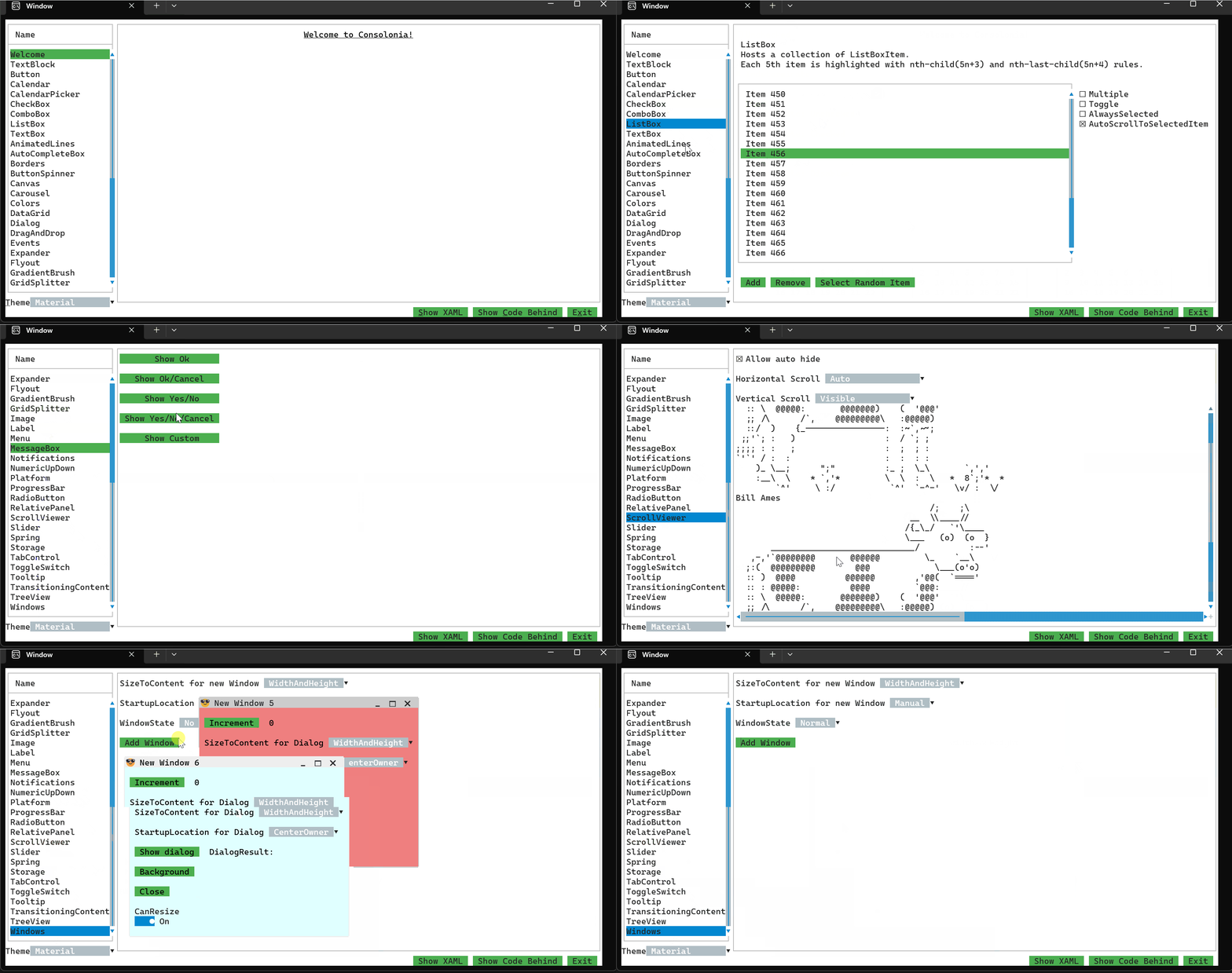
🚀 Modern UI Power, Now in Your Console
The wait is over. After months of passionate building, testing, and refining, Consolonia is stepping into the light — now available in beta for all who dare to reimagine what’s possible in the console world.
💡 Quick Start
The quickest way to get started is to install the dotnet template and create a project using the template:
dotnet new install Consolonia.Templates
Then you create a project using the template like this:
dotnet new consolonia.app
And you compile and run it like this:
cd MyConsoloniaApp
dotnet run
🎯 Why Consolonia Matters
Consolonia isn’t just another toolkit or framework. It’s a bold rethinking of the console environment — one that injects the benefits of the Avalonia UI framework directly into TUI applications.
That means:
- Sophisticated layout systems without manual positioning headaches
- Rich styling and theming you’d expect from a desktop GUI, applied seamlessly in text mode
- Unified control patterns across TUI and GUI, so your skills and code can travel
- Cross-platform consistency, drawing from Avalonia’s proven rendering engine
With Consolonia, console developers finally get modern UI principles — data binding, templating, responsive layouts — all without leaving the terminal.
⚖️ What Sets Consolonia Apart
Here’s how Consolonia compares to traditional TUI frameworks:
| Feature | Traditional TUIs | Consolonia + Avalonia |
|---|---|---|
| Layout & Positioning | Manual coordinates or simple grid; brittle with resizing | Avalonia’s flexible layout system with responsive panels and alignment |
| Styling & Theming | Limited color palettes, hard‑coded styles | Rich theming via Avalonia’s styling engine — full color schemes, gradients, and reusable style resources |
| Control Set | Minimal: basic text input, list, menu | Unified control library modeled on Avalonia’s UI elements — buttons, sliders, tree views, tab controls, and more |
| Data Binding | Rarely supported; requires manual refresh logic | Full Avalonia data binding system — bind to properties, collections, and commands for instant UI updates |
| Cross‑Platform Behavior | Inconsistent rendering and key handling across OSes | Avalonia’s mature cross‑platform abstraction layer for identical look and feel on Windows, macOS, and Linux |
| Event Handling | Ad‑hoc input loops; blocking or OS‑specific quirks | Async‑friendly event system, same patterns as Avalonia GUI apps |
| Templating | Usually none; monolithic rendering logic | Avalonia’s control templates — swap visual structure without touching logic |
| Tooling & Reuse | No shared patterns with GUI frameworks | Reuse Avalonia XAML, styles, and component patterns in both console and desktop contexts |
| Developer Experience | Steep learning curve for newcomers, few docs | Leverages Avalonia’s documentation, patterns, and ecosystem for instant productivity |
🛠 Built for Builders
Under the hood, Consolonia combines Avalonia’s mature architecture with a snappy, console‑optimized rendering pipeline:
- Async-friendly event handling that just works
- Declarative UI definitions familiar to Avalonia developers
- Tooling parity: leverage design patterns and workflows you already know
- Cross-platform reach: Windows, macOS, Linux, same behavior everywhere
🌱 Join the Beta, Grow the Future
We’re looking for developers who believe the terminal can be as elegant as any GUI — and who want to build TUIs without giving up the structure, maintainability, and aesthetic control of a modern UI framework.
If that’s you, kick the tires, and help us refine Consolonia into a powerhouse for serious console development.
💡 Ready to explore?
To try it out install the Consolonia.Gallery tool from nuget:
dotnet tool install -g Consolonia.Gallery --prerelease
Then run the gallery:
Consolonia.Gallery
To uninstall the Gallery app.
dotnet tool uninstall -g Consolonia.Gallery
See wiki for documentation
https://github.com/jinek/Consolonia/wiki