Typst-CV-Resume
October 21, 2025 · View on GitHub
This Typst CV template is inspired by the Latex template Deedy-Resume. You can use it for both industry and academia.
If you want to find a cover letter template, you can check out modernpro-coverletter.
How to start
Use Typst CLI
If you use Typst CLI, you can use the following command to create a new project:
typst init @preview/modernpro-cv
If you use the typst version
<0.13.0, you need to use the following code to initial your project.typst init @preview/modernpro-cv:1.0.2
It will create a folder named modernpro-cv with the following structure:
modernpro-cv
├── bib.bib
├── cv_double.typ
└── cv_single.typ
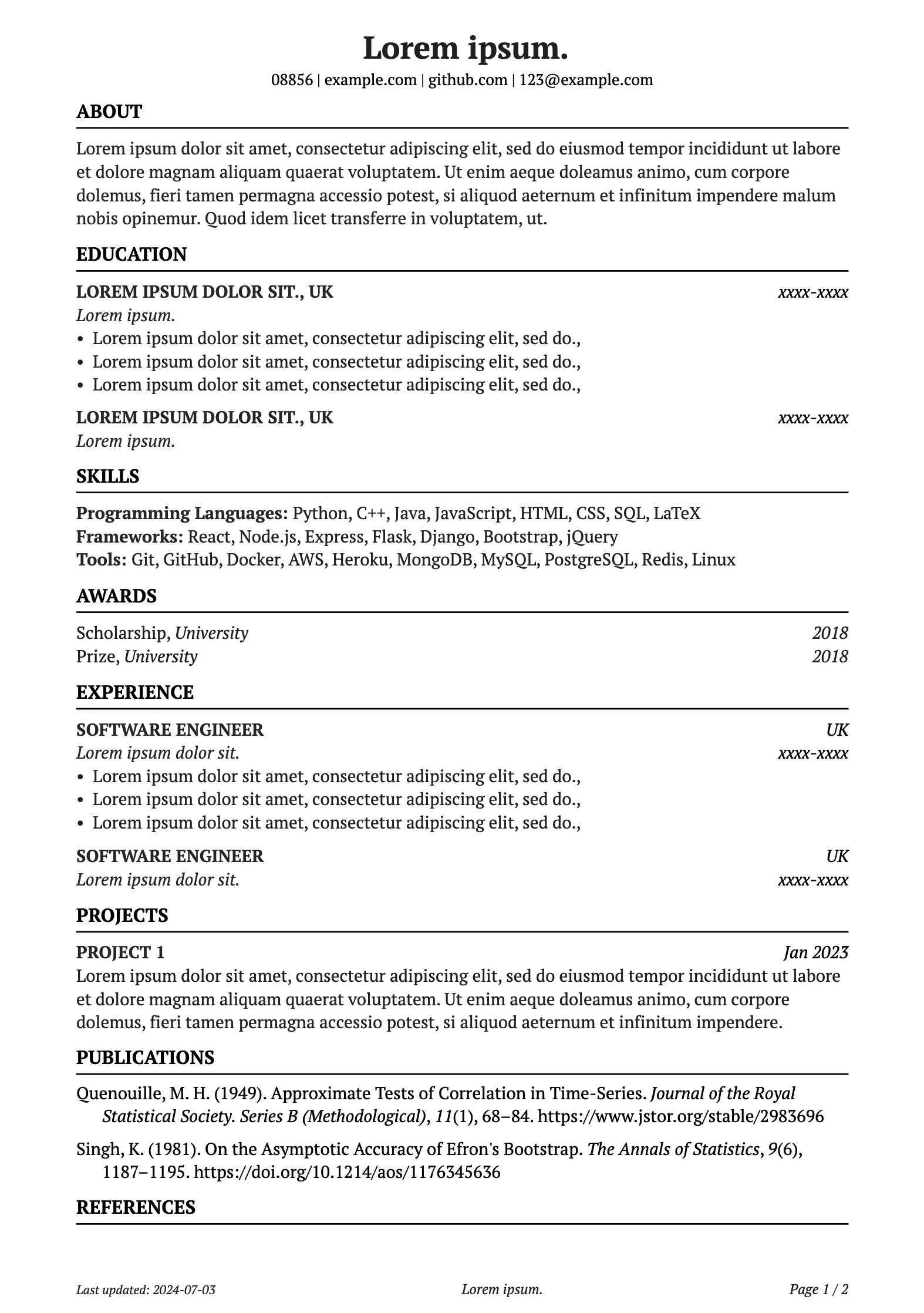
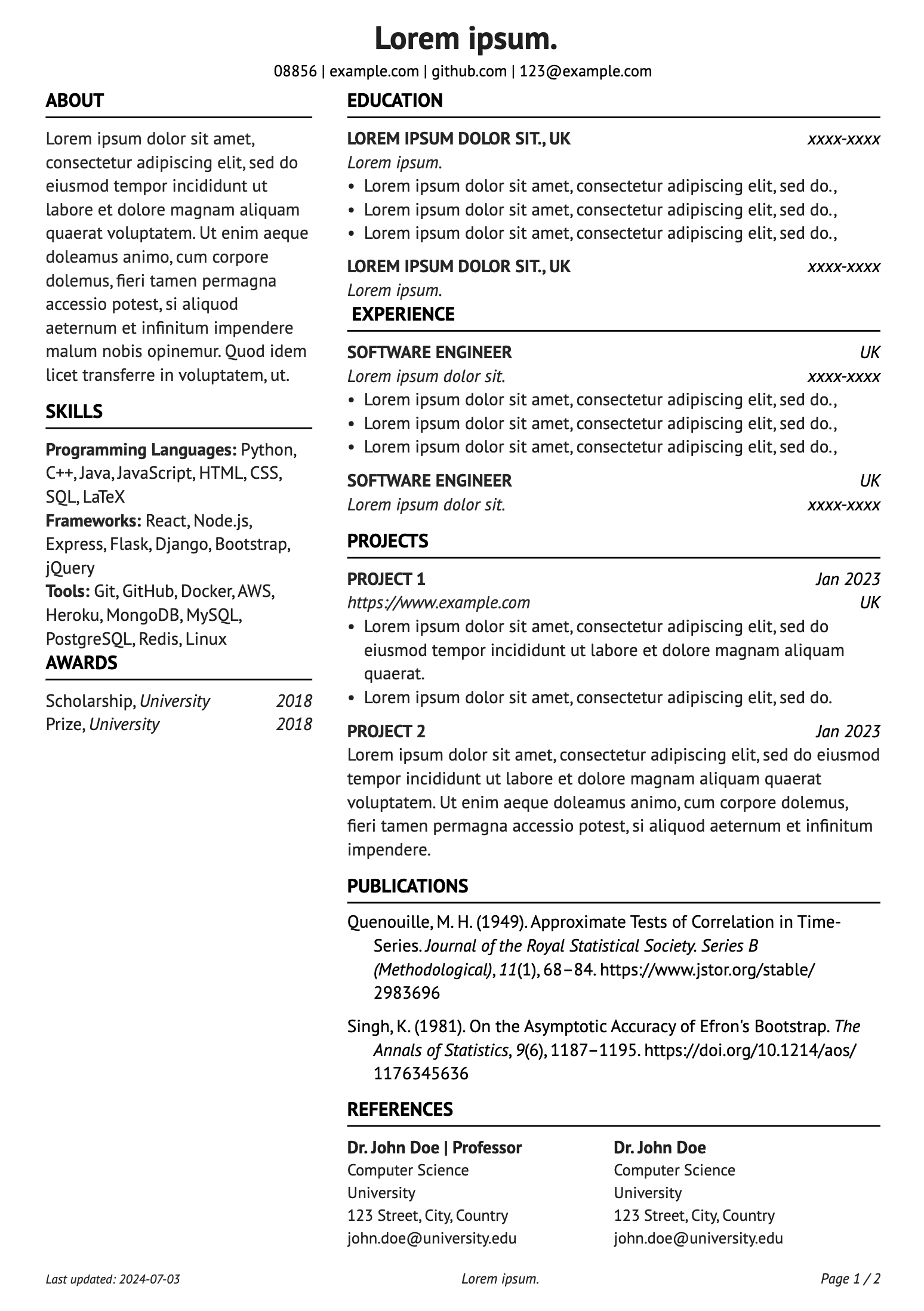
If you want to use the single-column version, you can modify the template cv-single.typ. If you prefer the two-column version, you can use the cv-double.typ.
Note: The bib.bib is the bibliography file. You can modify it to add your publications.
Manual Download
If you want to manually download the template, you can download modernpro-cv-{version}.zip from the release page
Typst website
If you want to use the template via Typst, You can start from template and search for modernpro-cv.
How to use the template
The arguments
The template has the following arguments:
| Argument | Description | Default |
|---|---|---|
font-type | The font type. You can choose any supported font in your system. | Times New Roman |
continue-header | Whether to continue the header on the follwing pages. | false |
margin | Override the page margin. When omitted, the template falls back to the built-in layout (1.25 cm sides with layout-specific top/bottom). | none |
name | Your name. | "" |
address | Your address. | "" |
lastupdated | Whether to show the last updated date. | true |
pagecount | Whether to show the page count. | true |
date | The date of the CV. | today |
contacts | contact details, e.g phone number, email, etc. | (text: "", link: "") |
Start single column version
If you want to use the single column version, pick the starter that matches how much customization you need.
Option 1 – Quick template (fixed order)
Use this when you are happy with the default section sequence.
#import "@preview/modernpro-cv:1.3.0": *
#import "@preview/fontawesome:0.6.0": *

#show: cv-single.with(
  font-type: "PT Serif",
  continue-header: "false",
  margin: (left: 1.75cm, right: 1.75cm, top: 2cm, bottom: 2cm),
  name: [],
  address: [],
  lastupdated: "true",
  pagecount: "true",
  date: "2024-07-03",
  contacts: (
    (text: [#fa-icon("location-dot") UK]),
    (text: [#fa-icon("mobile") 123-456-789], link: "tel:123-456-789"),
    (text: [#fa-icon("link") example.com], link: "https://www.example.com"),
  )
)

#section("About")
#descript[#lorem(40)]
#sectionsep

#section("Experience")
#job(
  position: "Software Engineer",
  institution: [#lorem(3)],
  location: "UK",
  date: "2022-now",
)
#sectionsep

#section("Education")
#education(
  institution: [University of Typst],
  major: [Computer Science],
  date: "2015-2019",
  location: "UK",
)
Option 2 – Flexible template (custom order or hidden sections)
Choose this when you want to reorder, remove, or conditionally render sections without editing them in multiple places.
#import "@preview/modernpro-cv:1.3.0": *
#import "@preview/fontawesome:0.6.0": *

#show: cv-single.with(
  font-type: "PT Serif",
  continue-header: "false",
  margin: (left: 1.75cm, right: 1.75cm, top: 2cm, bottom: 2cm),
  name: [],
  address: [],
  lastupdated: "true",
  pagecount: "true",
  date: "2024-07-03",
  contacts: (
    (text: [#fa-icon("location-dot") UK]),
    (text: [#fa-icon("mobile") 123-456-789], link: "tel:123-456-789"),
    (text: [#fa-icon("link") example.com], link: "https://www.example.com"),
  )
)

#let sections = (
  section-block("about", title: "About")[
    #descript[#lorem(40)]
  ],
  section-block("experience", title: "Experience")[
    #job(
      position: "Software Engineer",
      institution: [#lorem(3)],
      location: "UK",
      date: "2022-now",
    )
  ],
  section-block("education", title: "Education")[
    #education(
      institution: [University of Typst],
      major: [Computer Science],
      date: "2015-2019",
      location: "UK",
    )
  ],
)

#let section-order = ("about", "experience", "education")

#render-sections(sections: sections, order: section-order)
Define each section once with section-block, then control the sequence by reordering section-order. Any sections not mentioned in section-order are rendered afterward by default (set include-remaining: false to skip them).
Start double column version
The double column version is similar to the single column version. Pick the pattern you prefer for each column.
Option 1 – Quick template (fixed order in each column)
#import "@preview/modernpro-cv:1.3.0": *
#import "@preview/fontawesome:0.6.0": *

#show: cv-double(
  font-type: "PT Sans",
  continue-header: "true",
  margin: (left: 1.5cm, right: 1.5cm, top: 2.2cm, bottom: 1.8cm),
  name: [#lorem(2)],
  address: [#lorem(4)],
  lastupdated: "true",
  pagecount: "true",
  date: "2024-07-03",
  contacts: (
    (text: [#fa-icon("location-dot") UK]),
    (text: [#fa-icon("mobile") 123-456-789], link: "tel:123-456-789"),
    (text: [#fa-icon("link") example.com], link: "https://www.example.com"),
  ),
  left: [
    #section("Profile")
    #descript[#lorem(30)]
    #sectionsep

    #section("Skills")
    #oneline-title-item(title: "Languages", content: [Python, Typst])
    #sectionsep
  ],
  right: [
    #section("Experience")
    #job(
      position: "Software Engineer",
      institution: [#lorem(4)],
      location: "UK",
      date: "2022-now",
    )
    #sectionsep

    #section("Education")
    #education(
      institution: [University of Typst],
      major: [Computer Science],
      date: "2015-2019",
      location: "UK",
    )
  ],
)
Option 2 – Flexible template (custom order or hidden sections)
#import "@preview/modernpro-cv:1.3.0": *
#import "@preview/fontawesome:0.6.0": *

#show: cv-double(
  font-type: "PT Sans",
  continue-header: "true",
  margin: (left: 1.5cm, right: 1.5cm, top: 2.2cm, bottom: 1.8cm),
  name: [#lorem(2)],
  address: [#lorem(4)],
  lastupdated: "true",
  pagecount: "true",
  date: "2024-07-03",
  contacts: (
    (text: [#fa-icon("location-dot") UK]),
    (text: [#fa-icon("mobile") 123-456-789], link: "tel:123-456-789"),
    (text: [#fa-icon("link") example.com], link: "https://www.example.com"),
  ),
  left: [
    #let left-sections = (
      section-block("profile", title: "Profile")[
        #descript[#lorem(30)]
      ],
      section-block("skills", title: "Skills")[
        #oneline-title-item(title: "Languages", content: [Python, Typst])
      ],
    )
    #render-sections(sections: left-sections, order: ("profile", "skills"))
  ],
  right: [
    #let right-sections = (
      section-block("experience", title: "Experience")[
        #job(
          position: "Software Engineer",
          institution: [#lorem(4)],
          location: "UK",
          date: "2022-now",
        )
      ],
      section-block("education", title: "Education")[
        #education(
          institution: [University of Typst],
          major: [Computer Science],
          date: "2015-2019",
          location: "UK",
        )
      ],
    )
#render-sections(sections: right-sections, order: ("experience", "education"))
  ],
)
Adjust the left-order and right-order lists to change what appears first. Omit an id (and set include-remaining: false on render-sections) to hide the matching block entirely.
Start the CV
Once you set up the arguments, you can start to add details to your CV / Resume.
I preset the following functions for you to create different parts:
| Function | Description |
|---|---|
#section("Section Name") | Start a new section |
#sectionsep | End the section |
#oneline-title-item(title: "", content: "") | Add a one-line item (Title: content) |
#oneline-two(entry1: "", entry2: "") | Add a one-line item with two entries, aligned left and right |
#descript("descriptions") | Add a description for self-introduction |
#award(award: "", date: "", institution: "") | Add an award (award, institution date) |
#education(institution: "", major: "", date: "", institution: "", core-modules: "") | Add an education experience |
#job(position: "", institution: "", location: "", date: "", description: []) | Add a job experience (description is optional) |
#twoline-item(entry1: "", entry2: "", entry3: "", entry4: "") | Two line items, similar to education and job experiences |
#references(references:()) | Add a reference list. In the (), you can add multi reference entries with the following format (name: "", position: "", department: "", institution: "", address: "", email: "",), |
#show bibliography: none #bibliography("bib.bib") | Add a bibliography. You can modify the bib.bib file to add your publications. Note: Keep this at the end of your CV |
#section-block(id, title: none, separator: true)[…] | Wrap a section body once, optionally supplying its heading and whether to add a trailing separator |
#render-sections(sections: (), order: (), include-remaining: true) | Render the prepared section blocks in the order you choose; any blocks not listed in order appear afterward when include-remaining is true |
Note: Use + @ref to display your publications. For example,
#section("Publications")

// numbering list
+ @quenouille1949approximate
+ @quenouille1949approximate

// Keep this at the end
#show bibliography: none
#bibliography("bib.bib")
Preview
Single Column
Double Column
Legacy Version
I redesigned the template and submitted the new version to Typst Universe. However, you can find the legacy version in the legacy folder if you prefer to use the multi-font setting. You can also download the modernpro-cv-legacy.zip from the release page.
Note: The legacy version also has a cover letter template. You can use it with the CV template.
Cover Letter
If you used the previous version of this template, you might know that I also provided a cover letter template.
If you want to use a consistent cover letter with the new version of the CV template, you can find it from another repository typst-coverletter.
you can also use the following code in the command line:
typst init modernpro-coverletter
License
The template is released under the MIT License. For more information, please refer to the LICENSE file.