readme.md
March 14, 2021 · View on GitHub
Object IDs
-
ObjectID.ps1 - powershell script listing the NTFS $MFT ObjectID's of files in selected Folder & subfolders. The idea came from Phil Moore's Python script. The script uses the "fsutil objectid query" command.
-
Note: Must be run as an Administrator.
Output example:
Field Value Path D:\Temp\jpg File/Directory Name Image.JPG ObjectID 18f51114-187f-e811-aa2b-18dbf227d093 BirthVolume ID 8a289a36-3d3f-b549-a555-3cf5f3bcf201 BirthObject ID 18f51114-187f-e811-aa2b-18dbf227d093 Domain ID 00000000-0000-0000-0000-000000000000 -
Birth Volume Id: Birth Volume Id is the Object Id of the Volume on which the Object Id was allocated. It never changes.
-
Birth Object Id: Birth Object Id is the first Object Id that was ever assigned to this MFT Record. I.e. If the Object Id is changed for some reason, this field will reflect the original value of the Object Id.
-
Note: Updated to extract GUID Created timestamps & MAC addresses
(except BirthVolume ID GUIDs, as they are Version 4 GUIDs) -
References #1:
Object IdentifiersThe link tracking service maintains its link to an object by using an object identifier (ID). An object ID is an optional attribute that uniquely identifies a file or directory on a volume.
An index of all object IDs is stored on the volume. Rename, backup, and restore operations preserve object IDs. However, copy operations do not preserve object IDs, because that would violate their uniqueness.
You can perform the following operations on object IDs:
 Creation
 Deletion
 Query
When you create an object ID, you establish the identity of the file to the link tracking service. Conversely, when you delete an object ID, the link tracking service stops maintaining links to the file.
-
References #2:
NTFS File Attributes
_FILE_OBJECTID_INFORMATION structure
The MeaningofLinkfilesInForensicExaminations by Harry Parsonage (9/2008)
-
-
FILETIME Extractor - "fte(FILETIME Extractor) gets accurate timestamps and several information on NTFS." parses NTFS internal files like ObjID file, $INDX_ALLOCATION attribute. Supports mounted drives (eg FTK mounted images) also.
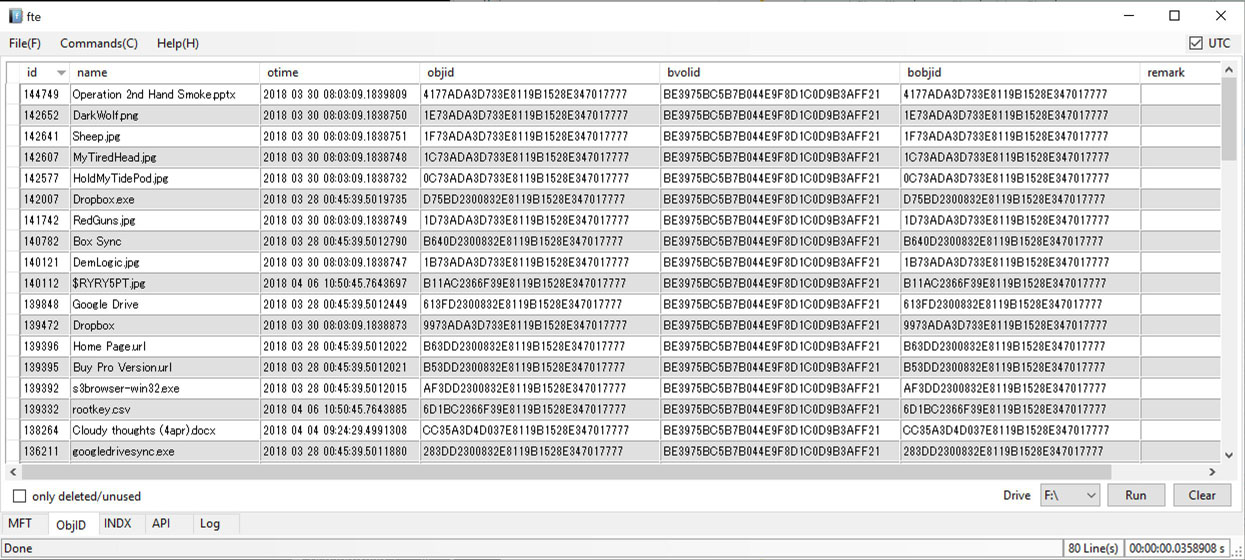
- USN.ps1 - Powershell script to parse a local or mounted drive and save the $USN journal to a comma separated file. The script uses the "fsutil usn readjournal driveletter csv" command.
-
NTFS.ps1 - Powershell script to get NTFS information from a local or mounted drive and get user readable results. The last 4 bytes of the Volume Serial number is the Serial Number used by Windows OS. (The serial number is a function of the time/date of the formatting or the diskcopying.) The script uses the "fsutil fsinfo ntfsinfo driveletter" command.
-
sample output:
Name Value NTFS Volume Serial Number B05E-A304-5EA2-C288 NTFS Version 3 LFS Version 2 Number Sectors 34.815 Total Clusters 4.351 Free Clusters 2.854 Total Reserved 1.024 Bytes Per Sector 512 Bytes Per Physical Sector 4096 Bytes Per Cluster 4096 Bytes Per FileRecord Segment 1024 Clusters Per FileRecord Segment 0 Mft Valid Data Length 262.144 Mft Start Lcn 1.450 Mft2 Start Lcn 2 Mft Zone Start 1.440 Mft Zone End 2.016 Max Device Trim Extent Count 4.096 Max Device Trim Byte Count 4.294.967.295 Max Volume Trim Extent Count 62 Max Volume Trim Byte Count 1.073.741.824
-