kandev-provider-usage
August 17, 2026 · View on GitHub
A kandev plugin that shows subscription utilization for your agent providers — how much of each rate-limit window (5-hour / weekly / monthly …) is used, with reset times — in the session top bar and, when enabled, Kandev's global status bar. Data comes from the codexbar CLI (covers ~60 providers: Claude, Codex/OpenAI, Gemini, Copilot, Cursor, Grok, OpenCode, …) plus Augment's own Analytics API.
Screenshots
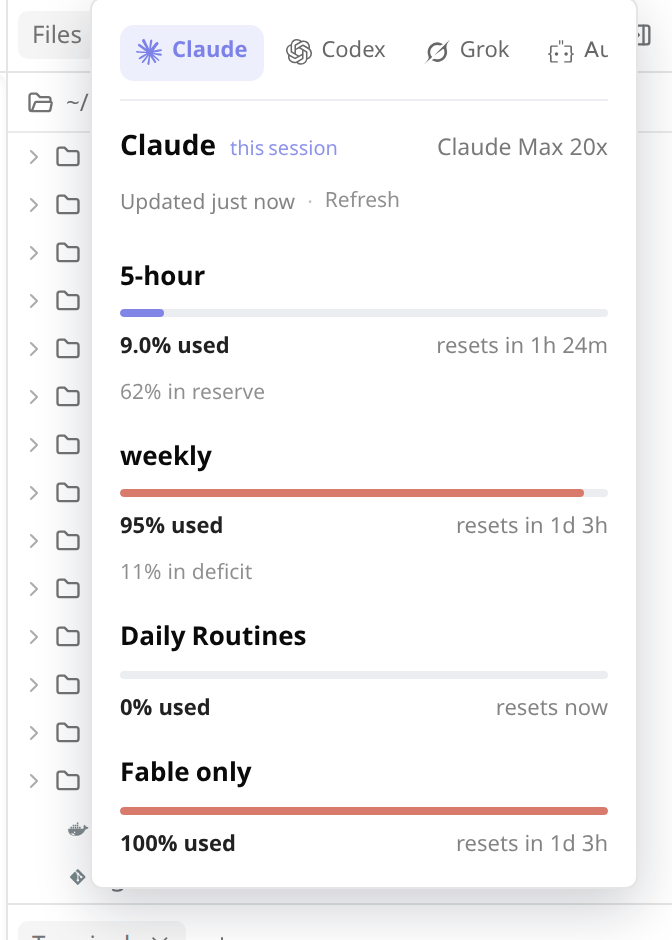
A pill in the session top bar (chat-top-bar slot) shows the selected provider
as an icon + %:

Hover it to open a panel that cycles through every provider. Click a tab to select it; the pill updates immediately and that selection persists across app/browser restarts. If it is unavailable, the panel falls back to the current session's provider, then the first available provider.
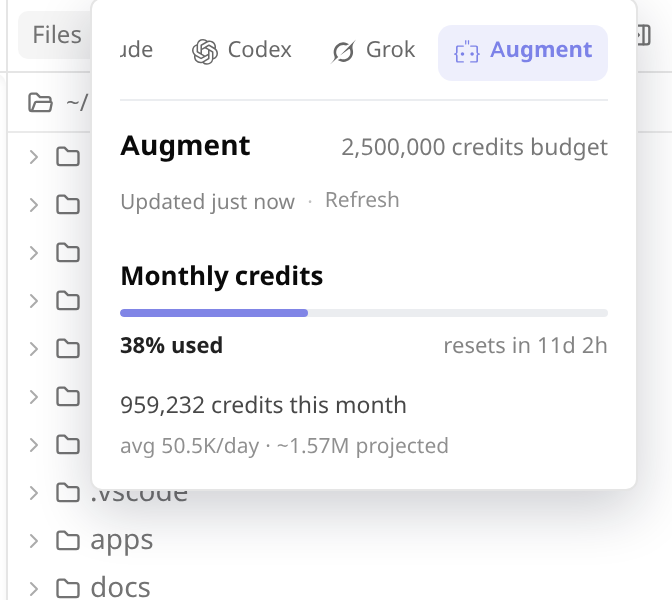
Augment shows month-to-date consumption against a budget, plus average/day and a projected month-end total:
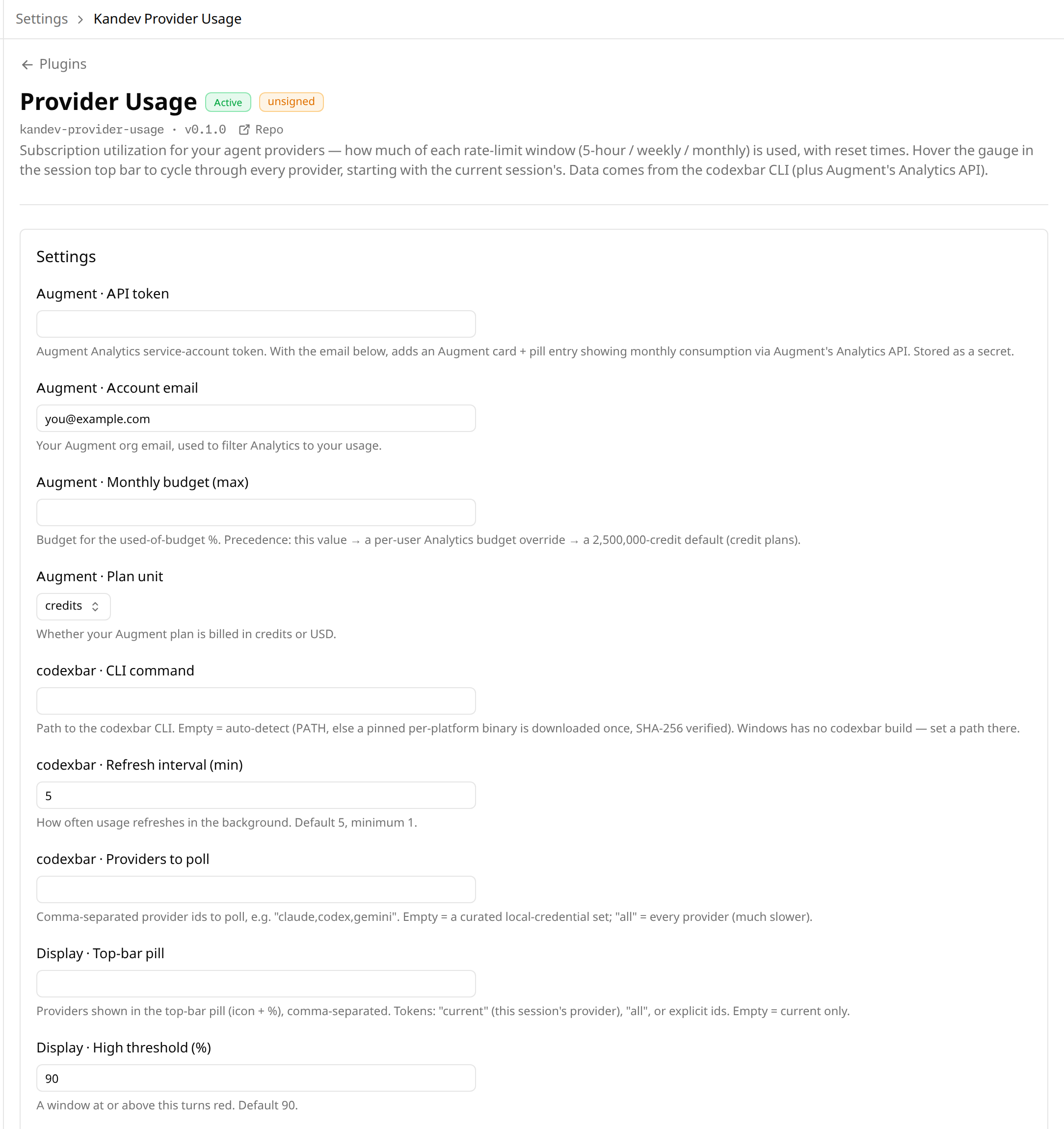
Operator settings (Settings → Plugins → Provider Usage), generated from the
manifest's config_schema and grouped by source:
What it does
- Session top bar (default): a component in the
chat-top-barplugin slot (kandev ≥ #1827) — a pill for your selected provider (icon + %), each real brand mark rendered monochrome. Hover to open a panel that cycles through every provider; click to switch, and the selected tab is remembered locally. - Global status display (opt-in):
display_status_bar_modechoosesoff(default),percentage,meter, orboth. The contribution inapp-status-bar-rightrenders the selected compact presentation plus reset context; hover opens the same full provider panel as the session top-bar pill. It adapts to the host's 24 px desktop/tablet bar and its phone Status drawer. It is global provider/account usage only; session IDs only help resolvecurrent. - Each provider's panel shows its rate-limit windows as thin bars (calm indigo normally, warming to amber/coral only when high — never a hard red), a reset countdown, plan/source badges, and codexbar's pace summary ("48% in reserve").
- Augment is a special case: codexbar can't read it off macOS, so it's fetched directly from Augment's Analytics API. Shows month-to-date consumption as a used-of-budget bar (defaulting to a 2.5M-credit budget for credit plans so it always renders a bar), plus average-per-day and a projected month-end total.
- A background poller refreshes a single snapshot of every provider every
few minutes (configurable); the pill and panel always serve that snapshot
instantly — codexbar/Augment only run on the timer or an explicit
Refresh. Each refresh tries codexbar's fast
oauthsource first, falling back to the agent CLI only when needed. - No cookies / web login required: utilization is read from your local
provider credentials (
~/.claude,~/.codex, …) for the OAuth agents.
codexbar distribution
codexbar ships per-platform release binaries (no npm/npx). The plugin resolves the CLI in this order:
- the codexbar command you set in Settings (a path, e.g.
/usr/local/bin/codexbar); - a
codexbarbinary onPATH; - otherwise it downloads a pinned build once, verifies it against a
bundled SHA-256, and caches it under
~/.config/kandev-provider-usage. Linux uses upstream's fully static musl builds so it does not depend on the host's glibc version. macOS uses the native builds. codexbar has no Windows build, so set an explicit path there.
When that fails, the plugin doesn't just go quiet: the Integration status card on the settings page shows which of those three paths was tried, the raw cause (including the failed command's first stderr line), and a hint naming the fix — no outbound access to github.com, a checksum mismatch, an unwritable cache directory, an unsupported platform, or a configured path that isn't executable. The download is retried on every refresh, so a transient failure clears itself on the next poll or on re-check.
Settings
Settings → Plugins → Provider Usage (generated from the manifest
config_schema, grouped by source):
| Key | Meaning |
|---|---|
augment_api_token | Augment Analytics service-account token (stored as a secret — masked in the UI). Enables the Augment card. Create one at app.augmentcode.com/settings/personal-api-tokens. |
augment_email | Your Augment org email, used to filter Analytics to your usage. |
augment_monthly_budget | Budget for the used-of-budget %. Empty = a per-user Analytics override, else a 2,500,000-credit default. |
augment_resource | credits (default) or usd — which metric your Augment plan bills. |
codexbar_command | Explicit codexbar command. Empty = auto-detect / auto-download. |
codexbar_poll_minutes | Background refresh interval (default 5, minimum 1). |
codexbar_providers | Comma-separated provider ids to poll. Empty = curated local-credential set; "all" = full sweep (slower). |
display_pill_providers | Providers included in the optional global status display, comma-separated. Tokens: current, all, or explicit ids. Empty = current session's provider only. The session top-bar pill instead follows the locally remembered tab selection. |
display_status_bar_mode | off (default) keeps usage in the session top bar only. percentage adds icon + percentage to global status; meter adds icon + meter without percentage; both adds meter + percentage. Enabled modes also appear in the phone Status drawer. Requires a Kandev host with app-status-bar slots. |
display_threshold_warn | A window at/above this % turns amber (default 75). |
display_threshold_high | A window at/above this % turns red/coral (default 90). |
Saving settings restarts the plugin, so changes take effect immediately; the panel also has a Refresh button for an on-demand update.
Below the settings form, an Integration status card shows live health at a
glance — whether the codexbar CLI resolved (with version, how it was found, and
the binary in use) and whether the Augment Analytics API is reachable — with a
re-check button. It renders inline via the host's plugin-settings slot.
When codexbar isn't working the card explains why: missing when no binary
could be resolved (download blocked, unsupported platform, checksum mismatch),
not working when one was found but wouldn't run. Both show the raw error plus
the next step to take. The same reason also appears in the hover panel, so a
blank pill explains itself without a trip to Settings.
Layout
manifest.yaml— three GET webhooks (status,providers,overview), the UI bundle, theapi_read: ["sessions"]capability (to resolve the current session's agent → provider server-side), and the groupedconfig_schema.server/— Go backend half (pluginsdk.Plugin), spawned by kandev over the gRPC plugin contract. Runs a background poller that shells out to codexbar (and, when configured, calls Augment's Analytics API directly) and caches a snapshot; webhooks serve that snapshot instantly.ui/bundle.js— hand-written, no-build ES module using the shared host React instance andhost.uicomponents, plus inlined real brand-mark SVGs (monochrome). It registers the compatibility chat top-bar and opt-in global status-right components, and only renders backend payloads.
Develop
Requires a sibling checkout of the kandev monorepo at ../kandev (see the
replace directive in go.mod).
make test           # Go + UI-bundle tests (codexbar/Augment calls are injected — no network needed)
make package-host   # tarball for this machine only (fast iteration)
make package         # tarball for all 5 supported platforms
Install the tarball via Settings → Plugins → Install plugin (upload), or:
curl -F package=@kandev-provider-usage-0.4.1.tar.gz \
  http://localhost:8080/api/plugins/install
Release
In Actions → release, run the workflow from main and choose a
patch, minor, or major bump. It commits the version update and generated
CHANGELOG.md directly to main, tags that commit as vX.Y.Z, then verifies
(fmt/vet/test), cross-compiles all platforms, and publishes the tarball +
checksums.txt as a GitHub Release, which the kandev marketplace resolves.