🌟 [CVPR24] Polos: Multimodal Metric Learning from Human Feedback for Image Captioning
June 12, 2026 · View on GitHub



- Accepted at CVPR 2024
- 🌐 project page
- 📄 arXiv
- 🤗 Dataset
🎉🎉 News
- 2026-06-13: Polos is now supported in CaptionEvalKit-for-VLMs, a reproducible caption-evaluation toolkit. You can reproduce Polos benchmark results with a single command and compare it with BLEU, CIDEr, CLIPScore, PAC-S, FLEUR, VELA, and more.
🔁 Reproduce Polos Results
Polos results can be reproduced via CaptionEvalKit-for-VLMs:
  pip install capevalkit
  capevalkit all_reproduce --metrics polos --benchmarks flickr8k-cf

  CaptionEvalKit runs each metric in an isolated uv environment, so Polos can be reproduced without manually recreating the original environment.
Quick Installation
To install the Polos library, run the following command in your terminal:
pip install polos
To use the Polos library, follow the steps outlined below.
Step 1: Importing Required Libraries
Import the necessary libraries from Polos and other dependencies.
from polos.models import download_model, load_checkpoint
from PIL import Image
Step 2: Downloading and Loading the Model
Download and load the model using the Polos library functions.
model_path = download_model("polos")
model = load_checkpoint(model_path)
Step 3: Preparing the Data
Prepare your data in the specified format. Here, we are using an example image test.jpg, and associated text data.
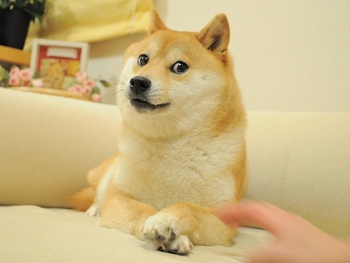
data = [
    {
        "img": Image.open("test.jpg").convert("RGB"),
        "mt": "a dog with a person",
        "refs": ["there is a dog sitting on a couch with a person reaching out", "a dog laying on a couch with a person", "a dog is laying on a couch with a person"],
    }
]
Step 4: Making Scores
Use the model to make predictions on your data.
_, scores = model.predict(data, batch_size=8, cuda=True)
print(scores)
Note
- Ensure that the image
test.jpgis correctly located in your working directory. - The
cuda=Trueargument in thepredictfunction indicates the use of CUDA for GPU acceleration. Make sure you have a compatible NVIDIA GPU and CUDA installed.
from polos.models import download_model, load_checkpoint
from PIL import Image

model_path = download_model("polos")
model = load_checkpoint(model_path)

# Data must be in the following format:
data = [
    {
        "img": Image.open("test.jpg").convert("RGB"),
        "mt": "a dog with a person",
        "refs":["there is a dog sitting on a couch with a person reaching out", "a dog laying on a couch with a person", 'a dog is laying on a couch with a person'],
    }
]

_, scores = model.predict(data, batch_size=8, cuda=True)
print(scores)
Instructions (for researchers)
We assume the following environment for our experiments:
- Python 3.10.0 (pyenv is strongly recommended)
- Poetry for dependency management (refer to Poetry documentation)
- PyTorch version 2.1.0 with CUDA 11.8 support
- PyTorch Lightning for model training facilitation
Clone & Install
git clone git@github.com:keio-smilab24/Polos.git
cd Polos
pyenv virtualenv 3.10.0 polos
pyenv local polos
sh install.sh # cuda=11.8
Datasets
- Polaris
- The Polaris dataset can be downloaded at this link.
- Unzip and extract the contents into the
data_endirectory. - [new!] Can download the Polaris from Huggingface🤗
- Flickr8k
- Composite / PASCAL-50S / FOIL
- For the Composite, PASCAL-50S, and FOIL datasets, download them from the following links:
- Composite
- PASCAL-50S
- FOIL
Checkpoint
The best checkpoint can be downloaded at this link. Unzip and extract the checkpoints.
Train
sh train.sh
Evaluation
PAC-S checkpoints are required to assess PAC-S.
Download the checkpoints according to the instructions on the authors' github and place them in the specified locations.
sh validate.sh
Bibtex
@inproceedings{wada2024,
    title     = {{Polos: Multimodal Metric Learning from Human Feedback for Image Captioning}},
    author    = {Wada, Yuiga  and Kaneda, Kanta and Saito, Daichi and Sugiura, Komei},
    year      = 2024,
    booktitle = {Proceedings of the IEEE/CVF Conference on Computer Vision and Pattern Recognition},
}
License
This work is licensed under the BSD-3-Clause-Clear license. To view a copy of this license, see LICENSE.