Prisma Entity Relationship Diagram Generator
August 27, 2026 · View on GitHub

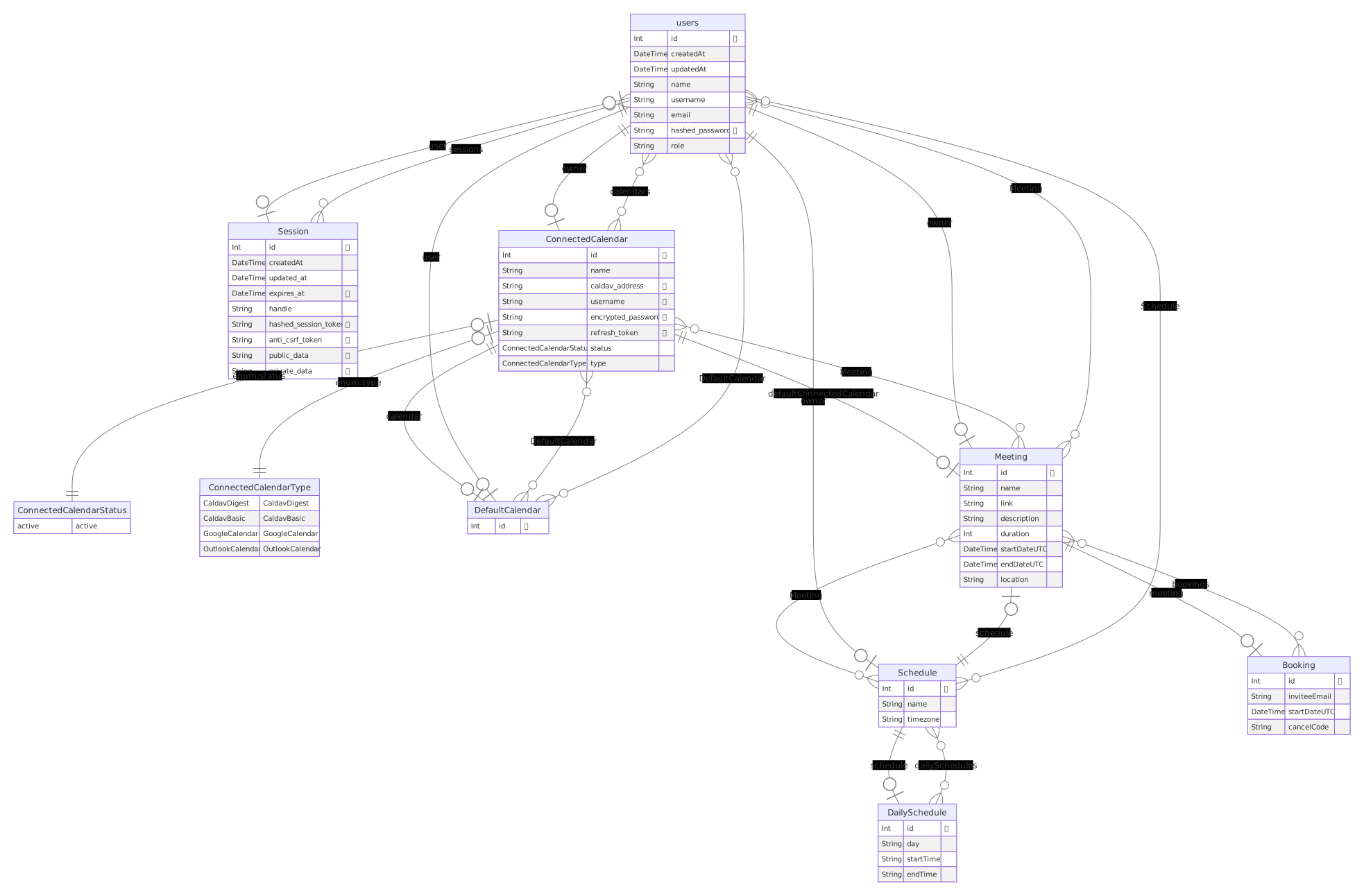
Prisma generator to create an ER Diagram every time you generate your prisma client.
Like this tool? @Skn0tt started this effort with his web app ER diagram generator
Rendering an image (.svg, .png, .pdf) shells out to the mermaid CLI, which brings a headless Chromium with it. That's an optional peer dependency, so pick the install that matches your output:
# images — svg (the default), png, pdf
npm i -D prisma-erd-generator @mermaid-js/mermaid-cli puppeteer

# text only — md, mmd (no browser, no Chromium download)
npm i -D prisma-erd-generator
Add to your schema.prisma
generator erd {
  provider = "prisma-erd-generator"
}
Run the generator
npx prisma generate
Versions
- Prisma >=5 use 3.x.x / 2.x.x
- Prisma = 4 use 1.x.x
- Prisma <4 use 0.11.x
Upgrading to 3.x
@mermaid-js/mermaid-cli is no longer a hard dependency. Nothing else changed — but if you output an image and relied on it being installed for you, add it explicitly:
npm i -D @mermaid-js/mermaid-cli puppeteer
If you output .md or .mmd, you can now drop both and skip the Chromium download entirely.
Options
Additional configuration
Output
Change output type and location
Usage
generator erd {
  provider = "prisma-erd-generator"
  output = "../ERD.svg"
}
Extensions
| Extension | Needs @mermaid-js/mermaid-cli |
|---|---|
svg (default: ./prisma/ERD.svg) | yes |
png | yes |
pdf | yes |
md — mermaid in a fenced code block | no |
mmd — bare mermaid | no |
Renderer
Which engine draws the diagram. Defaults to mermaid.
generator erd {
  provider = "prisma-erd-generator"
  output   = "../ERD.svg"
  renderer = "graphviz"
}
| Renderer | Extensions | Needs | Notes |
|---|---|---|---|
mermaid (default) | svg png pdf md mmd | @mermaid-js/mermaid-cli for images (~470 MB, bundles Chromium) | crow's-foot ER notation |
graphviz | svg dot | @hpcc-js/wasm-graphviz (~2 MB, no browser) | plainer diagram, no ER notation |
graphviz exists for anyone who wants an image without a browser. Mermaid lays out with getBBox(), which needs a real DOM — that is why the mermaid CLI ships Chromium. Graphviz does its own layout in WebAssembly, so it works the same in a slim container or a CI job with nothing installed:
npm i -D @hpcc-js/wasm-graphviz
The trade is that Graphviz has no crow's-foot notation, so cardinality shows up in the arrowheads and the relation label rather than in ER symbols. mermaidConfig and puppeteerConfig do not apply to it. Raster output stays mermaid-only, since rasterising would mean bringing back the browser this renderer exists to avoid.
Every other option — tableOnly, ignoreEnums, ignoreViews, ignorePattern, usePrismaNames, showIndexes, includeComments, sortFields, disableEmoji — works the same on both.
Theme
Theme selection
Usage
generator erd {
  provider = "prisma-erd-generator"
  theme = "forest"
}
Options
- default (default)
- forest
- dark
- neutral
This option does not accept environment variables or other dynamic values. If you want to change the theme dynamically, you can use the theme option in the mermaidConfig option. See Mermaid Configuration for more information.
mmdcPath
To render an image you must have mmdc installed — it ships with the optional @mermaid-js/mermaid-cli peer dependency. By default the generator searches for an existing binary file at /node_modules/.bin. If it fails to find that binary it will run find ../.. -name mmdc to search through your folder for a mmdc binary. If you are using a different package manager or have a different location for your binary files, you can specify the path to the binary file.
generator erd {
  provider = "prisma-erd-generator"
  theme = "forest"
  mmdcPath = "node_modules/.bin"
}
Use with yarn 3+
Yarn 3+ doesn't create a node_modules/.bin directory for scripts when using the pnp or pnpm nodeLinkers (see yarn documentation here). It instead makes scripts available directly from the package.json file using yarn <script_name>, which means that there won't be an mmdc file created at all. This issue can be solved by creating your own shell script named mmdc inside your project's files that runs yarn mmdc (note: this shell script does not need to be added to your package.json file's scripts section - prisma-erd-generatr will access this script directly).
An example mmdc script:
#!/bin/bash

# $@ passes the parameters that this mmdc script was run with along to the mermaid cli
yarn mmdc $@
Make this mmdc script executable by using the command chmod +x mmdc, then set the mmdcPath option to point to the directory where the mmdc file you've just created is stored.
Disabled
You won't always need to generate a new ERD. For instance, when you are building your docker containers you often run prisma generate and if this generator is included, odds are you aren't relying on an updated ERD inside your docker container. It also adds additional space to the container because of dependencies such as puppeteer. There are two ways to disable this ERD generator.
- Via environment variable
DISABLE_ERD=true
- Via configuration
generator erd {
  provider = "prisma-erd-generator"
  disabled = true
}
Another option used is to remove the generator lines from your schema before installing dependencies and running the prisma generate command. I have used sed to remove the lines the generator is located on in my schema.prisma file to do so. Here is an example of the ERD generator being removed on lines 5-9 in a dockerfile.
# remove and replace unnecessary generators (erd generator)
# Deletes lines 5-9 from prisma/schema.prisma
RUN sed -i '5,9d' prisma/schema.prisma
Debugging
If you have issues with generating or outputting an ERD as expected, you may benefit from seeing output of the steps to making your ERD. Enable debugging by either adding the following environment variable
ERD_DEBUG=true
or adding in the debug configuration key set to true
generator erd {
  provider = "prisma-erd-generator"
  erdDebug = true
}
and re-running prisma generate. You should see a directory and files created labeling the steps to create an ER diagram under prisma/debug.
Please use these files as part of opening an issue if you run into problems.
Table only mode
Table mode only draws your models and skips the attributes and columns associated with your table. This feature is helpful for when you have lots of table columns and they are less helpful than seeing the tables and their relationships
generator erd {
  provider = "prisma-erd-generator"
  tableOnly = true
}
Ignore enums
If you enable this option, enum entities will be hidden. This is useful if you want to reduce the number of entities and focus on the tables and their columns and relationships.
generator erd {
  provider = "prisma-erd-generator"
  ignoreEnums = true
}
Ignore views
If you enable this option, view entities will be hidden. This is useful if you want to reduce the number of entities and focus on the tables without displaying all the views.
generator erd {
  provider = "prisma-erd-generator"
  ignoreViews = true
}
Ignore specific tables by pattern
Hide specific models from the ERD using pattern matching. Useful for excluding system tables, temporary tables, or any models you don't want in the diagram.
Supports:
- Exact names:
"Session"matches onlySession - Wildcards:
"sys_*"matchessys_logs,sys_audit, etc. - Single char:
"temp_?"matchestemp_1,temp_a, etc. - Multiple patterns: Comma-separated list
generator erd {
  provider      = "prisma-erd-generator"
  ignorePattern = "sys_*,Internal*,Session,_*"
}
Example use cases:
"sys_*"- Hide all system tables (sys_logs,sys_audit)"_*"- Hide Prisma internal tables (_prisma_migrations)"temp_*,cache_*"- Hide temporary and cache tables"Session,Token"- Hide specific tables by exact name
Include relation from field
By default this module skips relation fields in the result diagram. For example fields userId and productId will not be generated from this prisma schema.
model User {
  id            String         @id
  email         String
  favoriteProducts  FavoriteProducts[]
}


model Product {
  id              String        @id
  title           String
  inFavorites  FavoriteProducts[]
}

model FavoriteProducts {
  userId      String
  user        User    @relation(fields: [userId], references: [id])
  productId   String
  product     Product @relation(fields: [productId], references: [id])

  @@id([userId, productId])
}
It can be useful to show them when working with RDBMS. To show them use includeRelationFromFields = true
generator erd {
  provider = "prisma-erd-generator"
  includeRelationFromFields = true
}
Sort fields
Sort the fields inside each generated model alphabetically. This is disabled by default, so existing diagrams keep their current field order unless you opt in.
generator erd {
  provider   = "prisma-erd-generator"
  sortFields = true
}
Include schema comments
Render /// documentation comments from your schema as mermaid attribute comments. Disabled by default.
generator erd {
  provider        = "prisma-erd-generator"
  includeComments = true
}
model Article {
  /// Primary key
  id    String  @id
  /// Page title
  title String
  /// Page body
  body  String?
}
erDiagram
  "Article" {
    String id "🗝️ Primary key"
    String title "Page title"
    String body "❓ Page body"
  }
Only /// comments are available — plain // comments are dropped by Prisma before the generator runs. Comments share the attribute slot with the primary key and nullable sigils, and are flattened to a single line with " replaced by ' so mermaid can parse them.
Use Prisma names instead of database names
By default, models and fields carrying @@map / @map are drawn with their database names. Set usePrismaNames to draw the names as they appear in your schema instead.
generator erd {
  provider       = "prisma-erd-generator"
  usePrismaNames = true
}
model User {
  id       Int    @id
  nickName String @map("nick_name")

  @@map("users")
}
usePrismaNames | Entity | Field |
|---|---|---|
false (default) | users | nick_name |
true | User | nickName |
This applies to models, composite types, enums, and fields.
Show indexes
Mark indexed columns so you can tell at a glance which fields a query can filter on cheaply. Disabled by default.
generator erd {
  provider    = "prisma-erd-generator"
  showIndexes = true
}
model User {
  id        Int    @id
  email     String @unique
  firstName String
  lastName  String
  tenantId  Int

  @@unique([firstName, lastName])
  @@index([tenantId])
}
erDiagram
  "User" {
    Int id "🗝️"
    String email "🔒"
    String firstName "🔍"
    String lastName "🔍"
    Int tenantId "🔍"
  }
| Marker | With disableEmoji | Meaning |
|---|---|---|
🔒 | UK | the column is unique on its own (@unique) |
🔍 | IDX | the column takes part in an index (@@index, or a @@unique composite) |
Prisma strips @@index before handing the model to a generator, so it is read back out of the schema file. Composite index order is not shown — a column is either covered or it isn't.
Markers share the attribute slot with the primary key, nullable and includeComments text, so a field can carry several at once.
Disable emoji output
The emoji output for primary keys (🗝️) and nullable fields (❓) can be disabled, restoring the older values of PK and nullable, respectively.
generator erd {
  provider     = "prisma-erd-generator"
  disableEmoji = true
}
Mermaid configuration
Overriding the default mermaid configuration may be necessary to represent your schema in the best way possible. There is an example mermaid config here that you can use as a starting point. In the example JavaScript file, types are referenced to view all available options. You can also view them here. The most common use cases for needing to overwrite mermaid configuration is for theming and default sizing of the ERD.
generator erd {
  provider = "prisma-erd-generator"
  mermaidConfig = "mermaidConfig.json"
}
SVG text and htmlLabels
Since 3.1.0 the generator sets htmlLabels: false. Mermaid otherwise puts every label inside a <foreignObject>, which embeds HTML in the SVG — browsers render it, but Inkscape, librsvg and ImageMagick ignore it and draw a diagram of empty boxes. Plain <text> looks the same in a browser and opens correctly everywhere else.
If you need the old HTML labels back:
module.exports = { htmlLabels: true }
Note this option only works at the top level. Mermaid deprecated the per-diagram variants, so { er: { htmlLabels: ... } } is silently ignored.
Puppeteer configuration
If you want to change the configuration of Puppeteer, create a Puppeteer config file (JSON) and pass the file path to the generator.
generator erd {
  provider = "prisma-erd-generator"
  puppeteerConfig = "../puppeteerConfig.json"
}
Issues
Because this package relies on mermaid js and puppeteer issues often are opened that relate to those libraries causing issues between different versions of Node.js and your operating system. As a fallback, if you are one of those people not able to generate an ERD using this generator, try running the generator to output a markdown file .md first. Trying to generate a markdown file doesn't run into puppeteer to represent the contents of a mermaid drawing in a browser and often will succeed. This will help get you a functioning ERD while troubleshooting why puppeteer is not working for your machine. Please open an issue if you have any problems or suggestions.
ARM64 users
This is no longer necessary on macOS. Puppeteer historically shipped no arm64 Chromium (puppeteer#7740), so Apple Silicon users had to supply their own. Current puppeteer downloads an arm64 build itself, and the generator needs no configuration.
If you do have chromium on your PATH, the generator will still prefer it over the one puppeteer manages. Not having one is fine and is no longer reported as a problem.
Using a system Chromium on macOS anyway
brew install --cask --no-quarantine chromium
which chromium
Other Operating Systems:
This can be fixed by either:
- Setting the
executablePathproperty in your puppeteer config file to the file path of the Chromium executable on your system. - Setting the following global variables on your system
PUPPETEER_SKIP_CHROMIUM_DOWNLOAD=true
PUPPETEER_EXECUTABLE_PATH=path_to_your_chromium
Star History
Contributors ✨
Thanks goes to these wonderful people (emoji key):


This project follows the all-contributors specification. Contributions of any kind welcome!