PX8
January 9, 2017 · View on GitHub

PX8
PX8 is an open source fantasy console (128x128 pixels) in Rust, where the cartridge code could be in Python or Lua.
It is still in development but the main features are:
- 128x128 pixels, 16 colours
- Python 3 / Lua 5.X support for the cartridge
- Controls with dpad + 2 buttons (gamecontroller/joystick support)
- No limit size in the code !
- Unlimited sprites (8x8)
- Map support (128x32)
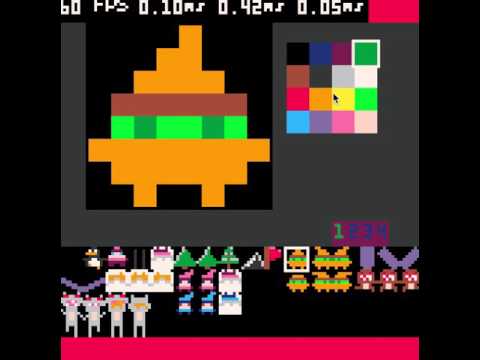
- Edition of the cartridge data
- PX8 format to use your favorite code editor
- Screenshot (PNG) / Video recording (GIF)
- Pico-8 (P8/P8.PNG) cartridge format support
- Mainly run @60 FPS
It should work on all platform (Linux/OSX/Windows), and on tiny hardware like Raspberry Pi (with opengl enabled).
The console is inspired from Pico-8, so you can play Pico-8 cartridges (P8/P8.PNG).
- Youtube Video
[ ]
(https://youtu.be/b-secxed-fk "PX8 SKI")
]
(https://youtu.be/b-secxed-fk "PX8 SKI")
- Recorded GIF
The time for each frame is slow (10ms) in the GIF, and doesn't correspond to the speed of the game (see the previous videos on Youtube).


- PX8
Download
You can get directly the latest version via git:
git clone https://github.com/Gigoteur/PX8.git
cd PX8
Binaries
Or you can get binaries for multiples platforms directly on itch.io:
- Raspberry Pi (available)
- Windows (Work in progress)
- Linux (Work in progress)
- Mac (Work in progress)
Requirements
You will need multiple things:
- SDL2
- python3
- libreadline
Linux
Packages:
- libsdl2-dev
- libreadline-dev
- libpython3-dev
Raspberry Pi
Please enable the GL Driver (7 - Advanced Options -> Ac - GL Driver -> Yes) via:
sudo raspi-config
OSX
Build
You could build PX8 with cargo directly, in release mode for example, with the support of Python and Lua.
cargo build --features="cpython lua" --release
Run a cartridge
You should be able to run it directly by providing the path of the cartridge:
./target/release/px8 -s 4 ./games/ski/ski.px8
The '-s' option is the scale, so you can increase it, or in fullscreen by using '-f' option.
Edit a cartridge
You can edit the cartridge by using the specific '-e' option:
./target/release/px8 -s 4 -e ./games/ski/ski.px8
Keyboard Shortcut
Player 1:
- cursors, Z,X / C,V / N,M
Player 2:
- ESDF, LSHIFT,A / TAB,Q,E
System shortcut:
- F2: FPS debug
- F3: Take a screenshot
- F4: Take a video
- F5: Save the current cartridge
- F6: Switch between editor/play mode
Game controller / Joystick
Change shortcuts
Add player
Create a new cartridge
PX8 could call 3 functions:
- _init : Called once on cartridge startup, mainly to initialize your variables
- _update: Called once per visible frame, mainly to get keyboard input for example
- _draw: Called once per visible frame, mainly to draw things on the screen :)
Python
def _init():
  print("INIT")

def _update():
  px8_print("UPDATE")

def _draw():
  px8_print("DRAW")
Lua
Cartridge format
| Format | Read | Write |
|---|---|---|
| P8 | :white_check_mark: | :white_check_mark: |
| P8.PNG | :white_check_mark: | :red_circle: |
| PX8 | :white_check_mark: | :white_check_mark: |
API documentation
See API
PX8 Format documentation
Compatible API with Pico-8
Audio
| API | Python | Lua |
|---|---|---|
| sfx | :red_circle: | :red_circle: |
| music | :red_circle: | :red_circle: |
Cart Data
| API | Python | Lua |
|---|---|---|
| cartdata | :red_circle: | :red_circle: |
| dget | :red_circle: | :red_circle: |
| dset | :red_circle: | :red_circle: |
Graphics
| API | Python | Lua |
|---|---|---|
| camera | :white_check_mark: | :white_check_mark: |
| circ | :white_check_mark: | :white_check_mark: |
| circfill | :white_check_mark: | :white_check_mark: |
| clip | :red_circle: | :red_circle: |
| cls | :white_check_mark: | :white_check_mark: |
| color | :white_check_mark: | :white_check_mark: |
| cursor | :red_circle: | :red_circle: |
| fget | :red_circle: | :red_circle: |
| flip | :red_circle: | :red_circle: |
| fset | :red_circle: | :red_circle: |
| line | :white_check_mark: | :white_check_mark: |
| :white_check_mark: (px8_print) | :white_check_mark: | |
| pal | :white_check_mark: | :white_check_mark: |
| palt | :white_check_mark: | :white_check_mark: |
| pget | :white_check_mark: | :white_check_mark: |
| :white_check_mark: | :white_check_mark: | |
| pset | :white_check_mark: | :white_check_mark: |
| rect | :white_check_mark: | :white_check_mark: |
| rectfill | :white_check_mark: | :white_check_mark: |
| sget | :white_check_mark: | :white_check_mark: |
| spr | :white_check_mark: | :white_check_mark: |
| sspr | :white_check_mark: | :white_check_mark: |
Input
| API | Python | Lua |
|---|---|---|
| btn | :white_check_mark: | :white_check_mark: |
| btnp | :white_check_mark: | :white_check_mark: |
Map
| API | Python | Lua |
|---|---|---|
| map | :white_check_mark: (spr_map) | :white_check_mark: |
| mget | :red_circle: | :white_check_mark: |
| mset | :red_circle: | :white_check_mark: |
Math
| API | Python | Lua |
|---|---|---|
| rnd | :white_check_mark: (random.randint) | :white_check_mark: |
| flr | :white_check_mark: (math.floor) | :white_check_mark: |
| ceil | :white_check_mark: (math.ceil) | :white_check_mark: |
| cos | :white_check_mark: | :white_check_mark: |
| sin | :white_check_mark: | :white_check_mark: |
| atan2 | :red_circle: | :white_check_mark: |
| sqrt | :white_check_mark: (math.sqrt) | :white_check_mark: |
| abs | :white_check_mark: (math.abs) | :white_check_mark: |
| sgn | :white_check_mark: | :white_check_mark: |
| band | :white_check_mark: | :white_check_mark: |
| bor | :white_check_mark: | :white_check_mark: |
| bxor | :white_check_mark: | :white_check_mark: |
| bnot | :white_check_mark: | :white_check_mark: |
| shl | :white_check_mark: | :white_check_mark: |
| shr | :white_check_mark: | :white_check_mark: |
| sub | :white_check_mark: | :white_check_mark: |
Memory
| API | Python | Lua |
|---|---|---|
| cstore | :red_circle: | :red_circle: |
| memcpy | :red_circle: | :red_circle: |
| memset | :red_circle: | :red_circle: |
| reload | :red_circle: | :red_circle: |
Peek Poke
| API | Python | Lua |
|---|---|---|
| stat | :red_circle: | :white_check_mark: |
| peek | :red_circle: | :red_circle: |
| poke | :red_circle: | :red_circle: |
Specific Lua functions
| API | Lua |
|---|---|
| add | :white_check_mark: |
| del | :white_check_mark: |
| min | :white_check_mark: |
| max | :white_check_mark: |
| mid | :white_check_mark: |
| foreach | :white_check_mark: |
| count | :white_check_mark: |
| all | :white_check_mark: |
Pico-8 compatibility
The version of LUA in Pico-8 has some differences with the original one.
| Lua features | Compatibility |
|---|---|
| Compound assignment operators | :white_check_mark: |
| Single line shorthand for if then else operator | :red_circle: |
| Not Equal To | :red_circle: |
GFX: :white_check_mark:
MUSIC: :red_circle:
Screenshots and Records
With a physical engine
PX8 + Python + Pymunk

