SysKnife MCP Server
July 29, 2026 · View on GitHub
The sysknife mcp-server subcommand exposes five MCP tools that let any
MCP-capable AI assistant (Claude Code, Cursor, Codex CLI, …) plan and execute
Linux system administration tasks through SysKnife's approval-gated,
audit-logged path.
💡 One command to configure everything
Run
npx sysknife-setup— it detects which AI clients you have installed and writes the correct config files for each one automatically.
Found SysKnife on a directory page where the tools error out? Discovery works anywhere: a directory sandbox lists all five tools, because the tool list is static metadata. Calling them needs a privileged
sysknife-daemonon a real host, which a build container has no way to provide, sodoctorreports the socket absent and the rest fail. That is the trust boundary, not a packaging defect. See Registry and Directory Listings.
Tools
sysknife_plan
Turn a natural-language intent into a risk-labelled plan. No action is executed.
Input
| Field | Type | Description |
|---|---|---|
intent | string | Natural-language intent, e.g. "check disk usage" |
Output — PlanOutput
| Field | Type | Description |
|---|---|---|
intent | string | The original intent |
summary | string | One-line plan summary |
explanation | string | Why this plan was chosen |
steps | PlanStep[] | Ordered steps to execute |
Each PlanStep:
| Field | Type | Description |
|---|---|---|
action_name | string | Canonical action name, e.g. GetDiskUsage |
summary | string | What this step does |
risk_level | string | "low", "medium", or "high" |
params | object | Action-specific parameters |
command | string | Daemon-resolved shell command, e.g. "timedatectl" |
transaction_id | string | Daemon identity for this immutable preview |
warnings | string[] | Preview-time warnings (reboot required, platform caveats). Relay these to the operator before collecting approval |
current_state | object | Relevant system state as the daemon found it |
proposed_change | object | What the daemon will change, as it resolved it — the substance of what is being approved |
expected_side_effects | string[] | Side effects beyond the change itself |
reboot_required | bool | Whether the step needs a reboot to take effect |
rollback_available | bool | Whether failure can be rolled back automatically |
sysknife_execute
Execute a plan produced by sysknife_plan. Each step must include the
one-time receipt printed by sysknife approve <transaction-id>.
Input
| Field | Type | Description |
|---|---|---|
steps | StepToExecute[] | Approved steps from sysknife_plan |
Each StepToExecute contains the original transaction_id, action_name, and
params, plus an approval_receipt. Execution halts on the first failure.
Output — ExecuteOutput
| Field | Type | Description |
|---|---|---|
steps | StepResult[] | Per-step results |
needs_reboot | bool | True if any step requires a reboot |
Each StepResult:
| Field | Type | Description |
|---|---|---|
action_name | string | Action that was executed |
status | string | "succeeded", "failed", etc. |
summary | string | Human-readable outcome |
output | string[] | Progress lines (ANSI stripped) |
warnings | string[] | Daemon warnings |
needs_reboot | bool | Whether this step needs a reboot |
transaction_id | string | Daemon audit transaction ID |
rollback_ref | string | null | What was rolled back after a failure, when anything was; null otherwise |
sysknife_history
List audit-log entries with optional status, action, since, and limit
filters. This tool is read-only and does not require a plan or receipt.
sysknife_doctor
Check daemon connectivity, active brain configuration, audit storage, and a quick audit-chain status. This tool is read-only.
sysknife_audit_verify
Verify the Ed25519-signed audit chain and report intact, broken, or
cannot_verify, including the first offending row when verification fails.
This tool is read-only.
The Approval Workflow
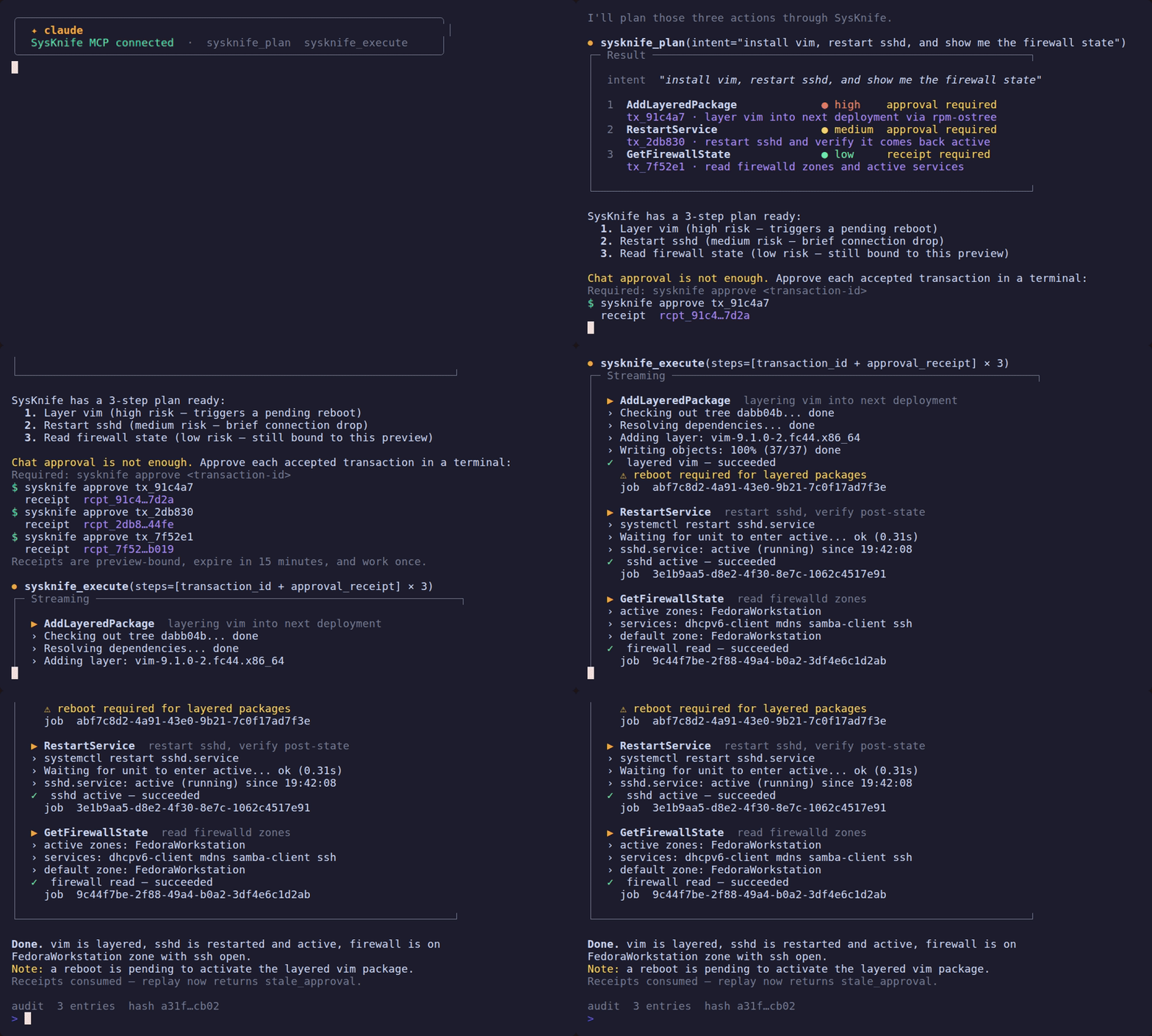
The assistant must always follow this order — no exceptions:
1. sysknife_plan { intent }
        ↓
   Present the plan (steps + risk levels) to the user
        ↓
2. STOP and wait for the user
        ↓
3. User runs: sysknife approve <transaction-id>
   Repeat for each accepted step and return the printed receipt
        ↓
4. sysknife_execute { steps with approval_receipt }
        ↓
   Report results
Never call sysknife_execute without a receipt minted by the separate CLI
command. A chat response such as "yes" is not an approval receipt. Receipts
are bound to one immutable preview, expire after 15 minutes, and are consumed
atomically on first use.
The daemon enforces this protocol. Prompt hooks provide guidance but are not the security boundary.
Setup
1. Run the setup wizard
npx sysknife-setup
Needs Node 18 or newer (Ubuntu 22.04's apt Node is 12, which is too old). The
wizard detects your installed sysknife binary, asks for the daemon socket and
LLM provider, and then asks which integration to configure. No manual file
editing needed. For install options and prerequisites in full, see the
canonical Quick Start.
If you already know the target, skip the picker:
npx sysknife-setup --claude
npx sysknife-setup --cursor
npx sysknife-setup --codex
.mcp.json is gitignored — it contains secrets and local paths.
2. Connect to a daemon in a VM
If the daemon runs inside a VM, two transports are available:
SSH socket tunnel (works with any hypervisor):
ssh -fN -L /tmp/sysknife-vm.sock:/run/sysknife/daemon.sock \
    <user>@<vm-host>
Set SYSKNIFE_SOCKET=/tmp/sysknife-vm.sock when the setup wizard asks for
the socket path.
virtio-vsock (KVM/QEMU only, no SSH required):
# Find the guest CID from the host
virsh dumpxml <vm-name> | grep cid
The daemon must be told to listen on vsock as well — it binds a Unix socket by default, so configuring only the client leaves the two on different transports and nothing connects. On the VM:
sudo systemctl edit sysknife-daemon
# [Service]
# Environment="SYSKNIFE_LISTEN_URI=vsock://:9734"
sudo systemctl restart sysknife-daemon
Then, on the host, set SYSKNIFE_SOCKET=vsock://<CID>:9734 and
SYSKNIFE_TOKEN=<hex> when the wizard asks. The wizard detects the vsock://
prefix and prompts for the token automatically.
See VM + Daemon Setup for the complete walkthrough including token generation, libvirt XML, and troubleshooting.
3. Manual configuration
If you prefer to edit .mcp.json by hand:
{
  "mcpServers": {
    "sysknife": {
      "command": "/path/to/sysknife",
      "args": ["mcp-server"],
      "env": {
        "SYSKNIFE_SOCKET": "/run/sysknife/daemon.sock",
        "SYSKNIFE_LLM_PROVIDER": "openai",
        "OPENAI_API_KEY": "<your-api-key>",
        "SYSKNIFE_LLM_MODEL": "gpt-4.1"
      }
    }
  }
}
For vsock add SYSKNIFE_TOKEN alongside SYSKNIFE_SOCKET.
4. If you skipped the prebuilt download: build the binary
Not a step in the sequence above — an alternative to the wizard's download, for
building from source. Needs a C compiler (sudo apt-get install -y build-essential on Ubuntu); cmake is not required.
cargo build -p sysknife-cli --release
# binary at target/release/sysknife
5. Reload the MCP server in your client
In Claude Code: run /reload-plugins.
Example Session
User:    check disk usage on the VM

Claude:  [calls sysknife_plan { intent: "check disk usage" }]

         Plan: Check disk usage on all filesystems
         Steps:
           ● low  GetDiskUsage — Retrieve current disk usage

         Execute?

User:    [runs sysknife approve 018f2c9d-... in a terminal]
         Approval receipt: 5f493f80-...

Claude:  [calls sysknife_execute with transaction_id and approval_receipt]

         GetDiskUsage ✓
         Filesystem     Size  Used Avail Use%  Mounted on
         /dev/vda3       38G   18G   19G  49%  /var
         ...
Risk Levels
| Level | Meaning | Approval |
|---|---|---|
low | Read-only or fully reversible | One-time receipt |
medium | Modifies state but reversible (e.g. set timezone) | One-time receipt |
high | Destructive or hard to reverse (e.g. rpm-ostree) | One-time receipt |
Risk changes how prominently the plan should be reviewed; it never replaces the receipt requirement. The standalone CLI additionally uses stronger confirmation prompts for high-risk actions.