feishu-docx
July 8, 2026 · View on GitHub
feishu-docx
Feishu knowledge base export, writing, and cloud-space management tool with Markdown, WeChat import, CLI, TUI, and OAuth 2.0



中文 | English
🆕 Recent Updates (v0.2.7)
- PDF export now supports custom templates, cover logos, and configurable code highlighting themes
- PDF and browser export dependencies are split into optional extras:
feishu-docx[pdf]andfeishu-docx[browser] - PDF cover titles are escaped before rendering to avoid injecting raw HTML
- PDF export improvements were contributed by @fishman
🎯 Why feishu-docx?
Let AI Agents read, write, and manage your Feishu/Lark knowledge base.
- 🤖 Built for AI — Works seamlessly with Claude/GPT Skills for document retrieval
- 📄 Full Coverage — Documents, Spreadsheets, Bitables, Wiki nodes, and WeChat articles
- ✍️ Write Back Support — Create docs, append content, and update specific blocks
- ☁️ Cloud-Space Management — List files, delete files, manage permissions, clear files safely
- 🔐 Authentication — One-time auth, automatic token refresh
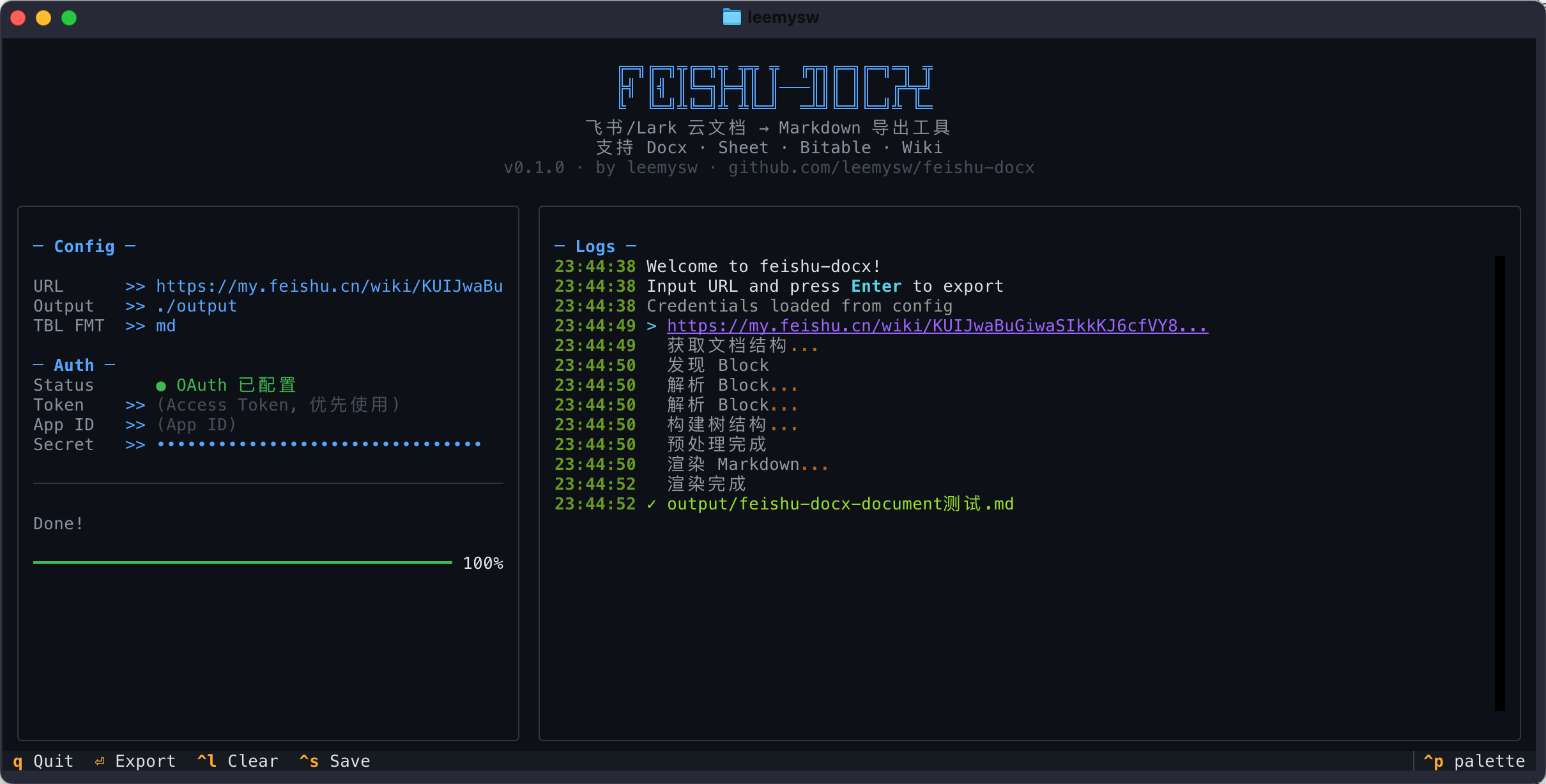
- 🎨 Dual Interface — CLI + Beautiful TUI (Textual-based)
- 📦 Easy Install —
uv tool install feishu-docxorpip install feishu-docx
⚡ Quick Start (30 seconds)
Install
Recommended: uv tool install (isolated, no conflicts with system Python)
uv tool install feishu-docx
Optional features are installed separately to keep the core package lightweight:
# PDF export: --pdf, --pdf-template, --pdf-logo, syntax highlighting
uv tool install 'feishu-docx[pdf]'

# Browser-based export: export-browser
uv tool install 'feishu-docx[browser]'
playwright install chromium
Or run directly without installing:
uvx feishu-docx export "https://my.feishu.cn/wiki/xxx"
If you don't have uv yet: curl -LsSf https://astral.sh/uv/install.sh | sh
Alternative: pip install (works inside a virtual environment or with --break-system-packages)
pip install feishu-docx
Optional extras also work with pip:
pip install 'feishu-docx[pdf]'
pip install 'feishu-docx[browser]'
playwright install chromium
Quote extras such as
'feishu-docx[pdf]'in shells like zsh, otherwise the[]may be treated as a glob pattern.
⚠️
pip installoutside a virtual environment may fail withexternally-managed-environmenton modern Linux/macOS (PEP 668). Use a virtual environment oruv tool installinstead.
Configure and Export
# Configure credentials (one-time)
feishu-docx config set --app-id YOUR_APP_ID --app-secret YOUR_APP_SECRET

# Export! (auto-obtains tenant_access_token, no OAuth needed)
feishu-docx export "https://my.feishu.cn/wiki/KUIJwaBuGiwaSIkkKJ6cfVY8nSg"

# Create a Feishu doc directly from a WeChat article
feishu-docx create --url "https://mp.weixin.qq.com/s/xxxxx"

# Manage app cloud-space documents
feishu-docx drive ls --type docx

# Optional: Use OAuth mode for user-level permissions
# feishu-docx config set --auth-mode oauth && feishu-docx auth
🤖 Skills Support
Enable Agent to access your Feishu knowledge base directly!
This project includes a Claude Skill at .skills/feishu-docx/SKILL.md.
Supports OpenCode, Claude Code, Codex, Cursor, and more.
Copy this Skill to your agent project, and Claude can:
- 📖 Read Feishu knowledge base as context
- 🔍 Search and reference internal documents
- 📝 Create docs, append content, and update specific blocks
✨ Features
| Feature | Description |
|---|---|
| 📄 Document Export | Docx → Markdown with formatting, images, tables |
| 📊 Spreadsheet Export | Sheet → Markdown tables, with rich-text cells and display/formula modes |
| 📋 Bitable Export | Multidimensional tables → Markdown |
| 📚 Wiki Export | Auto-resolve wiki nodes |
| 🗂️ Wiki Batch Export | Recursively export entire wiki space with hierarchy |
| ✍️ Document Writing | Create docs, append Markdown, update specific blocks |
| 📰 WeChat Import/Export | Export WeChat articles or create Feishu docs from them |
| 🌐 Browser-Based Export | Export public docs or docs accessible in the current browser session, with local assets |
| ☁️ Drive Management | List files, delete files, manage permissions, clear files |
| 🗄️ Database Schema | Export APaaS database structure to Markdown |
| 🧷 Local Asset Download | Images and attachments saved locally with relative paths |
| 🖨️ PDF Export | Generate branded PDF with WeasyPrint, custom CSS templates |
| 🔐 Auth | Auto tenant_access_token (recommended) or OAuth 2.0 |
| 🎨 Beautiful TUI | Terminal UI powered by Textual |
✅ Supported Blocks
This tool currently supports exporting the following Feishu/Lark document components:
| Category | Features | Status | Notes |
|---|---|---|---|
| Basic Text | Headings, Paragraphs, Lists, Tasks (Todo), Code Blocks, Quotes | ✅ | Fully Supported |
| Formatting | Bold, Italic, Strikethrough, Underline, Links, @Mentions | ✅ | Fully Supported |
| Layout | Columns, Callouts, Dividers | ✅ | Fully Supported |
| Tables | Native Tables | ✅ | Export to Markdown/HTML |
| Media | Images, Drawing Boards | ✅ | Drawing boards exported as images |
| Embedded | Spreadsheets (Sheets), Bitable | ✅ | Sheets support rich-text cells and display/formula modes |
| Special | Synced Blocks, Add-ons Blocks | ✅ | Synced blocks support same-document and cross-document references |
| Files | Attachments | ✅ | Local download when possible, temp link fallback |
📖 Usage
Use Cases
- Export Feishu docs, Sheets, Bitables, and Wiki nodes to Markdown
- Export a WeChat article to Markdown
- Create a Feishu doc directly from a WeChat article URL
- Create, append, or update Feishu document content
- Manage files and permissions in app cloud space or personal cloud space
CLI
export-browser requires Playwright.
If you installed via uv tool install, install the browser extra:
uv tool install 'feishu-docx[browser]'
playwright install chromium
If you are working inside a virtual environment:
pip install 'feishu-docx[browser]'
playwright install chromium
# Export single document to specific directory
feishu-docx export "https://xxx.feishu.cn/docx/xxx" -o ./docs

# Choose display values or formulas for Sheets (affects Sheet and embedded Sheet only)
feishu-docx export "https://xxx.feishu.cn/wiki/xxx" --table md --sheet-value-mode display
feishu-docx export "https://xxx.feishu.cn/wiki/xxx" --table md --sheet-value-mode formula

# Export a public or browser-readable doc in a real browser session
feishu-docx export-browser "https://xxx.larkoffice.com/wiki/xxx" -o ./browser_docs

# Export with existing Playwright storage state
feishu-docx export-browser "https://xxx.larkoffice.com/wiki/xxx" --storage-state ./storage_state.json

# Batch export entire wiki space (preserves hierarchy)
feishu-docx export-wiki-space <space_id_or_url> -o ./wiki_backup --max-depth 5

# Export APaaS database schema
feishu-docx export-workspace-schema <workspace_id> -o ./database_schema.md

# Export WeChat article to Markdown
feishu-docx export-wechat "https://mp.weixin.qq.com/s/xxxxxx"

# Export with PDF (requires the pdf extra)
uv tool install 'feishu-docx[pdf]'  # or: pip install 'feishu-docx[pdf]'
feishu-docx export "https://xxx.feishu.cn/docx/xxx" --pdf

# Export with company-branded PDF template
feishu-docx export "https://xxx.feishu.cn/docx/xxx" --pdf --pdf-template ./brand.css

# Export with logo on cover page
feishu-docx export "https://xxx.feishu.cn/docx/xxx" --pdf --pdf-template ./brand.css --pdf-logo ./logo.svg

# Export with syntax highlighting theme
feishu-docx export "https://xxx.feishu.cn/docx/xxx" --pdf --syntax-style solarized-light

# Fetch a WeChat article and create a Feishu doc
feishu-docx create --url "https://mp.weixin.qq.com/s/xxxxxx"

# List app cloud-space documents in tenant mode
feishu-docx drive ls --type docx

# Manage public permission of a document
feishu-docx drive perm-show "https://xxx.feishu.cn/docx/xxx"
feishu-docx drive perm-set "https://xxx.feishu.cn/docx/xxx" --share-entity anyone_can_view

# Clear files in cloud space with double confirmation
feishu-docx drive clear --type docx

# Use token directly
feishu-docx export "URL" -t your_access_token

# Launch TUI
feishu-docx tui
Python API
from feishu_docx import FeishuExporter

# Initialize (uses tenant_access_token by default)
exporter = FeishuExporter(app_id="xxx", app_secret="xxx")

# Export single document
path = exporter.export("https://xxx.feishu.cn/wiki/xxx", "./output")

# Get content without saving
content = exporter.export_content("https://xxx.feishu.cn/docx/xxx")

# Export with PDF (requires: uv tool install 'feishu-docx[pdf]' or pip install 'feishu-docx[pdf]')
path = exporter.export("https://xxx.feishu.cn/docx/xxx", "./output", pdf=True)

# Export with company-branded PDF template
from pathlib import Path
path = exporter.export(
    "https://xxx.feishu.cn/docx/xxx",
    "./output",
    pdf=True,
    pdf_template=Path("./brand.css"),
    pdf_logo=Path("./logo.svg"),
    syntax_style="solarized-light",  # optional Pygments theme
)

# Export a public or browser-readable doc via a real browser session
browser_path = exporter.export_with_browser(
    "https://xxx.larkoffice.com/wiki/xxx",
    "./browser_output",
)

# Get browser-based export content without saving
browser_content = exporter.export_content_with_browser(
    "https://xxx.larkoffice.com/wiki/xxx",
)

# Batch export entire wiki space
result = exporter.export_wiki_space(
    space_id="xxx",
    output_dir="./wiki_backup",
    max_depth=3,
)
print(f"Exported {result['exported']} docs to {result['space_dir']}")
🔐 Feishu App Setup
- Create app at Feishu Open Platform
- Add redirect URL:
http://127.0.0.1:9527/ - Request permissions:
"docx:document:readonly"  # 查看云文档
"wiki:wiki:readonly"  # 查看知识库
"drive:drive:readonly"  # 查看云空间文件(图片下载)
"sheets:spreadsheet:readonly"  # 查看电子表格
"bitable:app:readonly"  # 查看多维表格
"board:whiteboard:node:read"  # 查看白板
"contact:contact.base:readonly"  # 获取用户基本信息(@用户名称)
"offline_access"  # 离线访问(获取 refresh_token)
- Save credentials:
feishu-docx config set --app-id cli_xxx --app-secret xxx
🔑 Authentication Modes
| Tenant Mode (Default) | OAuth Mode | |
|---|---|---|
| Token Type | tenant_access_token | user_access_token |
| Setup | Configure permissions in Open Platform | Request permissions during OAuth flow |
| User Interaction | ✅ Automatic, no user action needed | ❌ Requires browser authorization |
| Access Scope | Documents the app has permission to | Documents the user has permission to |
| Best For | Server automation, AI Agents | Accessing user's private documents |
Tenant Mode (Recommended for most cases):
# One-time setup
feishu-docx config set --app-id xxx --app-secret xxx

# Export (auto-obtains tenant_access_token)
feishu-docx export "https://xxx.feishu.cn/docx/xxx"
⚠️ Tenant mode requires pre-configuring document permissions in Feishu Open Platform → App Permissions.
Cloud space management (tenant/user):
# Tenant mode: manage files in app cloud space
feishu-docx drive ls --type docx

# OAuth mode: manage files in personal cloud space
feishu-docx drive ls --auth-mode oauth --type docx
📎 Feishu separates cloud space by token type:
tenant_access_tokenmaps to app cloud space, anduser_access_tokenmaps to personal cloud space. App cloud space resources cannot be managed from the UI and should be managed through Drive/File APIs.
OAuth Mode (For user-level access):
# One-time setup
feishu-docx config set --app-id xxx --app-secret xxx --auth-mode oauth
feishu-docx auth  # Opens browser for authorization

# Export (uses cached user_access_token)
feishu-docx export "https://xxx.feishu.cn/docx/xxx"
💡 OAuth mode requests permissions during the authorization flow, no pre-configuration needed.
📖 Commands
| Command | Description |
|---|---|
export <URL> | Export single document to Markdown |
export-browser <URL> | Export a public or browser-readable doc in a real browser session |
export-wiki-space <space_id> | Batch export wiki space with hierarchy |
export-workspace-schema <id> | Export APaaS database schema |
export-wechat <URL> | Export WeChat article to Markdown |
create <title> | Create new Feishu document (--url supported) |
drive ls | List files in app/user cloud space |
drive rm <TOKEN> | Delete a file from cloud space |
drive perm-show <TOKEN> | Show public permission settings |
drive perm-set <TOKEN> | Update public permission settings |
drive perm-members <TOKEN> | List permission members |
drive perm-add <TOKEN> | Add a permission member |
drive perm-update <TOKEN> | Update a permission member |
drive perm-rm <TOKEN> | Remove a permission member |
drive clear | Clear files with double confirmation |
write <URL> | Append Markdown content to document |
update <URL> | Update specific block in document |
auth | OAuth authorization |
tui | Launch TUI interface |
config set | Set credentials |
config show | Show configuration |
config clear | Clear cache |
📚 Documentation Strategy
README: overview, quick start, and command indexdocs/*.md: topic-focused guides for more complex workflows
Currently available:
🗺️ Roadmap
- Document/Sheet/Wiki export
- OAuth 2.0 + Token refresh
- TUI interface
- Claude Skills support
- Batch export entire wiki space
- Write to Feishu (create/update docs)
- Browser-based export with local assets
📜 Changelog
See CHANGELOG.md for version history.
📚 More Docs
📄 License
MIT License - See LICENSE
⭐ Star this repo if you find it helpful!